Comparing the Best Digital Signage Solutions for Schools in 2026
Add.: 2F, Bldg 10, Changfeng Industrial Park, Dongkeng, Fenghuang, Guangming, Shenzhen, China 518132
Mobile/WHATSAPP: 86-138 25769658
Email: marketing@topadkiosk.com topadkiosk@gmail.com
Skype: pghenry1
Wechat: adkioskhenry
English Web.: https://www.topkioskdisplay.com/
http://www.ad-kiosk.com/
https://www.toplcddisplay.com/
http://www.multitouchdigitalsignage.com/
https://www.youtube.com/channel/UCYVYNJHxLVEcQD8fuUxXNTA/videos?view_as=subscriber
https://www.facebook.com/TOPADKIOSKSHENZHEN/?ref=bookmarks

You can pick from top digital signage solutions for schools in 2026, like AIScreen, Enplug, BrightSign, Pickle, Rise Vision, ScreenCloud, and Carousel. Digital signage for education lets you share news, events, and emergency alerts all over your campus. In 2026, 87% of schools use digital displays, and every school uses signage for announcements. This technology helps students and staff get information faster and more clearly. If you want to see how many schools use these systems, look at the chart below. You should think about your school’s setup, budget, and needs when you choose the best system. For more information, go to https://www.topkioskdisplay.com/.
Key Takeaways
Digital signage helps schools share news and alerts fast. It makes communication clear for everyone.
Pick a digital signage solution that fits your school’s needs. Think about your budget and what features you need. Look for things like easy use and good support.
Find platforms with centralized control and emergency alerts. Make sure the interface is easy for everyone to use. This helps keep people informed.
Plan your digital signage by setting clear goals. Train staff so they know how to use it. Update the content often to keep students and staff interested.
Watch for new trends like AI and interactive displays. These can help learning and make communication better in the future.
Leading Digital Signage Solutions for Schools
Quick List of Top Platforms
There are lots of digital signage solutions for schools in 2026. Here are some of the best ones you should know about:
AIScreen
Enplug
BrightSign
Pickle
Rise Vision
ScreenCloud
Carousel
These digital signage solutions are great for schools. They meet important needs that schools have. You can see the main things to look for in the table below:
Criteria | Description |
|---|---|
User-friendly interfaces | Easy for anyone to use, even without tech skills |
Scalability | Grows with your school’s needs |
Hardware flexibility | Works with many types of screens and devices |
Ongoing support | Offers help when you need it |
Effective content management | Lets you manage and share information on many screens at once |
Why These Solutions Excel
You want more than just a way to show messages. These platforms help you share news, events, and emergency alerts fast. They make it simple to reach students, staff, and visitors with updates right away.
Using digital signage in your school helps everyone stay informed. You can show things like schedules, lunch menus, or safety alerts in just seconds.
Here are some features that make these solutions good for schools:
Feature | AIScreen | Rise Vision | Carousel |
|---|---|---|---|
Centralized Control | Yes | No | No |
Remote Management | Yes | Yes | Yes |
User-Friendly Interface | Yes | Yes | Yes |
Emergency Alerts | Yes | No | Yes |
Multi-Screen Management | Yes | Yes | Yes |
Content Scheduling | Yes | Yes | Yes |
Template Library | 1500+ | Yes | Yes |
Integration Options | Many | Yes | Many |
Analytics Dashboard | Yes | No | No |
You get tools like template libraries, remote management, and emergency alerts. These features help you keep your school community updated and involved every day.
Key Comparison Criteria for Digital Signage for Education
When you look at digital signage for education, you should check the most important things. These things help you pick what works best for your school. Schools use facts and what others have tried to choose the right platform. The main things to think about are cost, features, support, and how easy it is to use. Each one matters a lot for how well digital signage for education helps your school.
Cost and Pricing
You want to know how much digital signage for education will cost in the long run. Do not just look at the first price you see. Think about hardware, software, updates, and support too. Schools often pick options that give good value for the money. Looking at the total cost helps you see all the real costs. This helps you plan your budget and not get surprised later.
Criteria | Importance |
|---|---|
Cost | Total cost of ownership helps you plan for long-term use, not just the starting price. |
Features and Functionality
Digital signage for education needs to have the right tools for your school. You want to manage content, schedule things, and share learning materials easily. Many platforms let you set up updates, show maps, and send emergency alerts. These tools help you talk to everyone in your school or college better.
Feature/Functionality | Description |
|---|---|
Lets you create and schedule educational content easily. | |
Multi-User Management | Staff can manage displays for their own areas. |
Scheduling Capabilities | Updates content based on school events and calendars. |
Wayfinding and Directory | Helps students and visitors find their way. |
Emergency Communications | Sends alerts quickly to keep everyone safe. |
Support and Training
You need good support and training to use digital signage for education well. Good companies help you set up, fix problems, and get updates. Some platforms give you templates and guides for school content. This help makes it easier for your staff to use the system every day.
Ease of Use
You want a system that is simple for everyone to use. Many schools pick digital signage for education that anyone can use, even without tech skills. Easy screens and clear steps help you make and share school news fast. This means more people can help keep your school up to date.
Tip: Pick a platform that lets you update screens fast. Quick updates mean you can share news, events, and safety alerts right away.
Overview of Each Digital Signage Solution
AIScreen
AIScreen is easy for teachers and staff to use. You can show announcements, menus, and event reminders. The system grows with your school as it gets bigger. It works with many types of screens. You get help and training when you need it.
Strengths | Weaknesses |
|---|---|
Not explicitly mentioned | |
Hardware flexibility for different needs | |
Scalable tools for growth | |
Ongoing support and training |
AIScreen is good for schools that want to start simple. It also helps if you want to add more screens later.
Enplug
Enplug lets you share news with students using social media walls. You can set up displays even if you are not a tech expert. It connects well with social media and does not cost too much. Some schools use Enplug to get students excited at events. It also helps schools save money on printing.
Strengths | Weaknesses |
|---|---|
Limited advanced layouts | |
Simple setup | Basic multi-zone layouts |
Competitive pricing | Less customization for complex needs |
Enplug is best for schools that want to show social media posts. It also helps if you have more than one campus.
BrightSign
BrightSign gives you strong hardware that works well. You can play videos and run screens without the internet. Many schools use BrightSign for fun lessons and training. It can handle lots of screens at once. It also supports HTML5 content.
Strengths | Weaknesses |
|---|---|
Reliable hardware | Technical complexity |
Advanced video capabilities | Higher initial investment |
Offline operation | Setup requirements |
BrightSign is good for big schools or special programs. It works well if you need a strong system.
Pickle
Pickle is simple and helps you share school news and events. You can control everything from one place and plan updates. It is easy to use and quick to set up. Pickle is best for schools that want basic digital signage. It does not have extra features.
Rise Vision
Rise Vision is made for schools and uses cloud-based management. You can use templates and connect with other school tools. It is easy to use but may cost money every month. It does not have many interactive features.
Strengths | Weaknesses |
|---|---|
Ongoing subscription costs | |
Integration ecosystem | Limited interactive features |
Educational focus | Storage and content limits |
Rise Vision is good for schools that want a simple system. It works well for everyday messages.
ScreenCloud
ScreenCloud helps you set up and manage content fast. You can use it for simple signs at a low price. It works with common content types. It does not have advanced analytics or interactive tools.
Strengths | Weaknesses |
|---|---|
Easy setup | Lacks advanced features |
Limited content organization | |
Supports common content types | Basic administrative tools |
ScreenCloud is best for schools that want easy digital displays. It is good if you do not need many features.
Carousel
Carousel lets you manage content in the cloud and send emergency alerts. You can use templates and plan content on a calendar. It works with many media players. You might need IT help and design skills for hard tasks.
Strengths | Weaknesses |
|---|---|
Cloud-based management | Complex workflows |
Emergency notifications | Steep learning curve |
Template-based creation | High costs for special features |
Carousel is good for schools that need strong scheduling and alerts. It helps if you have IT support.
Comparative Analysis of Digital Signage for Education
Feature Comparison Table
You want to know what makes each digital signage software special. The table below shows the main features schools care about most. You can use this table to quickly compare providers and see which one fits your needs best.
Platform | Centralized Control | Emergency Alerts | Template Library | Multi-Screen Management | Social Media Integration | Offline Operation | Interactive Features | Analytics Dashboard |
|---|---|---|---|---|---|---|---|---|
AIScreen | Yes | Yes | 1500+ | Yes | Yes | No | Limited | Yes |
Enplug | Yes | No | Yes | Yes | Yes | No | Basic | Yes |
BrightSign | Yes | Yes | Yes | Yes | Limited | Yes | Yes | Yes |
Pickle | Yes | No | Yes | Yes | No | No | No | No |
Rise Vision | No | No | Yes | Yes | Yes | No | No | No |
ScreenCloud | Yes | No | Yes | Yes | Yes | No | No | No |
Carousel | Yes | Yes | Yes | Yes | Yes | No | Yes | Yes |
Some digital signage software gives you more tools for emergency alerts and analytics. Others focus on easy templates and social media. If you want interactive features, BrightSign and Carousel have more choices.
Cost Comparison Table
You need to know how much each digital signage software costs. The table below shows the usual pricing and what you might pay. This helps you plan your budget before you start.
Platform | Pricing Model | Estimated Cost (per screen/year) | Free Trial | Hardware Included | Extra Fees |
|---|---|---|---|---|---|
AIScreen | Subscription | $180 | Yes | No | Support, Training |
Enplug | Subscription | $120 | Yes | No | Add-ons |
BrightSign | Hardware Purchase | $250 (one-time) + $60 software | No | Yes | Maintenance |
Pickle | Subscription | $100 | Yes | No | None |
Rise Vision | Subscription | $150 | Yes | No | Storage |
ScreenCloud | Subscription | $120 | Yes | No | None |
Carousel | Subscription | $200 | Yes | No | Advanced Features |
Look at both the starting price and any extra costs. Some digital signage software needs you to buy hardware. Others charge for special features or support. Pick the one that fits your school’s budget and needs.
Suitability for School Types
You want digital signage software that matches your school type. Each school has different needs. The table below shows which platforms work best for elementary, middle, and high schools.
School Type | Best Platforms | Why They Fit |
|---|---|---|
Elementary | AIScreen, Pickle | Simple interfaces, easy content scheduling, focus on daily announcements |
Middle School | Enplug, Rise Vision | Social media tools, templates for events, easy integration with school calendars |
High School | BrightSign, Carousel | Advanced features, emergency alerts, interactive displays, strong analytics |
Multi-Campus | Enplug, ScreenCloud | Cloud-based management, remote updates, scalable for many screens |
All School Types | AIScreen, Rise Vision | Flexible content, templates for recognition, wayfinding, and emergency communication |
You can use announcement systems for lobby displays and cafeteria boards. Special displays help you celebrate student achievements. Wayfinding solutions help visitors and new students find their way. Emergency systems keep everyone safe with instant alerts. Interactive screens let students learn in new ways.
Safety and emergency communication: You can send alerts fast.
Daily communication and announcements: You can update news quickly.
Wayfinding and campus navigation: You help visitors find places.
Student recognition and achievement: You celebrate student wins.
Event promotion and marketing: You share school events with everyone.
Selection Recommendations
You want to make the best choice for your school. Start by thinking about your goals for digital signage software. Decide what you want to do. Do you need better daily news, more safety, or to celebrate students? Make a list of your top needs.
Next, look at your school’s setup. Check if you have the right network, power, and places for screens. Plan your timeline and budget. Remember to include hardware, software, and support costs.
You should also plan your content. Decide what messages you want to show. Set up steps for making and updating content. Keep your screens looking the same everywhere.
Train your staff before you begin. Give them guides and help. Offer support so they feel ready to use the digital signage software. Good training helps everyone use the system well.
Here are some tips for a good start:
Set clear goals for your digital signage software.
Check your school’s needs and what you have.
Pick a platform that matches your goals and budget.
Plan where to put your screens for best viewing.
Make a calendar for regular updates.
Give staff training and support.
Review and change your plan as your needs grow.
Digital signage software helps schools and colleges talk to everyone. You can share news, events, and alerts with the whole campus. You help students, staff, and visitors stay up to date. You make your school safer and more connected.
Tip: Start with a few screens first. Add more screens and features as your school grows. This helps you save money and train staff step by step.
You can use this provider comparison and these tips to pick the best digital signage software for your school. The right choice will help you keep your school community informed and involved every day.
Implementation Best Practices
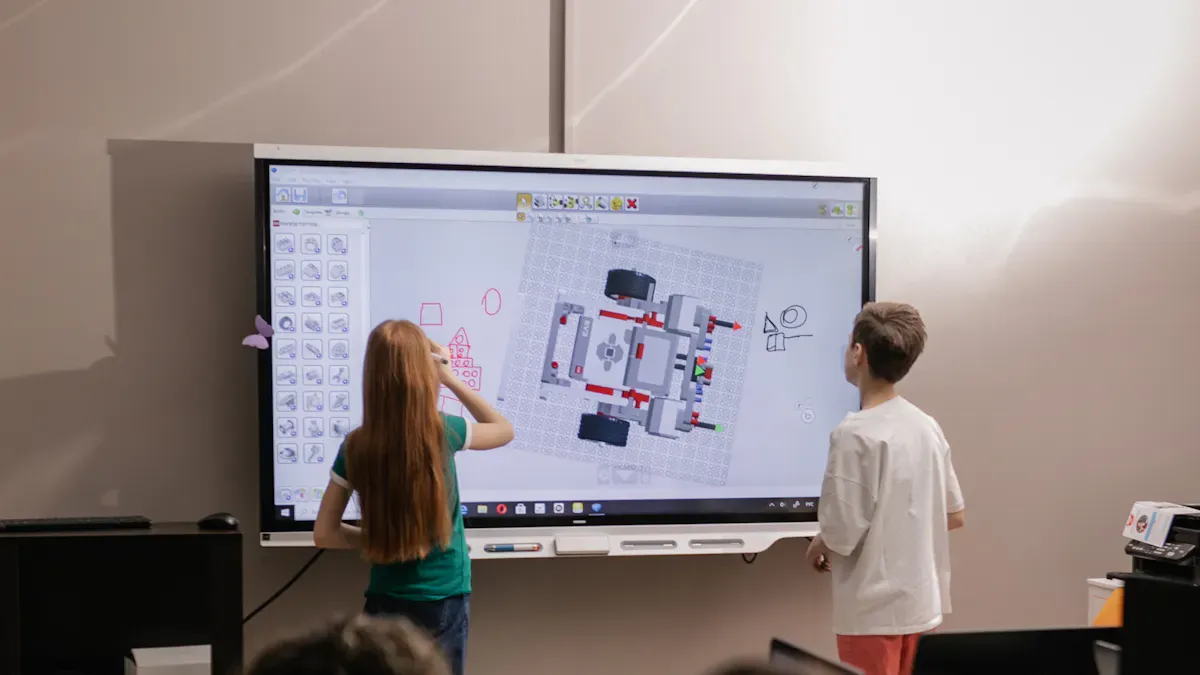
Planning and Deployment
You want your school’s digital signage to work well. Start with a plan that covers each step. First, set a clear goal for your cloud-based digital signage. Do you want to help people talk more, share news, or help others find their way? Pick one main goal to focus on. This makes it easier to choose the right interactive tools and touchscreen displays.
Find out what your school needs most from digital signage.
Think about what you need for tech, money, and how things will work.
Choose cloud-based digital signage that has touchscreen and interactive features.
Make sure your plan includes better interactive tools and artificial intelligence.
Put touchscreen displays where lots of people walk by.
Tip: Cloud-based digital signage lets you update content fast. This helps everyone know what is happening and makes talking easier.
Training and Support
Training helps your staff use digital signage with confidence. Give them guides and let them practice with touchscreen displays. Make sure everyone learns how to use interactive features and cloud tools.
Give easy training on how to use touchscreen controls.
Keep helping staff with cloud-based digital signage.
Use strong support to fix problems quickly.
Ask staff to use interactive content to get people interested.
Note: Cloud-based digital signage with touchscreen displays makes it simple to share news and celebrate students.
Overcoming Common Challenges
You might have problems with digital signage sometimes. Touchscreen displays may need updates. Staff may need more training on interactive tools.
Check your digital signage often for updates.
Give extra training for touchscreen and interactive features.
Use good support to fix problems.
Make sure your digital signage follows safety rules.
Interactive and cloud-based digital signage helps schools talk better. You can share news, events, and alerts on touchscreen displays. This keeps students, staff, and visitors interested and informed every day.
Future Trends in School Digital Signage

Emerging Technologies
New technology will change digital signage in schools. These tools make displays smarter and more useful for everyone. Here is a table with some important technologies you might see by 2026:
Technology | Description |
|---|---|
Artificial Intelligence | Makes content personal, plans schedules, and creates things automatically. |
Enhanced Interactivity | Uses AR overlays, gesture control, and games to get students involved. |
Advanced Emergency Communications | Sends smart alerts, messages on many channels, and translates in real time for safety. |
Sustainability Features | Saves energy and uses eco-friendly ways to build digital signage. |
You will also see more content made by AI for each person. IoT will help signs show real-time data. Interactive displays will use AR or VR. These new tools help you send the right message to the right people at the right time.
Changing Educational Needs
Schools need digital signage that does more than just show news. You want systems that help students learn, find places, and stay safe. Interactive screens let you share lessons, quizzes, and games. Emergency alerts tell everyone what to do during drills or real events. Digital signage helps everyone get important news fast. You can use these displays to celebrate student wins or help new students find their way.
Predictions for 2026 and Beyond
Digital signage will become even more important soon. Most schools already use these systems, and more will start using them. The chart below shows how much schools use digital signage for news, learning, and safety.
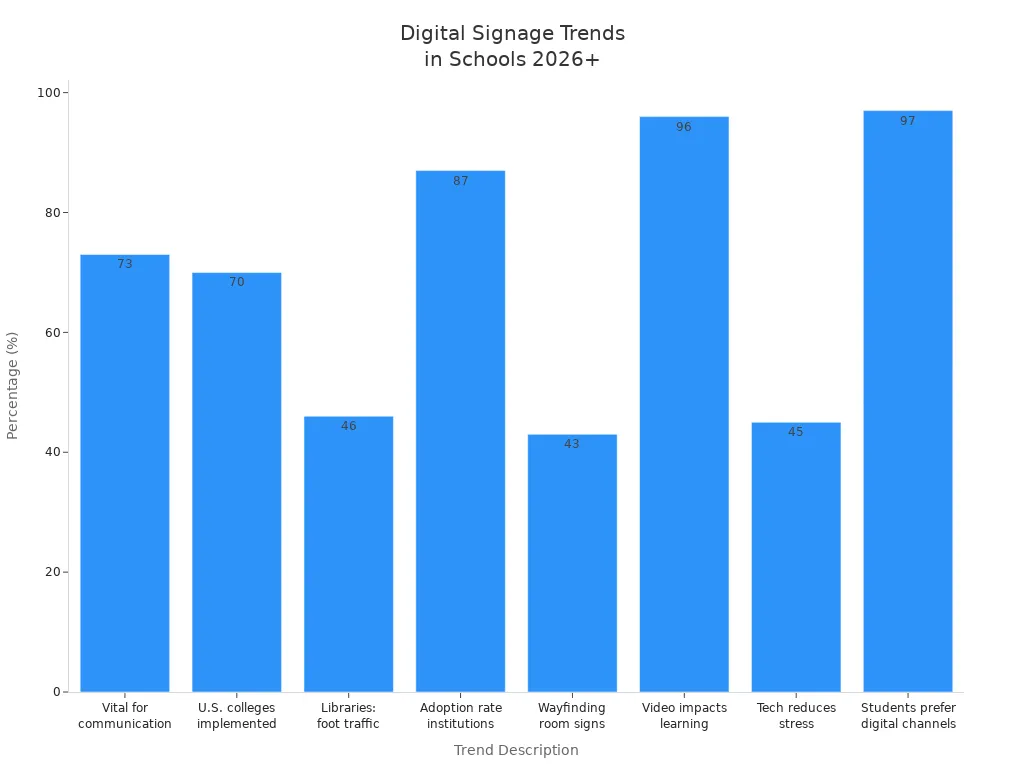
By 2026, almost every student will want to get information from digital signs. Schools will use digital signage for maps, room signs, and sharing videos. These trends show that digital signage will be a big part of education’s future. You will see more features that help students feel less stressed and enjoy learning more.
Each digital signage solution for schools has something special. AIScreen and Pickle help you share daily news fast. BrightSign gives you strong screens for on-premise digital signage. Carousel and Rise Vision let you manage content with advanced tools. When picking digital signage, think about your needs and budget. Also, look at the displays you already have. In the future, new trends will make sharing news even better. This guide helps you talk to your school and make announcements easy to understand and fun.
Educational digital signage is fundamentally a network of centrally managed screens that turns static bulletin boards and fragmented email blasts into a single, dynamic information hub. It solves the core challenge of modern campuses: getting the right information to the right people at the right time, without overwhelming staff.
✨ Key Benefits at a Glance
Category | Key Benefit | How It Helps Your Institution |
|---|---|---|
Communication | Unifies fragmented channels into a single source of truth | Replaces paper posters, emails, and portals with one reliable message system. |
Engagement | Boosts student participation in events and activities | Showcases student achievements, club activities, and social media highlights to build a connected campus culture. |
Safety | Enables instant, campus-wide emergency alerts | Provides immediate overrides for lockdowns, severe weather, and evacuations, reaching all screens at once. |
Efficiency | Dramatically reduces printing and manual labor costs | Eliminates the design, printing, and distribution of paper flyers. |
Accessibility | Supports multilingual messages, captions, and high-contrast text | Ensures clear communication for all students, including those with visual, hearing, or language barriers. |
🎓 Top 5 Campus Use Cases (2026)
In 2026, digital signage has become integral to daily campus life, adapting to the specific needs of K-12 and higher education.
Use Case | In K-12 Schools | In Universities & Colleges |
|---|---|---|
1. Emergency Alerts | Instant lockdown, weather, or evacuation orders displayed on every screen. | Real-time safety notifications, campus closure alerts, and emergency route guidance. |
2. Student Engagement | Showcase honor rolls, student art, and school spirit videos. | Promote club fairs, student government events, and research symposiums; display live sports scores. |
3. Wayfinding | Guide visitors during open houses and direct students to after-school activities. | Provide interactive maps to help 30,000+ students and staff navigate large campuses and find rooms. |
4. Information Hubs | Display daily announcements, lunch menus, and bus schedules in cafeterias and hallways. | Show campus news, exam schedules, library hours, and administrative deadlines in student unions and academic buildings. |
5. Learning Support | Enhance lessons with visual aids and display classroom instructions. | Show lecture outlines, assignment deadlines, and real-time data feeds in lecture halls and labs. |
Note: K-12 schools typically manage content centrally for tight control, while universities often have a more distributed model, allowing individual departments to manage their own screens.
🏫 In-Depth Case Studies: Real-World Success
Here's how some institutions have transformed their communication with digital signage:
Nottingham College (UK): This large college with nine campuses and over 30,000 students used Uniguest's Campus Hub to unify its disconnected screens. The system now integrates live data from SharePoint and student portals, creating dynamic displays that automatically update news, events, and transport information without manual effort.
University of Florida (US): With over 200 screens, UF centralized its fragmented department-run signage using NoviSign's platform. The result was improved communication, increased event attendance, and considerable cost savings by reducing printed materials.
Harnett County Schools (US): This district of 29 schools used Arreya's cloud platform to replace paper flyers. It now manages lunch menus, safety alerts, and daily announcements from anywhere, with one school even livestreaming its graduation ceremony.
Elizabeth Forward School District (US): The district wanted a better way to showcase student projects. Using Black Box iCOMPEL, they now stream live announcements and display student work on screens across all six schools, which has significantly increased community pride.
Drexel University (US): Drexel implemented a campus-wide network with Reach Media Network to provide real-time updates on events, emergency alerts, and wayfinding, creating a more connected and informed campus environment.
💻 Software & Hardware: Building Your System
A typical digital signage system consists of a Content Management System (CMS) and hardware (displays and players).
💻 Leading Software Providers (CMS)
Provider | Key Features & Certifications |
|---|---|
Arreya | Cloud-based platform designed specifically for education; used by Harnett County Schools for seamless remote management. |
NoviSign | Cloud-based CMS with AI-driven content creation and enterprise-grade security; used by the University of Florida. |
Yodeck | Features SSO, one-click emergency alerts, and supports multilingual messages; SOC 2, FERPA/COPPA, and ADA compliant. |
RocketScreens | Focuses on updating live, scheduled content from a central dashboard to replace static noticeboards. |
Samsung VXT | Integrated platform for commercial displays; offers hardware control, security features, and pre-designed templates. |
ViewSonic Manager | Supports integration with CAP (Common Alerting Protocol) systems for unified emergency messaging. |
Rise Vision | Cloud-based software available for K-12 education customers in the U.S.. |
TrilbyTV | A platform for education that pairs with design tools like Canva for content creation. |
🖥️ Hardware: Displays & Media Players
Displays: Choose commercial-grade LCD or LED screens (43″ to 75″) for indoor common areas like lobbies and cafeterias. For outdoor use (e.g., athletic fields), select weatherproof, high-brightness displays.
Media Players: Most modern solutions are cloud-based, using small, low-cost media players (like a Raspberry Pi) that plug directly into the screen. Many commercial displays now have System-on-Chip (SoC) capabilities, meaning the player software is built directly into the display, which simplifies installation and reduces costs.
💰 What Does It Cost? A Practical Budget Guide
The total cost of ownership includes hardware, software subscriptions, and installation. The following table provides a practical budget guide for 2026:
Component | Estimated Cost (USD) | Notes |
|---|---|---|
55" Commercial Display | $800 – $1,500 | Samsung, LG, ViewSonic, etc. |
Media Player | $100 – $500 | Raspberry Pi-based or commercial-grade. Some SoC displays have this built-in. |
CMS Subscription | $10 – $50 per screen/month | SaaS pricing; many offer education discounts. |
Installation & Mounting | $200 – $500 per screen | Professional installation for wall or ceiling mounts. |
Total Per Screen (First Year) | $1,200 – $2,800 | Estimate for 1 screen; costs decrease with scale. |
💡 Pro Tip: To maximize your budget, start with a small pilot (3-5 screens) in high-traffic areas. This allows you to prove value and refine your content strategy before expanding across the entire campus.
🚀 Future Trends Shaping Educational Signage (2026 & Beyond)
Several key trends are defining the next generation of digital signage:
Personalization & AI: Content can now be tailored by time and location (e.g., breakfast menus in the morning, club announcements in the afternoon). The industry is moving toward intelligent, software-driven content delivery.
Immersive & Interactive Tech: Augmented reality (AR) is being used to deliver immersive educational content, and interactive video walls are engaging students in new ways.
Enhanced Safety & Integration: Integration with Common Alerting Protocol (CAP) systems ensures digital signage can be a primary channel for emergency notifications, directly connected to local alert systems.
💡 How to Get Started: A Simple 5-Step Plan
Implementing digital signage is a straightforward process if you follow these steps:
Set Clear Goals: Determine what you want to achieve (e.g., improve emergency response, increase event attendance, reduce paper waste).
Plan Locations: Identify high-traffic areas for maximum visibility – entrances, cafeterias, student unions, and main hallways.
Choose a Provider: Select a CMS based on your needs. Take advantage of free demos or trials to test usability.
Start Small & Train: Pilot the system with a few screens, then train a small team of staff and students to manage content.
Launch & Gather Feedback: Go live, collect feedback, and adjust your content strategy to keep it fresh and relevant.
Digital signage offers a proven, scalable way to improve communication and build a more connected, vibrant campus community. By starting with a clear plan and focusing on high-impact areas, you can transform how your institution shares information.
FAQ
How do digital signage solutions improve communication in schools and universities?
Digital signage solutions help you share news and alerts fast. You can change what is on the screens right away. These solutions make sure everyone sees important messages. Students, staff, and visitors all get updates at the same time. This helps your school stay safe and informed.
What features should you look for in digital signage solutions for schools?
Look for solutions that are easy to use. Good solutions have tools for emergency alerts and scheduling. You should be able to control many screens at once. Make sure the solutions work with your devices. Pick ones that give support and training for staff.
Are digital signage solutions expensive for schools?
Some solutions cost more than others. You can find different prices and ways to pay. Subscription solutions help you plan your money. Some need you to buy hardware. Always compare to get the best deal for your school.
Can you use digital signage solutions for more than announcements?
Yes, you can use solutions for many things. You can show lunch menus, event times, and safety tips. Solutions help with wayfinding and student recognition too. Some let you share lessons or games that people can use.
How do you choose the right digital signage solutions for your school?
First, write down what your school needs. Compare solutions by features, price, and support. Try a free trial if you can. Ask other schools what they use. Pick the solution that fits your goals and works with your setup.
See Also
Exploring Emerging Digital Signage Trends For 2026
Latest Innovations In Digital Signage Technology For 2026
Popular Digital Signage Solutions Gaining Attention In 2026
