Top Tips for Creating Engaging Digital Signage Content in K-12 Schools
Shenzhen TopAdkiosk Display Technology Co., Ltd.
Add.: 2F, Bldg 10, Changfeng Industrial Park, Dongkeng, Fenghuang, Guangming, Shenzhen, China 518132
Mobile/WHATSAPP: 86-138 25769658
Email: marketing@topadkiosk.com topadkiosk@gmail.com
Skype: pghenry1
Wechat: adkioskhenry
English Web.: https://www.topkioskdisplay.com/
http://www.ad-kiosk.com/
https://www.toplcddisplay.com/
http://www.multitouchdigitalsignage.com/
https://www.youtube.com/channel/UCYVYNJHxLVEcQD8fuUxXNTA/videos?view_as=subscriber
https://www.facebook.com/TOPADKIOSKSHENZHEN/?ref=bookmarks

You have a hard time getting students, staff, and visitors to pay attention in k-12 schools. Digital signage education helps you make a lively experience. It supports talking, school spirit, and safety. Changing content often makes people more interested and helps them remember things. When students join in, they bring new ideas. This helps everyone feel like they belong. The right digital signage solution makes school learning more fun and important.
Key Takeaways
Digital signage helps schools share news fast with students, staff, and parents.
Fun content, like student work and awards, builds school spirit and helps students feel important.
Updating digital signage often keeps info new and helps students remember key messages.
Interactive displays get students involved and make learning more fun.
Clear and easy-to-read design helps all students understand the signs and feel included.
Why Digital Signage Matters in K-12
School Communication Benefits
You want everyone in your school to know what is happening. Digital signage for k-12 helps you do this. It lets you share important news fast with students, staff, and parents. You can use digital signage to show event times, safety alerts, and daily news. This helps you reach people right away and keeps everyone updated.
Digital signage education also makes people pay more attention. Students watch videos more than they look at posters. Digital signs get 400% more views than regular signs. You can see how digital signage helps your school connect and learn together. Here is a table that shows why digital signage matters in k-12 schools:
Benefit | Description |
|---|---|
Safety Alerts | Share emergency news quickly. |
Wellness Initiatives | Promote healthy habits and school programs. |
Wayfinding | Help students and visitors find their way around campus. |
District-Wide Messaging | Send updates to all schools in your district at once. |
Engagement Improvement | |
Cost Efficiency | Save money by reducing printing costs. |
You can use a digital signage solution to make talking easier and better. This helps people remember things and makes school life stronger.
Impact on School Culture
Digital signage does more than share news. It helps build a good culture in k-12 schools. You can use digital signage to celebrate student wins, show acts of kindness, and recognize staff success. This makes everyone feel proud and important.
You can also use digital signage to:
Show art and student projects.
Announce sports wins and academic awards.
Share messages that boost school spirit.
Digital signage works like a public intranet for teachers and staff. It reminds them about meetings and shows their hard work. Parents also get clear messages that are easy to read. This keeps them involved in k12 education and helps them support their kids.
When you use digital signage in schools, you make a friendly place. You help people pay attention, join in, and feel like they belong.
Student-Generated Content for School Engagement

Showcasing Student Work
Digital signage can show student work at school. You can display art, writing, or science projects. This makes students feel proud of what they do. It helps them feel like they belong and want to join in. Students see their work on screens and try harder. Changing the content often keeps things fresh. Students can make new graphics and messages for the signs.
Here are some ways to show student work in k-12 schools:
Show the UIL math team’s latest win.
Put up photos from the theater program’s show.
Share videos of the marching band’s best routine.
Display art projects from many grade levels.
Digital signage gives a bright look that grabs attention. It helps build school spirit and brings people together. It also shows future students how lively your school is.
Tip: Ask students to send in their work for digital signage education. This helps everyone join in and lets each student shine.
Interactive Digital Signage
Interactive digital signage lets students take part. You can use touch screens or QR codes. Students can vote on events or answer trivia questions. This keeps students active and builds confidence. Digital signage gets more views than regular signs. You reach more students this way.
Interactive displays help digital natives learn better. Bright visuals make hard topics easier to understand. Real-time updates on events get students to join in. You improve talking and keep students focused.
Interactive digital signage in k-12 schools sparks curiosity and helps students grow. Students build social skills and do better in class. When students help make content, learning feels more fun and important.
Real-Time Updates and Alerts in K12 Education
Event Schedules
You want everyone to know what is happening each day. Digital signage helps you share event schedules fast and easy. You can change schedules right away, so students and staff see new info. This helps everyone get to assemblies, sports, and special events on time. Using digital signage education means no one misses important or morning announcements.
Here is a table that shows how often schools update event schedules and the impact on attendance:
Impact on Attendance | |
|---|---|
Regular updates | Align with academic or organizational rhythms |
Annual updates | Refresh information and statistics, enhancing engagement |
Real-time updates | Promote events, leading to increased attendance |
You can use video announcements and visual announcements to get attention. Updating often keeps things new and makes people interested. Showing event schedules on classroom displays helps everyone stay ready and informed.
Safety Notifications
Keeping students and staff safe is very important in k-12 schools. Digital signage lets you send safety notifications and emergency messaging fast. You can connect your system to alert tools, so warnings reach everyone in seconds. This matters in k12 education, where quick action can save lives.
Digital signage lets you share news about weather alerts, emergencies, or schedule changes right away.
Schools use visual-first alerts to reach all students, even in loud places or for those with disabilities.
Emergency messages can take over other content, so everyone sees the warning.
You can send a campus-wide alert to all classroom displays, even if they are busy.
Integration with alert systems allows for automatic notifications, like lockdowns and bad weather.
Clear emergency messaging helps everyone know what to do next. You make your school safer by using digital signage for important announcements and safety updates.
Visual Design Tips for Digital Signage
Readable Messaging
You want your digital signage to stand out and be easy to read in k-12 schools. Clear messages help everyone get the information fast. Pick fonts that are easy to see and bold. Make sure the letters are big enough for students to read from far away. Leave space between lines and words so the message is not crowded. Use bigger letters for headings and smaller ones for other text. Keep the same font style and size to make your school look neat.
Tip: Put signs in busy places, like hallways or entrances, so more people see them.
Use colors that stand out from each other to help everyone read the signs. Bright screens and displays that do not glare work well in all kinds of light. Line up the words and pictures neatly for a clean look. Change the content often so it stays new and interesting. QR codes can make digital signage education more fun by letting students interact with the signs.
Effective Use of Graphics
Pictures and graphics help students pay attention and remember things. You can use photos, drawings, and moving images to make your digital signage special. Teachers use pictures and videos because students remember them better. Digital signage gets up to 400% more views than regular signs. This means students look at them more and remember what they see.
Research shows that digital signage helps students remember things 13% to 41% better than old ways. Use pictures that fit your school’s message. Keep graphics simple and do not put too many things on the screen. Moving pictures or scrolling words can help students pay attention, but do not use too many or they will distract from the main message.
Note: Pictures and graphics should help you share your message and make it easy for all students to understand.
Digital signage in k-12 schools works best when you use clear messages and good visuals together. This makes your school feel lively and helps students learn and feel proud.
Recognizing Achievements in School
Student Awards
Digital signage can show student awards in k-12 schools. This helps students feel proud and part of the school. When you show achievements in halls and classrooms, more students see them. This makes students want to do their best. You can show many kinds of achievements. This shows your school likes different talents.
Show academic, artistic, and athletic achievements.
Display awards for leadership and kindness.
Share positive quotes from students.
You can make different award groups, like "STEM Student of the Month" or "Athlete of the Month." This way, you include everyone and celebrate many skills. You also show students who join school events, not just the main ones. This helps all students feel important and included.
Celebrating success with digital signage helps students try harder. It teaches students to keep learning and believe they can do more.
Staff and Team Success
Digital signage can show staff and team achievements. This makes staff feel happy and want to do better. When you share news about sports or staff wins, school spirit grows. It also helps everyone talk and work together.
Benefit | Description |
|---|---|
Staff Appreciation | Showing staff wins makes them feel good and work harder. |
Team Success | Sharing team wins brings students and staff together. |
Community Awareness | Keeping everyone updated helps the school run well. |
Digital signage can remind people to be kind and share important news. You use pictures to get attention and help people remember. Schools use digital signage to share updates, event times, and safety alerts. This helps make a happy place where everyone feels special.
Boosting School Spirit with Digital Signage
Celebrating Milestones
Digital signage can help you celebrate big moments at school. When you show milestones, everyone feels proud and happy. Digital displays do more than share news. They help you honor achievements and tell stories about students. You can use screens to highlight things like reaching a fundraising goal or opening a new building. This makes everyone feel part of something special.
Here are ways digital signage helps you celebrate milestones:
Example | Description |
|---|---|
Fundraising Milestone | Animated graphics show progress, like reaching half the goal. This builds excitement and gets people involved. |
Ribbon-Cutting Ceremony | You can promote and recap events, showing teamwork and results. |
You can use digital signage to honor every accomplishment. This inspires students to try their best and helps your school reach new goals. When you celebrate together, you build a strong and positive culture.
Promoting School Events
Digital signage can help you promote school events and build excitement. When you share information about sports games, theater shows, or volunteer chances, more students and families join in. This makes your school community stronger.
Digital signage helps more people see school events and get involved.
You can share details about upcoming activities, so no one misses out.
When you celebrate student achievements, you encourage others to join.
Digital signage helps you talk better and make school lively. You can use bright visuals and clear messages to reach everyone in k-12. This makes your content stand out and keeps students interested. When you use digital signage well, your school grows and succeeds.
Accessibility and Placement in K12 Education
High-Traffic Areas
You want lots of people to see your digital signage. Put screens where many students walk every day. Hallways, entrances, cafeterias, and libraries are good spots. These places help your messages get noticed. Outdoor screens near main doors also work well for sharing news.
Put digital signage in places where students hang out, like corridors and common areas.
Use strong cases to keep screens safe from damage.
Make sure there is enough light, but do not let the screen glare.
Tip: When you put digital signage in busy spots, you help everyone know what is happening and join in k-12 activities.
Ensuring Visibility
You want everyone to see and read your digital signage. Good visibility means all students, even those with disabilities, can get the information. Here are some ways to make your screens easy to read:
Use big letters, at least 3 inches tall, for important news.
Pick clear fonts like Arial or Verdana.
Make sure the words and background are different colors, at least 4.5:1 contrast.
Show each message long enough—about one second for each word.
Hang screens 48 to 60 inches high so wheelchair users can see them.
Add closed captions to videos for students who cannot hear well.
Do not use flashing images that could bother some students.
Give printed or touchable versions of content for students who need them.
When you think about everyone’s needs, your school feels more welcoming. Clear digital signage helps all students get the news they need to do well.
Keeping Content Fresh in Digital Signage Education
Regular Updates
You need to keep your digital signage new to get students’ attention in k-12. Change your screens two or three times each day for the best results. Try to update messages in the morning, afternoon, and evening. This helps you reach students at different times and keeps them interested. You can change how often you update based on where your screens are. Busy hallways may need more updates than quiet offices.
Tip: If you show new content three times a day, students remember it better. The three-exposure rule helps students remember what they see.
You can use real-time integration with your school’s calendar to update event schedules right away. Dynamic playlists help take down old messages after events end. This keeps your screens up to date and helpful.
Content Planning
Planning well helps you get the most from your digital signage. Start by picking the right text size for your screens. Big screens need bigger letters so everyone can read them. Focus on one main message at a time. Too many messages can make students confused. Use space wisely and keep your design simple.
Pick colors that look good together and do not clash. Make sure your graphics and words work well together for a neat look. You can use snackable content, like short tips or reminders, to make things easy to read. Automation features let you add news, social media, or daily menus without extra work.
Here is a table with top ways to keep your digital signage content new:
Strategy | Description |
|---|---|
Real-time integration | Connect to calendars for automatic event updates. |
Dynamic playlists | Remove old content after events end. |
Daily logistics | Show lunch menus and daily schedules. |
Events and countdowns | Promote upcoming events with countdowns and QR codes. |
Social and peer content | Share student work and approved social media posts. |
Automation features | Pull in news and social feeds automatically. |
Snackable content | Use short, easy-to-read messages. |
Top Digital Signage Solutions for Schools in 2026
Many schools now use advanced digital signage solutions to keep content new and interesting. The best platforms in 2026 offer real-time integration with school calendars, easy automation, and support for student-made content. These solutions help you plan updates, remove old messages, and share news on all screens. Some even let you add countdowns for big events or show social media feeds. With these tools, you can keep your school’s digital signage fun and fresh every day.
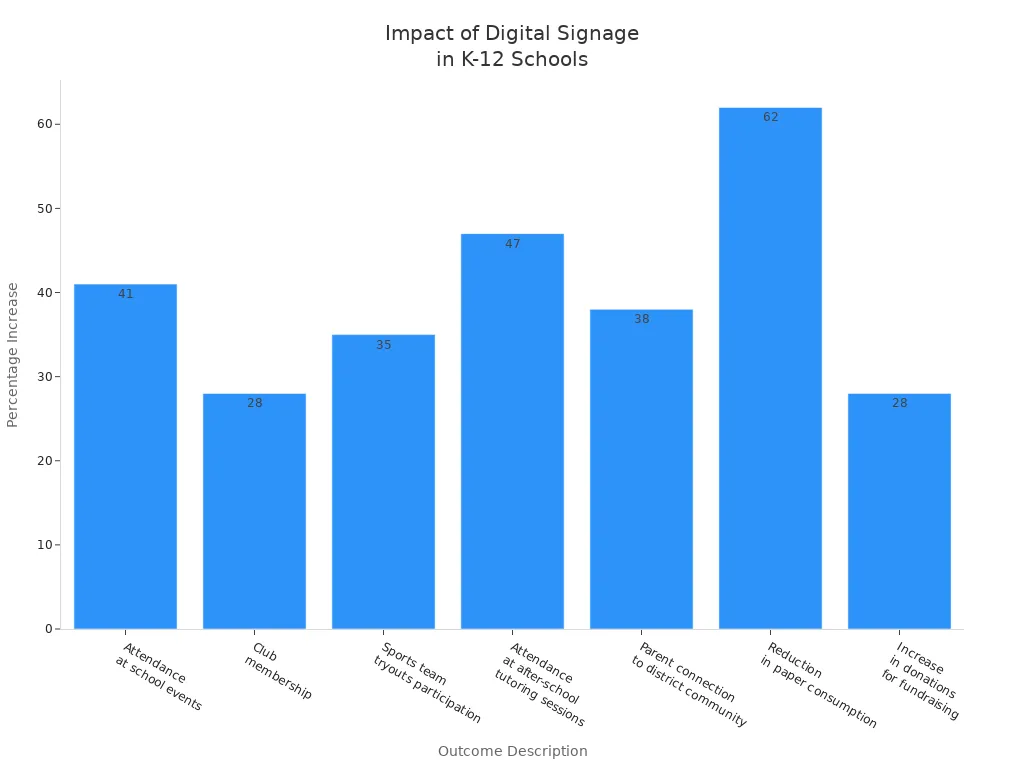
You can make your k-12 school better by using digital signage with different content. When students help and you share updates fast, more people pay attention. Clear messages for news and emergencies help students and families feel close. Schools see big changes, like more people going to events and less paper used.
Statistic | Impact |
|---|---|
400% more views than traditional signage | More people see the signs |
60% recall rate of digital signs in a week | People remember the signs better |
Keep your plan new by asking what people think and checking what works best. Your school gets stronger when you change your digital signage for each morning announcement and new need.
Top Digital Signage Solutions for Schools in 2026
Entering 2026, digital signage in education has moved far beyond simple information display. A forward‑looking guide needs to address two things: a clear understanding of the school’s real needs, and finding the right solutions in a crowded market.
Before listing specific vendors, it helps to define the two core needs schools have for digital signage. The first is informational digital signage – handling daily announcements, notices, and emergency alerts. The second is interactive recognition digital signage – designed to showcase achievements, build school culture, and strengthen community belonging through engaging experiences. Now, let’s look at some solutions.
📶 Market Overview: Top School Digital Signage Solutions in 2026
Platform | Core Positioning & Features | Integration & Compatibility Highlights | Pricing Model Reference (2026) | Core Value / Key Scenario |
|---|---|---|---|---|
AIScreen | All‑in‑one AI‑driven platform for modern schools. Combines content management, remote device monitoring, intuitive interface for all users. | Broad hardware compatibility (including Chromecast), supports Google Slides, robust enterprise management features. | Quote‑based. Value lies in its highly integrated collaborative ecosystem. | Unified campus communication hub |
Rise Vision | Long‑standing education player, completely free for K‑12 (requires .edu verification). 600+ templates. | Native Google Workspace (Calendar/Slides) integration, Microsoft 365 support, Common Alerting Protocol (CAP). | Completely free for K‑12, no screen limit. | Free public information screens for K‑12 |
Rocket Alumni Solutions | Specialist in honour & interactive displays. Focuses on immersive honour walls and hall of fame experiences. | Integrates with existing data systems to build searchable achievement databases; often used with Canva. | Custom quote – typically higher than generic SaaS. | Dedicated honour & achievement showcase |
Kitcast | Low‑cost, high‑reach solution. Known for compatibility with affordable hardware – turns ordinary smart TVs into digital signage. | Hardware compatibility focus: Apple TV, Amazon Fire TV Stick, Android TV consumer televisions. | Per‑screen subscription, base plan around $20‑$30/month. | Low‑cost smart TV conversion |
OptiSigns | Known for broad hardware compatibility and cost‑effectiveness (Android, Fire Stick, etc.). Suitable for budget‑conscious schools using existing devices. | Balanced features: content scheduling, multi‑screen management. Broad device support, good integrations and app ecosystem. | $10/screen/month. | Low‑cost, feature‑rich entry point |
Yodeck | Attracts users with a generous free tier – first screen free forever. Raspberry Pi‑based – great for budget‑tight single‑location deployments. | Supports Android, Windows, BrightSign, Fire TV, etc., but multi‑site management can be more complex. | First screen permanently free, then ~ $7.99/screen/month. | Cost‑effective single‑location alternative |
Scala | Enterprise‑grade deployment expert for large, complex systems. Deep customisation and integration – suitable for educational groups, universities, multi‑venue institutions. | Typical custom integration examples: connecting Smartsheet data sources, interactive panels – emphasises professional services. | Project‑based (enterprise). | Enterprise‑level multi‑site synchronisation |
ScreenCloud | App integration strength. Connects Slack, Google Sheets, etc. via its app store – suitable for universities with established content workflows. | App‑centric external data integration – well‑suited for digitally advanced higher education. | $20/screen/month. | Higher education app ecosystem |
TrilbyTV | Community & culture building in the UK. Well‑regarded in UK education for unified cross‑campus information and culture shaping. | Brand communication, works with school IT vendor partners for deployment. | Contact sales for quote. | UK campus community culture expert |
REACH | High‑value alternative. Addresses flexibility and design pain points of existing platforms. Offers professional visual design and easy calendar integration to help schools upgrade. | Web‑based platform accessible from internal websites, ensuring school‑wide content consistency. | Competitive pricing – suitable for budget‑sensitive schools. | High‑value professional upgrade choice |
Note: Prices are references; final costs vary by screen count, payment term, and region. Some pricing is based on historical data or third‑party estimates. Contact suppliers directly for the latest quotes.
🎯 Needs‑Based Selection Advice
For schools wanting to start quickly with a tight budget, consider deploying general electronic screens in hallways and lobbies – place them in high‑traffic areas to significantly improve information flow. For these core needs, Rise Vision and OptiSigns are reliable choices.
For specific spaces such as school history halls, gymnasiums, or main entrances, honour display screens are ideal. Rocket Alumni offers an irreplaceable immersive experience.
For schools facing high classroom cabling and hardware costs but wanting flexible centralised publishing and efficient management, solutions using cable TV networks and district‑level central management platforms can be effective.
💎 Summary
In 2026, school digital signage is evolving from an information display tool into a comprehensive ecosystem that integrates communication, safety, and community belonging. Go back to the needs checklist you created with your school team, select the right vendor, and ask for a demo based on your actual campus situation.
I hope this comparison provides a valuable reference. If your school has specific focus areas or budget ranges, feel free to share – I can offer more tailored suggestions.
FAQ
What types of content work best on school digital signage?
You can show event reminders, student achievements, safety alerts, and lunch menus. Short videos and bright graphics help get attention. Make messages simple so everyone can read them. Change what you show often to keep students interested.
How often should you update digital signage content?
Try to update your content two or three times each day. Changing signs often keeps information new and students interested. Use real-time tools to make changes fast.
How do you involve students in creating digital signage content?
Ask students to make graphics, write messages, or share photos. You can hold contests or let student clubs run a screen. When students make content, they feel proud and want to join in.
What are the top digital signage solutions for schools in 2026?
Top platforms in 2026 are BrightSign, Rise Vision, and ScreenCloud. These tools let you update screens in real time and use automation. They also support student-made content. You can control all screens from one place and connect to school calendars.
How can you make digital signage accessible for all students?
Use big, clear fonts and colors that stand out. Add closed captions to videos. Put screens at eye level for wheelchair users. Do not use flashing images. Give printed copies if someone needs them.
See Also
7 Strategies to Enhance Customer Interaction Using Digital Displays
Exploring the Impact of Digital Signage in Modern Marketing
Analyzing Digital Signage Innovations That Will Define 2026
A Step-by-Step Guide to Setting Up Digital Signage
Key Considerations for Installing Outdoor Digital Displays in 2026
