Digital Signage Corporate Communications That Truly Boost Engagement
Shenzhen TopAdkiosk Display Technology Co., Ltd.
Add.: 2F, Bldg 10, Changfeng Industrial Park, Dongkeng, Fenghuang, Guangming, Shenzhen, China 518132
Mobile/WHATSAPP: 86-138 25769658
Email: marketing@topadkiosk.com topadkiosk@gmail.com
Skype: pghenry1
Wechat: adkioskhenry
English Web.: https://www.topkioskdisplay.com/
http://www.ad-kiosk.com/
https://www.toplcddisplay.com/
http://www.multitouchdigitalsignage.com/
https://www.youtube.com/channel/UCYVYNJHxLVEcQD8fuUxXNTA/videos?view_as=subscriber
https://www.facebook.com/TOPADKIOSKSHENZHEN/?ref=bookmarks

Have you ever thought about why some workplaces feel close and informed? Digital signage corporate communications can change how you share news. It helps you celebrate wins and keep everyone updated. Look at these results:
Metric | Improvement |
|---|---|
Employee engagement increase | |
Productivity boost | 25% |
Workplace engagement improvement | 22% |
When companies like the YMCA used digital screens instead of bulletin boards, staff found information easier to see. It was also more fun to read. When leaders help, you build a place where communication is quick, clear, and important.
Key Takeaways
Digital signage can help employees feel more involved by up to 350%. Use it to tell news and show off wins.
Telling stories with pictures helps people remember messages. Share stories about happy customers and employee wins to make people proud.
Updates that happen right away keep everyone in the loop. Show sales numbers and project goals to show how each person helps the team win.
Content made for each department makes it matter more. Change messages so they fit what each team needs.
Fun features like polls and QR codes make people join in more. Ask for feedback and get people to take part to make work more exciting.
Engaging Content for Digital Signage
Visual Storytelling Techniques
You want people to notice your digital signage right away. People enjoy stories, especially when they can see them. Use visual storytelling to help people remember your messages. Show stories about customers who did well. You can also share your company’s history or celebrate when employees do great things. These stories make everyone feel proud and part of the team.
Here are some techniques that work well:
Technique | Description |
|---|---|
Telling stories about how customers use your products or services. | |
Company History | Showing your company’s journey and big moments to build pride. |
Employee Achievements | Sharing wins by teams or individuals to motivate and engage staff. |
Add photos, short videos, or simple animations. These visuals make your digital signage more exciting. You can also add fun things. A “Monday Motivation” quote or a silly award like “Coffee Pot Hero” can make people happy and help them remember your message.
Tip: Jokes and funny awards can help people pay attention and feel good about your content.
Real-Time Company Updates
You want everyone to know what is happening right now. Real-time updates on digital signage help your team stay informed. Show sales numbers, project goals, or important news as soon as it happens. When you share these updates, people see how their work matters.
Evidence | Description |
|---|---|
Sales Figures | Showing real-time sales numbers helps employees see how they help the company succeed. |
Companies that share news quickly have more engaged employees. Teams with good communication feel more connected and involved. You can also use digital signage to show social media posts, announce changes, or share motivational quotes. This keeps your content new and interesting.
Show company news and changes at work.
Add social media posts for a personal touch.
Share motivational quotes to inspire your team.
Employee Spotlights and Achievements
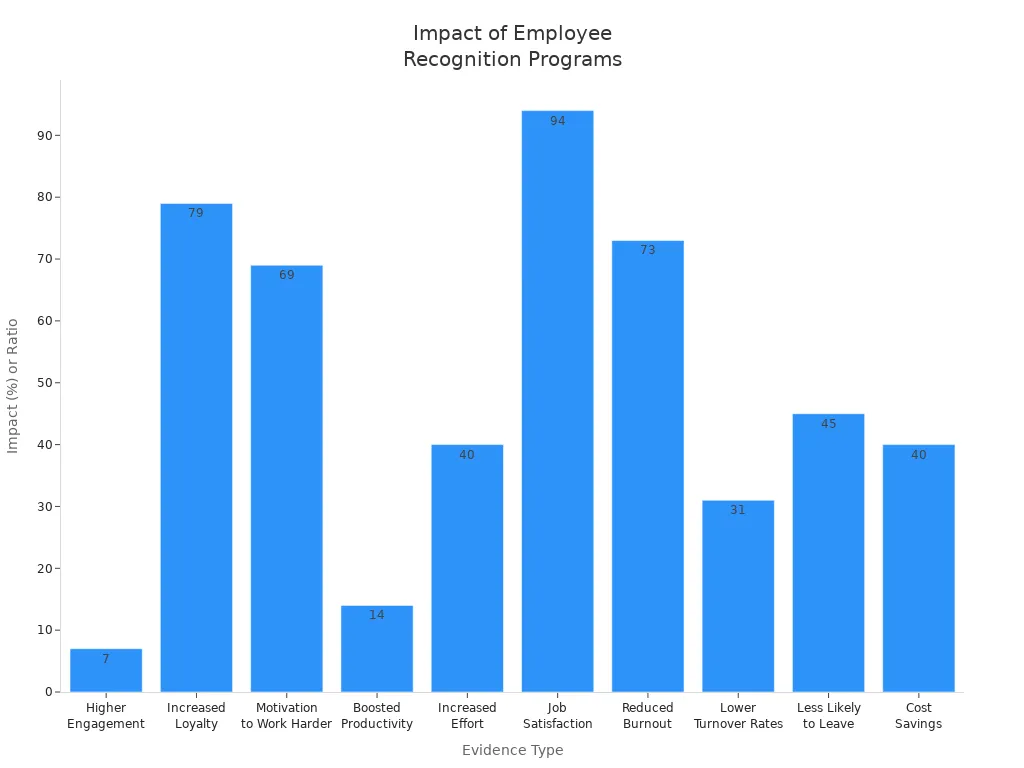
Everyone likes to be noticed for their hard work. Use your digital signage to show off team members who do a great job. You can feature an “Employee of the Month,” celebrate birthdays, or highlight project wins. This simple step can make your company a better place to work.
Look at these results:
Evidence Type | Statistic | Source |
|---|---|---|
Higher Engagement | Employees who get noticed are 7 times more likely to be engaged. | Perceptyx |
Increased Loyalty | 79% say they feel more loyal when they get rewards. | SHRM, Socialcast |
Motivation to Work | 69% would work harder if they felt appreciated. | Socialcast |
Boosted Productivity | Recognition can make people work 14% better. | ProofHub |
Lower Turnover Rates | Companies with rewards have 31% fewer people leaving. | Aberdeen Group, ProofHub |
You can also share photos and videos from past events. This helps everyone remember good times and look forward to more. When you make recognition part of your plan, you build trust and make people feel happier at work.
Note: Change up your content. Mix stories, updates, and celebrations to keep your digital signage fun. This way, people pay attention and remember your messages.
When you focus on engaging content, your digital signage becomes a tool that really helps employees feel involved and makes your company culture stronger.
Personalization in Digital Signage Corporate Communications
Department-Specific Messaging
Each department has different goals and news to share. Digital signage lets you send messages to the right group. Sales teams want to see their goals and wins. HR needs to tell people about new rules or health tips. IT may need to warn everyone about system changes. When you change messages for each team, people find the news more helpful and fun.
Try these ideas for department messages:
Show project steps for engineering teams.
Share customer comments with support staff.
Announce training for HR or rule teams.
Personal messages help everyone feel like they belong. Digital signage corporate communications make sure each group gets what they need. This way, your plan for sharing news is better and keeps everyone working together.
Tip: Ask each team what news helps them most. People pay more attention when they get updates that matter to them.
Employee-Generated Content
Let your team add their own stories to your digital signage. When employees share stories, photos, or shout-outs, your company feels stronger. People like seeing their work and wins on the screen. It makes them feel proud and important.
Here’s how employee content can help your workplace:
Aspect | Description |
|---|---|
Recognition | Digital signage shows when employees do well and says thank you. |
Morale Boost | Sharing good news makes people feel happy and want to do more. |
Real-time Communication | It helps everyone get news and praise right away. |
Digital signage shows when employees do great things.
It helps everyone feel included by saying thanks to hard workers.
You can share important news and KPIs, so people feel informed and valued.
When you use employee stories, your messages are not boring. You make sharing news fun and lively. This helps everyone feel close and want to join in. Your digital signage corporate communications become a tool for real-time praise and sharing, which makes people happy and helps your plan work better.
Interactive Digital Signage for Employee Engagement
Polls, Surveys, and Feedback
You want your team to feel listened to. Digital signage lets you ask for ideas and opinions easily. When you show polls, surveys, and feedback forms on screens, everyone can join in. People see these chances every day, so more people take part.
Use quick polls about changes at work.
Ask for feedback on new rules or events.
Let employees vote on fun things, like the next lunch.
Digital signage shows that leaders care about what employees think. This helps build trust and makes people more engaged. Employees feel closer when they know their ideas matter.
Tip: Keep feedback simple. Try digital suggestion boxes or forums so everyone can share ideas easily.
Here are some good ways to do this:
Strategy | Description |
|---|---|
Make Feedback Easy | Set up suggestion boxes, polls, or forums for fast input. |
Celebrate Successes | Show achievements on screens to motivate and encourage everyone. |
Recognition programs help too. When you show team wins or individual achievements, people feel proud and want to join in. This turns your digital signage into a tool for two-way communication.
QR Codes and Immersive Experiences
You can make your digital signage more fun. QR codes and cool displays let employees interact with content in new ways. When someone scans a QR code, they might start a training or a quiz. This makes learning and sharing information more exciting.
S3 Technologies shows how immersive experiences can get employees involved. For example, scanning a QR code can lead to a lesson about new software. This helps people learn faster and feel more confident at work.
Digital screens get four times more views than regular signs.
They help people remember messages 83% better than old methods.
You can use QR codes to share resources, sign up for workshops, or get feedback fast. Employees like these features because they are easy and fun. Adding interactive parts makes your digital signage stronger and helps boost engagement.
Note: Mix interactive displays with regular updates. This keeps your screens interesting and encourages everyone to join in.
Digital signage gives you many ways to connect with your team. When you use polls, surveys, QR codes, and immersive experiences, you make your workplace lively. Employees feel involved, and your communication plan gets better.
Promoting Learning and Development
Training and Workshop Announcements
You want your team to be ready for new things. Digital signage helps you share training and workshop news fast. Countdown timers and reminders grab attention. Fun pictures and videos make updates easy to notice. Employees see these messages every day, so they remember important dates.
Digital signage helps more people go to sessions by reminding them.
Training videos and skill pictures help people learn and remember better.
Countdown timers keep workshops in everyone’s mind, so no one forgets.
You can use your plan to show special events. Try showing short clips from old workshops or fun facts about the next training. This keeps your team excited and wanting to join.
Tip: Use bright colors and big words for urgent reminders. People see these and act fast.
Sharing Learning Resources
You can make your workplace a place to learn. Digital signage lets you share small training lessons, daily tips, and news right at work. Employees get easy access to resources, so they can grow and get better skills.
Digital signage shows training right to employees, making learning easy.
You can show learning content, job growth chances, and important news.
Sharing news and skill tips helps everyone keep learning all the time.
Try changing your content often. Show a quiz one day, then a new resource the next. This keeps your screens interesting and your team paying attention. When you promote learning, you help everyone stay ahead and feel good at work.
Note: Ask employees to share their favorite resources. This makes your learning community stronger and keeps your digital signage fun.
Consistency and Placement Strategies
Strategic Screen Locations
You want people to notice your digital signage. Where you put screens is very important. If you put screens where lots of people walk, more people will see them. Places like entrances, break rooms, and hallways are good spots. This helps more employees see important news.
Picking the best spot for your store is a big choice. Busy places like main streets or shopping centers have more people walking by. More people means more chances for new customers. When your store is easy to see, your brand gets more attention.
A great location is not just about selling things. It gives people a better experience. If your store is easy for people to get to, they will come more often. If you also have nice displays, people will want to check out your brand.
You can use these ideas at work, too. Screens in good spots help you share news and celebrate wins. They also keep everyone connected. Try moving screens to new places to see what works best.
Regular Content Refresh
You want your digital signage to always be interesting. If you show the same thing every day, people stop looking. Change your content often to keep your team interested. Update news, events, and achievements so everyone knows what’s happening.
Try to change digital signage every day or week, depending on the message.
News feeds and KPIs can update by themselves.
Change static campaigns every two weeks so people don’t get bored.
Set reminders to update your screens. Mix in videos, photos, and quick polls. When you refresh your content, your team will be excited to see what’s new.
Measuring Employee Engagement with Digital Signage
Tracking Engagement Metrics
You want to see if your digital signage works. Start by watching important numbers that matter to your team. Show department KPIs, sales results, and customer satisfaction scores on screens. This lets everyone see how things are going and feel excited. It helps people trust each other and work toward the same goals.
Here are some common things to measure:
Metric Type | Description |
|---|---|
Department KPIs | See how each team is doing and help them focus. |
Real-time progression | Show how close you are to company goals. |
Sales Performances | Motivate people by showing sales numbers and wins. |
Customer reviews | Share feedback to help everyone do better and care more. |
You can use special tools to see how many people look at the screens. Try linking your signage data with sales or CRM systems to see what works best. More than 70% of shoppers in busy places notice digital signage. Interactive screens can make engagement go up by 47%. These facts show that real-time updates and clear messages are powerful.
Tip: Make SMART goals for your signage. Goals should be specific, measurable, possible, important, and have a deadline.
Gathering Employee Feedback
You need to know what your team thinks to get better. Collect feedback with polls, surveys, and suggestion boxes. Ask employees what content helps them and what they want to see more. This helps you learn how they feel and if they are happy.
Here are some ways to get feedback:
Use quick polls on screens.
Set up digital suggestion boxes.
Ask for feedback after big news.
Sometimes, there are problems. Data can be spread out, and lots of use does not always mean people like the content. Tell employees why you want their feedback so they trust you. Make sure someone is in charge of measuring so nothing gets missed.
Challenge | Description |
|---|---|
Data is in many places, so it is hard to see everything. | |
Employee trust | Employees may worry about being watched, so explain your reasons. |
Governance gaps | If no one is in charge, measuring can be forgotten. |
When you track numbers and listen to feedback, you can see how engaged employees are. This makes your digital signage work even better.
You can make people pay more attention by putting screens in busy spots. Change what you show often so it stays interesting. Celebrate when someone does something great. Show clear goals and give feedback right away. Use easy words and fast pictures. Begin with a few screens and see what works best. Keep your displays new and exciting.
Want your workplace to feel more fun? Start now and make your messages more active and helpful!
The Core Problem It Solves
Traditional corporate communication methods often fail:
Emails get ignored or lost in overflowing inboxes.
Intranet posts rely on employees actively seeking out information.
Bulletin boards become "wallpaper" – cluttered and quickly outdated.
Town halls are infrequent and can't cover daily updates.
Digital signage directly confronts these issues by placing information in the physical flow of work and traffic.
Key Ways Digital Signage Improves Communication
Here are the specific, measurable improvements:
1. Boosts Visibility & Reach (Especially for Deskless Workers)
Over 80% of the global workforce is "deskless" (retail, manufacturing, healthcare, logistics). They don't sit at a computer all day.
How signage helps: You place screens in break rooms, by time clocks, on factory floors, or in hallways. This puts critical announcements directly in their line of sight during natural breaks or shift changes.
Example: Announcing a shift change, a safety protocol update, or a new benefit enrollment deadline on a lunchroom screen reaches everyone instantly.
2. Drives Higher Engagement & Retention
A screen showing dynamic content grabs attention far more effectively than a static email subject line.
How signage helps: Use motion, video, real-time data (like countdowns or leaderboards), and a visual hierarchy. Brains process visuals 60,000x faster than text.
Example: Instead of an email titled "Q3 Sales Results," a lobby screen shows a live-updating bar graph of regional performance, a video message from the CEO, and a "Top Performer" photo. This is memorable and shareable.
3. Enables Real-Time, Urgent Alerts
During a crisis or last-minute change, email is too slow.
How signage helps: Modern signage integrates with alert systems. You can instantly override all screens with a critical message.
Example: A weather emergency, IT system outage, building lockdown, or even a "cake in the break room" announcement can go from creation to every screen in seconds.
4. Strengthens Company Culture & Internal Branding
Culture isn't built in an email. It's built through shared moments and visible values.
How signage helps: Use screens as a "digital hearth." Celebrate work anniversaries, showcase "Employee of the Month" photos, share customer testimonials, or run fun fact trivia.
Example: A rotating slide on hallway screens that says, "Happy 10-Year Anniversary, Sarah from Accounting!" with a photo of her team. This feels personal and public, fostering a sense of belonging.
5. Reduces Information Overload & Improves Recall
Email volume has exploded. Digital signage acts as a filter, broadcasting only what's critical and relevant to that location.
How signage helps: Content is curated, concise, and designed for "glance media" (3-7 second reads).
Example: A screen in the HR corridor shows only: "Next open enrollment: Nov 1-15," "Wellness webinar today at 2 PM in Conf Room B," and "Meet our new intern, Jake." Employees don't have to hunt for this info.
6. Connects Remote & Hybrid Teams
When some people are at home and some are in the office, disconnection grows.
How signage helps: Integrate your signage with Microsoft Teams, Zoom, or Slack to show who's in the office, upcoming meeting room bookings, or a live feed of the remote team's collaboration space.
Example: A screen outside a meeting room shows: "Room booked for 'Global Product Launch' – 3 remote attendees online." Inside, a large screen shows the remote participants' video feed, making them feel present.
7. Provides Real-Time Performance Dashboards (KPI Tracking)
Motivate teams by making success visible.
How signage helps: Connect your signage to data sources like Salesforce, Google Analytics, or manufacturing sensors via an API.
Example: On the sales floor, a large screen shows a live leaderboard of deals closed vs. target. In the warehouse, a screen shows on-time shipping percentage and top picker. This fosters healthy competition and goal alignment.
Comparison Snapshot: Email vs. Digital Signage
Feature | Digital Signage | |
|---|---|---|
Primary Channel | Individual, asynchronous | Physical, ambient, synchronous |
Open/Awareness Rate | ~20-30% (internal emails) | Can exceed 90% (if placed in high-traffic areas) |
For Deskless Workers | Very poor (no computer) | Excellent (in break rooms, on floor) |
Urgent Alerts | Slow, easily missed | Instant, screen takeover |
Content Retention | Low (deleted or skimmed) | Higher (visual, repetitive, low-effort) |
Builds Culture | Weak (impersonal) | Strong (visible, shared, celebratory) |
How to Get Started (A Simple 3-Step Plan)
Audit Your Pain Points: Where do communications break down? (e.g., "No one reads the safety updates in the warehouse.")
Choose a Simple Cloud Platform: Look for user-friendly tools like ScreenCloud, OptiSigns, or Yodeck (often free for a single screen).
Start Small & Targeted: Don't try to do everything. Put one screen in a high-traffic break room or lobby. Rotate three content types: a KPI, an upcoming event, and a culture "fun fact." Measure if people stop and look.
Bottom Line
Digital signage doesn't replace email or the intranet. It augments them by creating a physical, visual, and timely layer of communication. It's the difference between sending a message and making sure it's seen. For any organization with deskless employees, multiple locations, or a struggling internal comms open rate, it's one of the highest-ROI tools available.FAQ
How often should you update digital signage content?
You should refresh your content at least once a week. This keeps your screens interesting and helps your team stay engaged. Try to mix in new stories, updates, and fun facts.
Can digital signage work for remote employees?
Yes! You can share digital signage content through online dashboards or emails. This way, remote workers see the same updates and feel included.
What types of content boost engagement the most?
Employee spotlights, real-time updates, and interactive polls work best. People love seeing their achievements and sharing their opinions. Try using photos, videos, and quick questions.
Is digital signage hard to set up?
No, most systems are easy to use. You can upload images, videos, or slides with simple tools. Many platforms offer step-by-step guides to help you get started.
