Digital podium review makes presentations easier than ever
Shenzhen TopAdkiosk Display Technology Co., Ltd.
Add.: 2F, Bldg 10, Changfeng Industrial Park, Dongkeng, Fenghuang, Guangming, Shenzhen, China 518132
Mobile/WHATSAPP: 86-138 25769658
Email: marketing@topadkiosk.com topadkiosk@gmail.com
Skype: pghenry1
Wechat: adkioskhenry
English Web.: http://www.topadkiosk.com/
https://www.topkioskdisplay.com/
http://www.ad-kiosk.com/
https://www.toplcddisplay.com/
http://www.multitouchdigitalsignage.com/
https://www.youtube.com/channel/UCYVYNJHxLVEcQD8fuUxXNTA/videos?view_as=subscriber
https://www.facebook.com/TOPADKIOSKSHENZHEN/?ref=bookmarks
You notice digital podiums are making presentations different. These systems put microphones, computers, and touch screens together in one device. You save time since you do not set up many tools. Digital podiums take away technical problems, so you can focus on better presentations. Interactive features let you connect with your audience and keep them interested.
Key Takeaways
Digital podiums put many tools together in one device. This makes setting up for presentations easier. It also helps stop technical problems.
Pick a digital podium that matches what you need. For example, use one for classroom lessons or office meetings. This helps make sure it works well in your space.
Interactive touch screens help people pay attention. They make presentations more fun and easy to remember for everyone.
Think about how much money you can spend when picking a digital podium. More costly models have extra features that can make your presentations better.
Always make sure the digital podium works with your devices and software. This helps your presentation go smoothly.
Top digital podiums comparison

Key features and specs overview
It is important to pick the right digital podium for you. The best digital podiums put many tools together in one place. You get a touchscreen, computer, microphone, and speakers all in one. Most have a touch display that is 21.5 inches or bigger. This makes it easy to use your content. Some podiums have two screens and wireless microphones. This gives you more ways to use them. You can plug in laptops, USB drives, and other things with HDMI, USB, and LAN ports. Many digital podiums let you control them from far away and share your screen without wires. These features help you make better presentations anywhere.
Here is a table that shows the main features of the top digital podiums:
Product Name | Touch Screen Size | Connectivity | All-in-One Functionality | Compatibility |
|---|---|---|---|---|
Portable Multimedia Steel Podium (HDFocus) | 10-point touch | HDMI, USB, modular | Yes | AV systems, PC |
Multimedia Desk Podium (Luoyang Cuide) | Not specified | HDMI, USB | Yes | Fortune 500 supplier |
43" Multimedia Podium (WiViTouch) | 43" dual-screen | Wireless mic, HDMI | Yes | PC, AV systems |
Desktop Intelligent Podium (Returnstar) | Not specified | HDMI, USB, LAN | Yes | Industrial-grade |
Tip: Look for things like motorized tilt and built-in speakers. These can help make your presentation easier and clearer.
Pricing and value analysis
Digital podiums can cost a little or a lot. Some start at $129 for simple classroom use. The most advanced ones can be as much as $3,000. The more expensive podiums have bigger screens, better sound, and more ways to connect. You pay extra for things like two screens, wireless microphones, and strong parts. These features help you give better presentations and make your job simpler.
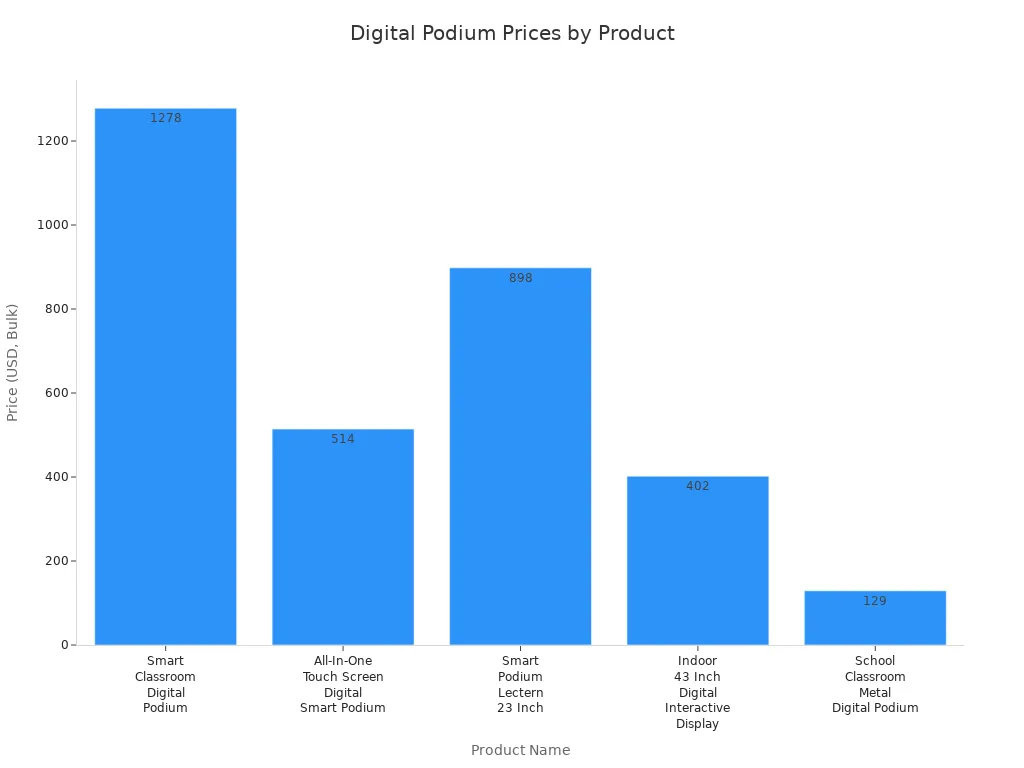
Pick a digital podium that fits where you will use it. Classrooms need touch screens and good sound. Offices need video calls and easy ways to connect devices. Events need quick changes and strong connections. The best digital podiums give you what you need to do well anywhere.
Digital podiums in presentations
All-in-one functionality and integration
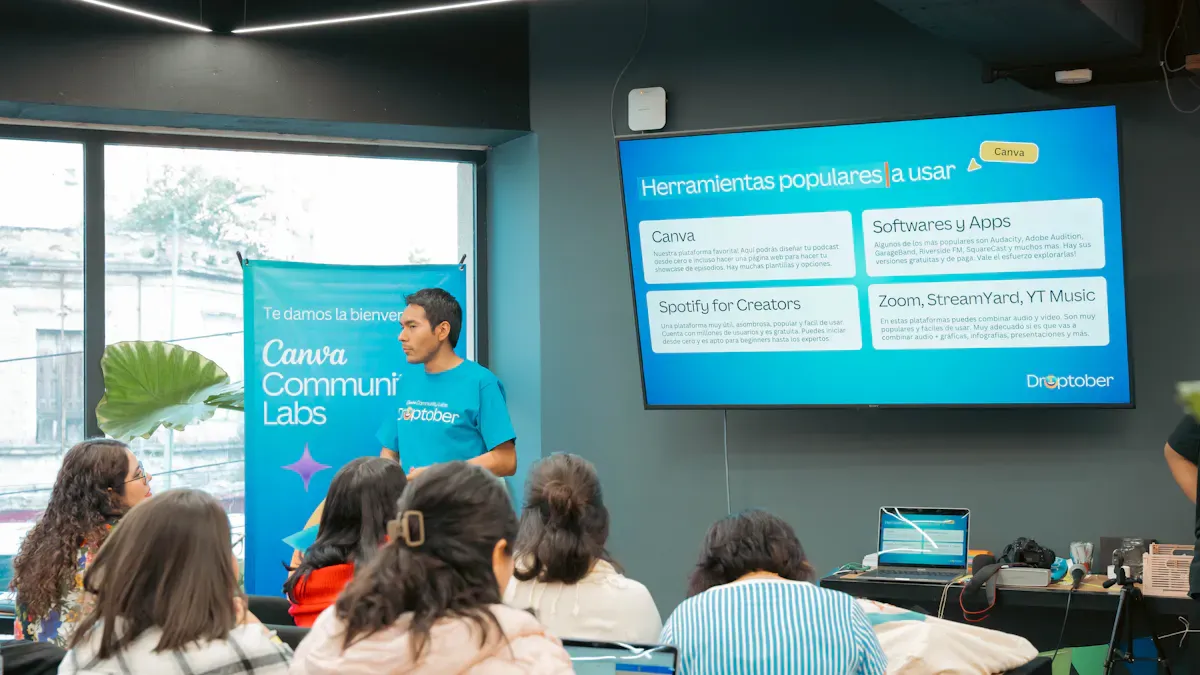
A digital podium changes how you get ready for presentations. You do not need to set up lots of different devices. One smart system puts everything together for you. You can control the microphone, computer, and speakers from one place. This saves time and keeps your desk clean. There are fewer devices, so you have fewer problems. You also get more space in your room to move around. This helps you talk to your audience and walk around easily.
Here is a table that shows how all-in-one functionality makes your presentation process easier:
Benefit | Explanation |
|---|---|
You set up faster and avoid complex installations. | |
Enhanced User Experience | You use one interface for all controls, making operations simple. |
Reduced Technical Issues | You face fewer compatibility problems, so your presentation runs smoothly. |
Space Optimization | You save room and create a professional look. |
Streamlined Support | You deal with one vendor, which makes maintenance easier and reduces downtime. |
Tip: You can pay attention to your message instead of worrying about your equipment.
Interactive touch screens and audience engagement
Digital podiums use interactive touch screens to help you connect with your audience. You can let people join in by touching and exploring the content. Touch screens make your presentation more fun and interesting. People remember things better when they see and do them. You can ask questions, show videos, or let students draw on the screen. This keeps everyone busy and excited.
Interactive touch screens let people join in, not just watch.
Touchscreen interfaces are easy to use and feel normal.
Touching the screen makes people curious and helps them learn.
People can look at things at their own speed, so it feels personal.
Touch screens help people remember your presentation and join in more.
You can leave the display open after the event for more use.
You can collect information from what people do, which helps you make better presentations next time.
Note: Digital podiums with touch screens help you connect better with your audience.
Reviews of top digital podiums
[Brand/Model 1]—Performance and usability
You want a digital podium that is simple to use. [Brand/Model 1] gives you an easy start. You can set it up fast. The controls are clear, so you do not get confused. You learn how to use it without trouble. If you need help, support is strong. Many people like this digital podium for its setup and use. You can see the ratings in the table below:
Aspect | Rating |
|---|---|
Onboarding | High |
Setup | Straightforward |
Overall Rating | |
Support Quality | Strengths |
You can use this digital podium in classrooms or meetings. It helps you record and share your talks. The system works well, so you can focus on your message. You do not worry about tech problems. This digital podium is good for schools and offices.
Tip: Save time with a digital podium that is easy to set up and has good support.
[Brand/Model 2]—Display and connectivity
You need a digital podium with a bright screen and good connections. [Brand/Model 2] gives you a clear display for your content. You can use touch controls to move slides or write notes. The display helps you record and share your lessons. You can connect laptops and tablets with HDMI and USB ports. You do not have trouble with cables or adapters.
You can use wireless microphones for clear sound. These digital podiums help you talk to big groups. You can switch between devices fast. You do not lose time during your talk. The system helps teachers and business leaders record their lessons. You can share your screen and record with one touch.
Note: A digital podium with strong connections and a bright screen can make your presentations better.
[Brand/Model 3]—Software integration and features
You want a digital podium that works with your favorite programs. [Brand/Model 3] gives you many ways to record and share your talks. You can use PowerPoint, Zoom, and Google Classroom. The system lets you record your talks and upload them to the cloud. You can edit your files and share them with others.
You get extra tools like screen drawing, video playback, and remote control. These tools help you make your talks more fun. These digital podiums help you connect with your audience. You can answer questions, show videos, and draw on the screen. You do not need extra devices or hard setups.
You can use tools to record and review your talks.
You can share files and videos with your group.
You can control the podium from your phone or tablet.
Tip: Pick a digital podium that works with your favorite programs and makes recording easy.
[Brand/Model 4]—Unique advantages and drawbacks
You want to know what makes [Brand/Model 4] special. This digital podium is easy to set up. You can use one dashboard to manage your talks and recordings. The system helps your team work together. You can focus on local business needs and improve your online reviews.
There are some problems too. Customer support is not always fast. Some features are hard to find or use. You may have trouble with how things connect. Billing can be confusing. You can see the good and bad points in the table below:
Advantages | Drawbacks |
|---|---|
Unreliable customer support | |
Unified communication dashboard | Hidden feature limitations |
Review-driven local SEO | Integration architecture constraints |
Team collaboration features | Billing transparency issues |
Local business specialization |
You also want a digital podium that lasts a long time. [Brand/Model 4] is made in advanced factories in Shenzhen and Guangzhou. The company takes care of everything from research to making the system. Each unit is tested for 72 hours to make sure it works well. You get strong performance checked in a lab. The factories use modern machines and robots to build the podiums. Quality checks meet CE, FCC, RoHS, and WEEE rules. You can see the details in the table below:
Aspect | Description |
|---|---|
Manufacturing Hubs | Operates dual advanced manufacturing hubs in Shenzhen and Guangzhou. |
Lifecycle Management | Manages the entire lifecycle from R&D to system customization. |
Aging Tests | Each unit undergoes rigorous 72-hour aging tests to ensure performance. |
Reliability Validation | Laboratory reliability validation for enterprise-grade performance. |
Production Facilities | Industrial park spans 330,000 m² with modern SMT production lines and fully automated assembly. |
Quality Control | Strict quality control with functional and reliability tests meeting CE, FCC, RoHS, and WEEE standards. |
Note: You can trust this digital podium for recording and long use, but check support and billing before you buy.
User experience with digital podiums
Real-world feedback from presenters
Presenters like digital podiums because they are easy to set up. The controls are clear and simple to use. With a touch panel, you can manage all your devices. You can switch slides, play videos, and use audio without getting mixed up. This makes it easy to show videos and sounds that keep people interested. Many presenters say their talks go smoother and are more fun with digital podiums.
The touch panel is easy for everyone to use.
You can play videos and sounds to get attention.
You can connect many devices for better talks.
Presenters say digital podiums let you focus on your talk, not tech problems.
Scenarios in classrooms and offices
Digital podiums are changing how people teach and present. In classrooms, teachers use them to make lessons more fun. Students can touch the screen, draw, or answer questions. This helps students join in and pay attention. Teachers use smart podium for classroom lessons to show pictures and talk with students right away. Hybrid lessons and hybrid teaching are easier with digital podiums.
Interactive features help students join in more.
Visual aids and talking in real time help students learn.
Old-style talks become lively and full of ideas.
In offices, people use digital podiums to share ideas and work together. You can connect laptops and tablets fast. Meetings are less stressful and more focused. Digital podiums turn classrooms and offices into places where everyone joins in. Smart podium for classroom tools help with interactive learning and make hybrid teaching better.
Digital podiums help make presentations and learning more lively and fun.
Pros and cons of digital podiums
Strengths and benefits
When you use a digital podium, you get many good things. All your tools are in one place, so it is simple. You can check reviews, send messages, and take payments from one dashboard. AI gives you tips on when to post and helps you see how people feel about your talks. The customer experience hub lets you handle reviews, messages, listings, surveys, referrals, and payments together. You can grow your work fast, and local managers talk to customers right away. Analytics show you clear feedback, like feelings and how urgent replies are. You also get help all the time, with training and support day or night.
Here is a table that shows the main strengths and benefits:
Feature/Benefit | Description |
|---|---|
Manage reviews and campaigns from one place. | |
AI-driven recommendations | Get suggestions for posting and monitor audience sentiment. |
Comprehensive customer experience hub | Integrate reviews, messaging, listings, surveys, referrals, and payments. |
Effortless scalability | Expand easily and let local managers engage customers. |
Instant actionable business clarity | Use analytics to understand feedback and improve presentations. |
Consistent support | Receive onboarding and 24/7 account management. |
AI-powered messaging helps you get more leads.
It is easy to make reviews, so more people see you online.
You can talk to customers in many ways at once.
You can set up meetings by text or web chat.
You can collect payments with messages.
Tip: Using a digital podium saves you time and makes you less stressed during presentations.
Limitations and considerations
There are some things to think about before you pick a digital podium. Some models cost a lot, especially the fancy ones. You might need to learn how to use all the features. Some systems hide tools, so they are hard to find or use. Sometimes, support does not answer fast. Billing can be tricky if you do not look at the details. Your devices or software may not work with the podium. Make sure the podium fits in your classroom or office.
Some features need extra setup or updates.
Old devices may not work well with the podium.
Support is not always the same for every brand.
Some podiums do not work well for remote or hybrid talks.
Note: Always check the features and support before you buy a digital podium.
Buying guide for digital podiums
Choosing the right digital podium for classroom or office
You should know how to pick the best digital podium for your space. First, think about what you want to do most. In a classroom, you need a digital podium for classroom lessons that lets you write, play back lessons, and get answers from students. In an office, you want a podium for video calls, sharing your screen, and easy whiteboarding. Check the screen size and how clear it looks. Classrooms usually use screens between 65 and 86 inches. Offices use smaller screens, but big auditoriums need even bigger ones.
Here is a table to help you see what matters most for each place:
Criteria | Classroom Use | Office Use |
|---|---|---|
Core Use-Cases | Active writing, lesson playback, student response systems | Video conferencing, screen-sharing, whiteboarding |
Screen Size & Resolution | 65"–86" for larger classrooms | 55"-75" for small rooms, 86"+ for auditoriums |
Touch & Writing Experience | 10+ touch points, low-latency pen | Collaborative features, ease of use |
Connectivity & I/O | HDMI, USB-C, Ethernet for stability | Multiple USB ports, Wi-Fi for BYOD convenience |
Camera & Audio | Built-in cameras for hybrid classrooms | Microphone arrays for clear audio in meetings |
Software & Management | Annotation apps, device management capabilities | Compatibility with conferencing applications |
Tip: Always make sure the digital podium for classroom or office works with your favorite presentation software.
Key factors—features, budget, environment
When you want to pick the best digital podium, look at features, price, and your space. Make sure the podium is easy to connect. You should be able to plug in laptops, tablets, and other devices without any trouble. Pick a podium with simple controls. This helps you run your presentations without stress.
Think about how much money you can spend. Cheaper podiums have basic tools and are good for small classrooms. More expensive ones have extra features and are better for big groups. Here is a table that shows how your budget changes what you can get:
Source | Budget Type | Features and Options |
|---|---|---|
Amazon | Lower | Affordable podiums with basic features, ideal for individual buyers or small businesses. |
Alibaba | Higher | Professional-grade podiums with advanced features, better suited for larger organizations needing bulk. |
You also need to think about your space. Classrooms need fun lessons and lots of media. Meeting rooms need tools for teamwork and sharing ideas. Auditoriums and halls need strong sound and big screens. Look for podiums that can change height, are tough, and keep cables neat.
Built-in tech support like HDMI and USB-C ports
Comfortable design for sitting or standing
Room to add webcams and document cameras
Note: Before you buy, check if the digital podium works with your projector, sound system, and interactive display. This will help your presentations go smoothly.
You can pick the best digital podium by checking what it does and who will use it. Here is a simple guide:
Podium Name | Key Features | Target Audience |
|---|---|---|
Shenzhen WiViTouch Technology Co., Ltd. | High reliability, Tier 1 requirements | Educators, Business Pros |
HUSHIDA Newest Smart Podium | Bulk pricing, ideal for schools | Educators, SMEs |
Shenzhen 360SPB Co., Ltd. | Dual-screen mobility | Event Organizers, Business |
Best Special Display Technology Co., Ltd. | Custom branding, wireless mic | Educators, Event Organizers |
Smart digital podiums help you finish work faster and stop tech problems. You see clear screens, use simple controls, and hear strong sound. Pick a podium that fits your room and what you need. Try to find things like video calls, touch screens, and recording. Read what other people say and use AI tools to help you choose.
FAQ
What is a digital podium?
A digital podium is a smart device that combines a computer, microphone, speakers, and a touch screen. You use it to control your presentations from one place. It helps you teach or speak without switching between many devices.
How do you connect your laptop to a digital podium?
You usually connect your laptop with an HDMI or USB cable. Some podiums let you connect wirelessly. Look for the right port on the podium. Plug in your device, and your screen will show up on the podium display.
Can you use Zoom or Teams on a digital podium?
Yes, you can use Zoom or Teams. Most digital podiums support popular video apps. You open the app on the podium’s computer or connect your laptop. You can join meetings, share your screen, and talk with others easily.
Are digital podiums hard to set up?
No, digital podiums are easy to set up. You follow simple steps on the screen. Many models have clear instructions. If you need help, you can ask your tech team or check the user guide.
See Also
Top High-Resolution LCD Kiosks For Unforgettable Exhibitions
Exploring Digital Signage Trends That Will Define 2026
Ten Innovative Digital Menu Board Designs For 2026
