What is a Digital Podium and What Makes It Unique
Shenzhen TopAdkiosk Display Technology Co., Ltd.
Add.: 2F, Bldg 10, Changfeng Industrial Park, Dongkeng, Fenghuang, Guangming, Shenzhen, China 518132
Mobile/WHATSAPP: 86-138 25769658
Email: marketing@topadkiosk.com topadkiosk@gmail.com
Skype: pghenry1
Wechat: adkioskhenry
English Web.: http://www.topadkiosk.com/
https://www.topkioskdisplay.com/
http://www.ad-kiosk.com/
https://www.toplcddisplay.com/
http://www.multitouchdigitalsignage.com/
https://www.youtube.com/channel/UCYVYNJHxLVEcQD8fuUxXNTA/videos?view_as=subscriber
https://www.facebook.com/TOPADKIOSKSHENZHEN/?ref=bookmarks
A digital podium is an innovative tool for giving presentations. This intelligent digital podium for conference settings features a clear screen, touch buttons, and the ability to play videos and sounds. You can interact with content directly on the podium, allowing you to display pictures and write notes while speaking. Unlike a regular podium, this intelligent digital podium for conference use enables you to incorporate videos and images to enhance learning. This approach makes it easier for students and audiences to grasp complex ideas. Research indicates that digital podiums significantly improve attention spans and simplify lesson comprehension. Additionally, a smart digital podium in meetings allows you to effectively control your presentation while encouraging others to participate and share their insights.
Key Takeaways
A digital podium helps make presentations better with tools like touchscreens and multimedia controls. These tools make it easier to get your audience interested. Using a digital podium lets you add videos, pictures, and notes easily. This helps explain hard ideas and keeps people paying attention. Digital podiums can be used in classrooms and at conferences. They help people learn together and talk clearly. Think about what features you need, like if you want it to be easy to move or safe to use. This will help you pick the best digital podium for your place. Buying a digital podium can help people pay attention and learn more. It is a good thing to have for any presentation.
What is a Digital Podium
Definition and Core Concept
A digital podium is a new kind of tool for giving talks. It mixes technology with the usual podium you see on stage. A digital podium has a touchscreen, speakers, and controls for videos and sound. You can use the screen to write notes or show pictures and videos. This makes it easy to talk and show things at the same time. The digital podium has many parts that work together to help you present.
Component | Description |
|---|---|
Touchscreen Computer | Has a touchscreen you use to control videos and pictures. |
Document Camera (Visualizer) | Shows papers or objects on a big screen for everyone to see. |
Inbuilt Speaker System | Lets you talk loudly and clearly without extra speakers. |
Amplifier with Lockable Utility Box | Makes your voice louder and keeps your tools safe. |
Interactive Screen | Shows pictures and videos to keep people interested. |
Customizable Features | Lets you change settings to fit what you need. |
When you use a digital podium, you can make your talks more fun. You can use the touch screen to point out important things. The screen is very clear, so everyone can see what you show. Some digital podiums, like the Tok™ Digital Podium, let you change the height and angle. This helps different people use it easily. You can also use a special pen to write neatly on the screen. These tools help you face your audience and keep them paying attention.
Tip: A digital podium lets you control all your tools from one spot. This saves time and helps you feel less worried during big events.
Digital vs. Traditional Podiums
You might wonder how a digital podium is different from a regular podium. The biggest difference is the use of technology. A regular podium is just a stand for your notes or a microphone. It does not let you show videos or write on slides. You also cannot use the internet with a regular podium.
A digital podium gives you more ways to share information. You can use cloud services, built-in video tools, and control everything from the podium. This makes it easier for you and your audience. You can talk with your audience and show things as you go. In classrooms, teachers can use a digital podium to show videos, share papers, and write notes for everyone to see. At conferences, speakers can use a digital podium to handle hard presentations and get people to join in.
A digital podium is useful for many kinds of talks and lessons. You can use it for slideshows or live demos. This makes it a great tool for teachers, business people, and event planners who want to give clear and interesting talks.
Digital Podium Features
Interactive Touch Display
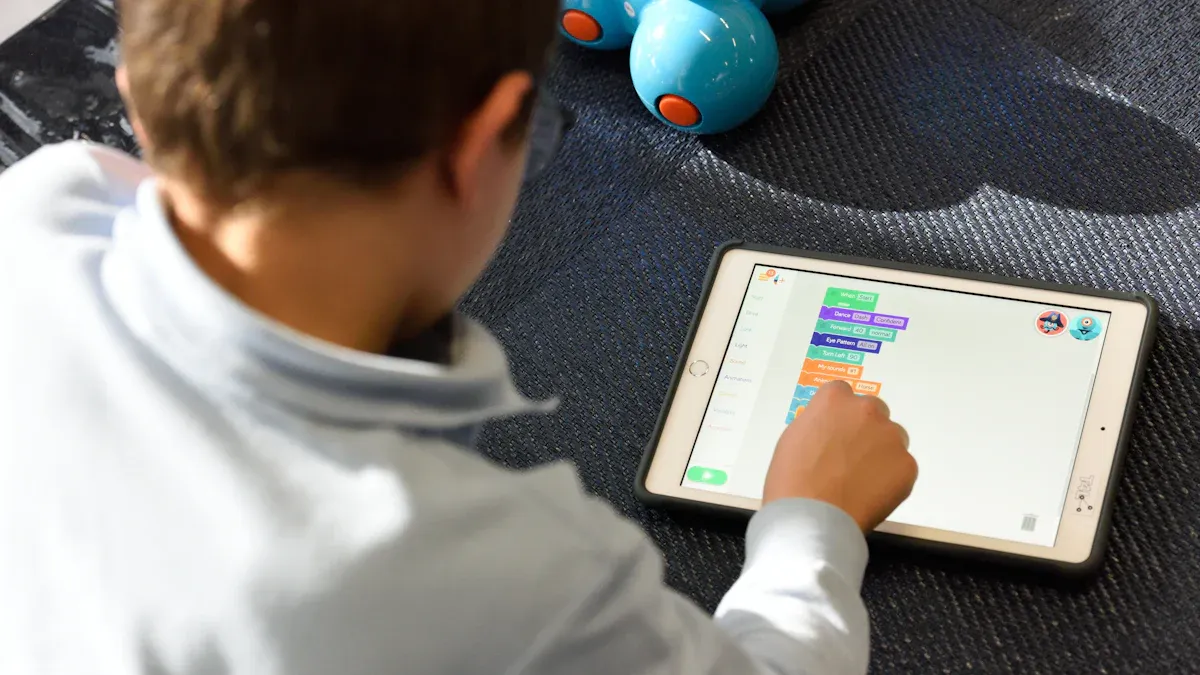
You use a digital podium by touching its screen. The screen is clear and reacts fast. You can write notes or move slides easily. You can highlight important points with your fingers. Many digital podiums let you use up to 10 fingers at once. Some have special pens and can notice hand movements. This makes drawing or pointing simple. These tools help you make your talk lively. They keep people paying attention. In digital classrooms, you can run quizzes or polls on the screen. This lets students join in and take part. It helps everyone stay interested and involved.
Multimedia and Content Integration
A digital podium lets you control all your media from one spot. You can connect cameras, microphones, and screens. You control them easily from the podium. The electronic lectern works with many file types. You can show videos, pictures, or papers without changing devices. You can also connect your laptop with HDMI or Type C. This makes sharing content simple. The table below lists some main multimedia features:
Feature | Description |
|---|---|
Brings cameras, screens, and microphones together in one place. | |
Interactive Touchscreen | Lets you write and work with content as you talk. |
Remote Management Capabilities | Lets you control devices from far away, good for big rooms. |
All-in-One System Components
A digital podium gives you many tools for teaching or speaking. You get a touchscreen computer, a camera for papers, speakers, an amplifier, and an interactive screen. You can change settings to fit what you need. The electronic lectern is simple to set up. It works well in smart classrooms. You can install it fast. Help is ready for bigger setups.
Security and Ease of Use
A digital podium keeps your things safe. Many are made from strong metal and fireproof parts. Lockable drawers and doors protect your notes and devices. Only you or trusted staff can open the podium. You also get Bluetooth, Wi-Fi, and smart cord holders. These help you connect devices and keep your area neat. Built-in shelves and trays help you stay organized while you talk.
Tip: Using a digital podium means you spend less time getting ready and more time talking to your audience.
Types of Digital Podiums
There are different types of digital podiums. Each type is made for a special use. Knowing about them helps you pick the best one for your school, meeting, or event.
Educational Models
Educational models are made for teachers and students. These podiums help make learning fun and active. You can use the touchscreen to write notes or show videos. Some have tools like text-to-speech and screen magnification. These tools help students who learn in different ways. Teachers can change the height to feel comfortable. The table below shows what makes these podiums good for schools:
Feature/Design Element | Description |
|---|---|
Lets students take part and build presentation skills. | |
Accessibility Features | Offers text-to-speech and screen magnification for all learners. |
Ergonomic Design | Adjustable height and comfort for teachers. |
Multimedia Integration | Supports videos, animations, and live demos. |
Centralized Teaching Hub | Keeps all teaching tools in one place. |
Interactive Features | Touchscreens and annotation tools for hands-on learning. |
You can use these podiums for quizzes and live demos. Students can also share their ideas with the class. This kind of digital podium helps everyone learn better.
Conference and Business Models
Conference and business models have smart features for meetings. These podiums have a clear screen and touch controls. You can connect microphones, cameras, and screens. This makes it easy to run your presentation. You can use smart tools to let people ask questions. You can also share content right away. These podiums have security to keep your data safe. You can use them in big halls or small rooms. They help you share your message and keep people interested.
Tip: With conference podiums, you can control lights, sound, and video from one place. This helps your event go well and saves time.
Portable and Custom Options
Some digital podiums are easy to move or made just for you. Portable podiums are light and simple to set up. You can use them in many rooms or take them to events. They have digital screens, touchscreens, and sometimes interactive whiteboards. You can do quizzes and get answers fast. Custom podiums are made for special needs. You can pick your own software, hardware, or features. The table below shows some good things about these podiums:
Feature | Benefit |
|---|---|
Help you deliver content clearly. | |
Touchscreen interface | Makes lesson management simple and interactive. |
Interactive whiteboards | Get students or audiences involved. |
Real-time quizzes | Check understanding right away. |
Multimedia presentations | Use videos, images, and more to keep people interested. |
You can also ask for special changes to fit your needs. This makes these digital podiums useful in many places.
Benefits and Considerations
Advantages for Users
You get many good things when you use a digital podium. The podium lets you connect multimedia tools. This makes your presentations more fun. You can show videos, pictures, and slides easily. You do not need to switch devices. This keeps your audience focused. It helps you share your message clearly.
Digital podiums help you stay organized. You can find your documents and slides fast. This means fewer distractions. You can pay attention to your talk. It is easier to manage your presentation. You keep everything in order.
You also get more accessibility and flexibility. You can move the podium to different rooms. It works with many devices. You can present in many places. After your talk, people can see your content online. This makes learning and sharing easier for everyone.
Note: Interactive features let you run quizzes and polls. You can have discussions with your audience. Students and audiences can join in. They can share ideas. This helps everyone learn better.
Here is a table showing key benefits:
Benefit | Description |
|---|---|
You can add videos, images, and sounds to your presentation. | |
Efficient and Organized Workflow | You manage slides and documents easily, reducing distractions. |
Greater Accessibility and Flexibility | You present in different places and share content after the event. |
You can use a digital podium to personalize learning. Teachers can change lessons for each student. Students get resources that fit their interests. They can learn in their own way. Chat features help students talk outside class. They can share ideas.
Limitations and Things to Consider
You should think about some limits before picking a digital podium. You may need advanced technology in your room. Traditional podiums work well in simple spaces. Digital podiums need more setup.
You must learn how to use the digital podium. Training helps you understand the features. Integrated systems make maintenance easier. You still need to check for updates and support.
Cost is another thing to think about. The first price is high. You get better engagement and learning. The return on investment is good. You get better communication and more participation.
Here is a table comparing limitations:
Limitation | Digital Podium | Traditional Podium |
|---|---|---|
Infrastructure Requirements | Needs advanced tech setup | Works in low-tech environments |
Maintenance Complexity | Integrated systems simplify upkeep | Struggles with modern needs |
User Training Needs | Requires training | Familiar use |
You should look at features like touchscreen size and CPU power. Microphone types and recording options matter too. Body material and custom branding help with durability and style. Warranty and support plans keep your podium working well.
Tip: Think about the benefits and limits before you decide. An intelligent digital podium for conference use can change your events. Careful planning helps you succeed.
You can make your presentations better with a digital podium. These tools have bright screens and fun features. They let you use videos and pictures. This helps people pay attention and join in. Here is how digital podiums are special:
Description | |
|---|---|
Capture Attention | Bright pictures help your audience stay focused. |
Boost Engagement | Videos and quizzes make learning fun and easy to remember. |
Project Innovation | Cool design shows you use new technology. |
Think about what you need, how much you can spend, and your room setup. If you want a modern and fun place to learn or meet, an intelligent digital podium for conference or classroom use can help you do well.
FAQ
What is a digital podium?
A digital podium is a smart tool for giving talks. It has a touchscreen, speakers, and controls for videos. You can show videos, write notes, and talk with your audience.
How does a digital podium help in classrooms?
You can use a digital podium to show lessons and run quizzes. Teachers can share videos and keep students interested. Everything is managed from one spot.
Can you use a digital podium for conferences?
Yes! A digital podium for conference lets you control slides, sound, and video. You can keep people interested and share ideas easily.
Is a digital podium easy to use?
Digital podiums are simple to use. The touchscreen and buttons make setup fast. You can learn how to use it quickly.
What features should you look for in a digital podium?
Pick a podium with a clear touchscreen and strong speakers. Make sure you can share content easily. Security and adjustable height help you stay safe and comfortable.
See Also
Understanding Digital Signage and Its Importance Today
The Unique Features of Transparent Hologram Boxes in 2026
An In-Depth Look at In-Store Digital Signage Options
