How Do You Create Stunning Mupi Ad Mockups in 2026
Shenzhen TopAdkiosk Display Technology Co., Ltd.
Add.: 2F, Bldg 10, Changfeng Industrial Park, Dongkeng, Fenghuang, Guangming, Shenzhen, China 518132
Mobile/WHATSAPP: 86-138 25769658
Email: marketing@topadkiosk.com topadkiosk@gmail.com
Skype: pghenry1
Wechat: adkioskhenry
English Web.: https://www.topkioskdisplay.com/
http://www.ad-kiosk.com/
https://www.toplcddisplay.com/
http://www.multitouchdigitalsignage.com/
https://www.youtube.com/channel/UCYVYNJHxLVEcQD8fuUxXNTA/videos?view_as=subscriber
https://www.facebook.com/TOPADKIOSKSHENZHEN/?ref=bookmarks
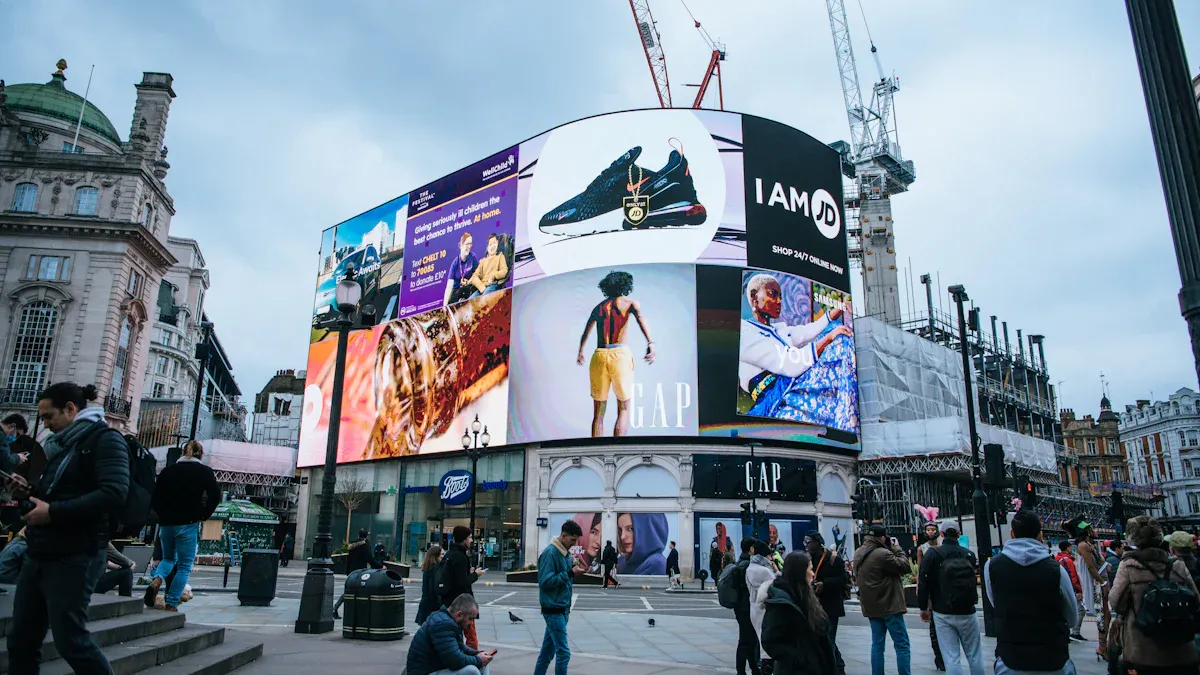
With the latest mockup generator tools and AI features, you can create stunning mupis ad mockups in seconds. A mupi ad mockup displays your poster in a real-world environment, such as a street or subway, allowing you to visualize exactly how your mupis advertisement will appear before launch. This process helps you identify design issues early and impress clients with highly realistic previews. The newest trends emphasize visual merchandising and effortless customization. You’ll save time, reduce costs, and enhance your campaign results. Ready to get started? Visit https://www.topkioskdisplay.com/ for your next mupis ad mockup solution.
Key Takeaways
Use mockup generators to make mupi ad previews fast. This lets you find design problems before you launch.
Pick the best template for your campaign. A good layout makes your ad easier to see and more interesting.
Always upload high-quality images. Clear pictures make your ad mockups look neat and nice.
Change your mockups with effects like shadows and reflections. This makes them look real and helps you picture your ad in real places.
Try different versions of your ad. Testing layouts and designs can help your campaign do better.
What Are Mupis and Mockup Generators

Mupis in Advertising
You see mupis every day when you walk through the city. These are the tall, glass-covered ad displays you spot at bus stops, sidewalks, and busy plazas. Mupis grab your attention with bright visuals and bold messages. They help brands reach people who are out and about. If you want your ad to stand out in a crowded urban space, mupis give you that chance. They make your message visible to thousands of people each day. You can use mupis to launch a new product, share a special offer, or build brand awareness. Many companies choose mupis because they work well for both local and big campaigns.
Mockup Generator Basics
When you create an ad, you want to see how it will look before you print or publish it. That’s where a mockup generator comes in. This tool lets you place your ad design onto a digital mupi display. You get a realistic preview in seconds. You can spot problems with your design early and fix them fast.
Here’s why a mockup generator is essential for your ad workflow:
You get a visual preview of your ad before launch, so you can refine your design and make sure everything looks right.
You can test different versions of your ad to see which one works best.
You keep your branding consistent across all your mupis.
You save time and money by catching mistakes before your ad goes live.
A mockup generator helps you improve your campaign results. You don’t have to guess how your ad will look on a real mupi. You see it, tweak it, and get it ready for the streets. If you want to impress your clients or team, show them a polished mockup. Ready to try it? Start with a free mockup generator and watch your ad ideas come to life.
Tip: Always preview your ad in different mupi settings to make sure it stands out everywhere.
How to Create a Mupi Ad Mockup
Creating a mupi ad mockup in 2026 feels simple when you follow the right steps. You can use a mockup generator to see your ad in a real-world setting before you print or share it. Let’s walk through the process together.
Select a Template
First, you need to pick a template that matches your campaign. Most mockup generators offer a wide range of mupi templates. You might see options for bus stops, shopping malls, or busy city streets. Choose a template that fits your target audience and the location where your ad will appear.
Many platforms let you pick between a combined layout or a split layout. If you want to show one big ad, go with the combined layout. If you want to test different versions or show multiple ads, try the split layout. This choice helps you plan your ad mockups for the best engagement.
Tip: Think about your campaign goals before you select a template. The right layout can boost your ad’s performance and make your message stand out.
Upload Your Ad Design
Now, it’s time to upload your ad design. Make sure your file is high quality and ready for display. Most mockup generators accept common formats like JPG or PNG. If you use design tools, export your work in the best resolution.
When you upload designs, pay attention to a few key things:
Check your layout. Use patterns like F-pattern or Z-pattern to guide the viewer’s eyes. This makes your ad easy to read.
Look at your colors. Use online tools to check if your color choices have enough contrast. This helps everyone see your ad, even from far away.
Review your text. Make sure your copy is clear and easy to read. Use big fonts and enough space between lines.
Zoom in on visuals. Every detail matters. High-quality images make your ad mockups look sharp and professional.
If you want to save time, try using AI-powered features. Some generators can adjust your media automatically, fix colors, or even suggest better layouts. This makes it easier to create mockups that look great on any mupi.
Customize and Preview
After you upload your ad, you can start customizing. Move your ad around the template. Change the size or add effects. Some mockup generators let you add reflections, shadows, or even weather effects to make your ad mockups look more realistic.
You can also test different versions of your ad. Try swapping out images, changing the cta, or updating your copy. This kind of testing helps you find the best design for your campaign. AI tools can help you compare versions and pick the one with the highest engagement.
When you finish, preview your ad mockups in different settings. Look at them on a sunny street, a rainy bus stop, or a busy plaza. This step helps you spot any problems before you launch your ad. If something looks off, go back and fix it.
Note: Always preview your ad mockups on different devices. This ensures your media looks good everywhere.
Once you’re happy, you can export your mockup. Most generators let you download high-resolution files for sharing with your team or clients. You can use these mockups for presentations, testing, or even to generate product mockups for other media.
By following these steps, you can create mockups that impress everyone. You’ll save time, improve your ad design, and boost your campaign’s performance.
Top Mupi Mockup Generator Tools
Leading Platforms in 2026
There are more mockup generators for mupi ads now. In 2026, some platforms are better because they make ad design easy and quick. Here are some you should look at:
Mockify Pro: This tool has many mupi templates. You can drag your ad into any layout. It uses AI to make your ad look better.
AdVision Studio: You get previews right away and smart testing tools. The platform helps you compare ads and choose the one that gets more attention.
UrbanMock: This generator shows your ad in real city places. You can see your ad at plazas, bus stops, or malls. It works with high-quality media and lets you export easily.
PosterGen AI: This tool uses smart AI to put your ad in different places. It even gives you tips to make your ad look and work better.
These mockup generators help you make, test, and share your ad mockups fast. You can try different pictures, layouts, and words to see what works best.
Key Features to Consider
When you choose a mockup generator, look for features that make designing ads simple. Here are some important things to check:
Customizable Templates: You want lots of mupi layouts. You should be able to change them for your campaign.
AI Integration: The best mockup generators use AI for easy editing, creative ideas, and quick changes. This means you spend less time fixing and more time testing your ads.
AI-powered mockup generators now make great visual content with little work. They use machine learning to show your ad in real places and make your media look better.
Aspect | Description |
|---|---|
Automation | AI mockup generators make high-quality visuals fast. |
Creative Production | Machine learning puts ads in many real places. |
Real-time Optimization | You get faster content and better looking ads. |
Market Adoption | Most companies now use AI tools for ad design. |
Technology Difference | Neural networks make these tools better than simple editing software. |
Export Options: You need to share your ad mockups in different ways. Here is what top mockup generators give you:
Export Format | Description |
|---|---|
4K PNG | High-quality image for print and digital use. |
JPG | Smaller image for websites. |
MP4 | Video for moving mockup presentations. |
Shareable Link | Easy link to share with your team or clients. |
Media Support: Make sure the generator works with high-quality media and many file types.
Testing Tools: Good mockup generators let you test different ads. You can see which ad gets more attention and change your campaign to do better.
Pick a tool that works for you and helps you make ad mockups that look real and sharp. With the right mockup generator, you can make your ad design better and get your media ready for any campaign.
Best Practices for Mupi Ad Design

Branding Consistency
You want your ad mockups to look good and honest. Using the same colors, logos, and style in every ad helps people know your brand fast. This makes your ad design stronger and your message easier to understand.
When you keep things the same, people trust your brand more. If your ads look or sound different, people might not trust you. Brands that always use the same style and message seem steady and reliable.
Here are some ways to keep your branding strong:
Make a main message template for your ad mockups.
Use a chart to organize your ad words for different groups.
Build a product message template to show what makes you special.
Plan out where your ad will show up for your customers.
Keep all your branding stuff in one place so you can find it fast.
Good brand messages help your ad mockups get noticed. They also make people trust you and help your campaign do better.
High-Resolution Visuals
You need clear and sharp pictures in every ad mockup. Blurry or blocky images can mess up your ad design. Always use high-quality pictures when you add media to your mockup tool. This makes your ad mockups look neat and professional.
Try these tips for better results:
Save your ad design from design tools at the best quality.
Check your pictures before you upload them to any ad mockup tool.
Use clear pictures for every layout and version.
Test your ad mockups on different screens to see if they stay sharp.
If you use bad pictures, your ad mockups will not impress anyone. Good pictures help your ad get seen and make your ad work better.
Realistic Presentation
A real-looking ad preview helps you see how your ad will look outside. You want your ad mockups to match the real place. Use a mockup tool that lets you add shadows, reflections, or weather effects. This makes your ad mockups look more real and helps you find problems early.
Here’s what you can do:
Put your ad mockups in different city backgrounds using your mockup tool.
Add effects to your pictures for a more real ad preview.
Test your call to action and words in every place.
Use testing to compare ad mockups and pick the one that works best.
Don’t forget to check your ad mockups for mistakes. Watch out for stretched pictures, missing logos, or words that are hard to read. Good testing and looking closely will help your ad do better and get more attention.
Tip: Always check your ad mockups with your team before you launch. New eyes can find mistakes you did not see.
You can create eye-catching mupi ad mockups in just a few clicks. Modern mockup generators make your design process fast and simple. When you follow these steps and best practices, your ads look sharp and professional. Try different tools and templates to see what works best for your campaign.
Tip: The more you experiment, the better your mockups will get. Start today and watch your ideas come to life!
How to Use MUPI Mockup Generators for Effective Advertising Design
When creating outdoor MUPI ads, nothing beats seeing your design on an actual city street before printing. MUPI mockups let you do exactly that—in just a few minutes, you can place your artwork into a realistic bus shelter ad model and see how it looks under real lighting and environmental conditions.
🎨 What Is a MUPI? Why Use a Mockup?
MUPI stands for Mobilier Urbain Pour l’Information (French for "Urban Information Furniture"). It's a common outdoor advertising medium found mainly at bus stops, high‑traffic pedestrian areas, and busy streets. Its key advantages:
Precise reach – Targets pedestrians, influencing them right before they make a purchase decision.
Cost‑effective – Lower cost than subway, large billboards, etc., ideal for tighter budgets.
24/7 visibility – Built‑in backlighting ensures clear visibility day and night.
Two‑sided display – One MUPI usually has two panels, allowing for different or complementary ads.
A MUPI mockup is a preview model that designers and advertisers use to see how the final ad will look in a real‑world setting. Think of it as a free “site survey”:
Avoid mistakes – Catch and fix design issues before printing and installing, saving money and effort.
Streamline communication – Show clients or team members a realistic preview, speeding up decisions.
Create professional assets – Generate high‑quality images for proposals or social media, boosting your brand’s professionalism.
🛠️ How to Use a MUPI Mockup in 3 Minutes
Most high‑quality mockups use Smart Object technology, making replacement as easy as “fit the shape”. Here’s the standard workflow:
Prepare – Download the mockup file (usually
.psd) and make sure you have Adobe Photoshop installed.Find the key layer – Open the file in Photoshop. In the Layers panel, look for a layer named “Your Design Here” or with a small square icon. That’s the smart object layer.
Replace the design – Double‑click the thumbnail of that smart object layer. Photoshop will open a new window.
Place your artwork – Drag and drop your ad image (JPG or PNG, recommended resolution at least 2074 × 3024 pixels) into the new window. Resize and position it so it completely covers the original content. Press
Ctrl+S(Windows) orCommand+S(Mac) to save.Finish and export – Close the new window. Back in the original mockup file, your design will now appear perfectly embedded in the scene. Save the file as a high‑quality JPG or PNG.
💡 5 Golden Rules for Effective MUPI Ad Design
Want your MUPI ad to stand out on the street and catch pedestrians’ eyes? Follow these design principles:
The 2‑second rule – A pedestrian may only spend 2 seconds looking at your ad. Keep the message simple, direct, and powerful. Stick to “one image, one headline, one call‑to‑action”.
Use the golden split – Visually divide the panel into three horizontal zones:
Top – Place the most striking image or headline to grab attention.
Middle – Showcase the core selling point or product image.
Bottom – Include the brand logo, slogan, and clear call‑to‑action.
Embrace white space – Don’t fill every inch. Enough white space keeps your core message from being buried, making it more focused and premium.
Prioritise visual hierarchy – Consider whether elements are readable at far, middle, and close distances. Ensure the most important information sits in the most prominent position.
Account for backlighting – MUPIs are backlit, which makes colours appear brighter. Pay extra attention to colour brightness and saturation to avoid harsh or washed‑out results.
Add motion for digital MUPIs – For electronic MUPIs, consider subtle animations like slow rotation or gentle motion. Avoid switching too fast – give viewers enough time to absorb the message.
🔧 Where to Find Mockups & Design Inspiration
Visit these websites for free or affordable MUPI mockup resources:
GRAFLICK – High‑quality free outdoor advertising mockups, including street and pedestrian lightbox scenes.
Designbolts – Free design resources, plus blog posts with MUPI design tips.
gitu.net – Free PSD mockup templates with detailed usage instructions.
psfiles.com – High‑quality, realistic bus stop MUPI mockups.
EDS – Showcases real MUPI ad campaigns, providing plenty of inspiration.
💎 The Bottom Line
A MUPI mockup is a practical tool that helps you test your creative idea before it goes live. In short: Good design + Good mockup + Smart testing = High‑ROI advertising. By following the steps above, you can preview the final result in advance and make every ad placement more confident.
Let me know if you’d like a list of free MUPI mockup templates or a visual step‑by‑step guide with screenshots!
FAQ
How do I choose the best mupi mockup generator?
You should look for easy templates, AI features, and export options. Try free versions first. Pick the tool that feels simple and helps you finish your ad mockup fast.
Can I use my phone to create mupi ad mockups?
Yes! Many mockup generators work on phones and tablets. You can upload your design, adjust it, and preview your ad anywhere. Just make sure your images stay sharp.
What file types work best for uploading my ad design?
Most tools accept JPG and PNG files. Use high-resolution images for the best results. Some platforms also support PDF or PSD files if you want more editing options.
How do I make my mockup look realistic?
Add shadows, reflections, or weather effects with your mockup tool. Preview your ad in different city backgrounds. Ask a friend to check your mockup for anything that looks odd.
See Also
Explore 10 Innovative Digital Menu Board Designs for 2026
Transform Dull Advertisements with a 3D LED Hologram Fan
Maximizing Advertising Impact with a 3D LED Fan in 2025
Current Digital Signage Trends Influencing 2026 Discussions
Leading Digital Signage Innovations Transforming Retail in 2026
