Cost of a digital signage kiosk
Add.: 2F, Bldg 10, Changfeng Industrial Park, Dongkeng, Fenghuang, Guangming, Shenzhen, China 518132
Mobile/WHATSAPP: 86-138 25769658
Email: marketing@topadkiosk.com topadkiosk@gmail.com
Skype: pghenry1
Wechat: adkioskhenry
English Web.: http://www.topadkiosk.com/
https://www.topkioskdisplay.com/
http://www.ad-kiosk.com/
https://www.toplcddisplay.com/
http://www.multitouchdigitalsignage.com/
https://www.youtube.com/channel/UCYVYNJHxLVEcQD8fuUxXNTA/videos?view_as=subscriber
https://www.facebook.com/TOPADKIOSKSHENZHEN/?ref=bookmarks
You may wonder about the cost of a digital signage kiosk in 2024. Prices can change based on what you need. For example:
Touch screen kiosks: $1,500 to $20,000
Indoor models: $1,500 to $10,000
Outdoor kiosks: $5,000 to $20,000
Self-service units: $2,000 to $8,000
Features, size, and type play a big role in what you pay. You also need to think about long-term costs like software, support, and maintenance.
Key Takeaways
Digital signage kiosks vary in price from $1,500 to over $25,000. Your choice depends on features, size, and customization.
Consider long-term costs like software, maintenance, and support when budgeting for a kiosk. These can add significantly to your total expenses.
Choose between indoor and outdoor kiosks based on your environment. Outdoor models cost more due to their durability and weatherproof features.
Interactive kiosks offer more engagement but come with higher costs. Static models are more affordable and easier to maintain.
Always compare vendor quotes carefully. Look beyond price to understand what each quote includes, such as features and support.
Cost of a digital signage kiosk: Price Range
Entry-Level to Premium Pricing
You can find a wide range of prices when you look for digital signage kiosks. Entry-level models start at around $1,500. Premium kiosks can cost more than $25,000. The cost of a digital signage kiosk depends on customization, screen size, and features. You might choose a basic model for simple displays or a premium kiosk with advanced technology.
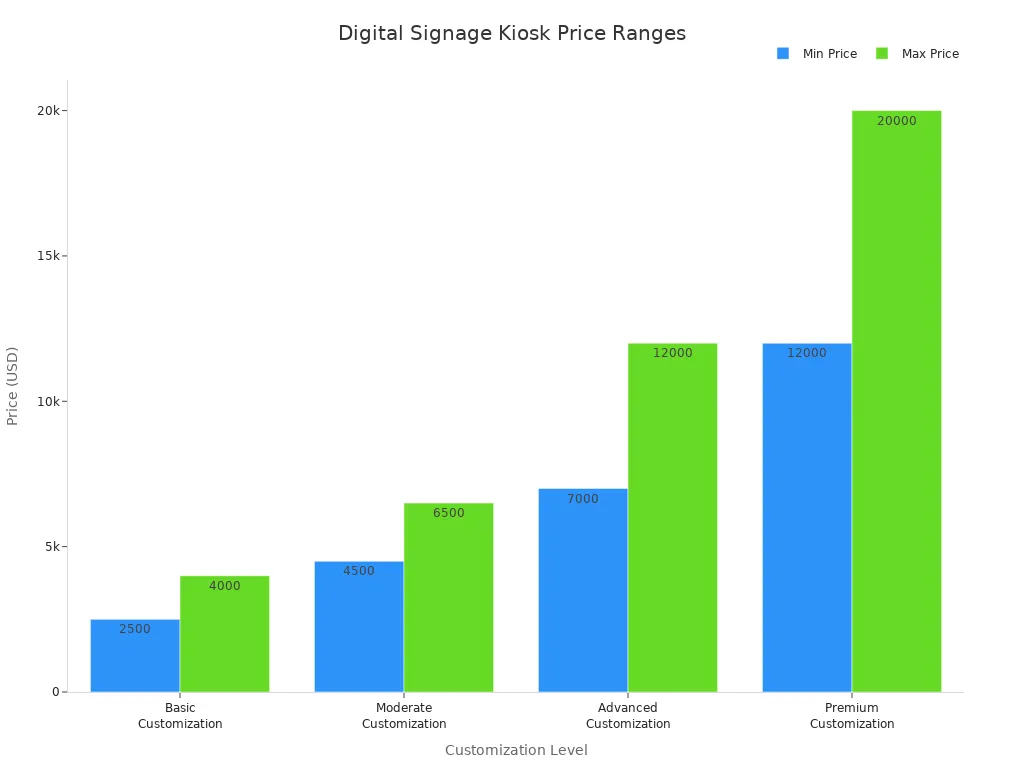
Here is a table that shows how customization affects price:
Customization Level | Price Range |
|---|---|
Basic Customization | $2,500 - $4,000 |
Moderate Customization | $4,500 - $6,500 |
Advanced Customization | $7,000 - $12,000+ |
Premium Customization | $12,000 - $20,000+ |
You can see that more customization leads to higher prices. If you want a kiosk with special features, you will pay more.
Screen size and resolution also change the cost of a digital signage kiosk. Larger screens and higher resolutions cost more. For example, a 32-inch model with full HD resolution is less expensive than a 55-inch model with 4K UHD. The table below compares features:
Feature | 32 Inch Model | 55 Inch Model |
|---|---|---|
Screen Size | 32 inches | 55 inches |
Resolution | 1920x1080 (FHD) | 4K UHD |
Brightness | 450 nits | 350 nits |
RAM | 2G | 2GB |
ROM | 8G | 32GB |
Touch Points | 10 Points Capacitive Touch (PCAP) | N/A |
Processor | RK3288 | N/A |
Minimum Order | 20 pcs | N/A |
If you want a touchscreen kiosk, you will pay more than for a non-touchscreen model. Touchscreen kiosks have extra hardware and software for interactivity.
Real-World Price Examples
You can see real-world examples to help you understand the cost of a digital signage kiosk. For instance, a 32-inch touchscreen kiosk can cost $899.99. A 50-inch 4K interactive kiosk may cost $2,995. Some premium models reach $25,000 or more.
Brands like topadkiosk offer many options. You can choose from entry-level, mid-range, or premium kiosks. Commercial-grade screens cost more than consumer-grade screens because they last longer and perform better. Larger screens and higher resolutions increase the price. Well-known brands charge more for quality and reliability.
Here are some factors that affect price:
Size: Bigger screens cost more.
Resolution: Higher resolution means a higher price.
Brand and quality: Trusted brands charge more.
Media player: Low-cost and high-end units change the total price.
Installation: More screens and complex setups increase costs.
Touchscreen kiosks cost more than non-touchscreen models. The software for touchscreens is more complex, which adds to the price. If you want a budget-friendly option, non-touchscreen digital signage is a good choice.
Tip: Compare features and prices before you buy. Look at screen size, resolution, and customization. Ask vendors for quotes to find the best fit for your needs.
You can use this information to plan your budget. The cost of a digital signage kiosk depends on what you want and how you plan to use it.
Key Factors Affecting Kiosk Cost
Hardware and Enclosure
When you look at the cost of a digital signage kiosk, hardware and enclosure choices matter a lot. The display, media player, and extra hardware like mounts or networking gear all add to the price. Here is a table to help you see which parts have the biggest impact:
Hardware Component | Cost Impact Description |
|---|---|
Displays | Size, type, and resolution affect price. Commercial-grade displays cost more than consumer-grade. |
Media Players | Processing power and graphics matter. Built-in or separate players change the price. |
Additional Hardware | Mounts, enclosures, and networking add to the total cost. |
The enclosure type also changes the price. For example, outdoor kiosks cost more than indoor ones. Here are some common enclosure types and their price ranges:
Type Kiosk Enclosure | Kiosk Enclosure Price Range (Estimated) |
|---|---|
Free Standing | $500 – $10,000+ |
Wall | $200 – $5,000+ |
Outdoor | $2,000 – $20,000+ |
Indoor | $300 – $8,000+ |
Portable | $400 – $3,000+ |
Counter-Top | $100 – $2,000+ |
In-Ground | $1,000 – $15,000+ |
Software and Licensing
Software and licensing are ongoing costs you need to plan for. You might pay a monthly fee per screen, a flat subscription, or a one-time license. Here are some common models:
Model | Description | Example Cost |
|---|---|---|
Per-Screen Monthly | Fee per display | $3–$30/screen/month |
Tiered Subscription | Flat fee for multiple screens | $19–$299/month |
Perpetual License | One-time purchase | $200–$1,000/player |
Freemium | Free basic, paid upgrades | Free + upgrades |
Recurring software fees, content creation, and network costs all add up over time. These ongoing expenses can affect your total budget for digital signage.
Installation and Setup
Installation costs depend on how many screens you have and where you put them. For a small setup, you might pay $300 to $800 per screen. Large projects with many screens or hard-to-reach places can cost much more. Custom mounting or special enclosures also increase the price.
Tip: Plan your installation carefully. The more screens and the more complex the setup, the higher your costs will be.
Maintenance and Support
Maintenance keeps your kiosk running well. You can expect to pay $200 to $800 per kiosk each year for regular upkeep. If you want higher support levels, you might pay more, but you get faster help and less downtime. Good support can save you money in the long run by making your equipment last longer.
Note: Proactive maintenance and strong support services help you avoid costly repairs and keep your kiosks working smoothly.
The cost of a digital signage kiosk depends on all these factors. When you plan your project, remember to include hardware, software, installation, and maintenance in your budget.
Types of Digital Signage Kiosks
Indoor vs. Outdoor
You will find two main types of digital signage kiosks: indoor and outdoor. Indoor kiosks work best in places like malls, schools, and offices. These kiosks do not need to handle harsh weather or extreme temperatures. Outdoor kiosks, on the other hand, must survive rain, sun, wind, and even vandalism. Because of this, outdoor models cost more. You pay extra for strong materials, climate control, and security features. Outdoor kiosks need special engineering to last in tough environments.
Description | |
|---|---|
IP65/IP66 Rating | Dust-tight and water-resistant for outdoor use. |
Rugged Build | Metal housing and tamper-proof glass for protection. |
UV Protection | Coatings that block sun damage. |
Weatherproof Housing | Aluminum or steel to resist weather. |
Climate Control System | Keeps the kiosk working in hot or cold weather. |
Note: Outdoor kiosks cost more because they must be durable and safe in all conditions.
Interactive and Self-Service
You can choose between static display kiosks and interactive or self-service models. Static kiosks show information or ads without user input. These are usually more affordable and need less maintenance. Interactive kiosks let users touch the screen, search for info, or complete tasks like ticketing or check-in. These models cost more because they use advanced hardware and software.
Kiosk Type | Cost Characteristics |
|---|---|
Static | More affordable, fewer parts, lower upkeep. |
Interactive | Higher cost, advanced tech, more maintenance. |
Interactive kiosks help you engage your audience and offer more services, but you should plan for higher costs.
Custom vs. Standard Models
You can pick a standard off-the-shelf kiosk or design a custom model. Standard kiosks cost less because companies make them in large numbers. Custom kiosks cost more, but you get unique designs, special materials, and extra features.
Custom kiosks usually range from $8,000 to $50,000 or more.
The price depends on how complex the design is and what features you want.
Standard models save money because they use common parts and simple designs.
Tip: Choose a custom kiosk if you need special branding or features. Pick a standard model if you want to save money and need a quick solution.
Additional Cost Considerations
Connectivity and Networking
You need reliable connectivity for your digital signage kiosk. This allows you to update content remotely and monitor your screens. Typical networking costs range from $100 to $300. These costs cover Wi-Fi, Ethernet, or cellular modems. You pay more if you need cellular connections for outdoor or remote locations. Strong connectivity helps you manage your kiosks without visiting each site.
Wi-Fi setup: Good for indoor kiosks in places with existing networks.
Ethernet: Offers stable connections for high-traffic areas.
Cellular modems: Useful for outdoor kiosks or places without wired internet.
Tip: Choose the best networking option for your location. Reliable connections save you time and keep your screens updated.
Content Management
Managing your content is a key part of your digital signage system. Most kiosks use a content management system (CMS) with subscription pricing. You pay a monthly fee per screen. Basic CMS solutions cost $15 to $50 per screen each month. Enterprise platforms can cost $75 to $250 per screen monthly. The price depends on the number of screens, features, storage, and user accounts.
Predictable monthly expenses help you plan your budget.
Rapid updates and new features keep your system current.
More screens and advanced features increase your costs.
The CMS fees make up a big part of your total cost. You should pick a CMS that fits your needs and budget.
Warranty and Upgrades
Protecting your investment is important. You can buy hardware warranties, extended warranties, and support contracts. These options help you avoid unexpected repair costs and keep your kiosks running smoothly.
Item | Basis | |
|---|---|---|
Hardware warranty | $50-200/screen | Manufacturer |
Extended warranty | 3-5% of hardware | Year 2+ |
On-site repair | $200-500/incident | As needed |
Remote support | $500-2,000/year | Contract |
Preventive maintenance | $50-150/screen | Annual visit |
You pay more for extended warranties and upgrades, but you get peace of mind and longer equipment life. Consider these costs when planning your digital signage project.
Budgeting for Digital Signage Kiosks
Total Cost of Ownership
When you plan your budget, you need to look beyond the sticker price. The total cost of a digital signage kiosk includes many parts. Use this table to see what you should consider:
Description | |
|---|---|
Hardware costs | Displays, media players, mounts, enclosures, networking equipment, kiosks |
Software costs | CMS subscription, licenses, integrations |
Installation costs | Physical setup, electrical work, network setup, configuration |
Content costs | Content creation, updates, graphic design, video production |
Training costs | Staff training on software and troubleshooting |
Operational costs | Power, network, space |
Support costs | Maintenance, warranties, emergency support |
Replacement costs | Hardware refresh every 5-7 years |
Staff time | Managing, updating, and coordinating kiosks |
Integration costs | Connecting to other systems, API development |
Contingency | Budget for unexpected issues |
Soft costs | Management time, risk factors |
You should also remember hidden expenses. These can include certification, site preparation, spare parts, and analytics work. Content creation often brings extra costs, like hiring designers or buying stock photos.
Comparing Vendor Quotes
When you compare quotes from vendors, look at more than just the price. Check what each quote includes. Here are important factors to review:
Custom features and degree of personalization
Material quality and durability
Touchscreen type and size
Hardware components and accessories
Software and license fees
Installation and maintenance services
Protective design for outdoor use
Quantity discounts for bulk orders
Shipping and logistics costs
Regional labor and material differences
Tip: Ask vendors to break down their quotes. This helps you see where your money goes and spot any hidden fees.
Cost-Saving Tips
You can save money if you plan carefully. Try these strategies:
Buy commercial-grade hardware for longer life and fewer repairs.
Keep spare parts ready to reduce downtime.
Sign a support contract with a trusted vendor for expert help.
Watch kiosk usage to plan maintenance and upgrades.
Buy in bulk or sign a multi-year contract to get lower prices.
Bundle services or ask for pilot programs to test before a full rollout.
Remember: The cost of a digital signage kiosk covers more than the first purchase. Smart planning and negotiation can help you get the best value.
You see many price ranges for digital signage kiosks. The table below shows common types and their costs:
Kiosk Type | Price Range | Key Cost Factors |
|---|---|---|
Touch Screen | Hardware, software, interactivity | |
Outdoor | $5,000 - $20,000+ | Weather-resistant features |
Custom | $8,000 - $50,000+ | Special requirements |
You should look at all expenses, not just the first purchase. To make a smart choice:
Check quality and materials.
Ask about support and maintenance.
Review technology and integration options.
Assess your needs and talk to vendors for quotes that fit your goals.
FAQ
How much does a digital signage kiosk cost?
You can expect prices from $1,500 for basic models to over $25,000 for advanced kiosks. The final cost depends on screen size, features, and customization.
What ongoing costs should you plan for?
You should budget for software licenses, maintenance, support, and content updates. These costs range from $200 to $2,000+ per year, depending on your setup.
Can you use a digital signage kiosk outdoors?
Yes, you can use outdoor kiosks. These models have weatherproof enclosures and climate control. Outdoor kiosks cost more because they need extra protection.
What features increase the price the most?
Touchscreen capability, large screens, high resolution, and custom enclosures raise the price. Advanced software and interactive functions also add to your total cost.
How do you choose the right kiosk for your needs?
Tip: List your requirements. Compare screen sizes, features, and support options. Ask vendors for detailed quotes. Choose a kiosk that fits your budget and goals.
See Also
Evaluating Pricing Strategies of Leading LCD Display Kiosk Brands
Exploring The World of Digital Signage Solutions
Leading Providers of Outdoor LCD Display Kiosks Today
Assessing Digital Signage Options in Singapore: Features and Costs
Top LChttps://www.youtube.com/watch?v=Hfo_fyHwX6gD Display Kiosks for Retail Spaces in 2026
