Comparing Interactive Whiteboards for Classrooms in 2026

You want the best interactive white board for your classroom. In 2026, top choices are Vibe Board, SMART Board, Promethean, IQBoard, and Nearhub S Max. Each interactive white board has advanced classroom technology. This helps interactive learning and participation. You need features like 4K UHD for clear visibility. Low latency gives smooth interactive writing. A user-friendly interface boosts engagement. Reliable interactive white boards make classroom technology simple and effective. The right interactive white board creates an interactive classroom. Students enjoy learning and participation. Interactive white board tools help interactive lessons, easy sharing, and collaboration. Interactive classroom technology increases engagement. It makes learning active.
Choose a user-friendly interactive white board to support education and interactive teaching.
Shenzhen TopAdkiosk Display Technology Co., Ltd.
Add.: 2F, Bldg 10, Changfeng Industrial Park, Dongkeng, Fenghuang, Guangming, Shenzhen, China 518132
Mobile/WHATSAPP: 86-138 25769658
Email: marketing@topadkiosk.com topadkiosk@gmail.com
Skype: pghenry1
Wechat: adkioskhenry
English Web.: http://www.topadkiosk.com/
https://www.topkioskdisplay.com/
http://www.ad-kiosk.com/
https://www.toplcddisplay.com/
http://www.multitouchdigitalsignage.com/
https://www.youtube.com/channel/UCYVYNJHxLVEcQD8fuUxXNTA/videos?view_as=subscriber
https://www.facebook.com/TOPADKIOSKSHENZHEN/?ref=bookmarks
Core Feature | Importance for Classroom Use |
|---|---|
4K UHD Display | Gives clear visibility from all corners of the classroom, even with overhead lights on. Eye-protection filter helps students avoid tired eyes during long classes. |
Low Latency Touch Technology | Lets many students write at the same time. Zero-bonding tech feels like pen on paper. There is no lag for smooth lesson delivery. |
User-Friendly Interfaces | Premium software saves lesson prep time by 40%. It supports interactive, student-centered learning. |
Key Takeaways
Pick an interactive whiteboard with a 4K UHD display. This helps you see clearly and protects your eyes in long classes.
Find one with low latency touch technology. Many students can write at the same time without any delay.
Choose a board with an easy-to-use interface. This saves lesson prep time and helps students join in more.
Think about boards that have real-time collaboration tools. These tools help groups work together and share ideas well.
Make sure the board works with many apps. This gives teachers more ways to teach and fewer tech problems.
Best Interactive Whiteboards for 2026
Top Physical Boards
You want a great interactive whiteboard for your classroom. In 2026, five boards are popular choices. Vibe Board, SMART Board, Promethean, IQBoard, and Nearhub S Max all have special features. These boards help students work together in real time. They also make it easy to manage devices. The main features are shown in the table below:
Feature | SMART Board MX | Promethean ActivPanel 9 | IQBoard | Nearhub S Max | |
|---|---|---|---|---|---|
Collaboration | Vibe Canvas built-in | Lumio (subscription) | Limited remote options | Multi-user support | Cloud-based sharing |
Pricing | $3,500–$5,000 | Higher | Lower upfront | Mid-range | Competitive |
App Ecosystem | Android/web apps | Proprietary | Android apps | Android apps | Android/web apps |
Compliance | COPPA/FERPA | COPPA/FERPA | COPPA/FERPA | COPPA/FERPA | COPPA/FERPA |
Device Management | Android MDM | Proprietary | Proprietary | Android MDM | Android MDM |
You can use these boards for group projects, lessons, and presentations. Each board lets many students touch and write at once. Writing is smooth and sharing is simple in your classroom.
Leading Digital Tools
You also need good software for your interactive board. Jamboard, ClassIn, Explain Everything, and Microsoft Whiteboard are top digital tools. These apps let you make, mark up, and share lessons on any board. You can join from any device with a link or QR code. Teachers can set permissions to keep collaboration safe.
Tip: Using both hardware and software makes your classroom more flexible. You can use your board for in-person and remote learning.
Research shows interactive boards help students pay attention and learn skills. You can use both physical and digital tools to fit your classroom needs. This way, you can make learning personal and manage your classroom easily.
Key Features of Interactive White Board
An interactive white board is a big screen. You can write, draw, and move things with your finger or stylus. It connects to a computer or uses built-in apps. In classrooms today, interactive white boards make lessons more fun. They help students work together in real time. Teachers use videos, pictures, and live notes to teach. Students can work on projects and share ideas right away.
Ease of Use
You want teaching to be simple. Interactive white boards should be easy to use. This helps you focus on your lesson. Most teachers think ease of use is most important. You can start lessons fast and switch activities easily. Students join in without getting confused. Simple setup saves time and lowers stress. Everyone in the classroom benefits from easy-to-use boards.
App Compatibility
Your interactive white board should work with many apps. App compatibility lets you use your favorite teaching tools. Sometimes, you may have technical problems or waste time. The table below shows common issues:
Issue Type | Percentage (%) |
|---|---|
Technical problems | |
Time-consuming usage | 17.30 |
Small screen size | 9.60 |
You want easy setup when adding new apps. Good compatibility lets you use collaboration tools and interactive features quickly.
Annotation Quality
Annotation quality is important for every lesson. You want to write and draw without lag. Touch response under 30ms keeps lessons smooth. Palm rejection stops mistakes from your hand. Multi-touch lets many students write at the same time. You can use your finger or stylus easily. The table below shows why these features matter:
Feature | Importance |
|---|---|
Less than 30ms touch response latency | Stops lag and keeps lessons flowing. |
Palm rejection enabled by default | Stops mistakes and keeps writing clear. |
Multi-touch support (minimum 10-point simultaneous touch) | Lets many students work together at once. |
Both finger and stylus annotation without switching modes | Makes lessons flexible and easy for everyone. |
Collaboration Tools
Real-time collaboration helps students join in. Interactive white boards let you add sticky notes, pictures, and videos for group work. You can use templates for planning projects. Real-time collaboration means students and teachers can work together from anywhere. The table below shows top tools:
Collaborative Feature | Description |
|---|---|
Sticky notes, images, and videos | Used for group brainstorming. |
Customizable templates | Good for planning and team reviews. |
Real-time collaboration | Lets people work together from different places. |
Export options | Makes sharing reports and presentations easy. |
Integration with Microsoft Teams | Helps teams work together smoothly. |
Cloud-based access | Lets remote teams use mobile devices. |
You want easy setup to start collaboration fast. These tools help you build an interactive classroom where everyone shares ideas.
Setup and Support
You need easy setup for a smooth start. Sometimes, people like old ways and need convincing. You want clear steps for using your board. Training helps you and your team use all features. Here are common setup and support problems:
It can be hard to get everyone to try new tech.
You need clear steps for using the board in class.
Training helps teachers and IT staff use the board well.
Easy setup and support make real-time collaboration and interactive learning possible for all.
Note: Studies show 4K UHD and low latency screens help students pay attention. Interactive flat panel displays help students learn better with visuals, touch, and sound. You can see these benefits in your classroom every day.
Reviews of Best Interactive Whiteboards
Vibe Board
You want a whiteboard that is easy to use in class. Vibe Board stands out because it has built-in collaboration tools. You can connect with students right away and share ideas fast. The board works with many educational apps, so you do not need extra steps. Vibe Board costs less than some other boards, so you can buy more for your school. You can set it up with your current classroom technology without problems.
Here is a table that shows the main good and bad points for classroom use:
Strengths | Weaknesses |
|---|---|
Collaboration tools are built in, so real-time teamwork is simple | The brand is new in schools, so you may not know it well |
Lower price lets you get more boards for your school | Only 10 touch points, so big groups may have trouble |
Works with many teaching apps | Has fewer lesson-building tools than SMART Board |
Easy to use with your current classroom tech | Warranty is only 1 year, while others give 5 years |
Vibe Board lets you write smoothly and see quick responses. There are fewer touch points than some other boards, but the interface looks modern and is simple to use. You can start lessons quickly and switch activities with almost no wait.
SMART Board
SMART Board is a name many teachers know. You get multi-touch and digital ink, which help you teach in fun ways. The board reacts fast when you write or draw. The interface is clear, so you find tools easily.
Multi-touch lets students work together.
Digital ink makes writing and erasing simple.
The board works with platforms like Canvas and Google Classroom.
Some boards, like Promethean, are just as fast for writing and touch. But SMART Board does not always have the fastest pen speed. Other brands may have quicker pen input and better software. Still, SMART Board is reliable for daily classroom use.
Promethean
Promethean is liked for its easy-to-use interface and strong security. You can trust it for safe use in class. Teachers like the basic annotation tools, but the menus can be harder to use than on other boards. Switching between writing and moving things takes more steps.
Note: You might spend more time looking for features on Promethean than on SMART Board. This can slow down your lesson.
Promethean gives you basic tools for writing.
You must switch between writing and moving, which can break your flow.
The board is good for group work, but it is not as smooth as some others.
Promethean is good for simple lessons and safe classrooms. If you want a smoother interactive experience, you might like another board more.
IQBoard
IQBoard helps you make class fun and engaging. You get instant feedback, so you know who needs help right away. The board makes learning interactive, which is great for younger students who may feel shy in class.
Here is a table that shows how IQBoard helps in class:
Feature | Benefit |
|---|---|
Instant Feedback | You see how students are doing right away. You can help those who struggle. |
Engaging Interactive Learning | Students join in and feel comfortable. This is great for young learners. |
Fostering Collaboration | You can split the screen and connect student devices. This helps teamwork and sharing. |
IQBoard gives you fast touch response and easy writing. The interface is simple, so you can focus on teaching. You can use the board for group projects and interactive lessons with little setup.
Nearhub S Max
Nearhub S Max brings a high-quality whiteboard to your classroom. You can replace small screens with this advanced board. The board helps both teachers and students feel supported. Teachers say they are happier and their classes do better with Nearhub S Max.
When you pick Nearhub S Max, you get more than just hardware. You show you care about new ideas and teacher happiness. The board’s interactive tools help you teach in new ways. You can use cloud sharing and real-time teamwork for any lesson.
Nearhub S Max is fast, lets you write clearly, and is easy to use. You can set up lessons quickly and keep students interested. The board works for both in-person and remote learning, so it is a flexible choice for today’s classrooms.
Interactive Whiteboard Tools Comparison
Software Options Overview
There are many interactive whiteboard tools you can use in class. Jamboard, ClassIn, Explain Everything, and Microsoft Whiteboard are some favorites. These tools help you make lessons and share ideas with students. You can work with your class at the same time. All these tools work on any classroom display. You do not have to worry about what device you have. Jamboard and Microsoft Whiteboard let you draw and add pictures. You can also work together with your class. Explain Everything lets you record lessons and add videos. ClassIn is good for online teaching and group work. You can choose the tool that fits your class.
Feature and Pricing Table
You want to see how these whiteboard tools are different. The table below shows the main features for each one. You can find which tool is best for your classroom.
Application | Key Features |
|---|---|
Microsoft Whiteboard | Real-time collaboration, freehand drawing, pins, image/document insertion, Microsoft app integration |
Google Jamboard | Real-time collaboration, drawing, handwriting recognition, pinning, image import, Google Workspace integration |
Explain Everything | Interactive presentations, screen recording, drawing, annotation, multimedia integration |
ClassIn | Online classroom management, group work, lesson recording, interactive quizzes |
The price for these tools can change. Some, like Microsoft Whiteboard and Jamboard, are free. Explain Everything and ClassIn might need a subscription for all features. You should check if your school already has these tools with your classroom display or software bundle.
Suitability for Classroom Types
You want the best whiteboard tools for your class. Jamboard and Microsoft Whiteboard are good for group work and sharing ideas. Explain Everything helps you make video lessons and fun presentations. ClassIn works best for remote or hybrid classes. You can use these tools on any classroom display. This means every student can join in. You can try different tools to see which one your class likes most.
Tip: Try using more than one tool. Switching tools can keep your classroom display new and your students excited.
Classroom Scenarios and Use Cases

Elementary School
You can use an interactive white board to make lessons fun. Young students enjoy picking pen colors and using interactive tools. These tools make learning exciting. Students like drawing, playing games, and working in groups on the board. When you use pictures and videos, students work together more. This helps them remember what they learn. Teachers see that students join in more with group activities.
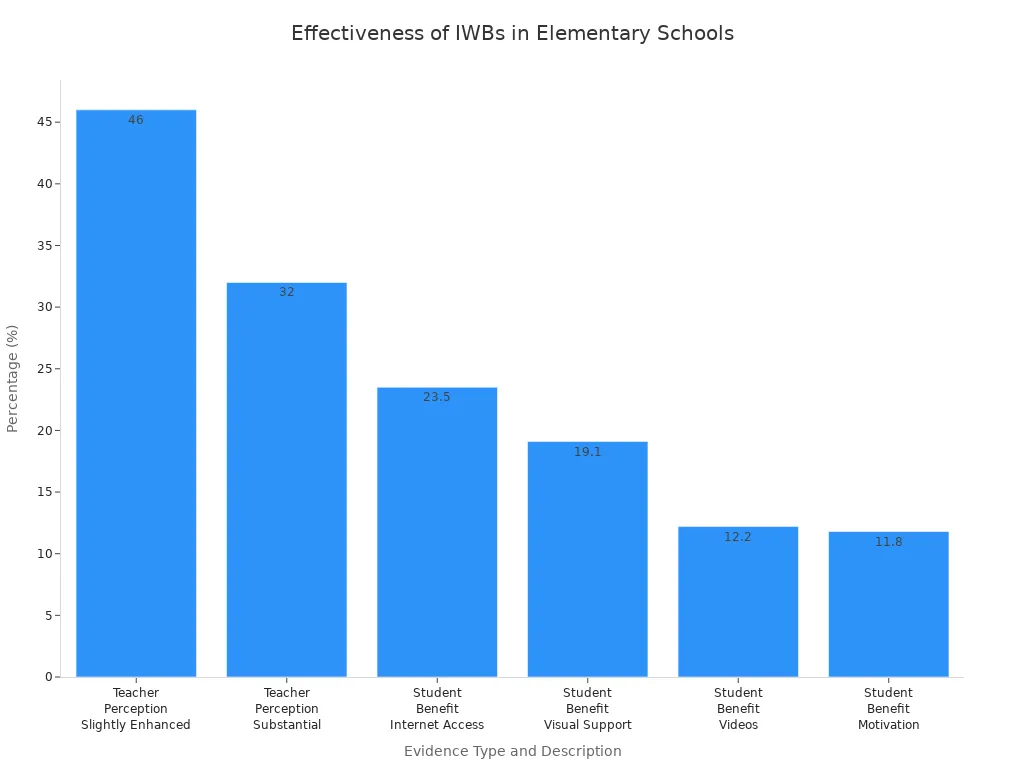
You can look at the table below to see what teachers and students think about interactive white boards:
Evidence Type | Percentage | Description |
|---|---|---|
Teacher Perception | 46% | Slightly enhanced departmental activities |
Teacher Perception | 32% | Substantial enhancement |
Student Benefit | 23.5% | Internet access as a key advantage |
Student Benefit | 19.1% | Visual support for understanding and retention |
Student Benefit | 12.2% | Videos for dynamic presentations |
Student Benefit | 11.8% | Motivation to learn |
The Internet gives you more things to use in class.
Pictures and charts help you understand and remember.
Videos make lessons more interesting.
Interactive lessons make you want to learn more.
High School
Interactive white boards help different students learn in their own way. You can add videos and activities to your lessons. Students join group work and class talks more often. Over 70% of schools say students pay more attention with these boards. You can use group tools for projects and presentations. Switching from chalkboards to interactive white boards makes your classroom modern and busy.
Tip: Use group features so students can share ideas and solve problems together.
Special Education
Interactive white boards help all students learn, even if they need extra help. You can zoom in on words, use text-to-speech, and connect special keyboards. These features help students who have trouble seeing, hearing, or moving. Group activities let everyone join, even if they need support. You can use pictures and sound to keep students focused. The table below shows how these boards help in special education:
Benefit Type | Description |
|---|---|
Engagement | Keeps students interested and improves behavior |
Accessibility for Motor | Lets students write using fingers or other tools |
Visual Support | Makes it easier for visually impaired students to see and understand |
Interactive Learning | Supports students with behavioral needs through visual lessons |
Multisensory Experiences | Gives focused, hands-on learning for students with learning disabilities |
Zoom and text-to-speech help students who cannot see well.
Recording and sound tools help students who cannot hear well.
Adjustable stands and casting features help students move and use the board.
Remote and Hybrid Learning
Interactive white boards help students learn together, even if they are not in the same room. Live video and writing on the board let everyone join in at once. You can share files right away, so no one misses notes. The board saves your work, so you can look at lessons later. Group tools help every student join, no matter where they are.
Feature | Benefit |
|---|---|
Live video integration | Connects remote students through Zoom or Teams |
Real-time annotation | Lets all students see and join collaborative work instantly |
Instant file sharing | Gives everyone access to notes and materials right away |
Hybrid meetings bring students in class and online together.
Digital records keep lessons neat for everyone.
Group activities make learning active and include all students.
You have lots of good interactive white board choices for your class. The table below shows the best boards by price and features:
Price Range | Model | Key Features |
|---|---|---|
Under $3,000 | Promethean ActivPanel 10 | Good display, simple to use |
$3,000–$5,000 | Vibe Board S1 | Balanced features, teamwork tools |
$5,000+ | SMART Board MX | Advanced tools, big screen |
Think about how you like to teach and your budget. Pick a board that helps students work together. Make sure it is easy to add to your classroom. Choose one that can get new features later. Check for training, support, and help from other teachers. This will help you keep up with new technology.
FAQ
What is an interactive white board?
An interactive white board is a large touch screen. You can write, draw, and move things on it. You use your finger or a stylus. It helps you teach lessons and lets students join in.
How do you clean an interactive white board?
You should use a soft, dry cloth. Do not use water or spray cleaners. Wipe gently to keep the screen clear. This keeps your board working well.
Can you use any app on an interactive white board?
Most boards support many apps. Some boards work best with their own apps. You should check the board’s app list before you buy. This helps you plan your lessons.
Why do teachers like interactive white boards?
Teachers like these boards because they make lessons fun. You can show videos, draw, and let students work together. Interactive white boards help students learn in new ways.
See Also
Innovative Developments in Interactive Display Tech for 2026
Exploring Current Digital Signage Trends Influencing 2026
Seven Key Trends in Digital Signage Player Technology for 2026
