A Comprehensive Comparison of In Store Digital Signage Solutions
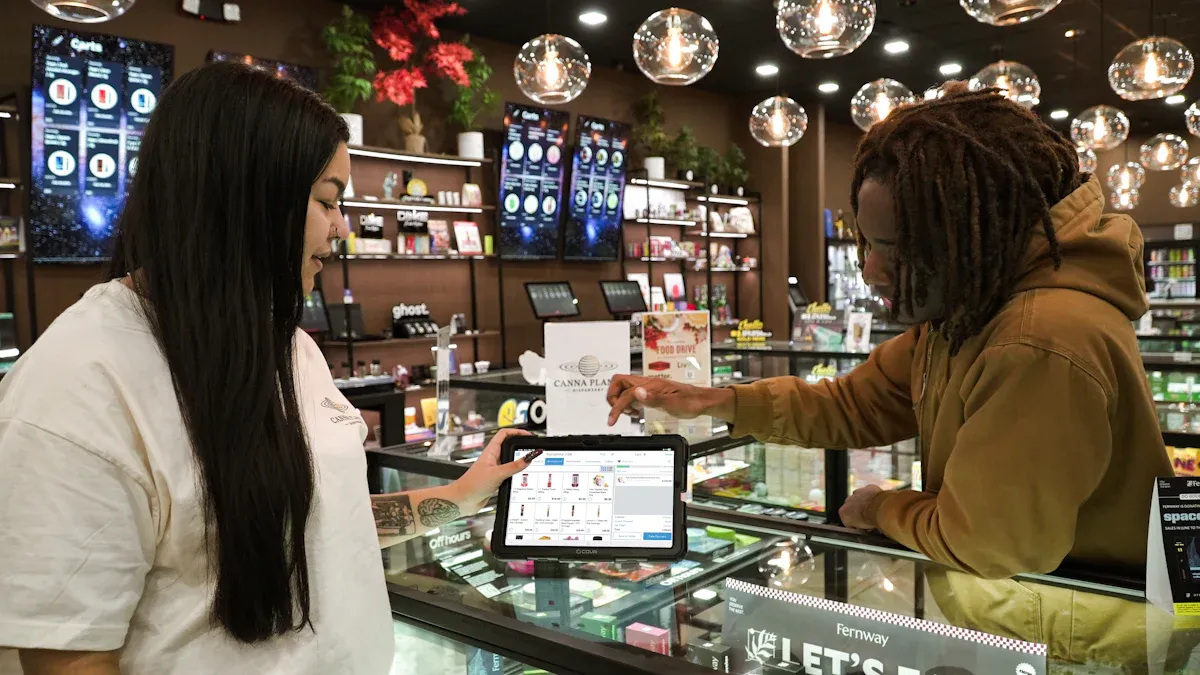
You might ask which in store digital signage solution is best for your store. The answer depends on your store’s size, how much money you have, and what you want to achieve. Trusted comparison websites like Gartner Peer Insights, Gable Company, and MetroClick give you reviews and expert advice. When you look at digital signage solutions, pay attention to features, how easy they are to use, price, if they can grow with your business, if they work with your other tools, and if they fit your business. You will see a fair comparison that helps you pick the right signage for your store.
Statistic | Value |
|---|---|
68% | |
Retail market share in global signage 2024 | 21% |
Projected market value by 2034 | USD 21.2 billion |
Average sales increase with signage 2023 | 32% |
Key Takeaways
Digital signage solutions are different for each store. The size, budget, and goals matter. Pick one that matches what you need.
Check for features like adaptability and ease of use. Make sure it can work with other systems when you compare digital signage platforms.
Buying digital signage can help customers pay more attention. It can also help stores sell more by making shopping more fun.
Think about both the first cost and later costs when you pick a digital signage solution. This helps you not get surprised by extra fees.
Always try a digital signage system in a few stores first. Do this before using it everywhere to make sure it works well for you.
What Is In Store Digital Signage?
Core Functions and Benefits
You see in store digital signage almost every day. This technology uses screens to show ads and information. You can change what is on the screens quickly. You can control the screens from anywhere. This keeps your brand message clear and the same everywhere.
Here is a table that shows the main functions and benefits of digital signage:
Function/Benefit | Description |
|---|---|
Adaptability | You can update info fast and keep all stores current. |
Automation | The system lets you set up promotions and content to run by itself. |
Exposure | Digital signage gets more views than paper signs. |
Recall and retention | Bright screens help customers remember your messages better. |
Wait times | Displays keep shoppers busy while they wait, making shopping nicer. |
Analytics | You can see what customers look at and use this info to help your business. |
You can use digital signage to show new items or sales. You can also share important news. This tool helps you manage promotions and reach more people.
Impact on Retail Experience
Digital signage changes how you shop in stores. These screens grab your attention with bright colors and moving pictures. You feel more interested when you see things you like.
Digital signage helps you find products faster and makes shopping easier.
You get suggestions based on what you buy.
Stores with digital signage often have more repeat customers and happier shoppers.
Cool displays can bring more people into the store.
When you see special deals, you may buy more.
If you have a bad experience, you might not come back. Studies show that 56% of customers will not return after a poor visit. Some will tell friends or leave bad reviews. Good digital signage can help make your visit better.
A smart digital signage plan can boost sales and help stores connect with shoppers. You get a better shopping trip, and stores do well.
Digital Signage Product Comparison Overview
Leading Solutions at a Glance
There are many digital signage solutions for stores. Trusted guides like Gable Company, MetroClick, and Gartner Peer Insights show which options are best. Real user reviews help you know what people think about each platform. This makes comparing products easier and more trustworthy.
Here is a table with some trusted platforms for in store digital signage:
Platform | Key Features | Reliability |
|---|---|---|
PosterBooking | Easy scheduling, cloud-based, affordable | High |
ScreenCloud | Simple setup, strong integrations, scalable | High |
Yodeck | Animated designs, remote updates, free device mgmt | High |
NoviSign | Custom templates, interactive content | High |
TelemetryTV | Enterprise-ready, analytics, multi-device support | High |
SignageTube | Easy content management, scheduling | High |
BrightSign | Used by IKEA, Levi’s, 24/7 uptime, free software | Legendary |
BrightSign is very reliable and trusted by big stores. Animated designs and easy content management help stores get more customers and sales.
Tip: 84% of store owners say digital signage helps their brand. Customers spend 30% more time in stores with digital signage.
Selection Criteria
When you compare digital signage products, look at important things. You want solutions that fit your store and help your business grow.
Reliability means screens work all the time.
Ease of use makes managing content simple.
Remote updates let you change displays from anywhere.
Scheduling helps you plan promotions ahead.
Cloud-based software gives flexibility and can grow with your store. On-premise solutions give more control and let you customize. Open-source options let you change features to fit your needs.
A smart comparison helps you pick the best platform. You get better service, more sales, and a stronger brand.
Best Digital Signage CMS Features
Content Management Tools
You need a content management system to control your content. It should let you make fast changes. Real-time updates help you keep prices and sales correct. You can use a scalable digital signage cms to share campaigns in all stores. Local managers can change messages for their own area.
A scalable CMS lets the main team share campaigns everywhere. Local managers can still change messages for their own store or region.
When you compare features, look for tools that help you schedule content and connect with other systems.
Hardware compatibility means your digital signage works with many devices.
User-friendly interfaces help you manage content without needing IT help.
Content scheduling lets you plan sales and keep screens new.
Cloud-based digital signage solution platforms are flexible. They help you manage content for many stores. Real-time content management keeps your screens interesting and up to date.
Customization and Interactivity
Customization makes your digital signage special. You can change layouts, colors, and branding to fit your store. Interactive screens let shoppers touch or use keyboards to see products.
Feature | Description |
|---|---|
No-Code Solution | |
Maintain Consistent Design | Control how your signs look to match your brand. |
Integrated Analytics | Watch how people use your screens and see what works. |
Both Touch and Keyboard | Let people use touch or keyboard for easy use. |
Customization helps you get attention and can make people buy more. New CMS platforms help you make money and keep content fresh. Retail digital signage uses hardware and software to show custom content in stores. You can change messages if the weather or stock changes. Customization gives you tools to reach your business goals.
Digital signage gets attention and can change what people buy.
New CMS platforms help you make money and keep content fresh.
Keeping content new is important for retail media networks.
Integration Capabilities
Easy integration is important for digital signage. You need to control many screens in different places. Advanced scheduling and automation help you update screens on time. Trigger-based playback changes content using real-time data.
Connecting to your network lets you manage screens from far away and keeps data safe.
Connecting with point-of-sale systems makes shopping better and can help sales.
Real-time data updates keep your screens current and interesting.
Personalizing content uses data from POS systems to show the right message.
Integration in your content management system lets you change screens and update them automatically. Customization and content management work together for a smooth shopping experience.
Compare Pricing Plans for Digital Signage
Upfront vs Ongoing Costs
It is important to look at pricing plans before you pick a digital signage solution. Pricing can affect how much you pay now and later. Some companies use subscription models. You pay every month or year for each screen or user. Other companies use perpetual licensing. You pay once and might pay extra for maintenance.
Here is a table that shows the main pricing structures:
Pricing Model | Characteristics | Cost Implications |
|---|---|---|
Subscription-Based | Monthly or yearly fee per display, tiered plans, user-based, feature-based | Lower starting costs, possible higher costs over time |
Perpetual Licensing | One-time payment, optional maintenance, server/player licensing | Higher upfront costs, could save money long-term |
Digital signage prices go from $200 to more than $3,000 for each screen. You may have ongoing costs for software, updates, and support. Some platforms have free plans with fewer features. Paid software gives you more control, remote management, and proof of play. You should check for hidden costs like hardware upgrades or extra integrations.
Tip: Always ask vendors about hidden fees and what features come with each pricing plan.
Value for Small Businesses
Small businesses must compare pricing plans closely. You want a solution that fits your budget and helps you run promotions easily. Mandoe Media, MetroClick, and SignageTube have flexible pricing. You can pick one-time licenses or subscriptions. Cloud-based platforms let you manage screens from anywhere.
Digital signage software pricing includes one-time licenses, subscriptions, and cloud-based platforms. Ongoing costs are worth it for features like remote control and integrations. You can start with a basic plan and upgrade as your business grows. This helps you avoid paying for features you do not need.
Small stores benefit from affordable digital signage. You can use digital signage to show promotions and bring in customers. Comparing pricing plans helps you find the best value for your store.
Usability and User Experience
Setup and Management
You want a digital signage system that is simple to use. The best platforms let you get started fast. You do not need experience with digital screens. You can connect screens and upload content easily. Scheduling campaigns takes only a few clicks. User-friendliness is important because it saves time. It also helps you avoid mistakes. Reliable media players and a basic content management system help you control what shoppers see.
Here is a table showing important usability factors for retail stores:
Factor | Description |
|---|---|
Display Quality and Screen Type | Clear and bright screens make your messages easy to see. |
Media Player and CMS | Simple tools let you manage content without trouble. |
Content Flexibility | You can show videos, pictures, or text and update screens from anywhere. |
Hardware Durability | Strong screens last longer and work well every day. |
Scalability and Integration | You can add more screens and connect with other systems as your store grows. |
You can update displays from far away and keep your store looking new. Commercial-grade screens work all day and stay strong. Flexible content lets you change promotions quickly.
Training and Support
You need good training and support to use digital signage well. Ongoing training helps you learn new features and tools. Vendors offer professional training and certifications. Consultants can help you too. Training teaches you how to update content and schedule campaigns. It also shows you how to fix problems. This keeps your screens working and reduces downtime.
Support comes in many ways:
You can get help by phone, email, or remote desktop.
Help centers have articles and videos for self-service.
Webinars and check-ins help you keep learning and feel confident.
Proactive support includes account checks and updates to keep your system working well.
You stay ready for new challenges and changes. Staff can manage screens easily and keep your store running smoothly. Good training and support make your digital signage experience better. They help your business grow.
Hardware Compatibility and Scalability
Supported Devices
You want digital signage that works with lots of devices. This gives you more options and can save you money. Most top platforms work with popular operating systems and hardware. You can use screens, tablets, or smart TVs for your displays. The table below shows which devices work with each digital signage platform:
CMS Platform | Compatibility | Highlights |
|---|---|---|
ScreenCloud | Android, Chrome, Windows | Cloud-first, easy to use, great for chains |
Xibo | Linux, Windows, Android | Open-source, flexible, on-prem or cloud |
NoviSign | Android, Chrome | Templates, mobile app control |
DSignage | Android | Lightweight, works offline, good for ShiMeta |
You can choose the device that fits your store best. Some systems let you use old screens with new software. Others work well with tablets in small spaces. You do not have to buy expensive hardware if your system supports many devices.
Tip: Always check if your current screens or players work with your new digital signage software. This can help you save money.
Multi-Store Operations
If you have more than one store, you need digital signage that can grow with you. Good platforms let you control all your screens from one place. You can keep your brand message the same in every store. Local managers can change some content for their own customers.
Feature | Description |
|---|---|
Centralized control | Manage content for all stores from one dashboard |
Consistent branding | Keep your brand message the same everywhere |
Efficient delegation | Give different teams the right permissions |
Real-time content delivery | Update screens right away across all locations |
Reduced IT burden | Less need for tech support, easier rollouts |
Granular user permissions | Let local managers control their own screens |
In-built tagging | Assign content to screens using filters |
Drag-and-drop scheduling | Plan and send out content with simple tools |
Automated device monitoring | Check if screens work and fix problems fast |
You can add more stores and screens as your business grows. You do not have to start over when you expand. This makes it easy to run sales, share news, and keep your stores looking new.
In Store Digital Signage for Different Business Sizes
Small Business Solutions
If you have a small store, you want more customers. You also want your job to be easier. Digital signage can help with both things. Samsung VXT is a smart choice for small stores. Its cloud-based system lets you manage screens from anywhere. You can upload pictures or videos fast. You can change deals and update displays quickly. You do not need special skills to use it. Restaurants and shops use Samsung VXT to show menus, deals, or news. You can make your screens match your store’s style. This helps customers feel welcome and come back again.
Tip: Pick a digital signage solution that lets you update content easily. You will save time and keep your store looking new.
Medium and Large Retailers
If you run a bigger store or many stores, you need advanced tools. Digital signage for medium and large stores has features for managing many screens. You can run campaigns in all your stores at once. Your brand message stays the same everywhere. Large stores use systems that connect with other technologies like IoT and analytics. These tools help you learn what customers like and improve your displays.
Here is a table that shows how solutions are different for medium and large stores:
Feature/Scalability Aspect | Medium Retailers | Large Retailers |
|---|---|---|
Content Management Systems | Basic systems for local use | Advanced systems for multi-location |
Scalability | Limited to a few displays | Extensive networks with thousands |
Customer Engagement | Focus on local promotions | Nationwide campaigns and consistency |
Integration of Technologies | Basic digital signage | Advanced integration with IoT and analytics |
You can start with simple features and add more as your business grows. Advanced systems help you manage thousands of screens and reach customers everywhere.
Pros and Cons of Top Digital Signage Solutions
PosterBooking
PosterBooking lets you control screens in your store easily. You can change what shows on screens from anywhere. It works well for small businesses that want affordable in store digital signage. You do not need special skills to use it.
Pros:
Setup is simple and you can control screens online.
It costs less for small stores.
It works with many screen types.
Cons:
It does not have many advanced features for big stores.
Analytics are basic compared to other top digital signage platforms.
Best Fit:
PosterBooking is good for small shops, cafes, or local stores. It helps you show deals and keep your screens updated.
ScreenCloud
ScreenCloud is flexible and connects with other tools well. You can change content based on the time of day. This helps you reach customers with the right message. You can talk to your staff in real-time and manage screens in many places. During events, you can control many screens and change content fast.
Pros:
Change content for different times and people.
Talk to staff and customers in real-time.
Manage screens in many stores.
Handle events with easy control.
Cons:
There is no free plan for people with small budgets.
Some hardware needs to be installed by hand.
Best Fit:
ScreenCloud is good for stores with many screens. You can use it for smart shelves, interactive displays, and mobile features. Data analytics help you learn about customers and improve engagement.
Yodeck
Yodeck is easy to set up and use. You can install it fast without needing technical help. It has advanced tools like tag-based playlists and video editing. Security features protect your information. The interface is simple for anyone to create and manage content.
Pros:
Install easily with players that are ready to use.
Advanced tools for managing and editing content.
Strong security for important data.
Good prices and free media players.
Cons:
It has fewer app connections than some other platforms.
Analytics are limited compared to enterprise solutions.
Best Fit:
Yodeck is great for small businesses and stores that want easy setup. You can use it to show deals and update screens quickly. The free plan helps you start without spending much.
NoviSign
NoviSign lets you control content for many locations from one place. You can customize messages for each store or department. It works in retail chains, offices, and hospitals. You can use it for employee displays, internal news, and patient info.
Pros:
Control content for many places from one dashboard.
Customize for each store or department.
Works well in offices and healthcare.
Cons:
You may need training to use advanced features.
It does not connect with all hardware.
Best Fit:
NoviSign is good for retail chains, offices, or hospitals. It helps you show deals, share news, and improve communication.
TelemetryTV
TelemetryTV is made for big stores and chains. You can power three screens with one device, which saves money. The special operating system keeps your system safe and stable. You can manage content from the cloud and schedule campaigns for all stores. Advanced scheduling lets you run deals for certain regions. Remote monitoring helps you check devices and fix problems from anywhere.
Feature | Retail Benefit |
|---|---|
Native 3-Display Support | Use one device for three screens |
Purpose-Built OS | Stable system with automatic security updates |
Cloud-Based Content Management | Manage campaigns for all stores |
Advanced Scheduling & Targeting | Run deals for certain regions or groups |
Remote Device Monitoring | Check and fix devices from anywhere |
Cons:
It costs more for small stores.
Advanced features may be hard for beginners.
Best Fit:
TelemetryTV is best for big stores and businesses with many locations. You can use it to run deals, check devices, and keep your system safe.
SignageTube
SignageTube lets you manage content online from anywhere. The interface is easy to use even if you are not technical. You can plan when content shows on screens. Interactive tools help you make fun displays, like social media and touch screens. You get strong support and helpful resources.
Pros:
Manage content from far away.
Easy interface for simple navigation.
Plan content and use interactive features.
Good support and resources.
Cons:
Customization is limited for big operations.
It may not have all analytics for large businesses.
Best Fit:
SignageTube is good for small and medium stores that want flexible in store digital signage. You can use it to show deals and make interactive displays.
Topadkiosk
Topadkiosk is a strong solution for digital signage. You can use it in stores, hotels, or public places. It supports interactive kiosks and touch screens. You can change layouts and run targeted deals. Topadkiosk gives you reliable hardware and software.
Pros:
Supports kiosks and touch screens.
Change layouts for different store types.
Reliable hardware integration.
Cons:
Hardware costs more at first.
You may need technical help to set it up.
Best Fit:
Topadkiosk is good for stores, hotels, or airports. It helps you engage customers with interactive screens and run deals that boost sales.
Note: Picking the right digital signage solutions depends on your store size, budget, and goals. You can use these platforms to get more engagement, run deals, and keep your screens updated.
How to Choose the Best Digital Signage CMS
Assessing Store Needs
First, you need to know what your store wants from digital signage solutions. Start by making clear goals. Pick which results matter most, like more sales or happier customers. Decide how much money you can spend. Choose a few stores to test your ideas. Give each step to someone in charge. Try out hardware and a digital signage cms in some stores for six to twelve weeks. Check how well it works and connect your point-of-sale or ERP systems. Teach your staff how to use it and set rules for content. If the test goes well, use it in more stores. Watch your results and change your content and schedule if needed. Set up automatic campaigns for holidays and use analytics to make your messages better.
Phase | |
|---|---|
A | Set goals, budget, test stores, and pick leaders. |
B | Use hardware + CMS in 1–3 stores. Test for 6–12 weeks and check results. |
C | Connect POS/ERP, make content rules, and train staff. |
D | Expand to more stores, watch results, and improve content and schedule. |
E | Automate holiday campaigns, set rules for inventory messages, and use analytics. |
Key Questions for Vendors
When you talk to vendors about digital signage cms, ask smart questions. Make sure the company will stay in business for a long time. Ask how good their support is and how fast they help you. Check if they have strong security and certifications. Find out if they sell hardware and help with setup or just software. Ask if their system connects with other tools and if they have open APIs. Look for clear prices and fair contracts. Make sure the vendor matches your company’s style and is honest about what they can do. Ask for a test or pilot before you decide.
Description | |
|---|---|
Will they be around long-term? | Check if the company is stable and will last. |
Support quality | Ask about help, response times, and service agreements. |
Security practices | Look for certifications like SOC 2 and ask about privacy and security checks. |
Integration capability | Ask about APIs, current integrations, and custom support. |
Pricing transparency | Make sure prices are clear and there are no hidden fees. |
Contract terms | Look for fair contracts and avoid long lock-ins. |
Company culture | See if the vendor is a good fit and honest about limits. |
Proof of concept | Try a pilot test before making a big decision. |
Tip: Ask if the platform works for many stores and how often it updates.
Implementation Steps
You can use easy steps to set up the best digital signage cms in your store. Make clear goals for your screens. Walk around your store to find the best places for screens. Plan what you want to show and pick hardware and software that fit your needs. Create content that matches your brand and is simple to understand. Keep your content fresh and update it based on how well it works. Navori, Monitors Anywhere, and Agneovo say you should set goals, know your customers, and make a budget before you start. You can use digital signage cms to run automatic campaigns and check your results. Topadkiosk gives strong hardware for stores that want interactive screens.
Note: Always read reviews and ask for demos before you choose. This helps you find digital signage solutions that fit your store and your budget.
You found out that picking the best digital signage solution depends on what your store wants. To choose wisely, follow these steps:
Decide what you want to achieve.
Figure out how much money you can spend.
Look at trusted guides and compare options.
Ask for demos to see how they work.
Digital signage helps customers learn about services. It makes waiting easier and gets people more interested. Check the pros and cons and use the guide to pick the right one. Good screens help your store do better and can change what people buy.
FAQ
What is digital signage and how does it work?
Digital signage shows ads or info on screens. You control what shows from a computer or the cloud. You can change messages fast. You can manage one or many screens in stores.
How do you choose the right digital signage solution?
Think about your store size, money, and goals. Compare features, prices, and support. Watch demos and read reviews. Pick a system that fits your needs and helps your store grow.
Can you use your existing screens for digital signage?
Most platforms work with many kinds of screens. Check if your screens are compatible before you start. Using your own screens can save money and make setup simple.
What makes Topadkiosk a good choice for stores?
Topadkiosk gives you strong hardware and interactive screens. You can show deals to certain people and change layouts. It works well in stores, hotels, and public places.
Do you need special training to manage digital signage?
Most systems are easy for anyone to use. You can get help from guides, videos, or support. Training helps you learn new things and keep your screens fresh.
See Also
Innovative Digital Signage Trends Transforming Retail by 2026
Selecting Optimal Outdoor Digital Signage Solutions for Your Company
Understanding the Functionality of Outdoor Digital Signage Today
Selecting the Ideal LCD Digital Signage for 2026 Business Needs
Comprehensive Guide to Choosing and Installing Outdoor Digital Signage
