Comparing Leading Digital Signage Solutions for Hospitals in 2026
Shenzhen TopAdkiosk Display Technology Co., Ltd.
Add.: 2F, Bldg 10, Changfeng Industrial Park, Dongkeng, Fenghuang, Guangming, Shenzhen, China 518132
Mobile/WHATSAPP: 86-138 25769658
Email: marketing@topadkiosk.com topadkiosk@gmail.com
Skype: pghenry1
Wechat: adkioskhenry
English Web.: https://www.topkioskdisplay.com/
http://www.ad-kiosk.com/
https://www.toplcddisplay.com/
http://www.multitouchdigitalsignage.com/
https://www.youtube.com/channel/UCYVYNJHxLVEcQD8fuUxXNTA/videos?view_as=subscriber
https://www.facebook.com/TOPADKIOSKSHENZHEN/?ref=bookmarks
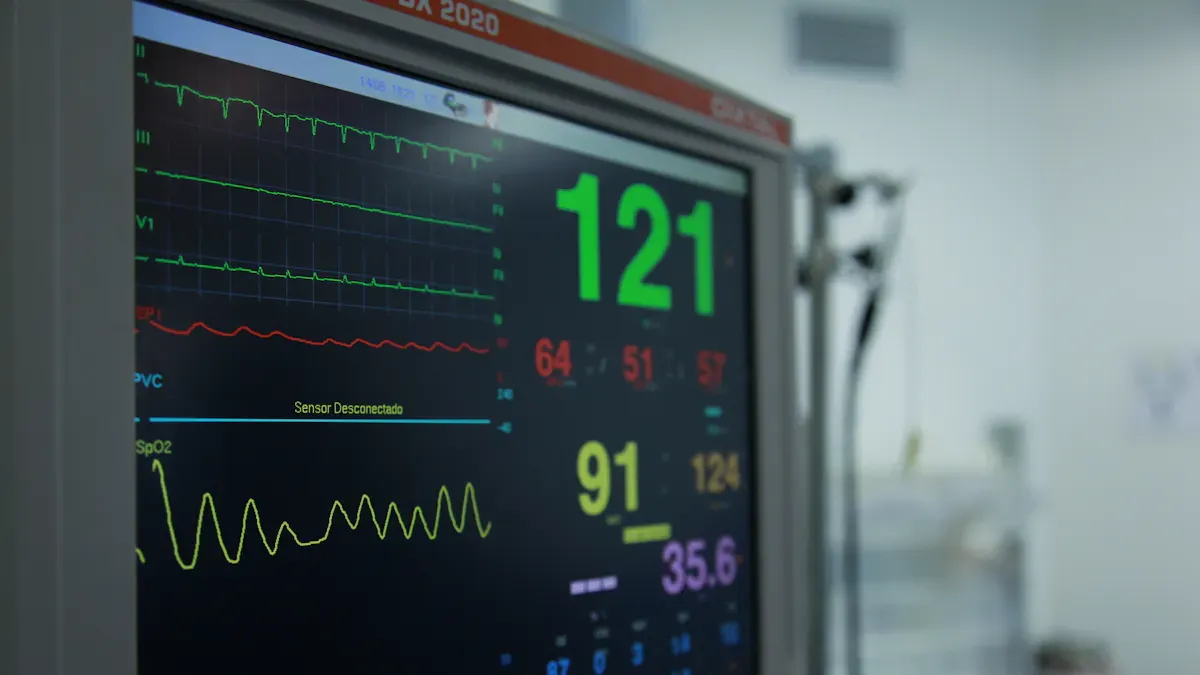
You want the best digital signage for hospitals in 2026. Top solutions like AIScreen, Kitcast, NoviSign, and BrightSign are known for being reliable and safe. Digital signage solutions for healthcare give real-time updates and help people find their way. They also show fun content to help patients and staff talk better. In hospitals, these solutions help visitors know where to go. They show wait times and help with personal care. You need to think about rules, safety, and how these work with hospital systems. Recent studies say that 30% of hospitals use digital signage by 2026. This shows there are more choices and features now.
Metric | Value |
|---|---|
Adoption Rate in Hospitals | 30% |
Year | 2026 |
Key Takeaways
Digital signage helps patients by giving updates and clear directions. This makes hospital visits easier for everyone.
Pick cloud-based solutions for easy control and fast updates. This helps your hospital react to changes and emergencies well.
Make sure you follow rules like HIPAA to keep patient information safe when using digital signage.
Interactive displays get patients involved and help people talk better. This makes patients happier and helps the hospital work better.
Think about what your hospital needs and wants before picking a digital signage solution. This makes sure it fits what you are looking for.
Best Digital Signage Solutions for Hospitals
Leading Platforms Overview
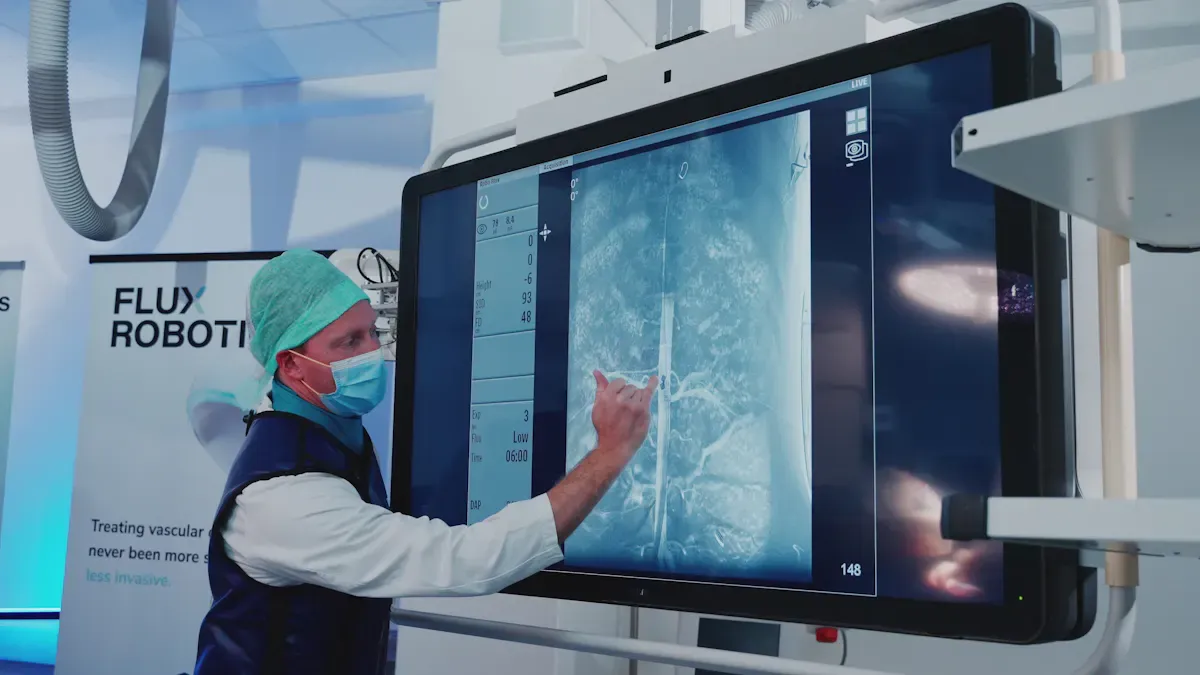
There are many digital signage options for hospitals. AIScreen, Kitcast, NoviSign, ScreenCloud, BrightSign, Visix, and 22Miles are popular brands. Each brand has special features that help hospitals talk to patients and staff. Most brands use cloud-based digital signage. This lets you control screens from anywhere. You can update information fast.
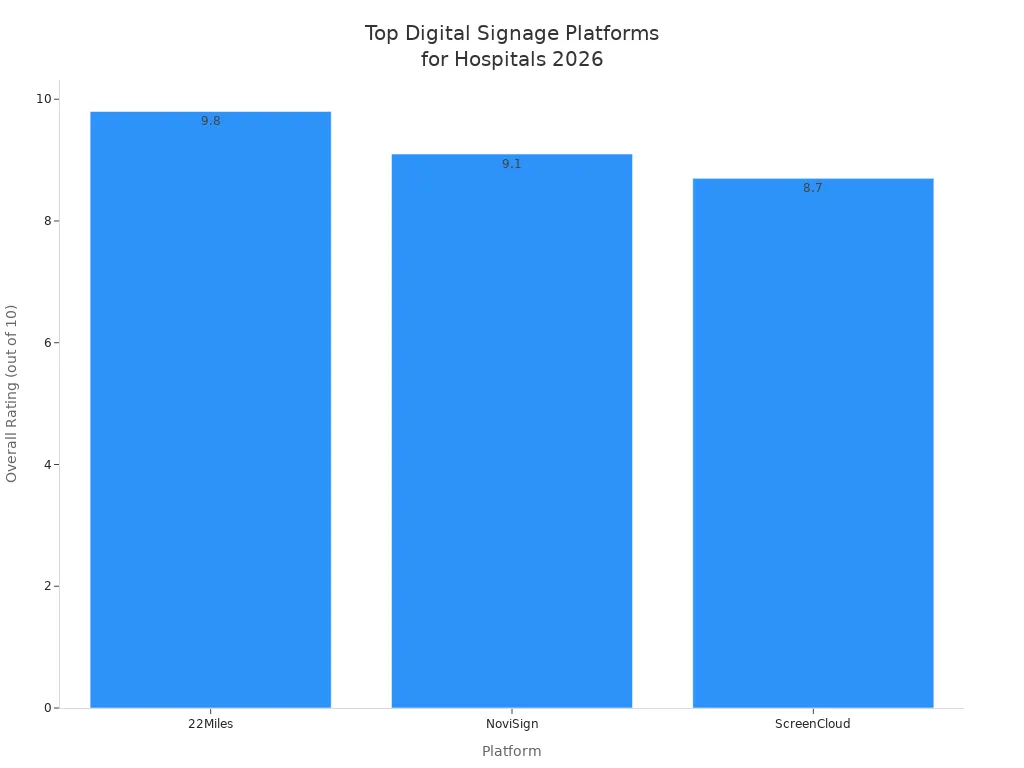
Here is a table that shows how these platforms compare in compatibility and user ratings:
Brand | Platform Compatibility | User Ratings | Features |
|---|---|---|---|
22Miles | Cloud-based | 9.8/10 | Real-time content management, patient navigation, multi-language support, analytics |
Kitcast | Cloud-based | 8.5/10 | Clean UI, smooth playback, suitable for waiting room displays |
NoviSign | Cloud-based | 9.1/10 | Dynamic displays for wayfinding, health tips, emergency alerts |
ScreenCloud | Cloud-based | 8.7/10 | Versatile management of dynamic content across multiple screens |
AIScreen | Cloud-based | 8.9/10 | Centralized control, strong integrations, remote device management, kiosk-ready interactivity |
BrightSign | Cloud-based | 8.8/10 | Reliable hardware, robust scheduling, secure deployment |
Visix | Cloud-based | 8.6/10 | Customizable layouts, alert integration, ADA compliance |
22Miles, NoviSign, and ScreenCloud have high user ratings. They also work well with many systems. These platforms give real-time updates and interactive features. Hospitals need these to keep everyone informed.
Most top brands use cloud-based software. This lets you manage screens in different hospital areas from one place. You can send emergency alerts, update maps, and share health tips right away. Interactive screens help patients find their way or check in. Hospitals like these features because they make things easier for patients and staff.
Selection Criteria
When picking digital signage for hospitals, focus on what your hospital needs most. Here are the main things to think about:
Selection Criteria | Description |
|---|---|
Patient Experience | Enhancements that improve patient interaction and satisfaction within healthcare facilities. |
Operational Efficiency | Solutions that streamline hospital operations and reduce costs. |
Compliance | Adherence to regulations such as HIPAA to protect patient information. |
Specific Features | Options for interactive vs. non-touch solutions tailored to different hospital needs. |
Choose software that follows HIPAA rules. This keeps health information safe. Secure systems with role-based access controls protect your data. Encrypted data stops people from seeing information they should not.
Tip: Pick cloud-based digital signage for healthcare with real-time updates and interactive features. This helps your hospital react fast to changes and emergencies.
Hospital digital signage needs to be flexible. You should be able to update content quickly. This matters for emergency alerts, maps, and talking to patients. Interactive screens help patients get directions or information. Hospitals also need software that works with their current systems.
Real-time features let you send important messages right away. You can update wait times, share health tips, or send alerts to all screens. Interactive displays help patients feel more involved and happy. Hospitals using these features have better communication and smoother operations.
Why Digital Signage for Hospitals Matters
Patient Engagement
You want patients to feel safe and know what is happening. Digital signage helps you talk to patients in waiting rooms and halls. These screens show health tips, directions, and news. Using digital signage makes the hospital visit easier for patients. Patients see clear signs and know what will happen next. You can remind them about healthy habits or show hospital services. This keeps patients interested and helps them trust your care.
Communication Efficiency
Hospitals need to share news quickly and clearly. Digital signage lets you change messages right away. This stops confusion and helps teams work together. Many hospitals do better after using digital signage.
The healthcare digital signage market is growing fast.
You can send new messages that stop mistakes.
Schweiger Dermatology Group made communication and patient happiness better by keeping messages new.
Real-time updates help everyone stay on track.
Showing wait times helps you manage patients and staff.
Digital signage makes sure everyone gets the right message fast.
Operational Benefits
Digital signage gives your hospital many good changes. You can see these every day:
Benefit | Description |
|---|---|
Real-time updates | You send alerts and news to staff and patients right away. |
Streamlined communication | Staff spend less time calling or looking for answers. |
Emergency alerts | You show urgent messages on all screens to help people act fast. |
Patient information updates | Staff update patient details quickly so everyone knows what is happening. |
Improved patient care | You make things smoother for staff and patients. |
Enhanced engagement | Digital signage helps patients pay attention in waiting areas. |
Operational efficiency | You make hospital work easier and more organized. |
Digital signage helps your hospital work better. Patients get news fast. Staff can act quickly in emergencies. Your hospital feels safer and friendlier.
Hospital Digital Signage Features Comparison
Content Management
You want software that makes it simple to manage content. Top hospital digital signage solutions like Monitors AnyWhere, 22Miles, and NoviSign use cloud-based content management. You can change what is on the screens from anywhere. This helps you keep patient information up to date and correct. Hospitals use these tools for fast updates, health tips, and emergency alerts. Here is a table that compares the main features of each platform:
Solution | Key Features | Target Use Case |
|---|---|---|
Monitors AnyWhere | AV-over-IP, central management, on-premises or cloud-based CMS | General hospital signage |
22Miles | Interactive wayfinding, real-time data integration, multi-language | Patient navigation |
NoviSign | Dynamic displays, real-time feeds, hardware-agnostic | Patient wayfinding |
Interactive wayfinding helps visitors find where they need to go. Hospitals use dynamic displays to show health tips and news.
Control & Monitoring
You want to control and watch your digital signage without extra work. Cloud-based digital signage lets you check screens, change content, and fix problems from anywhere. Hospitals use remote monitoring to make sure everything works. You can show alerts and appointment times to help staff and patients. This makes communication better and keeps everyone in the loop.
Feature | Description |
|---|---|
Remote Monitoring | Update and troubleshoot screens remotely |
Integration with Scheduling | Show real-time appointment schedules |
Display emergency notifications and safety protocols |
Connectivity & Integration
You need software that connects with your hospital’s systems. Cloud-based digital signage supports real-time data integration. This lets you share information between departments. Hospitals use these tools to make work easier and improve communication. You save money by using the systems you already have. Interactive displays help patients check in and get directions.
Streamlined operations help stop data silos.
Real-time data sharing helps you respond quickly.
Using current hospital systems saves money.
Security & Compliance
Security and compliance are important in healthcare. Hospital digital signage must follow HIPAA rules. You should use cloud-based digital signage with strong access controls and encrypted connections. Hospitals keep clinical dashboards private and separate public and staff-only channels. You need to check content and train staff to keep patient privacy safe.
Feature | Description |
|---|---|
No patient health info on public screens | |
Secure Integrations | Encrypted, authenticated connections to hospital systems |
Access Control | Only authorized staff can change content |
Audit Trails | Logs of content changes and user access |
Vendor Compliance | Vendors must sign agreements if they access patient data |
Tip: Use interactive wayfinding and real-time updates to help patients and staff. Large screens in busy places make it easy to find your way and help everyone talk better.
Impact of Digital Signage Solutions for Healthcare
Operational Improvements
Hospitals change a lot when they use digital signage software. Cloud-based digital signage lets you update screens fast. You can share news or alerts right away. Staff do not have to answer the same questions again and again. For example, a mid-sized hospital used Qtenboard’s digital signage. They saw 20% fewer questions at the front desk. Staff could spend more time checking in patients and helping in emergencies.
Here is a table that shows how digital signage helps hospitals:
Benefit | Description |
|---|---|
Effective Wayfinding Solution | Patients use interactive wayfinding to find their way. Staff can focus on care. |
Reduce Waiting Room Anxiety | Real-time updates on screens help patients feel calm and informed. |
Share Real-Time Messages | You can send health tips and alerts to everyone in the hospital. |
Build Healthy Staff-Patient Relationships | Digital signage software helps staff connect with patients. |
Effective Internal Communication | Cloud-based digital signage helps staff share information better. |
Faster Diagnosis | Real-time patient information displays help doctors make quick decisions. |
"In healthcare, success is not just about money. It is about patient well-being and making hospital work better."
Patient Care Enhancement
You want every patient to feel safe and cared for. Digital signage solutions for healthcare help you do this. Hospitals use interactive wayfinding to guide patients and families. Vanderbilt University Medical Center made patient navigation and information sharing better with cloud-based digital signage. Schweiger Dermatology Group saw happier patients and better communication after using digital signage software.
You can use interactive screens to show real-time updates, health tips, and directions. This makes visits less stressful. Cloud-based digital signage lets you change content fast. Patients get the right information at the right time. Staff also get help because there is less confusion and communication is clear.
"If digital experiences help a hospital get a higher STAR Rating by improving communication and reducing confusion, that is a clear and measurable goal."
When you compare solutions, look for tools that show how each platform supports patient information displays, interactive wayfinding, and cloud-based management. These features help your hospital work better and keep patients happy.
Addressing Hospital Concerns
Security & Privacy
Hospitals must keep patient information safe. Privacy rules are strict. Never show private patient details on public screens. Use strong access controls and encryption to protect data. Only trusted staff should change what is on screens. Lock media players in secure boxes to stop tampering. Pick digital signage software with permission-based controls. Centralized control helps you manage all screens and keep them safe. Old hardware can be risky, so update devices often.
Always use encryption for data when sending and storing.
Limit who can edit or upload content.
Secure devices with locked cases and strong passwords.
Do not show confidential information in public places.
Compliance Standards
Hospitals must follow healthcare laws like HIPAA. Use digital signage solutions for healthcare that support compliance. Cloud-based systems help you track changes and keep audit trails. Set up approval steps for content updates. Train staff on privacy rules and refresh training often. Use a centralized dashboard to check compliance. Make sure your vendor signs agreements if they access patient data. Regular software updates and anti-malware protection keep your hospital safe.
Use two-factor authentication for system access.
Limit physical access to devices with key cards or biometrics.
Assign clear roles for content management.
IT Integration
You want digital signage software that works with your hospital’s IT systems. Real-time data integration lets you share updates fast. Cloud-based platforms make it easy to manage screens from anywhere. Interactive displays help patients find their way and check in. Hospitals face problems like patients getting lost or appointments starting late. The table below shows common issues:
Challenge | Statistic |
|---|---|
Patients asking for directions | More than 85% |
First-time visitors getting lost | 30% |
Patients getting lost | 58% |
Appointments starting late | 23% |
Staff hours spent on directions | 12,000 annually |
Navigation-related stress | #2 source |
HCAHPS scores | 62nd percentile |
Cloud-based digital signage solutions help fix these problems. Real-time updates and interactive features make communication better and lower stress for everyone in the hospital.
Recommendations for Hospitals
Matching Solutions to Needs
You want to pick the best digital signage for your hospital. First, think about what you want to achieve. Do you need help with navigation, managing lines, or sharing updates? Write down your main needs. Look at how big your team is and what skills they have. Some digital signage solutions for healthcare need more help than others. Check how much money you have for hardware and software. Decide where screens will go to make the biggest difference. Compare features and support for each product. Make sure the content management system is simple and can use real-time data. Choose a solution that can grow as your hospital grows. Use feedback and data to keep making things better. Always check if the system follows security and compliance rules.
Tip: Customizable and interactive displays help you meet special patient needs and make communication better.
Implementation Tips
You can make your digital signage project work well by following these steps:
Set clear goals for each hospital area.
Put screens where patients and staff need fast information.
Use interactive content to help patients and give directions.
Keep content new and useful.
Make sure screens are easy to see and use for everyone, even people with disabilities.
Protect patient privacy by not showing private information on public screens.
Secure all devices and use passwords for interactive kiosks.
Test your system with a trial run and ask for feedback.
Track patient happiness and improvements, like fewer questions about directions.
Work with vendors who know healthcare and can help you.
Challenge | Solution |
|---|---|
Getting Buy-ins | Show leaders how digital signage helps patient care and makes the hospital work better. |
Staffing and Delegating | Build a team and give clear jobs for managing content and devices. |
Match features to your hospital’s size, needs, and rules. |
Note: Most hospitals get their money back in two to three years after using real-time and interactive digital signage.
You want great digital signage for your hospital. Find solutions with a cloud dashboard, smart tags, and emergency override. These features help you update patients, give directions, and alert staff. Hospitals see happier patients and shorter wait times with real-time updates and interactive directories.
To pick the right system:
Write down your hospital’s goals for patient care and staff communication.
Choose technology that fits your needs and follows rules.
Make sure it can connect easily and has strong support.
Deployment Type | Best Fit | Why It Matters |
|---|---|---|
Simple hospital setup | Bundled solution | Easy to use and support |
Large hospital network | Separate components | More choices and better connections |
Good support and easy connections help your hospital save time and make patient care better.
How to Implement Digital Signage in Hospitals Effectively
Digital signage in hospitals is not just about installing screens – it’s about improving patient experience, streamlining staff communication, and enhancing safety. An effective implementation requires careful planning, integration with existing systems, and attention to the unique healthcare environment.
Below is a step‑by‑step framework to help you deploy digital signage successfully.
📋 Step 1: Define Clear Objectives and Use Cases
Before buying any hardware, identify what you want to achieve. Common hospital objectives include:
Reducing patient anxiety through clear wayfinding and wait‑time displays.
Improving staff communication with real‑time bed status, shift handovers, and emergency alerts.
Enhancing patient education with health tips and procedure explanations in waiting areas.
Increasing operational efficiency by integrating with nurse call, bed management, and lab systems.
Tip: Start with 2–3 high‑impact use cases (e.g., waiting room queue display + cafeteria menu board) and expand later.
🏥 Step 2: Understand the Hospital Environment
Hospitals have unique constraints that affect hardware and software choices.
Consideration | Implication |
|---|---|
Infection control | Screens in patient areas must be easy to clean (smooth, sealed edges, no crevices). Consider antimicrobial coatings. |
Noise levels | Avoid speakers or audible alerts in patient care areas. Use silent visual notifications. |
Lighting conditions | Corridors and waiting areas vary from dim to very bright. Choose screens with adjustable brightness (e.g., 350–500 nits for indoor, 1000+ nits for window‑facing). |
24/7 operation | Use commercial‑grade displays rated for continuous operation (not consumer TVs). |
Privacy regulations (e.g., PDPA, HIPAA) | Never display patient names or clinical data on public screens. Use anonymised identifiers (e.g., “Room 204” or “Ticket #A12”). |
Accessibility | Ensure screens are mounted at appropriate heights for wheelchair users, and use large fonts, high contrast, and optional voice‑over. |
🛠️ Step 3: Choose the Right Hardware
Hardware selection must match the use case and environment.
Location | Recommended Display Type | Key Specs |
|---|---|---|
Lobby / wayfinding | Large‑format commercial LCD (55″–86″) or video wall | High brightness (500+ nits), touch optional |
Waiting areas | 43″–55″ commercial LCD | Anti‑glare, 350–500 nits, wall‑mounted |
Clinic door signs | Small 15″–22″ LCD or e‑paper (low power, no backlight bleed) | Network‑updateable, portrait orientation |
Cafeteria / staff lounge | Standard commercial LCD (32″–55″) | Standard brightness, any orientation |
Emergency / critical areas | Industrial‑grade display with fail‑safe | High reliability, backup power, integration with alarm systems |
Outdoor / drive‑thru pharmacy | Weatherproof high‑brightness LCD | IP65, 1500–2500 nits, wide temperature range (-20°C to 70°C) |
Tip: Use e‑paper displays for bed signs and room door signs – they are readable without backlight, consume almost no power, and can be updated wirelessly.
💻 Step 4: Select Software with Healthcare‑Specific Features
Your Content Management System (CMS) must support:
Integration with hospital systems – HIS (hospital information system), LIS (lab), nurse call, bed management, and queuing systems. This enables automatic updates (e.g., bed status, lab results ready).
Role‑based access control – Different permissions for IT, department heads, and front desk staff.
Emergency override – One‑click ability to push evacuation routes, code alerts, or infection control notices across all screens.
Scheduled content – Dayparting for cafeteria menus, visiting hours, etc.
Audit logs – Track what was displayed and when – important for compliance.
Recommended software approaches:
Cloud‑based SaaS (e.g., OptiSigns, ScreenCloud, Rise Vision) – easy to scale, no on‑premise servers.
On‑premise (e.g., Xibo) – for hospitals with strict data security requirements.
Tip: Before committing, run a pilot in one department (e.g., outpatient waiting area) to test software integration and user acceptance.
🔌 Step 5: Integrate with Existing Hospital Systems
The most effective digital signage is not standalone – it pulls real‑time data.
System | Integration Benefit |
|---|---|
HIS / ADT (admission, discharge, transfer) | Automatically update patient status on floor boards, discharge lists, and bed availability. |
Nurse call system | Show call light status on hallway screens so staff can see which room needs attention. |
Queuing / appointment system | Display live queue numbers and estimated wait times in outpatient clinics. |
Lab / pharmacy systems | Notify patients when results are ready or prescriptions are filled. |
Fire / security alarms | Automatically override all screens with evacuation instructions and shelter‑in‑place messages. |
Technical requirement: Ensure your signage CMS has an open API or uses standard protocols (e.g., REST API, HL7 for healthcare) to connect with these systems.
🖼️ Step 6: Design Content for a Healthcare Audience
Content must be clear, reassuring, and easy to understand – especially under stress.
For Patients & Visitors
Wayfinding – Simple maps with “You are here” markers, colour‑coded zones.
Wait time displays – “You are number 12. Estimated wait: 15 minutes.” Reduces anxiety.
Health education – 30–60 second animations on hand hygiene, medication safety, post‑op exercises.
Soothing content – Nature scenes, calming music (without lyrics), or art rotations in waiting areas.
For Staff (Back‑of‑house)
Bed occupancy board – Red/yellow/green status for each bed, pending discharges.
Shift schedules – Upcoming shifts, break rotations, mandatory training reminders.
Performance metrics – Door‑to‑doctor time, patient satisfaction scores, hand hygiene compliance.
Content Design Rules
Large fonts – Minimum 24pt for body text, 48pt for headings.
High contrast – e.g., white text on dark blue, not light grey on white.
Short loops – Each screen should refresh or change content every 10–30 seconds.
No sensitive data – Never display full patient names, medical record numbers, or diagnosis on public screens.
🧪 Step 7: Pilot, Train, and Roll Out
Do not try to deploy hospital‑wide all at once.
Select a pilot area – Choose one department with clear pain points (e.g., busy outpatient clinic or ED waiting room).
Install 2–5 screens and integrate with one system (e.g., queue management).
Train staff – Show nurses and front desk how to update content (simple CMS interfaces). Address their concerns about extra work.
Collect feedback – Survey patients and staff after 2 weeks. Adjust content, brightness, or placement as needed.
Gradual expansion – Once validated, add more areas: cafeteria, inpatient floors, staff lounge, then lobby.
Average timeline: 3–6 months from pilot to full deployment for a medium hospital.
🛡️ Step 8: Plan for Maintenance and Compliance
Scheduled checks – Monthly inspection of screen condition, cable security, and software updates.
Remote management – Use cloud CMS to monitor screen health (online/offline, playback status) and push updates without on‑site visits.
Privacy audit – Regularly review that no patient data is inadvertently displayed.
Backup procedure – Have a manual fallback (paper signs) in case of power or network outage.
✅ Summary Checklist for Effective Hospital Digital Signage
Phase | Key Actions |
|---|---|
Planning | Define objectives, identify use cases, involve stakeholders (IT, nursing, facilities). |
Environment | Assess lighting, infection control, mounting surfaces, power, network. |
Hardware | Choose commercial‑grade, cleanable, appropriate brightness. |
Software | Select CMS with integrations, role‑based access, emergency override. |
Integration | Connect to HIS, nurse call, queuing, alarm systems. |
Content | Design for readability, safety, and calm. No patient identifiers on public screens. |
Pilot | Test in one department, train staff, gather feedback. |
Rollout | Expand gradually, communicate changes to all shifts. |
Maintenance | Remote monitoring, monthly checks, privacy audits. |
💎 Final Thoughts
Effective hospital digital signage is not about technology alone – it’s about reducing stress, saving staff time, and improving patient outcomes. When done right, it becomes an invisible but indispensable part of daily hospital operations, guiding families, informing patients, and connecting care teams. Start small, integrate deeply, and always put safety and privacy first.
FAQ
What is digital signage in a hospital?
Digital signage in a hospital means using screens to give information. These screens can show directions, health tips, or alerts. This helps patients and staff find things fast.
How does digital signage improve hospital communication?
Digital signage lets you send news and updates quickly. Staff and patients see important messages right away. This stops confusion and keeps everyone informed.
Is digital signage safe for patient information?
Patient data stays safe because private details are not shown. Hospital systems use secure access and encryption to protect information. Only trusted staff can change what is on the screens.
Can digital signage connect with other hospital systems?
Yes, digital signage can link with hospital scheduling and check-in systems. This helps you update wait times and directions in real time. It makes things easier for everyone in the hospital.
Why should hospitals invest in digital signage for healthcare?
Hospitals get many benefits from digital signage. It helps patient care and makes staff work better. You can share health tips, guide visitors, and send alerts. This makes the hospital safer and more organized.
See Also
Best Digital Signage Solutions for Retail in 2026
Latest Innovations in Digital Signage Technology for 2026
An In-Depth Look at In-Store Digital Signage Options
Enhancing Restaurant Efficiency with Digital Signage in 2026
Comparing Digital Signage and LED Signs for Businesses in 2026
