How Major Brands Stack Up on Freestanding LCD Display Kiosk Pricing
You can find good prices from brands like Samsung, Peerless-AV, LG, and Elo when you shop for freestanding LCD display kiosks. Stores often pick these kiosks for self-service and to help people find their way. Indoor models usually cost between $912 and $1,537. Outdoor kiosks like the Outdoor Enviro Kiosk cost from $2,500 to $3,000. The Freestanding Touch Screen Kiosk has a nice look and fits today’s needs. To make an informed decision, compare pricing on freestanding LCD display kiosks by considering your business goals and the type of display you require.
Brand | Product Type | |
|---|---|---|
VEVOR | Digital Kiosk | $912.9 - $1536.9 |
Advanced Kiosks | Outdoor Enviro Kiosk | $2,500 - $3,000 |
Key Takeaways
Check prices of freestanding LCD kiosks from brands like Samsung, LG, and Peerless-AV to see which one works best for you. - Think about indoor and outdoor models, because prices change a lot depending on features and how strong they are. - Search for important features like touchscreen, weatherproofing, and ways to customize to make the kiosk work better. - Look at warranty and support choices to make sure your kiosk lasts a long time and works well. - Always look at what your business needs before you buy, so you pick the right kiosk.
Compare Pricing on Freestanding LCD Display Kiosks
If you want to compare pricing, look at more than just the price tag. Brands sell many kinds of kiosks for different jobs like retail, wayfinding, or self-service. Commercial digital signage displays come in lots of shapes and sizes. Some kiosks are made for indoor use. Others can handle outdoor weather. The price changes a lot depending on what you need.
Price Table: Top Brands and Models
The table below helps you compare pricing from top brands. It shows indoor and outdoor models. You can see how much each kiosk costs.
Brand | Model/Type | Indoor/Outdoor | Price Range | Notable Features |
|---|---|---|---|---|
Samsung | Kiosk KM24A | Indoor | $1,200 - $2,000 | Touchscreen, payment ready |
Peerless-AV | Portrait Kiosk | Indoor | $1,500 - $3,500 | Large lcd, digital signage |
LG | 49" Digital Kiosk | Indoor | $2,000 - $4,000 | High-res lcd, slim design |
Elo | 55" Interactive Kiosk | Indoor | $2,500 - $4,500 | Touchscreen, commercial digital signage displays |
Advanced Kiosks | Outdoor Enviro Kiosk | Outdoor | $2,500 - $3,000 | Weatherproof, rugged enclosure |
Peerless-AV | Xtreme Outdoor Kiosk | Outdoor | $10,000+ | Weatherproof, sunlight readable |
Meridian | Presenza Outdoor Kiosk | Outdoor | $12,000 - $25,000 | Customizable, payment options |
VEVOR | Digital Kiosk | Indoor | $912.9 - $1,536.9 | Entry-level, basic digital signage |
Tip: Indoor kiosks usually cost between $700 and $4,000. Outdoor kiosks often start at $10,000 and can go up to $25,000 or more. Always compare pricing based on what you need.
Key Factors Affecting Kiosk Pricing
Many things change the price of a kiosk. When you compare pricing, look at features and build quality. Some kiosks have better hardware or software. Others use strong materials for outdoor use. Here are the main things that affect kiosk prices:
Factor | Description |
|---|---|
Enclosure Type | Stainless steel or weatherproof materials cost more and protect the kiosk. |
Hardware | Bigger lcd screens and high-definition displays raise the price. |
Software | Custom software for your business adds to the cost. |
Customization | Payment modules or special features make the kiosk more expensive. |
Maintenance | Outdoor kiosks need regular care, which increases long-term costs. |
Features like touchscreens, payment modules, and weatherproofing can make the price go up. For example, a basic model might cost $2,600. Adding a touchscreen or weatherproofing will make it cost more. Commercial digital signage displays with advanced features cost more but work better and give you more ways to use them.
When you compare pricing, always think about what you need. If you only want a simple lcd display kiosk for basic digital signage, pick a cheaper model. If you need a kiosk for outdoor use or payment, expect to pay more. This helps you get the best value for your business.
Major Brands Price Breakdown
Samsung Kiosk Pricing and Features
You can find Samsung kiosks in many stores and public spaces. Samsung offers the Kiosk KM24A, which fits well in indoor environments. The price for this model ranges from $1,200 to $2,000. You get a touchscreen that responds quickly. The kiosk supports payment systems, so customers can pay for items or services. Samsung uses high-quality lcd panels that show clear images. The kiosk has a modern design and works well for self-service or wayfinding. You can set up the kiosk easily and use it for many business needs.
Peerless-AV Kiosk Pricing and Features
Peerless-AV builds kiosks for both indoor and outdoor use. The Portrait Kiosk costs between $1,500 and $3,500. You get a large lcd display that shows bright and sharp content. Peerless-AV also offers the Xtreme Outdoor Kiosk, which starts at $10,000. This outdoor kiosk has a weatherproof enclosure and a sunlight-readable lcd screen. You can use Peerless-AV kiosks for digital signage, advertising, or information displays. The kiosk stands strong in tough weather and lasts a long time.
Note: Peerless-AV kiosks give you many options for customization. You can add payment modules or choose different screen sizes.
LG Kiosk Pricing and Features
LG makes kiosks with high-resolution lcd displays. The 49" Digital Kiosk costs between $2,000 and $4,000. You get a slim design that fits well in modern spaces. The kiosk uses advanced lcd technology to show clear and colorful images. LG kiosks work well for retail, wayfinding, or self-service. You can use the kiosk for interactive displays or digital signage. LG offers reliable hardware and easy setup.
Elo Kiosk Pricing and Features
Elo builds interactive kiosks for businesses that need touchscreens. The 55" Interactive Kiosk costs between $2,500 and $4,500. You get a commercial lcd display that responds to touch. Elo kiosks support digital signage and self-service tasks. The kiosk has a sturdy enclosure and works well in busy areas. You can use Elo kiosks for payment, information, or customer check-in. Elo gives you good support and warranty options.
Other Notable Brands (e.g., Advantech, Meridian)
You can find unique kiosks from Advantech and Meridian. Advantech offers the 106 series, which supports many peripherals for self-order or self-checkout. The kiosk features an all-in-one touch computer with Intel processors. You get a fanless system and a multi-touch lcd screen. Advantech kiosks work well for fast food, retail, or ticketing.
Meridian builds kiosks like the Meridian Locker. This kiosk lets customers pick up ordered merchandise easily. The kiosk includes clear doors and internal LED lights. Meridian kiosks offer customizable options for payment and pickup. You can use these kiosks for retail, logistics, or package pickup.
Tip: When you compare brands, look at the lcd display quality, kiosk durability, and the features you need. Each kiosk gives you different options for self-service, payment, or digital signage.
Value for Cost Analysis
Features and Support Comparison
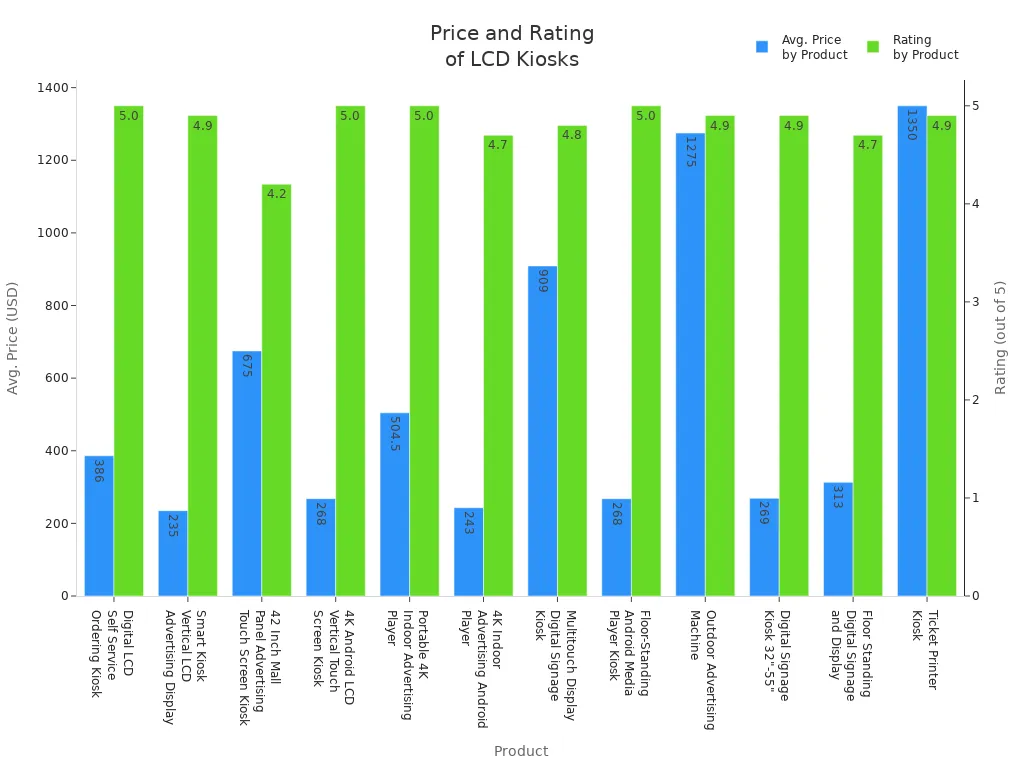
When you buy a kiosk, you want to know what you get. Each brand gives you different features and support for the price. Some kiosks come with a basic warranty for parts and labor. Others let you buy longer warranties or service plans. You can get help from tech support, regular checkups, and remote help. Most kiosks have lcd screens, touchscreens, and digital signage. Some models add payment modules or ticket printers for self-service.
Product Description | Price Range | Brand | Rating |
|---|---|---|---|
Digital LCD Self Service Ordering Kiosk | $306-466 | Shenzhen YJCen Technology Co., Ltd. | 5.0/5.0 |
Smart Kiosk Vertical LCD Advertising Display | $235-295 | Beijing Hushida Technology Co., Ltd. | 4.9/5.0 |
42 Inch Mall Panel Advertising Touch Screen Kiosk | $450-900 | Shenzhen Hdfocus Technology Co., Ltd. | 4.2/5.0 |
Multitouch Display Digital Signage Kiosk | $866-952 | Guangzhou Touchwo Electronics Co., Ltd. | 4.8/5.0 |
Ticket Printer Kiosk | $1,200-1,500 | Shenzhen Lirsen Technology Co., Ltd. | 4.9/5.0 |
Cheaper kiosks usually have simple lcd displays and basic digital signage. More expensive kiosks have interactive features and better support. Longer warranties cover more parts and give you phone help. Service plans help your kiosk last longer.
Warranty Type | Typical Term | What’s Covered | Common Exclusions |
|---|---|---|---|
Standard OEM Warranty | 12 months | Parts & labor for major components | Consumables, accidental damage, software bugs |
Extended Warranty | Up to 3-5 years | Advance replacement parts, phone support | Consumables, improper operator use |
Service Contract | Multi-year + SLA terms | Preventive maintenance, remote monitoring | Wear & tear beyond contract, unauthorized modifications |
Tip: If you need a self-service kiosk for retail or wayfinding, pick one with good support and warranty. This helps you save money over time.
Customization and Upgrade Options
You can change your kiosk to fit your business. Many brands let you add touchscreens, double displays, or remote content control. You can pick high brightness lcd screens for outdoor use. You can install your kiosk on the floor, wall, or use a mobile stand. Energy-saving features help you spend less.
Interactive touchscreens make your kiosk fun to use.
Dual-sided displays help more people see your digital signage.
Remote content management lets you update your screen fast.
High brightness lcd screens are good for outdoor kiosks.
Custom touch screen kiosk options let you add payment modules or ticket printers.
Modular upgrades let you swap tablets or add things like fingerprint scanners.
Cross-platform compatibility works with Windows, Android, and iOS.
You can use an interactive information kiosk for self-service or a self service information kiosk for wayfinding. Upgrades help you control cost and stop vendor lock-in. You can pick a self service kiosk for dining areas or a floor standing advertising kiosk for busy places. Interactive digital signage helps you advertise and make more money.
Note: Customizing and upgrading your kiosk makes it more helpful and gives you better value for your money.
Pros and Cons by Brand
Strengths of Each Brand’s Pricing
There are many good things about each brand’s pricing. Samsung gives you lcd screens that work well and easy ways to pay. Peerless-AV makes outdoor kiosks that can handle bad weather. LG has lcd displays that look sharp and have a thin shape. Elo makes kiosks you can touch and use for self-service in stores. VEVOR and Advanced Kiosks help you spend less with simple models.
Samsung: You get a new look and can set up your kiosk fast.
Peerless-AV: You can pick kiosks that work outside in any weather.
LG: You see bright pictures on great lcd screens.
Elo: You use touchscreens and get helpful support.
VEVOR: You pay less for simple digital signage kiosks.
Advanced Kiosks: You find strong kiosks for outdoor places.
Tip: You should look at what features and help each brand gives. This helps you choose the right kiosk for your business.
Weaknesses and Limitations
You should watch out for problems with kiosk pricing. Some brands show a low price, but you might pay more later. You pay once for things like hardware, payment tools, setup, and installation. You also pay again and again for software, support, care, payment fees, and connecting to other systems.
Cost Type | Examples |
|---|---|
kiosk hardware, payment device, installation, setup fees | |
Recurring costs | software subscription, support plans, maintenance, payment processing fees, integration fees |
Hidden fees can make your kiosk cost more than you think. You might pay more if you add new registers or more kiosks. You may pay more for each user or place you add. If you want better features, you need to pay for higher subscriptions. Adding new tools or ways to sell online costs extra. If you have more sales, your fees can go up after a certain point.
You pay more for hardware when you add more kiosks.
Fees go up if you add more users or places.
Better features need higher subscriptions.
New tools mean extra costs.
Fees change if you have more sales.
Note: You should check all the costs before you buy a kiosk. This helps you plan your money and avoid surprises.
Recommendations by Budget and Need
Best for Budget Buyers
If you want to spend less, you can pick kiosks from brands like Hisense, TCL, Insignia, Vizio, and Westinghouse. These brands have digital signage that costs less money. You can use these kiosks for sharing information or simple digital signs in offices and stores. Hisense and TCL start at about $500, which is good for places with normal lighting. Insignia and Vizio have lcd kiosks for under $100 and $398. These give you basic digital signage features.
Brand | Model Series | Starting Price | Ideal Use Case |
|---|---|---|---|
Hisense | Class A6, U6 | ~$500 | Informational displays |
TCL | S Class (4-Series) | ~$500 | Reception area digital signage |
Insignia | F20, F40 | Under $100 | Basic digital signage |
Vizio | 70-inch 4K | $398 | Budget-friendly digital signage |
Westinghouse | Various | N/A | Value-for-money digital signage |
Tip: These kiosks are good for simple lcd digital signs if you do not want to spend a lot.
Best for Feature-Rich Needs
If you need more features, you can choose a kiosk with touchscreens, payment tools, and weatherproof cases. Outdoor Enviro Kiosk and Merchant Max Interactive Kiosk work well in tough weather and busy places. You can use these kiosks for finding your way, self-service, and paying for things. Pinnacle Service Kiosk and Airport Tower Kiosk have big lcd screens and LED lights to help people see your brand.
Kiosk Model | Advanced Features |
|---|---|
Outdoor Enviro Kiosk | Weather-resistant, interactive touchscreen |
Merchant Max Interactive Kiosk | LED lightbar, high-traffic point-of-sale |
Pinnacle Service Kiosk | 43" or 55" touchscreen, visitor information |
Airport Tower Kiosk | 7-foot-tall, LED accents, high-traffic design |
Note: These kiosks are great for digital signs in busy or outdoor places.
Best for Customization and Support
If you want a kiosk made for your business, you can pick Marvel Technology or Conceptkiosk. These brands let you change your lcd digital signage and give strong support. You can make your kiosk fit retail, healthcare, or hotels. Manufacturer A lets you change many things and gives help all day and night. Manufacturer C has many designs and a good warranty.
Marvel Technology: Custom digital signage kiosks for many industries.
Conceptkiosk: Premium hardware and tailored lcd digital signage.
Manufacturer A: High customization, 24/7 support.
Manufacturer C: Versatile designs, strong warranty.
Tip: You can get a kiosk that fits your needs and get help when you need it.
You can get good deals on digital signage by looking at brands like Samsung, LG, and Peerless-AV. Every kiosk has its own features, so check the warranty and support before buying. Look at how clear the display is and decide if you want extra changes. To pick the best one, ask for prices, compare digital signage choices, and talk to companies to find what works for you.
Ask for prices from different sellers
Compare digital signage features and support
Talk to companies for custom solutions
When it comes to freestanding LCD display kiosks, prices vary widely based on the brand and, more importantly, the features you need. In the mall environment, "durability" is as much about uptime as it is about physical toughness.
Here is a breakdown of how major brands stack up, from budget-friendly screens to enterprise-ready systems.
💰 Price Comparison by Brand & Type
The table below provides a direct comparison of costs and capabilities for different tiers of kiosks.
Tier / Brand | Model / Type | Price (Starting MSRP) | Key Features & Durability | Best Mall Application |
|---|---|---|---|---|
Value / Generic | Shenzhen Layson / HDFocus | $1,000 – $4,600 | Basic 32-43" screen, 300 nits, Android/Windows, 1-year warranty . | Digital signage, basic wayfinding in low-traffic indoor areas. |
Mid-Tier | TouchWo | $2,500 – $5,000 (est.) | 43" screen, metal housing, Mohs 7 glass, modular front panel, 24/7 operation . | Interactive directories, self-service, retail displays. |
Premium (Modular) | LG (27KC3P-M) | $2,667 | 27" screen, modular design, ADA accessible, Windows OS, 3-year warranty . | Countertop or standing self-ordering kiosks, information points. |
Premium (All-in-One) | LG (27KC3PK-C) | $4,000 | 27" screen, built-in scanner, card reader, receipt printer, Windows OS, 3-year warranty . | High-volume food court ordering, ticketing, payment transactions. |
Enterprise / High-Brightness | RisingStar / Hisense | $6,200+ (est.) | 49-75" screen, 2500+ nits, IP55 rating, anti-vandal glass, 24/7 operation . | Mall atriums, storefront windows, outdoor-adjacent areas with high ambient light. |
🤔 How to Choose: Beyond the Price Tag
While the upfront cost is a major factor, focusing solely on the sticker price can lead to higher long-term expenses. Here is what you should look for:
For High-Traffic Malls (Mid-Tier to Premium): Durability is non-negotiable. Prioritize models with metal housing and tempered glass to withstand constant use. The TouchWo or LG models are excellent choices for their robust build quality and reliability .
For Mall Entrances & Atriums (Enterprise): Standard 300-500 nit screens will be unreadable in these bright environments. You need a high-brightness display (2,000+ nits) to combat glare and direct sunlight. This feature alone commands a significant price premium but is essential for visibility .
For Self-Service & Ordering (Premium): If the kiosk will process payments, look for an integrated solution. The LG 27KC3PK-C model includes a printer, scanner, and card reader for a streamlined, all-in-one package that is easier to maintain . For businesses with specific needs, the modular LG 27KC3P-M allows you to add only the peripherals you require .
💡 How to Get the Best Value
Beware of Hidden Costs: The purchase price is just the beginning. Always factor in installation, network infrastructure, software licensing (often a monthly fee), and ongoing maintenance when calculating your total budget .
Consider Long-Term Value: A cheaper, generic kiosk might have lower upfront costs but could require more frequent repairs or earlier replacement. A premium brand like LG offers a 3-year warranty and commercial-grade components designed for 24/7 operation, which can lower your total cost of ownership over time .
Henry Fang
General Manager
Shenzhen TopAdkiosk Display Technology Co., Ltd.
Add.: 2F, Bldg 10, Changfeng Industrial Park, Dongkeng, Fenghuang, Guangming, Shenzhen, China 518132
Mobile/WHATSAPP: 86-138 25769658
Email: marketing@topadkiosk.com topadkiosk@gmail.com
Skype: pghenry1
Wechat: adkioskhenry
English Web.: http://www.topadkiosk.com/ FAQ
What is a freestanding LCD kiosk?
You see a freestanding LCD kiosk as a self-contained unit. It stands on its own and lets you interact with digital content. You use it for information, self-service, or payment tasks in public spaces.
How do you choose the right kiosk for your business?
You should think about your business needs first. Decide if you want a kiosk for self-service, wayfinding, or payment. Check the features, support, and price. Always compare different brands before you buy.
Can you use a kiosk outdoors?
You can use a kiosk outdoors if it has a weatherproof enclosure. Outdoor models protect the internal parts from rain, dust, and sunlight. Make sure the kiosk has a bright display for easy viewing outside.
What maintenance does a kiosk need?
You need to clean the screen and check the hardware often. Update the software when needed. Outdoor kiosks may need more care because of weather. Regular maintenance helps your kiosk last longer.
How do you update content on a kiosk?
You can update content on a kiosk using remote management software. This lets you change information, ads, or menus from your computer. You do not need to visit each kiosk in person.
See Also
Top LCD Kiosks That Enhance Retail Sales Effectively
Leading LCD Kiosk Makers To Follow In 2026
Best Outdoor LCD Kiosk Brands To Monitor In 2026
