How to Choose the Best Touch Screen OLED Display for Your Project
Shenzhen TopAdkiosk Display Technology Co., Ltd.
Add.: 2F, Bldg 10, Changfeng Industrial Park, Dongkeng, Fenghuang, Guangming, Shenzhen, China 518132
Mobile/WHATSAPP: 86-138 25769658
Email: marketing@topadkiosk.com topadkiosk@gmail.com
Skype: pghenry1
Wechat: adkioskhenry
English Web.: http://www.topadkiosk.com/
https://www.topkioskdisplay.com/
http://www.ad-kiosk.com/
https://www.toplcddisplay.com/
http://www.multitouchdigitalsignage.com/
https://www.youtube.com/channel/UCYVYNJHxLVEcQD8fuUxXNTA/videos?view_as=subscriber
https://www.facebook.com/TOPADKIOSKSHENZHEN/?ref=bookmarks
You should pay attention to some important things when picking a touch screen oled display. Think about what your project needs. Try to match the display’s features to those needs. Check the screen size. Look at color quality. Check the resolution. Make sure it works with your devices. Think about where you will use it. Learn about the technical details. This will help you choose the best display for your project.
Screen size
Color quality
Resolution
Compatibility
Environment
Key Takeaways
Know what your project needs before picking a display. Think about what you will use it for, where it will be, and how people will use it.
Make sure the screen size and resolution fit your project. A bigger screen with clear pictures makes it easier to use.
Pick the right kind of OLED display. PMOLED works well for easy jobs. AMOLED is better for harder tasks and looks nicer.
Make sure the display works with your device. Check that the driver IC fits what your system needs.
Do not pick just by looking at the price. Always think about how strong it is, where it will be used, and if people can use it easily.
Define Your Project Needs

Purpose and Application
First, think about how you will use the touch screen oled display. Different groups use these displays for different things. Here are some examples:
Sector | |
|---|---|
Consumer Electronics | Smartphones, tablets, TVs, wearable devices |
Industrial | Automotive displays, dashboards, infotainment systems |
Medical Devices | Healthcare devices, patient monitoring systems |
These displays have many good points:
Bright colors and dark blacks
They save energy
They are thin and can bend for small devices
You can see them well in many kinds of light
Think about what is most important for your project. Do you want great pictures or a small device? Do your users need quick touch or easy use?
Environment and Usage
You need to know where and how your device will be used. The place and conditions can change how the display works. Here are some things that matter:
Impact on Touchscreen OLED Displays | |
|---|---|
Temperature | Very cold can make it crack. Too much heat can make it wear out or get bigger. |
Humidity | Wet air can cause water drops and rust. It is important to keep out water. |
Lighting Conditions | Bright sun means you need a bright screen to see well. |
Pick display features like brightness and type to fit your project. Small devices often use 400–700 nits. Car screens need over 800 nits to see in sunlight.
Design Constraints
You will face some design problems when you add a touch screen oled display. Here are some common ones:
Description | |
|---|---|
Mechanical Integration and Mounting | You need space for connectors so nothing bends or breaks. |
Thermal Management | Heat from parts must be handled to keep it working. |
Electromagnetic Compatibility | Electric noise can make wrong touches or make it less sensitive. |
Reliability and Certification | Good long-term use and safety rules help stop problems. |
Think about how people will use your device. Make the layout simple. Use big buttons and give fast feedback. Use easy-to-read fonts and sound cues for everyone.
Tip: Write down your project’s goal, where it will be used, and any design problems before picking a display. This helps you choose the right one and avoid errors.
Understanding Touch Screen OLED Display Technologies
OLED Display Types
There are two main types of OLED displays. These are PMOLED and AMOLED. Each type is good for different projects. PMOLED means Passive Matrix OLED. It has a simple design. It works well for small screens and easy controls. AMOLED means Active Matrix OLED. It has a more advanced design. It gives you better pictures and faster screen changes. You will find AMOLED in smartphones and fancy devices.
Here is a table to help you compare both types:
Display Type | Performance Characteristics | Cost Implications |
|---|---|---|
PMOLED | Simpler technology, lower resolution, low power use | Less expensive, good for small screens |
AMOLED | Faster refresh rates, higher resolution, better color | More expensive, used in premium devices |
Touch Technology Options
You can pick from different touch technologies for your display. The most common are capacitive and resistive. Capacitive touch screens react fast and feel smooth. Resistive touch screens work well in rough places and last longer. Some OLED and AMOLED displays have touch layers built in.
Here is a quick comparison:
Touch Technology | Sensitivity | Durability |
|---|---|---|
Capacitive | High | Moderate |
Resistive | Moderate | High |
OLED | High | Moderate |
AMOLED | High | Moderate |
Tip: If you want a display that needs quick touch and bright colors, pick AMOLED with capacitive touch.
Pros and Cons
A touch screen oled display has many good points. You get bright colors and deep blacks. It uses less power. You can make thin and bendy devices. But there are some problems too. These displays can cost more money. They may not last as long as LCDs. Sometimes, you might see burn-in or fading after a while.
Advantages | Disadvantages |
|---|---|
Superior image quality and color accuracy | Durability and longevity issues |
Energy efficiency and longer battery life | High manufacturing costs |
Design flexibility and aesthetics | Burn-in issues |
You will see more touch screen oled display choices in new devices. Many companies use them for better looks and saving energy.
Essential Selection Criteria
When you pick a touch screen oled display, you need to look at some technical things. The display’s features should match what your project needs. Here are the most important things to think about:
Screen Size and Resolution
Screen size and resolution change how people use your device. A bigger screen gives more room for buttons and information. High resolution makes pictures and words look clear and sharp. Doctors need high resolution to see small details. This helps them make good choices. For small devices, the right screen size makes it easier to hold and use.
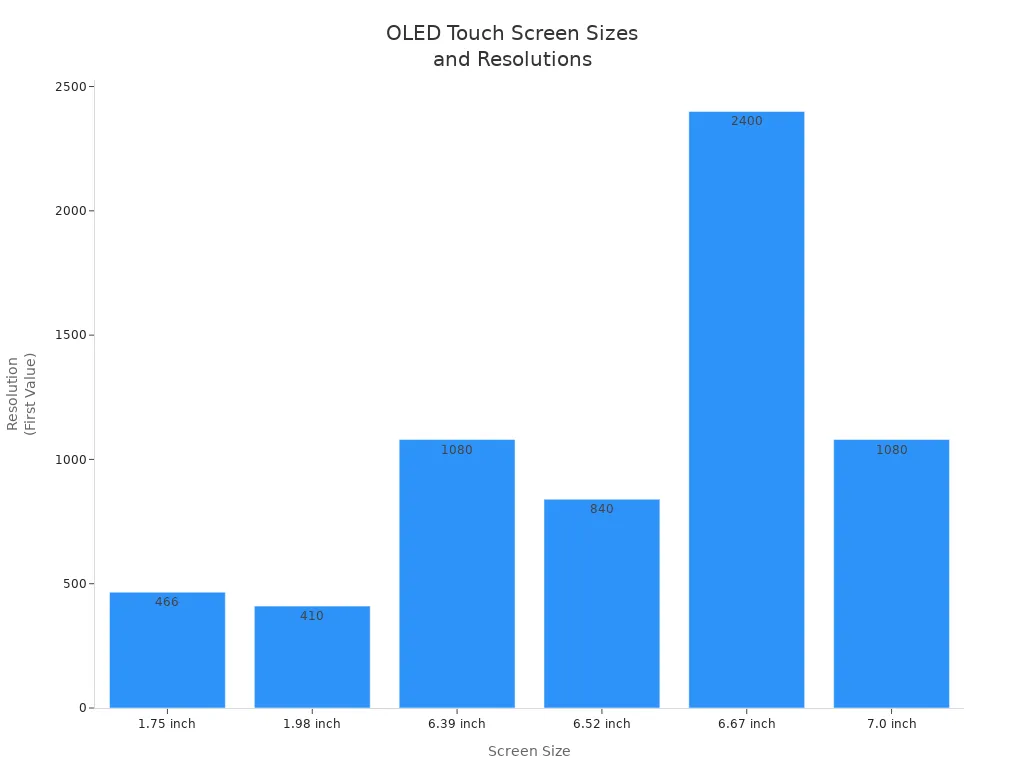
Here is a table with common screen sizes and resolutions for touch screen OLED displays:
Screen Size | Resolution |
|---|---|
6.67 inch | 2400×1080 |
6.39 inch | 1080×2340 |
1.98 inch | 410×502 |
6.52 inch | 840×2520 |
1.75 inch | 466×466 |
7.0 inch | 1080×1920 |
Tip: Pick a screen size that fits your device. Choose a resolution that makes your pictures and words look good. For medical devices you carry, both size and resolution are important.
Color Quality and Pixel Pitch
Color quality makes your display bright and easy to see. OLED displays show dark blacks and bright colors. This makes the screen look better. Pixel pitch is the space between each pixel. Smaller pixel pitch means more pixels in the same spot. This makes images look sharper.
Pixel Pitch | Pixels per Square Meter | Visual Clarity |
|---|---|---|
P1.2 | 694,000 | Sharp |
P10 | 10,000 | Fuzzy |
Smaller pixel pitch means higher resolution.
More pixels make images look clearer.
How far you are from the screen changes how sharp it looks.
Bright colors and high brightness use more battery. If you want your device to last longer, you need to balance color and power.
Factor | Description |
|---|---|
Color Quality | Bright colors and deep blacks use more power, especially when the screen is very bright. |
Refresh Rate | Faster refresh rates look smoother but use more energy. |
Features | Touch sensitivity and extra sensors can use more power. |
Note: If your device will be outside or needs to be very bright, you may need to use more power for better color and clarity.
Driver IC and Interface Compatibility
The driver IC helps your touch screen oled display work. It connects the display to your main board and sends signals. You need to make sure the driver IC matches your system’s voltage and interface. Some common interfaces are LVDS, MIPI, and SPI. If you pick the wrong one, your display might not work.
Check your device’s main board for the right interface.
Make sure the driver IC works with your display’s resolution and speed.
For cars or factories, check if the display meets special rules.
Criteria | Details |
|---|---|
Interface Compatibility | Match the interface (LVDS, MIPI, etc.) to your system. |
Customization Capability | Some companies can change the size, shape, or controller board for you. |
Certification | For cars, look for AEC-Q100 or other rules. |
Tip: Always read the datasheet for voltage, interface, and driver IC before you buy.
Durability and Temperature Range
Durability is important if your device will be in tough places. You need to check the display’s temperature range, water resistance, and if it can handle bumps. Industrial displays usually work from -20°C to +70°C. Car displays may need to work from -40°C to +85°C.
Industrial displays work from -20°C to +70°C or more.
Car displays work from -40°C to +85°C for all weather.
Outdoor displays need to be tested for sun, rain, and dust.
Tests include hot and cold, scratch resistance, and bumps.
Callout: If your device will be outside, ask about sun tests, water resistance, and how strong the display is.
Quick Checklist for Matching Display Specs to Your Project
Does the screen size fit your device?
Is the resolution good for your content?
Does the color quality look nice?
Is the pixel pitch small for sharp images?
Does the driver IC match your system?
Can the display handle your device’s temperature range?
Has the display passed tests for your environment?
Does the company offer changes and help?
If you check these things, you can pick a touch screen oled display that works well for your project.
Tips for Choosing the Right Touch Screen OLED Display
Matching Features to Needs
You need to pick features that fit your project. First, decide what your display will do. Think if you need high resolution or fast touch. Maybe you need it to be tough. Pick the right display type for your job. Make your layout simple with a grid. This helps users touch buttons easily. Try your display in real places. Get feedback and make changes.
Here are steps you can follow:
Pick the display type that fits your needs.
Make the layout easy for users.
Test the display in different places.
Use the display and check how it works.
Tip: For industrial jobs, check what your project needs. Look at where it will be used. Work with vendors who help and can change things for you.
Best Touch Screen OLED Displays for 2026
If you want new technology, look for displays with high brightness. They should use less power and have strong touch. Experts like AMOLED panels with capacitive touch. Wide temperature ranges are good too. These displays work well for both home and work devices.
Common Mistakes
People often make mistakes when picking a display. You can learn from others and avoid these errors. Here is a table of mistakes and ways to fix them:
Common Mistakes | Solutions |
|---|---|
Choosing by price only | Look at total cost, including fixing and how long it lasts. |
Picking the wrong screen size | Use formulas to find the best size for viewing. |
Not thinking about the environment | Check the place and all conditions before picking hardware. |
Forgetting about accessibility | Make your design easy for everyone by following standards. |
Not planning for warranty and support | Pick vendors with good warranties and quick help. |
Do not pick just by price. Do not ignore the optical stack. Do not wait too long to know what users need. Always check supplier quality. Plan for network needs early.
Final Checklist
Before you pick a touch screen oled display, check this list:
Resolution and display quality
Portability and durability
Touchscreen responsiveness
Speed and memory performance
Battery life and charging
Display size and how easy it is to use
Extra features like stylus or connectivity
Note: If you use these tips and check this list, you will pick a display that fits your project and lasts a long time.
You can pick the right display by using easy steps. First, choose the display size, color, and resolution for your project. Then, check where the device will be used and how people use it. Use the checklist to compare things like power use, speed, and strength. Here is a table to help you see the main differences:
Technical Factor | OLED Features | LCD Features |
|---|---|---|
Display Effect | Deep blacks and strong contrast | Weaker blacks and less contrast |
Color Reproduction | Bright colors | Real colors in sunlight |
Response Speed | Very quick | Not as fast |
Power Consumption | Uses less power in dark mode | Uses less power with bright screens |
Structural Stability | Thin and bendy | Thick and strong |
Eye Protection | Might flicker when dim | No flicker |
Cost | Costs more | Costs less |
Remember: If you use the checklist and tips, you can find the best touch screen oled display for your project.
FAQ
What makes OLED displays better than LCDs?
OLED displays give you deeper blacks and brighter colors. You get faster response times and thinner screens. OLEDs also use less power in dark mode. LCDs cost less, but OLEDs look better and save energy.
How do I choose the right screen size for my project?
You should think about how people will use your device. Pick a size that fits your design and lets users see and touch everything easily. Test different sizes with your team or users before you decide.
Can OLED touch screens work outdoors?
Yes, you can use OLED touch screens outdoors. Choose a display with high brightness and a wide temperature range. Ask your supplier about sunlight readability and water resistance for outdoor use.
What are common mistakes when picking a touch screen OLED display?
Many people pick by price only or forget about the environment. Some choose the wrong size or ignore support and warranty. Always match the display to your project needs and test it in real conditions.
See Also
Enhance Your Project With These OLED Display Tips
Selecting The Ideal LCD Round Display For 2025 Projects
Evaluating Top Transparent OLED Displays Available In 2025
