Choosing the Best Touch Screen Stretched Bar LCD Display for Your Needs
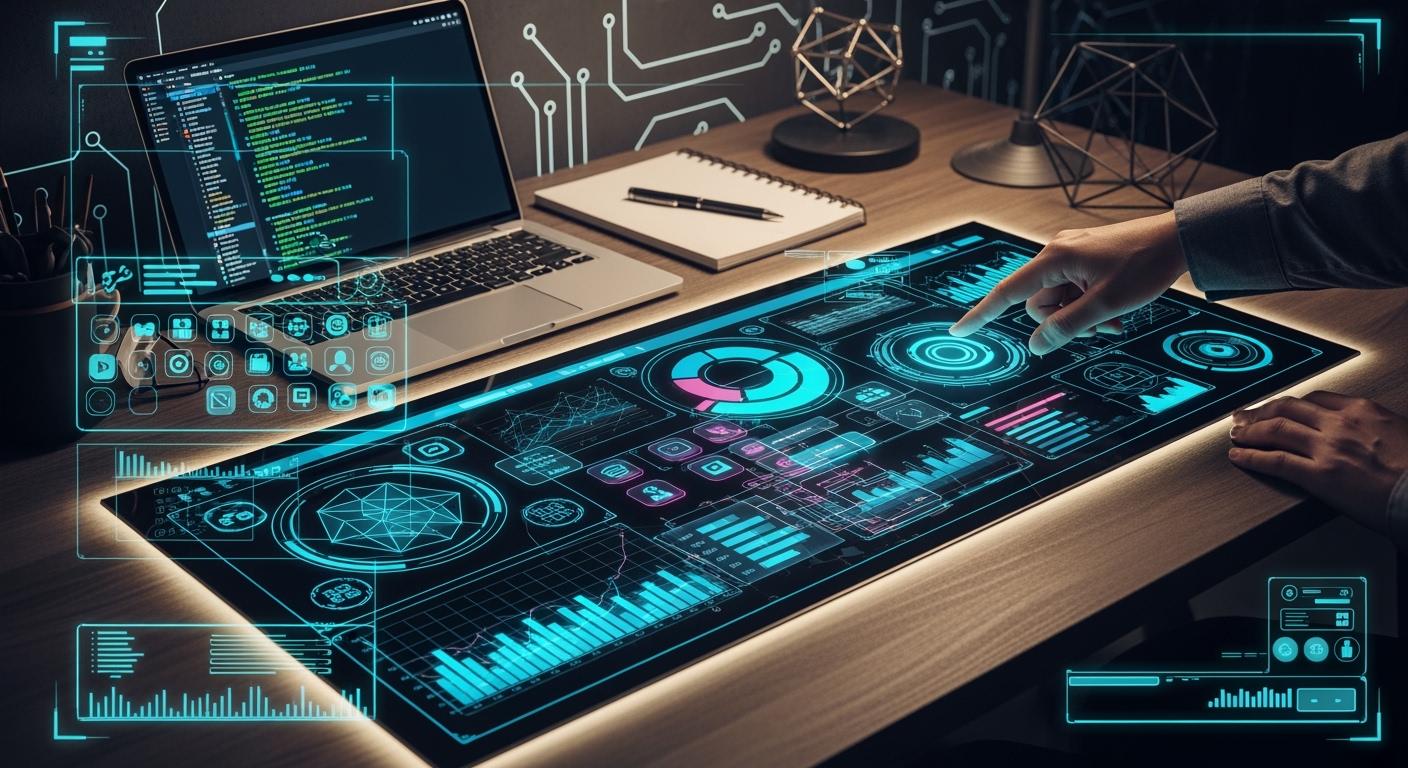
You want the right touch screen stretched bar lcd display for your project, but knowing where to start can feel tricky. Think about what you need most—do you want a screen for a shelf, a bus, or a digital sign? Ultra-wide and high-brightness displays have changed the game, fitting tight spaces and showing clear images for ads or information. These displays also help businesses save money due to their energy efficiency. The market keeps growing, with bar-type displays expected to reach over 788 million USD by 2032. Focus on display quality, resolution, and build strength to get the best results.
Shenzhen TopAdkiosk Display Technology Co., Ltd.
Add.: 2F, Bldg 10, Changfeng Industrial Park, Dongkeng, Fenghuang, Guangming, Shenzhen, China 518132
Mobile/WHATSAPP: 86-138 25769658
Email: marketing@topadkiosk.com topadkiosk@gmail.com
Skype: pghenry1
Wechat: adkioskhenry
English Web.: http://www.topadkiosk.com/
https://www.topkioskdisplay.com/
http://www.ad-kiosk.com/
https://www.toplcddisplay.com/
http://www.multitouchdigitalsignage.com/
https://www.youtube.com/channel/UCYVYNJHxLVEcQD8fuUxXNTA/videos?view_as=subscriber
https://www.facebook.com/TOPADKIOSKSHENZHEN/?ref=bookmarks
Key Takeaways
Think about where you will use the display and why you need it. Decide if you want a screen for stores, buses, or signs.
Pick the size and shape that fits best. Ultra-wide screens work well in small spaces and help people see ads and info better.
Focus on resolution and brightness. A higher resolution makes pictures look sharp. Bright screens (1000-2000 nits) are easier to see in sunlight.
Find displays that are strong and can handle weather. Tough screens last longer, especially outside or in busy places.
Check how the display connects to other devices. Make sure it works with HDMI, USB, and Wi-Fi so you can use it easily.
Key Features of Touch Screen Stretched Bar LCD Display
When you pick a touch screen stretched bar lcd display, you want to know what makes each one different. These displays use advanced display technology. They fit into small spaces and show clear, bright images. You can find them in stores, buses, and airports. They are long and slim. Many are interactive too. Let’s look at the main features you should check before buying.
Size and Aspect Ratio
Size and aspect ratio are very important. The best size depends on where you will use your display. Here are some common choices:
32:9 Stretched Screen
Good for shelf-edge displays or digital signs in tight spots.
48:9 / 49:9 Ultra Wide Stretched Screen
These are even longer and slimmer. They are great for showing information or ads.
Custom Aspect Ratios
Some companies make custom sizes for special needs.
Tip: Ultra-wide aspect ratios like 16:3 and 32:9 fit well in narrow places. They work well for retail shelves or signs in buses and trains.
Here is how different industries use these displays:
Industry | Use Case | Example |
|---|---|---|
Retail | Shelf-edge pricing and promotions | Supermarkets, convenience stores |
Transportation | Timetables and passenger info | Train stations, airports |
The long bar shape fits small or special spaces. High brightness and clear images help your message stand out, even in bright places.
Resolution and Visual Quality
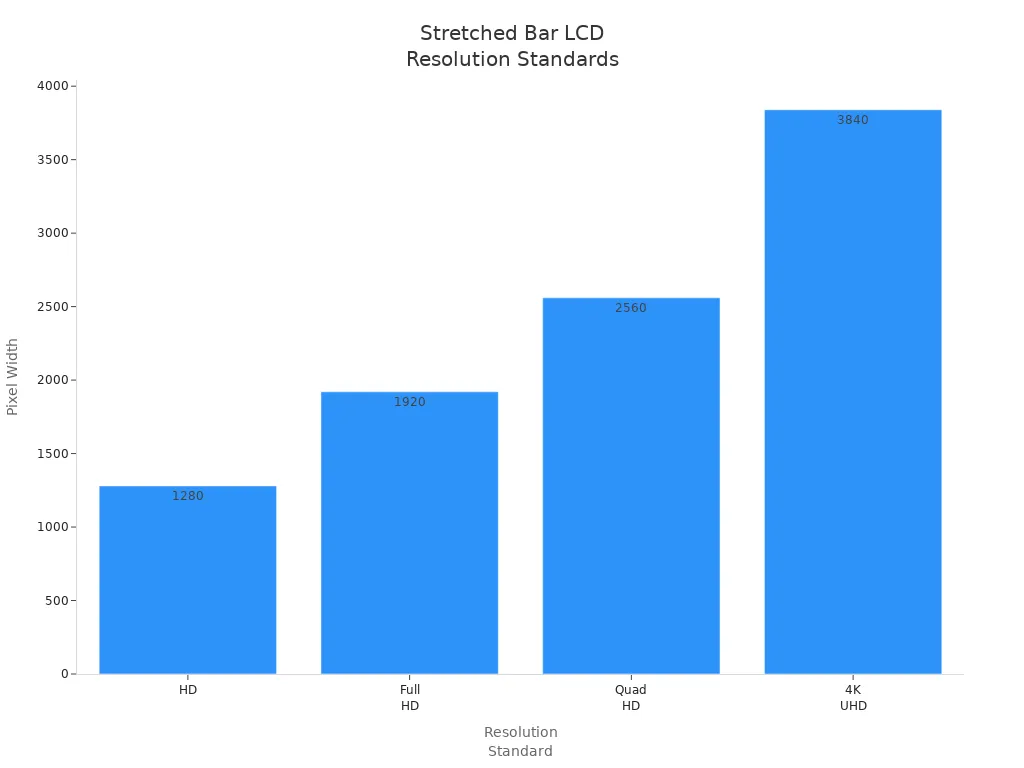
Resolution shows how sharp and clear your images will be. Higher resolution means better visual quality. Here is a table to help you compare:
Resolution Standard | Resolution (Pixels) | Impact on Visual Quality |
|---|---|---|
HD | 1280×720 | Good for basic displays and simple tools |
Full HD | 1920×1080 | Balances detail for dashboards and graphics |
Quad HD | 2560×1440 | Great for detailed inspections and better zoom |
4K UHD | 3840×2160 | Best for large displays and high-quality feeds |
If you use your touch screen stretched bar lcd display outside or in bright places, think about brightness and color accuracy. High brightness (1000–2000 nits) makes your screen easy to see in sunlight. Good color accuracy helps your content look bright and clear. Some displays have anti-glare coatings for better use outside.
Feature | Standard LCD | High Brightness LCD |
|---|---|---|
Brightness (nits) | 250–350 | 1000–2000 |
Readability in Sunlight | Limited | Excellent |
Color Uniformity | Moderate | High |
Touch Responsiveness
Touch technology changes how you use your display. You want a screen that reacts fast and is accurate. Here is a quick comparison:
Touch Technology | Responsiveness | Accuracy |
|---|---|---|
Capacitive (PCAP) | High | High |
Resistive | Moderate | High |
Capacitive touch screens react quickly and are very precise. They are good for interactive displays.
Resistive touch screens cost less and are still accurate, but they may feel slower.
When you use a touch screen stretched bar lcd display for digital signs, you want it to react right away. Multi-point touch lets more than one person use the screen at the same time. You get instant feedback, which makes using the screen easy and fun.
Connectivity
You need the right connections to use your display with other devices. Most touch screen stretched bar lcd displays have several options:
Connectivity Type | Description |
|---|---|
HDMI | High-definition video and audio, works with most modern devices |
VGA | Good for older devices, adds flexibility |
USB | Lets you connect peripherals or play media easily |
Wi-Fi | Access online content and manage displays remotely |
Ethernet | Stable network connection for reliable content delivery |
Note: Advanced features like remote management and IoT integration let you control many displays from one place. You can update content automatically and connect to live data for real-time updates.
Build Quality and Durability
You want your display to last, especially in busy or outdoor places. Look for strong build quality and features that protect your display:
Feature | Specification |
|---|---|
IP Rating | IP54 or IP65 |
IK Rating | IK08+ |
Operating Temperature Range | -30°C to +70°C |
Extra Protection | Anti-glare, UV-resistant, thermal management |
Some touch screen stretched bar lcd displays can handle vibration and shock. This is important for moving vehicles. These features help your display last longer and need fewer repairs.
When you choose a touch screen stretched bar lcd display, focus on the features that fit your needs. Think about where you will use it, how bright the space is, and how much you want people to interact with it. The right display technology will help you get the best results for your project.
Comparing Top Monitors
Choosing the right monitors can feel overwhelming. You see so many options, but not all monitors work the same way. Let’s break down what makes some monitors stand out and help you find the best monitors for your needs.
Model Highlights
You want monitors that fit your space and purpose. Some monitors use non-standard aspect ratios. This means they can fit into narrow spaces, like above shelves or on a bus. Precision cutting technology helps create these custom shapes.
Here’s a quick look at what sets top monitors apart:
Feature | Description |
|---|---|
Non-Standard Aspect Ratio | Custom shapes fit tight or unique spaces. |
High Brightness & Anti-Glare | Bright screens (500–700 cd/㎡) stay clear, even in sunlight. |
Reliability | Built for 24/7 use. They resist dust, heat, and bumps. |
Installation Flexibility | Easy to mount in many ways. Great for stores, vehicles, or public spaces. |
Monitors with high brightness and anti-glare features work well in bright places. You can see the screen clearly, even if sunlight hits it. Some monitors also offer advanced connectivity. You can connect them to Wi-Fi, Ethernet, or USB. This makes it easy to update content or link several monitors together.
Monitors now use touchscreen technology more often. This lets people interact with the screen. In stores, customers can tap to learn more about products. In airports, travelers can check flight info with a touch.
Energy efficiency matters too. Some monitors use less power, which can lower your bills by about 20%. If you run many monitors, this adds up fast.
Strengths and Weaknesses
Every monitor has good points and weak spots. You want to know what to expect before you buy.
Feature | Description |
|---|---|
Color Accuracy | Some monitors show bright, bold colors. Others look more neutral. Test them in your space to see what looks best. |
Brightness | Not all monitors are equally bright. High brightness helps in sunny spots. |
Resolution | High resolution means sharp images. This is great for graphics, but can cause glare if the screen is too shiny. |
Monitors with high durability last longer. They work well outdoors or in busy places. You do not need to worry about dust or bumps as much. Compared to regular screens, stretched bar monitors are tougher. They need the same cleaning, but rugged models handle rough use better.
Here’s a quick comparison:
Feature | Stretched Bar LCD Monitors | Traditional LCD Monitors |
|---|---|---|
Durability | Very strong, handles tough spots | Needs more care |
Maintenance | Clean and check for problems | Clean and check for problems |
Best Place | Outdoors, busy areas | Indoors, calm places |
Monitors need regular cleaning. Keep them safe from water and dust. Check for pixel problems sometimes.
Tip: If you want monitors for outdoor use, pick ones with high durability and anti-glare screens.
Professional Applications
Monitors come in many shapes and sizes. Each type works best in certain places. Here’s how different jobs use stretched bar monitors:
Application Area | Key Features |
|---|---|
Shows prices, tells brand stories, splits the screen for more info. | |
Public Transportation (PIS) | Displays maps, ads, and guides people where to go. |
Industrial HMI & Automation | Gives a wide view of data, helps workers react fast and stay safe. |
Gaming & Casino | Shows game buttons, flashes jackpot wins to grab attention. |
You see these monitors in many places:
Digital signage grabs your eye in malls and airports.
Transportation systems use monitors for maps and schedules.
Wayfinding monitors help you find your way in big buildings.
Menu boards and retail displays show deals and products.
Monitors in airports, train stations, and bus terminals give real-time info. You can see schedules and safety messages from far away. Retail stores use monitors to show sales and product details. They put them at checkout or in windows to catch your eye.
The market for these monitors grows fast. People want high brightness and sharp images. But you need to balance cool features with your budget. Sometimes, the newest monitors cost more at first.
When you compare monitors, think about where you will use them. Do you need bright screens for sunlight? Do you want people to touch and interact? Do you need strong monitors for busy places? Answering these questions helps you pick the right monitors for your project.
Use Cases
Retail and Shelf-Edge
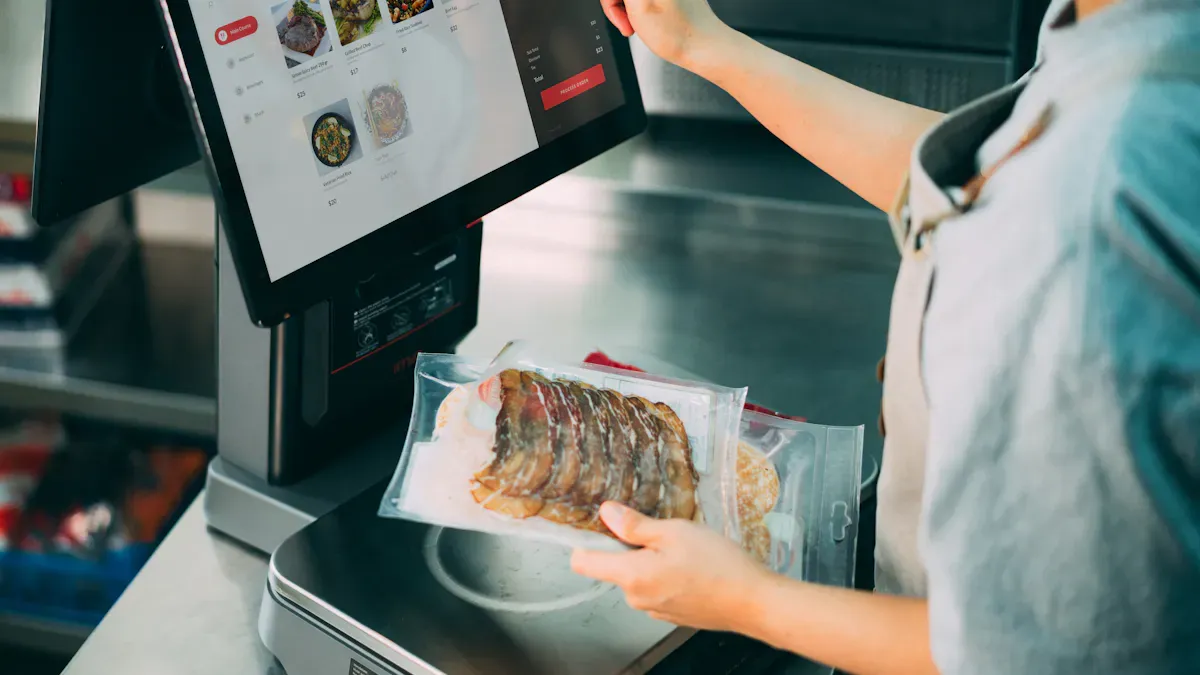
Touch screen stretched bar LCD displays are common in stores. They sit on shelf edges and grab your attention fast. These screens show prices that change right away. You can see promotions and discounts as soon as they happen. Some screens have QR codes for scanning. You scan them to get more info or deals. Multi-zone menus let you see different products and nutrition facts. The slim shape fits shelf rails without blocking anything.
Here’s a table showing how stores use these displays:
Use Case | Description |
|---|---|
Prices change quickly to attract shoppers. | |
Promotions | Special offers pop up to boost sales. |
QR Codes | Scan for extra product info or exclusive deals. |
Multi-zone Menus | See options and nutrition in a neat layout. |
Shelf Edge Display | Fits shelves without hiding products. |
You might see portable monitors in stores, too. Staff use them to update displays fast. Gaming monitors sometimes show demos or games for customers.
Transportation
Touch screen stretched bar LCD displays help make travel easier. You find them on buses, trains, and in stations. These screens show route info, schedules, and maps. You never miss your stop because the display updates quickly. Airports and stations use these screens for ads and announcements. The slim design fits tight spaces, like above doors or along walls.
Here’s a table for transportation uses:
Application Area | Description |
|---|---|
Shows routes and stops on buses, trains, and streetcars. | |
Advertising Displays | Runs ads in airports, bus stations, and train stations. |
Portable monitors help staff manage info on the go. Gaming monitors sometimes entertain passengers during long rides.
Digital Signage
Digital signage is better with stretched bar LCD displays. You see them in malls, offices, and outside. These screens show ads, product info, and directions. The ultra-wide shape stands out and grabs your eye. High resolution makes pictures sharp and bright. Energy-efficient designs save money on electricity. The slim bezel looks modern and fits small spaces.
You can install these screens in landscape or portrait mode.
The slim shape works well where space is tight.
The ultra-wide format draws attention for ads and info.
Portable monitors let you move displays for events or pop-up shops. Gaming monitors sometimes run interactive ads or games to engage people.
Tip: If you want your message to stand out, use a stretched bar LCD display. The shape and brightness make your content pop.
Price and Performance
When you buy stretched bar LCD monitors, you want a good deal. You also want monitors that fit what you need. Some people care most about price. Others want special features or comfort. Let’s look at three main groups of monitors.
Budget Options
If you want to spend less, budget monitors are a smart choice. These usually cost between $200 and $600. They have screens smaller than 40 inches. The resolution is 1080p, and brightness is 500 to 800 nits. Most have a one-year warranty. You still get decent comfort, but check if they fit your space. Look at how deep they are and how wide the edges are. These work well for simple digital signs or shelf displays.
Tier | Price Range | Size | Resolution | Brightness | Warranty |
|---|---|---|---|---|---|
Budget | $200–$600 | Under 40in | 1080p | 500–800 nits | 1 year |
Tip: Pick monitors that fit your setup and have good ports like HDMI or USB.
Mid-Range Choices
Mid-range monitors cost $600 to $1,500. These are bigger, from 40 to 65 inches. The resolution can be 1080p or 4K. Brightness is over 1000 nits, so screens look bright. Most have a three-year warranty. They are more comfortable to use in busy places. You get more ways to set up your screen. You can see the screen from many angles. Some have touch screens too. These are great for stores, buses, and public areas.
Advantage | Description |
|---|---|
Fits tight spots, good for stores and transit. | |
Enhanced Visual Impact | Makes ads and info easy to see. |
Creative Flexibility | Lets you change layouts and update info fast. |
Wide Viewing Angles | Easy to see from different spots. |
Touch Functionality | Lets people use the screen by touching it. |
Premium Models
Premium monitors start at $1,500 and go higher. You can get special sizes and 4K or better resolution. They are bright enough for outdoor use. These often have longer warranties and are very comfortable to use. They work well in tough places and last a long time. If you need screens for outside, airports, or busy spots, these are the best. They have the most features and last the longest.
Tier | Price Range | Size | Resolution | Brightness | Warranty |
|---|---|---|---|---|---|
Premium | $1,500+ | Custom sizes | 4K+ | Outdoor-ready | Extended |
Note: Premium monitors often have special coatings and strong cases to last longer and stay comfortable.
The right monitor depends on your budget, your space, and how much comfort you want. Think about what is most important to you. Then you can pick the best monitor for your needs.
User Reviews
Positive Feedback
You might want to know what others think before buying. Many people say stretched bar LCD displays help them at work. They like the high resolution and clear images. Text and pictures look sharp, so it is easy to read. These monitors are strong and last a long time. They work well in busy places and outside. You can use them in tough spots, and they keep working.
Here’s a table showing what users like most:
Positive Aspect | What Users Say |
|---|---|
High Resolution and Image Clarity | "Images look sharp and clear. I can read everything easily." |
Durability and Reliability | "These monitors last a long time, even in busy stores." |
Flexible Installation Options | "I can mount my monitors anywhere—above shelves or on walls." |
Energy Efficiency | "My electricity bill went down after switching to these monitors." |
Enhanced Connectivity and Control | "I connect my monitors to Wi-Fi and update content from my desk." |
Customization and Adaptability | "I can change the look and size to fit my brand." |
Applications Across Industries | "I use these monitors in retail and my friend uses them in transportation." |
These monitors help you get more done each day. You can manage information and work faster with them.
Common Issues
Not everyone has a perfect experience. Some people notice a few problems with these monitors. You might see glare if sunlight hits the screen and there is no anti-glare. The touch screen can be slow if your hands are wet or you wear gloves. Some users say setup takes a while, especially with many monitors.
Here are some common issues:
Glare happens in bright sunlight without anti-glare.
Touch response slows with gloves or wet hands.
Setup is hard for first-time users.
Some monitors need special mounts for odd spots.
If you plan ahead, you can avoid most problems. You can ask for help or read the manual to make setup easier.
User Tips
You can have a better time with a few easy tips. Put your monitors where people can see them well. Clean the screens often so images stay clear. Use remote control features to update content fast. Try different layouts to see what works best for your space.
Tip: Turn on energy-saving settings to save money and help your monitors last longer.
Test the touch screen with different tools. If you wear gloves, pick monitors that work with gloves. For outdoor use, choose monitors with high brightness and anti-glare. These steps help you get the most from your monitors and work better every day.
Durability and Lifespan
Longevity
When you pick monitors for your space, you want them to last. Good monitors can work for years, even in busy places. You might see them in stores, buses, or airports. These monitors handle bumps, dust, and sunlight. Some monitors have strong glass and tough frames. You do not need to worry about small accidents. If you use monitors outside, look for ones that can handle rain and heat. Some monitors work in very hot or cold weather. You can trust these monitors to keep showing clear images every day.
Monitors with high-quality parts last longer. They use better screens and strong cases. You get more value because you do not need to replace them often. Some monitors run all day and night without problems. If you want your monitors to last, choose ones made for heavy use.
Maintenance
Taking care of your monitors helps them work better and last longer. You do not need special tools. Just follow some simple steps. Here is a table to help you remember the best ways to care for your monitors:
Maintenance Practice | Description |
|---|---|
Proper Cleaning Techniques | Use soft cloths and gentle pressure. This keeps the screen safe from scratches. |
Dust Prevention Measures | Dust your monitors often. Air purifiers help keep dust away. |
Safe Handling Guidelines | Store monitors with covers. Keep them away from very hot or cold places. |
Environmental Control | Keep the room at a good temperature and humidity. Monitors work best this way. |
Tip: Clean your monitors once a week. Do not press too hard on the screen.
If you follow these steps, your monitors will stay bright and clear. You will not see dust or smudges. Monitors that get regular care break less often. You save money and time. When you treat your monitors well, they keep working for you.
When you pick monitors, think about size, brightness, and how you want to use them. For a tight budget, choose basic monitors that still show clear images. If you need monitors for busy stores or outdoor spots, go for tough, high-brightness monitors. Professionals should look for monitors with sharp visuals and easy touch controls. Always check reviews and compare monitors before you buy. The right monitors help your message stand out every time.
FAQ
What is a stretched bar LCD display?
A stretched bar LCD display is a long, slim screen. You often see it on shelves, in buses, or as digital signs. It shows clear images and fits in tight spaces.
Can I use these displays outdoors?
Yes, you can! Just pick a model with high brightness and weather protection. Look for features like anti-glare and a strong case. These help your display work well outside.
How do I clean my touch screen display?
Use a soft, dry cloth. Gently wipe the screen. Do not use harsh cleaners or spray water directly. If you need, use a little screen-safe cleaner.
What connections do these monitors support?
Most stretched bar LCD displays support HDMI, USB, and sometimes Wi-Fi or Ethernet.
Tip: Check your device’s ports before you buy to make sure everything matches.
See Also
Selecting The Ideal LCD Round Display For Your 2025 Project
Best LCD Kiosks With Touch Screen Features Available In 2026
Finding The Perfect LCD Rack Monitor For Your Requirements
Leading LCD Display Screen Brands For Your Upcoming Project
Selecting The Right LCD Kiosk Installation Service In Your Area
