The 7 Best Touch Screen Coffee Tables for Modern Living Rooms
Shenzhen TopAdkiosk Display Technology Co., Ltd.
Add.: 2F, Bldg 10, Changfeng Industrial Park, Dongkeng, Fenghuang, Guangming, Shenzhen, China 518132
Mobile/WHATSAPP: 86-138 25769658
Email: marketing@topadkiosk.com topadkiosk@gmail.com
Skype: pghenry1
Wechat: adkioskhenry
English Web.: https://www.topkioskdisplay.com/
http://www.ad-kiosk.com/
https://www.toplcddisplay.com/
http://www.multitouchdigitalsignage.com/
https://www.youtube.com/channel/UCYVYNJHxLVEcQD8fuUxXNTA/videos?view_as=subscriber
https://www.facebook.com/TOPADKIOSKSHENZHEN/?ref=bookmarks

Here are the 7 best touch screen coffee tables for 2026:
Jigabyte Touch Screen Coffee Table
Sobro Smart Coffee Table
TableConnect Interactive Coffee Table
TouchTable Pro
Lumi Smart Coffee Table
VividTouch Coffee Table
UrbanEdge Touch Screen Table
These tables do more than just hold things. They have smart controls and wireless charging. They look cool and have secret storage spots. More people want these tables every year. Look at these numbers:
Year | Market Size (USD) | CAGR (2026-2033) |
|---|---|---|
2025 | 15.8% |
This guide helps you see what each table offers. It makes it easier to pick the right one for your room.
Key Takeaways
Touch screen coffee tables look nice and work well. They are great for modern living rooms. These tables have smart features like wireless charging. They also have Bluetooth speakers and built-in storage. These things make life easier. Picking the right size and features for your room helps you feel comfortable. It also makes the table easy to use. Smart coffee tables are popular with people who like technology. Millennials and Gen Z like furniture that does many things. Think about your daily needs before you pick a smart coffee table. This helps you find one that fits your routine.
Why Choose a Touch Screen Coffee Table?
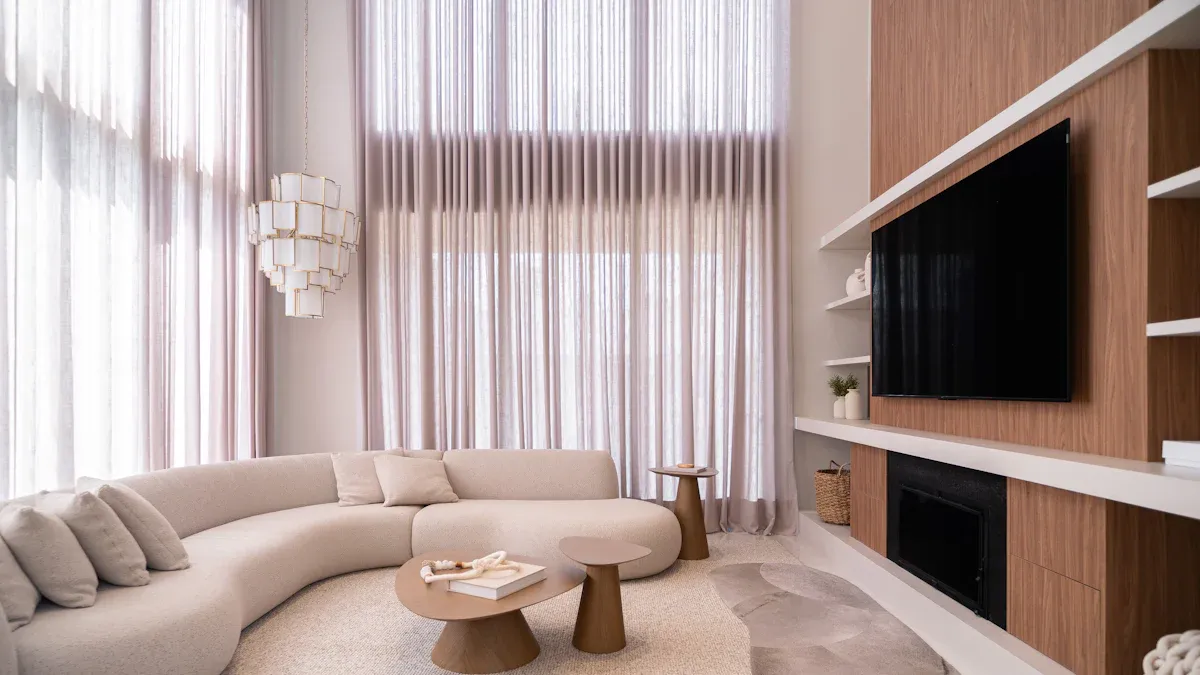
Benefits for Modern Living Rooms
You want your living room to feel modern and comfortable. Smart coffee tables help you do that. These tables fit right in with your busy life. You can use them for work, play, or relaxing with friends. Many people, especially Millennials and Gen Z, love smart coffee tables. Tech-savvy users also find them useful. Take a look at who is most likely to buy these tables:
Demographic Group | Likelihood to Purchase Touch Screen Coffee Tables |
|---|---|
Millennials | High |
Gen Z | High |
Tech-savvy Users | High |
U.S. Households Using Smart Devices |
Smart coffee tables offer more than just a place to set your drink. They combine style and function. You can use them as a dining table or a workspace. They save space and make your room look neat. Here are some benefits:
Benefit Type | Description |
|---|---|
Works as a coffee table and dining table for different needs. | |
Space-Saving Solution | Perfect for small rooms, so you don’t need extra furniture. |
Integration of Technology | Brings smart features that make your home more comfortable and stylish. |
Tip: If you live in a small apartment, a smart coffee table can help you maximize every inch.
Smart Features and Daily Use
Smart coffee tables make your daily routine easier. You can control music, lights, and even the temperature right from the table. Some models, like the Pico Touch Coffee Table, let you run apps for work or entertainment. You can watch movies, play games, or check emails without leaving your seat.
Here are some smart features you’ll find in many smart coffee tables:
Built-in refrigerator keeps drinks cold.
Bluetooth speakers give you great sound for movies and music.
Wireless charging lets you power up your phone without messy cords.
USB ports help you charge more devices at once.
LED lighting sets the mood and makes your room look cool.
Smart coffee tables connect with your smart home devices. You can adjust settings with a touch panel. Change the lighting, control the volume, or manage other smart gadgets in your home. Smart coffee table technology lets you personalize your living space and enjoy a connected lifestyle.
If you want a table that does more than just sit in your living room, smart coffee tables are the way to go. You get style, convenience, and smart features all in one.
How We Selected the Best Smart Coffee Tables
Criteria: Design, Functionality, Durability
When you look for the best smart coffee tables, you want something that fits your space and your life. We checked each table for design, how well it works, and how long it will last. You want a table that looks good and feels right in your living room. We made sure each table uses strong materials, like thick glass and sturdy frames, so you can trust it for years.
We also looked at the tech inside. You want a smart table with a bright screen, fast processor, and enough memory for smooth use. We checked for features like a full HD display, at least 8GB of RAM, and a tough glass top. Each table needs to handle daily life, so we picked ones that can hold over 300 pounds and have water resistance. You can see how these features matter in the table below:
What We Checked | Why It Matters |
|---|---|
Strong materials | Lasts longer and stays safe |
Bright, clear display | Easy to see and use every day |
Fast processor & memory | Smooth smart features and apps |
Water resistance | Handles spills and daily messes |
Features: Storage, Connectivity, Price
You want your smart coffee table to do more than just look cool. We picked tables with storage for your stuff, like remotes and chargers. Many smart tables have hidden drawers or shelves, so your living room stays neat. We also checked for smart features like wireless charging, USB ports, and Bluetooth speakers. These make your table work for both fun and work-from-home needs.
Price matters, too. We compared what you get for the money. Some tables cost more, but they offer better smart features or more storage. We read lots of reviews to see what real people think. We also tested how easy it is to set up and use each table. Our reviews focus on value, so you get the most for your budget.
Tip: If you live in a small space, a smart coffee table with storage and good connectivity can make your room feel bigger and more organized.
We picked these tables after reading expert reviews, checking user feedback, and comparing the top models. You can trust our reviews to help you find the right smart coffee table for your home.
Top Touch Screen Coffee Tables for 2026

Jigabyte Touch Screen Coffee Table
This table looks cool and futuristic. The Jigabyte touch screen coffee table has a big HD screen. You can tap, swipe, and play games with friends. Families who like tech will enjoy this table. It stands out in any room.
Key Features:
43-inch full HD touch screen
Wireless charging pad for your devices
Built-in Bluetooth speakers
Hidden storage drawer
Water-resistant glass top
Pros:
Big, bright screen for movies and games
Easy to wipe clean
Great sound for music and videos
Cons:
Heavy, so it’s hard to move
Costs more than simple tables
Ideal User/Room Style:
This table is good for modern living rooms. It’s great for people who like game nights. It fits well in bright, open spaces.
Price Range:
$1,800 – $2,500
Sobro Smart Coffee Table
The Sobro smart coffee table is perfect if you want everything close by. It has a fridge, charging ports, and LED lights. This table makes your living room feel high-tech.
Key Features:
Refrigerator drawer for drinks and snacks
Dual USB charging ports
Bluetooth speakers
LED lighting with color options
Touch controls for music and temperature
Pros:
Keeps drinks cold and nearby
Many ways to charge your devices
Fun lights for parties
Cons:
Smaller touch screen than other tables
Needs to be near a power outlet
Ideal User/Room Style:
Great for apartments, dorms, or people who like to entertain. It fits well in small, modern rooms.
Price Range:
$1,200 – $1,600
TableConnect Interactive Coffee Table
This table feels like a giant tablet. The TableConnect interactive touch screen table has a huge 55-inch screen. You can use it for work, games, or movies. The design is sleek and modern, so it stands out.
Key Features:
Feature | TableConnect Interactive Coffee Table |
|---|---|
Touch Technology | Advanced multitouch capabilities |
Display Size | |
Design | Innovative and modern |
Connectivity | Wi-Fi and Bluetooth integration |
User Interface | Intuitive and customizable |
Pros:
Huge screen for group fun
Smooth multitouch for games and apps
Easy to connect with other devices
Cons:
Takes up more space than smaller tables
Costs more than most tables
Ideal User/Room Style:
Best for tech fans, families, or anyone who wants a cool centerpiece. It works well in big living rooms or creative spaces.
Price Range:
$3,000 – $4,500
TouchTable Pro
TouchTable Pro gives your home a professional look. It is strong and has a fast touch screen. You can use it for meetings, learning, or relaxing with friends. It is good for both work and fun.
Key Features:
Responsive touch screen for presentations and games
Multiple USB ports for charging
Durable frame for heavy use
Easy-to-clean surface
Pros:
Good for work and play
Great for group projects or family time
Simple to set up
Cons:
Not as stylish as some tables
Has fewer entertainment features
Ideal User/Room Style and Price Range:
Ideal User/Room Style | Price Range |
|---|---|
Business (conference rooms) | $1,000 - $2,000 |
Education (classrooms) | $1,000 - $2,000 |
Entertainment (retail spaces) | Up to $5,800 |
You will like this table if you need a reliable touch screen coffee table for work or school.
Lumi Smart Coffee Table
The Lumi smart coffee table makes your living room fun. You can play games, draw, or play chess with family. The table uses multi-touch for group activities. You can watch cooking videos, call for service, or connect with other tables. It mixes smart features and entertainment.
Key Features:
Interactive touchscreen for games and drawing
Multi-touch sensing for group activities
Smart ordering and service calling
Watch videos and connect with other tables
Pros:
Makes family time more fun and creative
Easy for all ages to use
Makes your home feel smart and connected
Cons:
Some features need Wi-Fi
Less storage than other tables
Ideal User/Room Style:
Best for families, kids, or anyone who likes interactive fun. It fits well in playful, modern rooms.
Price Range:
$1,500 – $2,200
VividTouch Coffee Table
VividTouch adds color and style to your room. It has a bright touch screen and cool LED lights. The table supports wireless charging and has USB ports for your gadgets. It’s a good pick if you want a table that pops.
Key Features:
40-inch HD touch screen
Customizable LED lighting
Wireless charging pad
Multiple USB ports
Sleek, modern design
Pros:
Fun lights for any mood
Charges devices quickly
Looks nice in any room
Cons:
Smaller screen than some tables
No built-in fridge
Ideal User/Room Style:
Great for young adults, gamers, or anyone who likes bright colors. It fits well in trendy apartments or media rooms.
Price Range:
$1,000 – $1,700
UrbanEdge Touch Screen Table
UrbanEdge is made for city homes. It is a small touch screen coffee table with wireless charging and Bluetooth speakers. The table has hidden storage for remotes and magazines. It is easy to move and fits in small spaces.
Key Features:
Compact touch screen display
Wireless charging and USB ports
Bluetooth speakers for music
Hidden storage compartments
Pros:
Saves space in small rooms
Keeps your devices charged
Simple, modern look
Cons:
Smaller screen size
Basic smart features
Ideal User/Room Style:
Great for city apartments, studios, or minimalist homes. You will like it if you want a smart table that does not take up much space.
Price Range:
$900 – $1,300
Tip: Pick the touch screen coffee table that fits your style and needs. Each table has something special for your home.
Comparison Table: Touch Screen Coffee Tables
Specs and Features Side-by-Side
You want to see how these smart coffee tables stack up. Here’s a quick look at the main specs and features for each top model. This table helps you compare what matters most—screen size, brightness, sound, and more.
Model | Screen Size | Resolution | Brightness (cd/m²) | Contrast Ratio | Audio Output | Power Max | OS Options | Special Features |
|---|---|---|---|---|---|---|---|---|
Jigabyte | 43" | 1920×1080 | 300 | 1500:1 | 5W, 8Ω | 100W | Android/Windows | Wireless charging, storage |
Sobro | 21.5" | 1920×1080 | 300 | 1000:1 | 5W, 8Ω | 60W | Android/Windows | Fridge, LED, USB ports |
TableConnect | 55" | 1920×1080 | 350 | 2000:1 | 5W, 8Ω | 150W | Android/Windows | Huge screen, multitouch |
TouchTable Pro | 32" | 1920×1080 | 300 | 1200:1 | 5W, 8Ω | 80W | Android/Windows | USB ports, durable frame |
Lumi | 32" | 1920×1080 | 300 | 1200:1 | 5W, 8Ω | 80W | Android/Windows | Multi-touch, games, video |
VividTouch | 40" | 1920×1080 | 300 | 1500:1 | 5W, 8Ω | 100W | Android/Windows | LED lights, wireless charging |
UrbanEdge | 21.5" | 1920×1080 | 300 | 1000:1 | 5W, 8Ω | 60W | Android/Windows | Compact, storage, Bluetooth |
Tip: If you want the brightest screen and highest contrast, TableConnect stands out. If you need a table with a built-in fridge, Sobro is your best bet.
You can also check out this chart to see how brightness, contrast, and power use compare across different sizes:
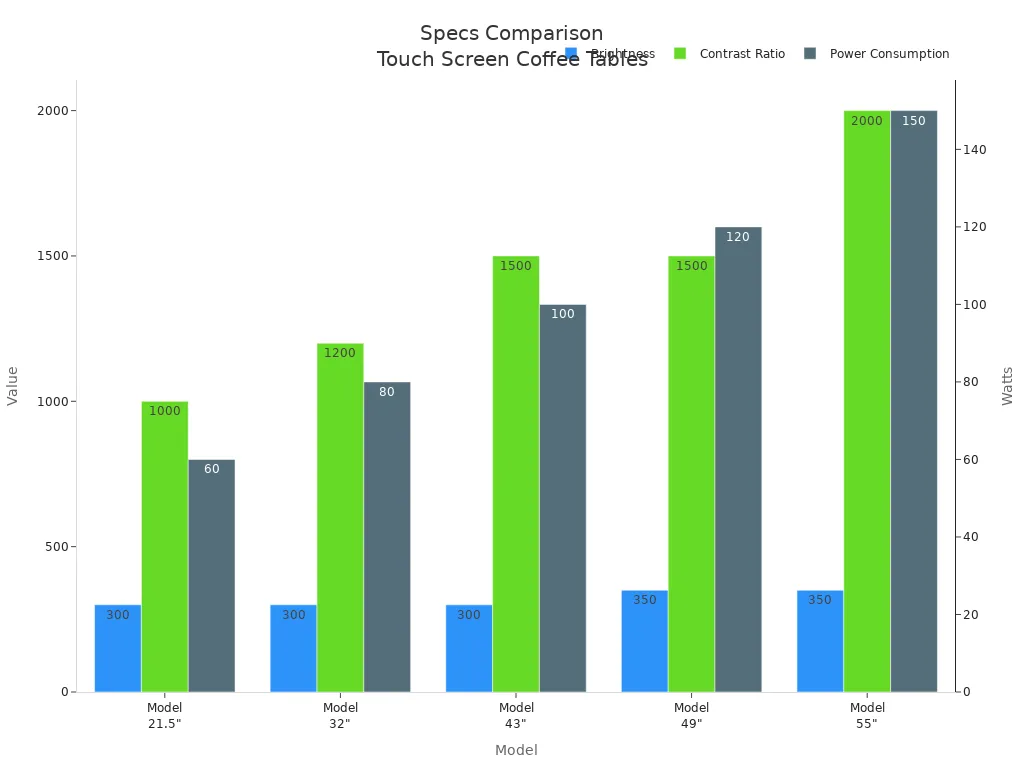
You don’t have to guess which table fits your needs. Use this table and chart to pick the right smart coffee table for your space and lifestyle.
Smart Coffee Tables: Buying Guide
Room Size and Table Dimensions
You want your living room to feel open and comfortable. Picking the right size for smart coffee tables makes a big difference. Use these guidelines to help you choose:
Guideline | Description |
|---|---|
Make sure your table matches the size of your living room and seating area. | |
Size for Large Rooms | Go for a bigger table if you have a spacious room. It can become a statement piece. |
Size for Small Spaces | Choose a compact table or even two smaller tables for flexibility. |
Measure Your Space | Always measure before you buy. A table that’s too big can crowd your room. |
Table Length | Pick a table no more than two-thirds the length of your sofa. |
Table Height | Match the height to your sofa cushions or go one to two inches lower. |
Tip: A smart coffee table that fits your space will look better and work better for your daily life.
Choosing Features for Your Lifestyle
Think about how you use your living room. Do you work from home? Do you have kids who love to play games? Smart coffee tables come with features like wireless charging, Bluetooth speakers, and built-in fridges. If you have a busy family, look for tables with hidden storage and easy-to-clean surfaces. For work-from-home setups, pick a table with a large screen and USB ports. You can find smart coffee tables that fit your routine, whether you want to relax, work, or entertain.
Design and Style Tips
Smart coffee tables can match many home styles. Many models use a minimalist modern look, so they fit in with modern, industrial, or even simple home designs. A table with a clean finish can become the centerpiece of your room. Try to pick a color and shape that matches your sofa and other furniture. You can use a smart coffee table to add a touch of tech without making your space feel crowded.
Budget Considerations
You want to get the most for your money. Here are some things to think about before you buy:
Consideration | Description |
|---|---|
Cost | Look at the price tag and see what features you get. |
Maintenance | Think about the cost of repairs or updates for the technology. |
Security Concerns | If you use your table in a public space, check for privacy and security. |
Note: Smart coffee tables can cost more than regular tables, but you get more features and convenience.
You saw how touch screen coffee tables bring smart features, cool designs, and handy storage to your living room. If you want the best overall pick, go with TableConnect for its huge screen and multitouch fun. For the best value, Sobro stands out with its fridge and charging ports. Think about your space, style, and tech needs. Got questions or want to share your favorite? Drop a comment below! 😊
How to Build Your Own Touch Screen Coffee Table at Home
Turning your living room coffee table into a futuristic touch‑screen entertainment hub is a DIY project you can now accomplish with readily available tools. A DIY touch‑screen coffee table lets you experience your favourite Windows or Android apps and games in a whole new way – on a giant “tablet” surface.
Below are a few successful DIY examples and budget references to give you a quick idea of cost and outcome.
Project | Total Cost (USD) | Dimensions | Core Components | Highlights |
|---|---|---|---|---|
Low‑cost build | ~$650 | 108 x 65 x 46 cm | Old laptop, used 40″ TV, touch overlay | Affordable; use virtual touch panel to handle drink spills |
Ultra‑low‑cost build | ~$400 | – | Heavily uses used / idle electronics and reclaimed wood | Excellent budget control, emphasises sustainability |
Early classic build | ~$1,000+ | 80 x 80 cm | 32″ TV, custom touch screen, Android mainboard | Pioneering project that proved feasibility, but higher cost |
🛠️ Core Hardware Choices
The soul of a touch‑screen coffee table lies in smooth interaction and stunning visuals. Choosing the right core hardware is the first step to success.
Display – Your “Canvas”
The table is used horizontally, so viewing angles are less critical. A used TV from a thrift store or online marketplace (with scratches or cosmetic damage only – the panel must be intact) is a great budget choice. However, consumer TVs are not designed for 24/7 operation – if you plan to use your table as a primary computer for long hours, consider a more durable commercial display.Touch System – The Bridge from “See” to “Touch”
This is what turns a normal screen into a touch screen. You place a touch sensor over the screen.Infrared touch overlay – The DIY favourite. A thin frame with IR emitters and receivers creates an invisible grid of light beams across the screen. When you touch the screen, the beams are broken, and the position is calculated.
Capacitive / resistive touch film – You can also buy ready‑made USB touch films or controllers, but driver configuration can be more complex than an IR overlay.
The “Brain” – Processing Unit
The table needs a powerful brain to handle all processing.Old computer / laptop – An old but still functional laptop or Mini PC is a very cost‑effective choice. It has enough performance and avoids buying new hardware. Depending on your needs, you can run Windows 11 or Android.
🪚 Structure & Enclosure Design
A good internal system needs an attractive case that can withstand daily life.
Material & Safety – Do not use ordinary glass – it can shatter under uneven heat or stress. Use safety‑rated tempered glass or clear acrylic sheet (safer). For a natural look and easy workability, you can also use wood.
Design & Protection
Mounting structure – Consider a sliding drawer or a lift‑up platform so the screen can be hidden when not in use – improves aesthetics and safety.
Waterproofing – Coffee tables often encounter spilled drinks, so water resistance is important. You can leave a normal area on top for coasters and odds and ends, or design a “virtual desktop” / “normal table” mode switch to avoid accidental touches.
Ventilation – Electronics in an enclosed space generate heat. Make sure to design ventilation openings for the compartment that houses the computer and TV.
💻 Software Magic – Giving the Table Intelligence
Once the hardware is in place, software gives it true life.
Operating System – Choose based on your app needs.
Windows – Widest software compatibility; can run PC games and traditional applications.
Android (e.g., Android‑x86) – Designed from the ground up for touch interaction; huge library of touch‑optimised apps; feels more like a giant tablet.
User Interface – Designing a beautiful launcher for this “big toy” is very cool. You can also turn a few old Android phones into dedicated wireless touchpads, or use apps like Unified Remote to turn your phone into a multi‑function remote control for greater flexibility.
✅ Action Checklist
Plan and design – Visualise the final coffee table based on your budget and needs.
Collect components – Make a hardware list and patiently search online or in second‑hand markets.
Build and test – Before building the enclosure, connect the core hardware, install the OS, and make sure everything works.
Woodworking – If you have decent woodworking skills, build the case yourself; otherwise, ask a carpenter to help with final assembly.
I hope this guide inspires your DIY project! If you decide to try it and get stuck choosing an OS or matching hardware, feel free to come back and discuss further.
FAQ
Can you use a touch screen coffee table without Wi-Fi?
Yes, you can use basic features like the touch screen and charging. Some smart features, like streaming or updates, need Wi-Fi. You get the most out of your table when you connect it to the internet.
How do you clean a touch screen coffee table?
Use a soft, damp cloth for the screen and surface. Avoid harsh cleaners or too much water. For sticky spots, try a little mild soap. Always dry the table after cleaning.
Do smart coffee tables work with all phones?
Most smart coffee tables support wireless charging for popular phones like iPhone and Samsung. Check your phone’s compatibility with the table’s specs. You can also use USB ports for charging.
Is it hard to set up a smart coffee table?
No, setup is usually simple. You just plug it in and follow the on-screen instructions. Some tables have an app for easy setup. If you need help, check the manual or contact support.
What happens if the table gets wet?
Most tables have water-resistant surfaces. If you spill something, wipe it up right away. Don’t let water get inside the ports or electronics. For big spills, unplug the table and let it dry.
See Also
Discover The Essential Features Of Today's Touch Screen Kiosks
Uncover 10 Unexpected Applications For Touch Screen Kiosks In 2026
Leading 10 Firms Focused On Touchscreen Kiosks In 2026
Identifying LCD Kiosks With Touch Screen Features For 2026
Ratings Of Stunning High-Resolution LCD Kiosks For Exhibitions
