Comparing the Best Free Digital Signage Software for 2026

PosterBooking, PiSignage, and DigitalSigns.ai are great free digital signage choices for 2026. You want digital signage software that works well with your devices. It should be easy to set up. It should also have features that look professional.
Shenzhen TopAdkiosk Display Technology Co., Ltd.
Add.: 2F, Bldg 10, Changfeng Industrial Park, Dongkeng, Fenghuang, Guangming, Shenzhen, China 518132
Mobile/WHATSAPP: 86-138 25769658
Email: marketing@topadkiosk.com topadkiosk@gmail.com
Skype: pghenry1
Wechat: adkioskhenry
English Web.: http://www.topadkiosk.com/
https://www.topkioskdisplay.com/
http://www.ad-kiosk.com/
https://www.toplcddisplay.com/
http://www.multitouchdigitalsignage.com/
https://www.youtube.com/channel/UCYVYNJHxLVEcQD8fuUxXNTA/videos?view_as=subscriber
https://www.facebook.com/TOPADKIOSKSHENZHEN/?ref=bookmarks
Aspect | Description |
|---|---|
Compatibility | Lets you use many platforms and devices. This makes it easy for you to access. |
Ease of Use | Lets you manage and update screens easily. You do not need special training or skills. |
With these options, you can make, plan, and change content on many screens. This helps your messages stay new and interesting. |
Key Takeaways
Pick digital signage software that is simple to use. Make sure it is easy to set up. Find drag-and-drop editors and scheduling tools. These tools help you manage content easily.
Check if the software works with your devices. Most free digital signage works on many platforms. You can use Android, Windows, and smart TVs. This lets you use your current hardware.
Think about what you need before choosing software. Small businesses may like cloud-based options. These are quick to set up. Bigger groups may want on-premise solutions. These give more control.
Try open source digital signage for custom features. You can change features and save money. You need some technical skills for these options.
Test different platforms to see what works best. Begin with free plans to check features and support. Do this before paying for a plan.
Criteria for Choosing Free Digital Signage
Essential Features
You want digital signage software that is simple to use. Look for tools with a drag-and-drop editor. This lets you make slides and videos easily. You do not need special skills to use it. Scheduling tools help you pick when your messages show. Multimedia support lets you add images, videos, and live data. This keeps your screens fun and fresh. Role-based access lets your team help with tasks. You can see some common features in the table below:
Feature | Description |
|---|---|
Drag-and-Drop Content Editor | Lets you create content easily without technical skills. |
Scheduling Tools | Helps you plan and time content for your screens. |
Multimedia Support | Keeps your displays engaging with images, videos, and real-time data. |
Role-Based Access | Lets you set permissions for your team members. |
Platform Support
You need digital signage software that works with your devices. Most solutions work on many platforms. You can use Android, Fire TV, Windows, Raspberry Pi, Mac, Linux, and Chrome OS. Many systems also work on smart TVs and Amazon Fire TV Stick. This means you can use what you already own. If you like to try new things, check open source projects on GitHub. Some projects are not finished, but you might find one that works for you.
Android
Fire TV
Windows
Raspberry Pi
Mac
Linux
Chrome OS
Smart TVs
Amazon Fire TV Stick
Usability and Setup
You want digital signage software that is easy to set up. Cloud-based platforms let you control screens from anywhere. You do not need a big IT team to help. On-premise systems give you more control but need more work. Small businesses often pick cloud-based solutions because they cost less. They also grow fast. Large companies may choose on-premise setups for more security. They can also customize more. Good support helps you fix problems quickly. Look for guides, videos, and user forums. A strong community helps you learn and get answers. Make sure your network is strong and your hardware can last a long time.
Top Free Digital Signage Software in 2026
PosterBooking Overview
You want digital signage software that is modern and flexible. PosterBooking lets you connect with Google Slides, PowerPoint, Chromecast, and Firestick. You can control your screens from anywhere, even your couch. The free plan lets you manage up to 10 screens. This works well for small businesses, schools, or churches.
What makes PosterBooking special?
You can use many integrations like Google Slides and PowerPoint.
You get remote control for your screens.
The free tier supports up to 10 screens.
But there are some weak spots:
PosterBooking needs a strong Wi-Fi connection. If your network drops, your screens might go blank.
It does not store content offline, so you need the internet all the time.
Scheduling is basic unless you use a CMS.
Setup takes more effort than some plug-and-play options.
If you use consumer streaming devices, you might see extra apps you do not want.
Hardware can cost more than Chromecast or Firestick.
It works best with Apple devices, but it is less flexible for others.
Tip: PosterBooking is a good pick if you want a free digital signage solution with remote control and you do not mind setting things up yourself.
PiSignage Features
PiSignage gives you lots of control over your digital signage software. You can update many screens at once. This helps you keep your messages fresh. The platform works with different hardware, so you can use what you already have. You get a simple dashboard to manage your campaigns. You do not need your own server.
Why choose PiSignage?
You can update all your screens instantly.
It works with many types of devices.
You get one place to control all your messages.
The user interface is easy to use.
The player uses Node.js, so it handles lots of media types and layouts.
You can schedule content for certain times and make different playlists.
Multi-zone playback lets you show different things on one screen.
You can upload many file types and change templates.
PiSignage is great for businesses that want to change content often. You can manage everything from one place. You do not need to be a tech expert. The free plan lets you use two screens. If you need more, you can upgrade for a fee.
DigitalSigns.ai Highlights
DigitalSigns.ai uses artificial intelligence in digital signage software. You can make smart content that changes based on the time of day or who is watching. The platform is cloud-based, so you can manage your screens from anywhere. You get tools for scheduling, templates, and analytics. This helps you see what works best.
What makes DigitalSigns.ai unique?
AI-powered content that adapts to your audience.
Cloud-based platform for easy remote management.
Built-in templates and analytics.
DigitalSigns.ai works best if you want smart features and easy setup. The free plan has limits, but you can try out the main features before you pay.
Other Notable Free Digital Signage Solutions
You have many choices for digital signage software. Here are some other popular options:
viewneo: Offers a simple interface and supports many media types. The free version is limited, but it is easy to start.
Yodeck: Lets you use one screen for free. It is great for Raspberry Pi users and has lots of templates.
NoviSign: Gives you a drag-and-drop editor and works on many devices. The free plan is limited, but it is good for testing.
OptiSigns: Supports up to three screens for free. You get templates, scheduling, and remote management.
Atmosphere TV: Focuses on entertainment content. It is free for businesses that want to show news, sports, or viral videos.
Raydiant: Offers a cloud-based signage solution with apps for menus, social media, and more. The free plan is limited.
Rise Vision: Great for schools and nonprofits. You get free templates and easy scheduling.
TelemetryTV: Lets you use one screen for free. It has advanced features for larger deployments.
Fugo: Offers a free plan with basic features. You get templates and remote management.
Each platform has its own strengths. Some give you more screens for free. Others focus on templates or special features.
Open Source Digital Signage Options
If you want full control, you might like open source digital signage. These platforms let you change the code and make your own features. You can host them yourself, so you do not pay monthly fees. Here are some top open source digital signage choices for 2026:
Software | Features | License | Best For |
|---|---|---|---|
Anthias | Raspberry Pi support, local web interface, image and video playback | GPLv2 | Single-screen, low-budget deployments |
Xibo | Drag-and-drop editor, multi-zone support, campaign scheduling | AGPLv3 | Multi-client networks, feature-rich needs |
LibreSignage | Web-based slide editor, per-slide scheduling, multi-user access | BSD 3-Clause | Lightweight CMS for small setups |
Garlic Player | SMIL 3.0 support, cross-platform, media caching | AGPLv3 | Vendor-agnostic players, cross-platform use |
Open source digital signage gives you lots of flexibility. You can add plugins, fix bugs, and improve features if you know how to code. Many projects have active communities that help with updates and support. But the quality of help can change from project to project.
Note: Customizing open source digital signage takes some technical skill. You need to handle updates and fixes yourself. For example, LibreSignage is no longer maintained, so you might not get new features or security patches.
Open source digital signage lets you build what you want. You can use it for schools, businesses, or at home. You just need to be ready for a bit more work.
Comparison Table: Free Digital Signage Solutions
Picking digital signage software can be hard. You want to know how each one compares. The table below shows popular free digital signage choices for 2026. You can see features, screen limits, platform support, and user ratings all together.
Features and Screen Limits
Software | Free Screen Limit | Drag-and-Drop Editor | Scheduling | Templates | AI Features | Multi-Zone Support |
|---|---|---|---|---|---|---|
PosterBooking | 10 | Yes | Basic | Yes | No | No |
PiSignage | 2 | Yes | Advanced | Yes | No | Yes |
DigitalSigns.ai | 1 | Yes | Advanced | Yes | Yes | Yes |
Yodeck | 1 | Yes | Advanced | Yes | No | Yes |
OptiSigns | 3 | Yes | Advanced | Yes | No | Yes |
Xibo | Unlimited | Yes | Advanced | Yes | No | Yes |
LibreSignage | Unlimited | Yes | Basic | No | No | No |
Some platforms let you use more screens for free. Others have extra features like AI or multi-zone support.
Platform Compatibility
You want your software to work on your favorite devices. Most top platforms support many kinds of hardware and operating systems. Here is what you get:
Description | |
|---|---|
Raspberry Pi | Free player software is available |
Windows | Works with regular PCs |
Mac | Supports Apple computers |
Linux | Runs on different Linux systems |
Android | Works with Android devices |
Amazon Fire TV Stick | Streams on Fire TV |
Smart TVs | Can be used with smart TVs |
Dedicated media players | Works with special media hardware |
You can use devices you already own at home or work. This makes starting with free digital signage easy.
User Ratings and Support
When you try new digital signage software, you want to know what other people think. You also want to know how much help you can get if you need it.
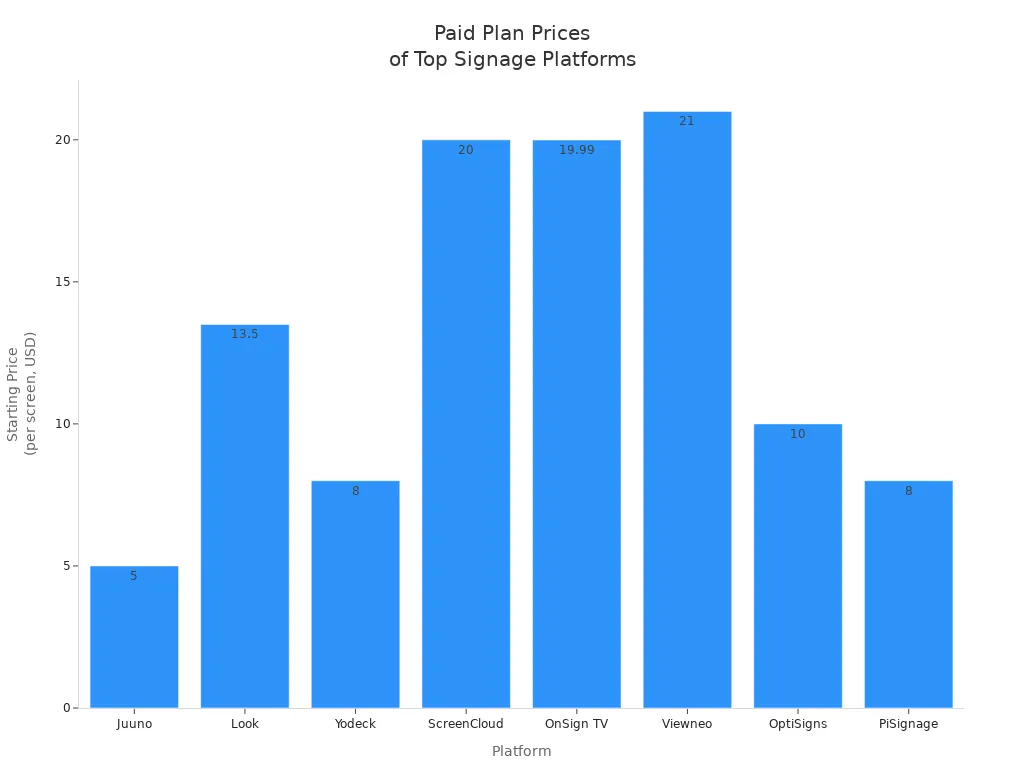
OptiSigns lets you use three screens for free. Paid plans start at $10 per screen.
Yodeck gives you one screen for free. You get a free player if you pay yearly.
Viewneo has a 30-day trial, then costs $21 per screen.
Most platforms give basic support on free plans. If you upgrade, you get more help, team features, and better security.
You can start with a free plan to see how it works. If you need more screens or support, you can upgrade later. Many users like the easy setup and wide device support these digital signage solutions offer.
Choosing the Right Free Digital Signage for Your Needs
Small Business Recommendations
If you have a small business, you want software that is fast to set up. It should be easy for anyone to use. Most small businesses do not have a big IT team. You need something that works right away and helps you show messages to customers. Here are some top choices for small businesses:
Solution | Best For | Key Features | Pricing Model |
|---|---|---|---|
OptiSigns | Small businesses prioritizing simplicity | Quick setup, template library, cloud-based | Starts at $10/month per screen |
NoviSign | Mid-market organizations | Advanced scheduling, multi-zone layouts | N/A |
Rise Vision | K-12 schools on a budget | Google Workspace integration, basic features | N/A |
OptiSigns is good if you want something simple and in the cloud. NoviSign lets you use more advanced layouts. You can start with a free plan and upgrade if you need more screens.
Schools and Nonprofits
If you work at a school or nonprofit, you need to share news and events. You also want to save money. Rise Vision is popular for K-12 schools. Teachers can add content using Google Workspace. You can control all your screens from one place. Many schools use Rise Vision because it has free software and templates for education. Other good choices are Yodeck, Screenly OSE for Raspberry Pi, and Xibo for self-hosted setups.
Tip: Choose a platform with easy templates and low hardware costs. This helps you save money.
Tech-Savvy and DIY Users
Do you like building things yourself? Are you good with technology? You might want software you can install and control. Here is what you get with DIY options:
Feature | Details |
|---|---|
Software Type | 100% FREE, Software Only |
Installation | Download & install on your own hardware |
Supported Platforms | Windows, Mac, Linux, Android TV, Chrome OS |
DIY Options | Build Your Own from $50 |
Tech-Savvy Focus | Perfect for tech-savvy teams |
Extra Features | IoT & GPIO sensor integration |
You can make your own content with HTML, CSS, or JavaScript. You get full control and can save money if you like to build things.
Enterprise and Multi-Site Solutions
If you manage many screens in different places, you need software that can grow with you. Look for tools with strong support, user accounts, and automatic updates. Make sure the software works with your devices and keeps your data safe. You can start with a free plan, but you may need to upgrade for more features and help.
Remember: The best choice depends on how many screens you have, your tech skills, and how much control you want.
You have great free digital signage options for 2026. PosterBooking, PiSignage, and DigitalSigns.ai stand out for their features and flexibility. Before you choose, try these steps:
Plan your content and how often you will update it.
Pick the best spots for your screens.
Check your internet connection.
Make sure your devices stay secure.
Test a few platforms. See which one fits your needs. Open source tools give you more control if you like to customize. Watch for new features as the digital signage world keeps changing.
FAQ
What is free digital signage software?
Free digital signage software lets you show messages, images, or videos on screens without paying for a license. You can use it to share news, ads, or updates in your store, school, or office.
Can I use free digital signage on any device?
You can use most free digital signage platforms on many devices. Try it on a smart TV, Raspberry Pi, Windows PC, or Android box. Always check the software’s website for a list of supported devices.
How many screens can I manage for free?
Most free digital signage plans let you control one to ten screens. Some open source options have no screen limits. If you need more screens, you may need to upgrade to a paid plan.
Is free digital signage safe to use?
Yes, most free digital signage tools are safe if you download them from trusted sources. Always keep your software updated. Use strong passwords to protect your screens and content.
Do I need to know how to code to use free digital signage?
No, you do not need coding skills for most free digital signage platforms. Many offer drag-and-drop editors and simple menus. If you want to customize open source software, some coding knowledge helps.
See Also
An In-Depth Look at Retail Digital Signage Options
Latest Innovations in Digital Signage Technology for 2026
Popular Digital Signage Solutions Gaining Attention in 2026
Best Digital Signage Tools for Retailers in 2026
Comparing Digital Signage and LED Signs for Businesses in 2026
