Top Digital Lobby Signage Software for Modern Businesses
Shenzhen TopAdkiosk Display Technology Co., Ltd.
Add.: 2F, Bldg 10, Changfeng Industrial Park, Dongkeng, Fenghuang, Guangming, Shenzhen, China 518132
Mobile/WHATSAPP: 86-138 25769658
Email: marketing@topadkiosk.com topadkiosk@gmail.com
Skype: pghenry1
Wechat: adkioskhenry
English Web.: https://www.topkioskdisplay.com/
http://www.ad-kiosk.com/
https://www.toplcddisplay.com/
http://www.multitouchdigitalsignage.com/
https://www.youtube.com/channel/UCYVYNJHxLVEcQD8fuUxXNTA/videos?view_as=subscriber
https://www.facebook.com/TOPADKIOSKSHENZHEN/?ref=bookmarks
Digital lobby signage helps your business make a good first impression in 2026. You can pick from top choices like Yodeck, ScreenCloud, Rise Vision, TelemetryTV, Poppulo, and Appspace to update your lobby. Businesses use digital lobby signage to save money, connect better with customers, and work faster. The right digital lobby signage lets you set up content automatically, connect with business tools, and check results with analytics. You get a good return on investment when you choose digital lobby signage that is simple to use.
Reason for Adoption
Description
Cost Reduction
Digital signage cuts printing needs and lets you change content fast, saving money.
Improved Customer Engagement
64% of users say digital signage helps them connect better with customers.
Operational Efficiency
Fun content can make wait times feel shorter by up to 35%, making customers happier.
Key Takeaways
Digital lobby signage helps make a good first impression and keeps visitors interested. - Pick software that is easy to use so you can change content quickly and save time. - Find platforms that have good analytics so you can see how well things are working and check your ROI. - Think about integration features so you can link with other business tools and work better. - Update your content often to make sure your lobby stays new and important for visitors.
Leading Digital Lobby Signage Software in 2026
Digital lobby signage uses screens to show messages, pictures, or videos. You control these screens with digital signage software. This software lets you change what is on the screens fast. You can also plan updates and connect with other business tools. Digital signage software helps you welcome guests, share news, or show off your brand. Now, let’s see the best digital signage software for 2026.
Yodeck Overview and Strengths
Yodeck is a digital signage software that helps you manage lobby screens easily. You can use it to show ads, company news, or special deals. Yodeck is good for small and medium businesses because it is simple to use. You do not need to be a designer to use it.
Description | |
|---|---|
Advertisement and Content Management | Yodeck lets you handle ads and content on many screens. |
Internal Communications and Customer Relations | You can talk to staff better and build good customer ties. |
Custom Reports and Integration Capabilities | Yodeck gives custom reports and links with other business tools. |
24/7 Support | You get help any time by phone or chat. |
Yodeck gives you a dashboard you can see and easy playlist tools. You can use pictures and videos to make your lobby fun. Many people like that Yodeck helps set up content for sales and events. If you want digital signage that is easy and has strong support, Yodeck is a smart pick.
ScreenCloud Overview and Strengths
ScreenCloud is a digital signage software for making and managing lobby screen content. You can change how your screens look and make playlists to keep things new. Many people say ScreenCloud is easy and keeps people interested.
You can post messages and change content fast.
The platform lets you make playlists for different times.
Customer support is nice and fixes problems quickly.
Platform | |
|---|---|
ScreenCloud | 4.7 |
TelemetryTV | 4.8 |
ScreenCloud works well for big businesses with lots of screens. Some people think the price is high for small businesses. They also wish the analytics were better. Still, if you want digital signage that is easy and has good support, ScreenCloud is a good choice.
Rise Vision Overview and Strengths
Rise Vision is a digital signage software that helps you make content that matches your brand. You can use templates to make your lobby look nice. Rise Vision connects to real-time data, so your screens always show the newest info.
Description | |
|---|---|
Customizable Templates | You can make content that fits your brand. |
Real-Time Data Integration | Your screens update with new data by themselves. |
Automation for Customer Experience | Content changes based on what customers do and the time. |
Extensive Support for Data Accuracy | You get strong options to keep your messages right. |
Rise Vision helps you set up content to make customers happy. You can trust this digital signage software to keep your lobby up to date and on brand.
TelemetryTV Overview and Strengths
TelemetryTV is a digital signage software that gives you many ways to show and manage content. You can connect it with other apps and plugins to make your lobby screens better.
Strengths | Description |
|---|---|
Variety of integrations | Connects with many other apps and plugins. |
Remote management | Manage all your screens from one place, no matter how many. |
Content scheduling | Set up playlists to play at certain times or days. |
Multimedia content | Show videos and pictures to make your lobby lively. |
Widgets | Add news or social media feeds to your screens. |
Interactive displays | Use touchscreens for interactive content. |
Automatic provisioning | Set up new screens easily in different places. |
Advanced reporting | Get detailed reports on how your screens do. |
TelemetryTV is good for businesses that want to use video and interactive screens. You can use it for ads, brand awareness, or sharing news. Many people like its strong analytics and reporting tools.
Poppulo Overview and Strengths
Poppulo is a digital signage software that lets you control all your lobby screens from one safe, cloud-based place. You can plan content with drag-and-drop tools, so it is easy to set up campaigns.
Description | |
|---|---|
Cloud-Based Centralized Control | Manage all your screens from one web platform. |
Easy Content Scheduling | Use drag-and-drop tools to make playlists and schedules. |
Multi-Location Scalability | Works for one office or many places around the world. |
Security & Compliance | Keeps your content safe with strong security and permissions. |
Analytics & ROI Tracking | See how your screens do with built-in reports. |
Governance & Brand Compliance | Make sure all messages match your brand and rules. |
Poppulo is used in many fields, like healthcare, hotels, stores, and schools. You can use it to keep your brand message clear and check your return on investment with built-in analytics.
Appspace Overview and Strengths
Appspace is a digital signage software that helps your workplace stay connected. You can use it to share news, manage meeting rooms, and help teams work together.
Customer Feedback | |
|---|---|
User-friendliness | “Easy to use” and “intuitive” |
Adaptability | Fits your business needs and brand style |
Community focus | Helps teams stay informed and connected |
Support | Fast and helpful customer service |
Suitability for teams | Works well for teams in many places |
Appspace connects with workplace tools, like room scheduling and team apps. You can use it to manage digital screens across your office. This digital signage software is a good pick if you want to bring teams together and support them in different places.
Tip: When you pick digital signage software, think about how it helps you manage content, connect with business tools, and keep your lobby fun for visitors.
Digital Signage Software Feature Comparison
Ease of Use
You want software that is simple to use. Yodeck is easy because it has a clear dashboard. Many people say Yodeck is very easy to use.
Platform | G2 Rating | |
|---|---|---|
Yodeck | 4.9 (732 reviews) | 4.8 (200 reviews) |
ScreenCloud and Rise Vision are also easy to use. You can set up screens fast and manage content without much help. Appspace and Poppulo give step-by-step guides for new users. TelemetryTV has more tools, but it takes longer to learn.
Automation and Integrations
Automation saves you time. The best software lets you schedule content and connect with other tools. Most top platforms have these features:
Feature | Description |
|---|---|
Shows the right content at the right time. | |
Content distribution tools | Updates screens in many places with one command. |
API Integration Depth | Connects with business tools like ERP, POS, and dashboards. |
User Experience (UX) | Lets you manage content without needing tech skills. |
Yodeck and TelemetryTV have strong automation and integration. ScreenCloud and Appspace work with many business apps. Poppulo is good for big teams and uses cloud-based digital signage.
Analytics and Reporting
You need to know how your screens are doing. TelemetryTV gives advanced reports, like health checks and playback data. You can see which content works best. Scala is known for deep analytics, but TelemetryTV is used more in lobbies. Poppulo and Appspace have basic reports to help you check your return on investment.
TelemetryTV gives health check scans and playback reports.
Scala has deep analytics for campaign tracking.
Security and Reliability
Security is important for digital signage. Fusion Signage and Mvix have ISO 27001 and SOC 2 certifications. These show strong data protection. OptiSigns also meets SOC 2 standards. Poppulo and Appspace use cloud-based signage to keep your content safe. You can trust these platforms to protect your data.
Pricing and ROI
You want software that gives you good value. Yodeck has a low price and includes hardware for starters. ScreenCloud costs more but has extra features. Rise Vision is free, but it adds a watermark.
Product | Lowest Price (per screen/month) | Hardware Included? |
|---|---|---|
Yodeck | Starter kit promo | |
ScreenCloud | $20 | No |
Rise Vision | $0 (with watermark) | No |
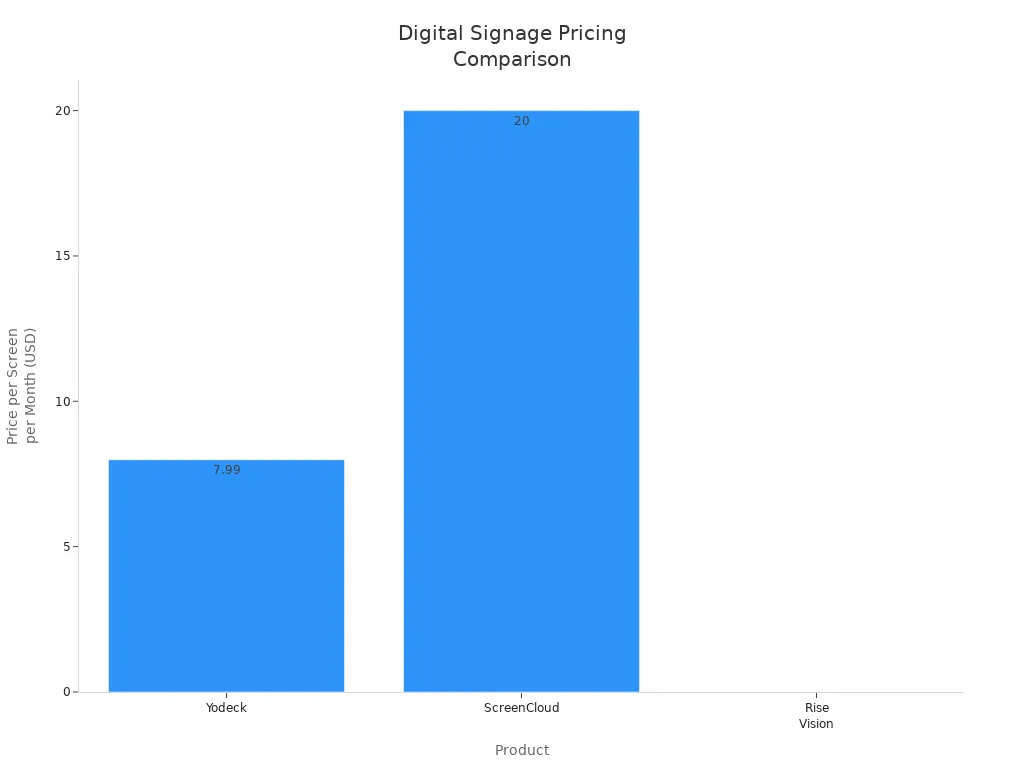
Cloud-based signage like Poppulo and Appspace may cost more. They help big teams and give strong support. You should check which software fits your budget and needs.
How to Choose Digital Lobby Signage Software
Assessing Business Needs
First, you should know what your business needs. Digital displays use screens instead of old signs. These screens can show messages, pictures, or videos. You can change what is on the screens right away. You can make messages special for each visitor. Think about what your lobby needs most. Do you want touch screens or smart content? Make sure your screens work well and play different media. Look for tools that help manage content, support many screens, trigger content, let you change branding, and connect in real time.
Multimedia support
Content management capabilities
Multi-screen support
Dynamic content triggering
Interactive touch support
AI-driven content optimization
Customizable branding
Real-time integrations
Evaluating Essential Features
Check which features are most important for your business. Use the table below to see what each software can do.
Essential Feature | Description |
|---|---|
Easy uploads and playlist organization. | |
Powerful scheduling and remote control | Automates content and lets you manage screens from anywhere. |
Wide hardware compatibility | Works with many media players and systems. |
Centralized remote management | Updates and monitors screens from one dashboard. |
Strong security and access control | Keeps your data safe with permissions and encryption. |
Analytics and performance insights | Tracks how your content performs and engages visitors. |
Considering Scalability and Support
As your business gets bigger, you need software that grows too. You can add more screens without much work. Central control helps you handle lots of screens and keeps your messages the same. Subscriptions cost less at first and are easy to keep up. Automatic updates keep your software safe. Flexible content lets you change messages for different places or people. Companies like AIScreen, ADAsoft, and Enplug give remote control, cloud platforms, and good support.
Making the Final Choice
Focus on easy use, ways to set up, changing signs, connecting, growing, and support. Pick software that is simple to use for managing content. Decide if you want cloud or local solutions. Look for signs and templates you can change. Make sure the software works with your business tools. Choose a solution that grows with you and has strong support.
Tip: Digital lobby signage software helps you greet guests, share news, and show your brand. The right software makes people pay attention and saves time.
You can pick from many digital lobby signage software options. The best one helps you talk to visitors and show events. It also helps you give better service. Some businesses use digital displays for fun, check-ins, and ads.
Key Takeaway | Description |
|---|---|
You can keep visitors busy and share news with fun features. | |
Digital Check-Ins | Sign-in kiosks help people check in faster. |
Event Promotion | You can show off events and get people to come back. |
Ad-Space | Show videos about your products and services. |
To begin, pick hardware that works for you. Make a plan for what you want to show. Put your signs where people will notice them. Learn about your visitors and change your content often.
Watch for new trends like interactive screens and smart tools. Check your signage plan often so your business stays ahead.
What Is Digital Lobby Signage?
Digital lobby signage refers to electronic displays (LCD, LED, or projection screens) placed in the reception or waiting areas of corporate offices, hotels, hospitals, government buildings, and other facilities. Its purpose is to welcome visitors, provide directional information, display brand messages, show real‑time data (e.g., weather, news, meeting schedules), and enhance the overall visitor experience.
Unlike static posters or printed notice boards, digital lobby signage is dynamic, centrally managed, and can be updated remotely in real time.
How Does Digital Lobby Signage Work?
A digital lobby signage system operates using three core components working together:
1. Content Management System (CMS) – The Brain
A software platform (cloud‑based or on‑premise) where administrators create, schedule, and manage content.
Users can design playlists, set display times (dayparting), target specific screens, and monitor device health.
Many CMS platforms offer drag‑and‑drop editors, templates, and integration with external data sources (e.g., calendar, RSS feeds, weather APIs).
2. Media Player – The Processor
A small computer (hardware or built‑into the display) that receives content from the CMS, stores it locally or streams it, and outputs the video signal to the screen.
Media players can be:
External: Android sticks (e.g., Amazon Fire TV Stick), Raspberry Pi, Intel NUC, BrightSign, etc.
Built‑in (SoC): Integrated into commercial displays from brands like Samsung (Tizen), LG (webOS), Sony (Android TV).
3. Display – The Screen
The physical screen placed in the lobby. Commercial displays are designed for long operating hours (16/7 or 24/7), offer higher brightness for well‑lit areas, and often have slim bezels for a professional look.
Sizes typically range from 32″ to 86″ or large‑format video walls.
Typical Workflow
Content creation – An administrator designs or selects content (welcome messages, event schedules, wayfinding maps, brand videos, live news feeds) using the CMS.
Distribution – The CMS sends the content to the media player over the internet (cloud) or local network.
Scheduling – The content is scheduled to play at specific times (e.g., “Good morning” message from 8‑10 AM, corporate video loop from 10 AM‑12 PM, etc.).
Playback – The media player decodes the content and outputs it to the display. The screen shows the content according to the schedule.
Monitoring – The CMS can remotely check if each screen is online, playing the correct content, and alert administrators of any failures.
Key Features of Digital Lobby Signage
Feature | Benefit |
|---|---|
Welcome personalisation | Display “Welcome, [visitor name]” or “Good morning, [company name]” integrated with visitor management systems. |
Wayfinding | Interactive or static floor maps to help visitors find meeting rooms, restrooms, elevators, or specific departments. |
Meeting room status | Show which rooms are occupied, free, or reserved for the next hour – integrated with calendar systems (Outlook, Google Calendar). |
Real‑time information | Display live weather, stock tickers, news headlines, or company KPIs. |
Emergency alerts | One‑click override to show evacuation routes, safety instructions, or severe weather warnings. |
Brand building | Loop corporate videos, mission statements, award highlights, and employee achievements. |
Benefits of Digital Lobby Signage
Professional first impression – Dynamic, high‑quality screens convey a modern, well‑managed organisation.
Reduced front‑desk workload – Visitors can find their way, see schedules, and read announcements without interrupting reception staff.
Real‑time updates – Change content instantly from anywhere (e.g., “Meeting room 3 moved to room 5”) – no reprinting.
Cost savings – Eliminate printing and laminating posters, schedules, and notices.
Increased engagement – Video and motion capture attention far better than static paper signs.
Scalability – One CMS can manage screens in a single lobby or across hundreds of buildings.
Typical Locations in a Lobby
Location | Content Examples |
|---|---|
Reception desk (customer‑facing) | Company welcome, visitor check‑in instructions, brand video |
Waiting area | Event calendar, safety reminders, local weather, news |
Elevator lobby | Floor directory, meeting room status, wayfinding arrows |
Hallway leading to conference rooms | “Room 301 – Board meeting 10‑11 AM, Dr. Smith” |
Digital totem / floor stand | Interactive wayfinding map, directory search |
Hardware & Software Examples (2026)
Category | Options |
|---|---|
CMS (free/paid) | Yodeck, OptiSigns, ScreenCloud, Rise Vision, Trillboards |
Media players | Amazon Fire TV Stick (budget), BrightSign (enterprise), built‑in SoC on Samsung/LG commercial displays |
Displays | Samsung QMC series, LG UL3J series, Philips Signage Solutions, NEC |
Summary
Digital lobby signage is a centrally managed display system that places dynamic, scheduled content in reception and waiting areas. It works by combining a cloud‑based CMS, a media player, and a commercial‑grade display. The result is a flexible, professional, and engaging way to welcome visitors, share information, and reinforce brand identity – while reducing printing costs and front‑desk interruptions.
FAQ
What is digital lobby signage and how does it work?
Digital lobby signage shows messages, pictures, or videos on screens in your lobby. You use software to control what is on the screens. You can change the screens from your computer or phone. This helps you share news, greet guests, or tell people about events fast.
Can I update my lobby screens from anywhere?
Yes, you can change your screens from any place. Most digital signage software lets you manage content online. You just need the internet and your login information.
Is digital lobby signage secure?
Most digital signage platforms have strong security. They use encryption and special controls for access. This keeps your content and data safe from people who should not see it.
How much does digital lobby signage software cost?
Prices are different for each software. Some start at $7.99 for each screen every month. Some have free plans but with fewer features. You should look at the features and choose what works for your budget.
What devices can I use for digital lobby signage?
You can use TVs, monitors, or tablets for digital lobby signage. Many platforms work with lots of hardware. Make sure your software works with your device before you begin.
See Also
Understanding The Role Of Outdoor Digital Signage Today
An In-Depth Look At In-Store Digital Signage Options
Best Digital Signage Solutions For Retailers In 2026
The Importance Of Digital Signage In Today's Market
Enhancing Restaurant Efficiency With Digital Signage In 2026
