Best Curved LED Panel Brands Compared for 2026 Buyers
Shenzhen TopAdkiosk Display Technology Co., Ltd.
Add.: 2F, Bldg 10, Changfeng Industrial Park, Dongkeng, Fenghuang, Guangming, Shenzhen, China 518132
Mobile/WHATSAPP: 86-138 25769658
Email: marketing@topadkiosk.com topadkiosk@gmail.com
Skype: pghenry1
Wechat: adkioskhenry
English Web.: http://www.topadkiosk.com/
https://www.topkioskdisplay.com/
http://www.ad-kiosk.com/
https://www.toplcddisplay.com/
http://www.multitouchdigitalsignage.com/
https://www.youtube.com/channel/UCYVYNJHxLVEcQD8fuUxXNTA/videos?view_as=subscriber
https://www.facebook.com/TOPADKIOSKSHENZHEN/?ref=bookmarks
Curved LED panels use special technology to bend the screen. This makes pictures wrap around what you see. It feels more real and pulls you into the action. This helps you work better, play games, and show ads in stores. Big brands like HP, Dell Alienware, and Samsung are leaders in curved LED screens for 2026. The HP E45c G5 is great for getting work done. The Dell Alienware AW3225QF is best for gaming. Samsung OLED panels work well for both games and stores.
Brand | Market Share |
|---|---|
Samsung | |
ASUS | 20% |
Dell | 15% |
HP | N/A |
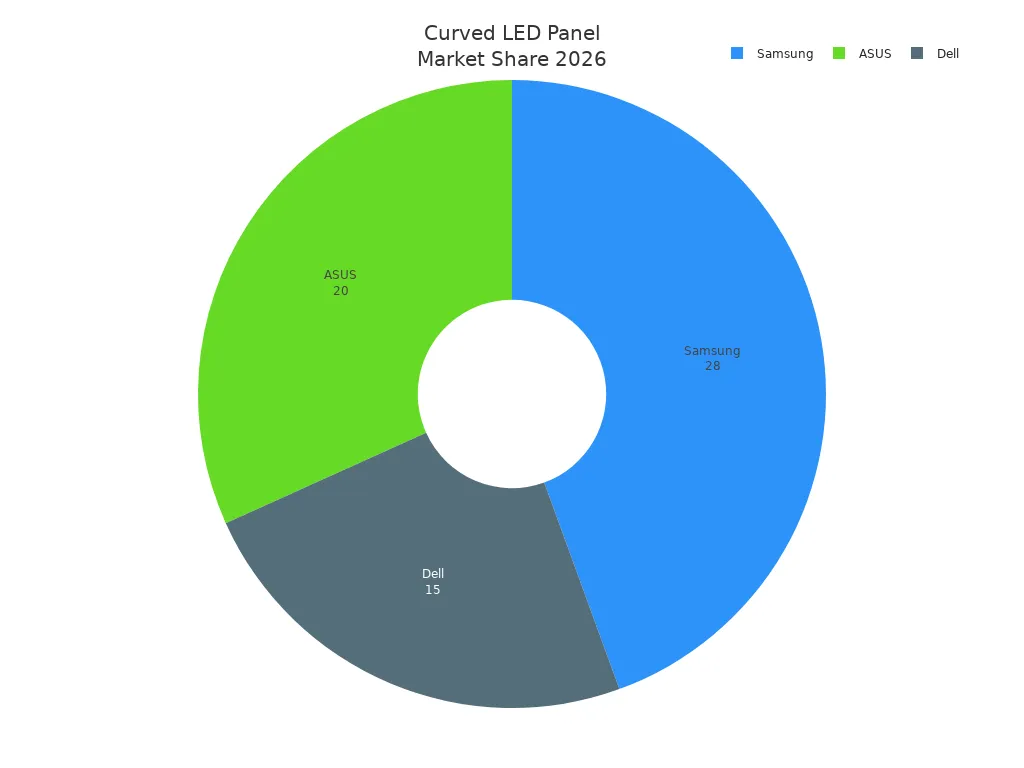
You can look at the table and brand review. This helps you pick the best curved monitor for you.
Key Takeaways
Curved LED panels make watching and playing games more fun. They wrap pictures around your eyes. This makes movies and games feel real.
Brands like Samsung, Dell, and HP have special features. These features are made for gaming, work, or stores. Pick a brand based on what you need most.
When you pick a curved monitor, look at important features. Check the refresh rate, response time, and resolution. These help you find what is best for games or work.
There are cheaper monitors you can buy. But buying a good curved monitor lasts longer. It also works better as time goes on.
Always read reviews and ratings from other users. This helps you find a curved monitor that is good and makes you happy.
Quick Comparison of Best Curved Monitors
Top Brands Overview
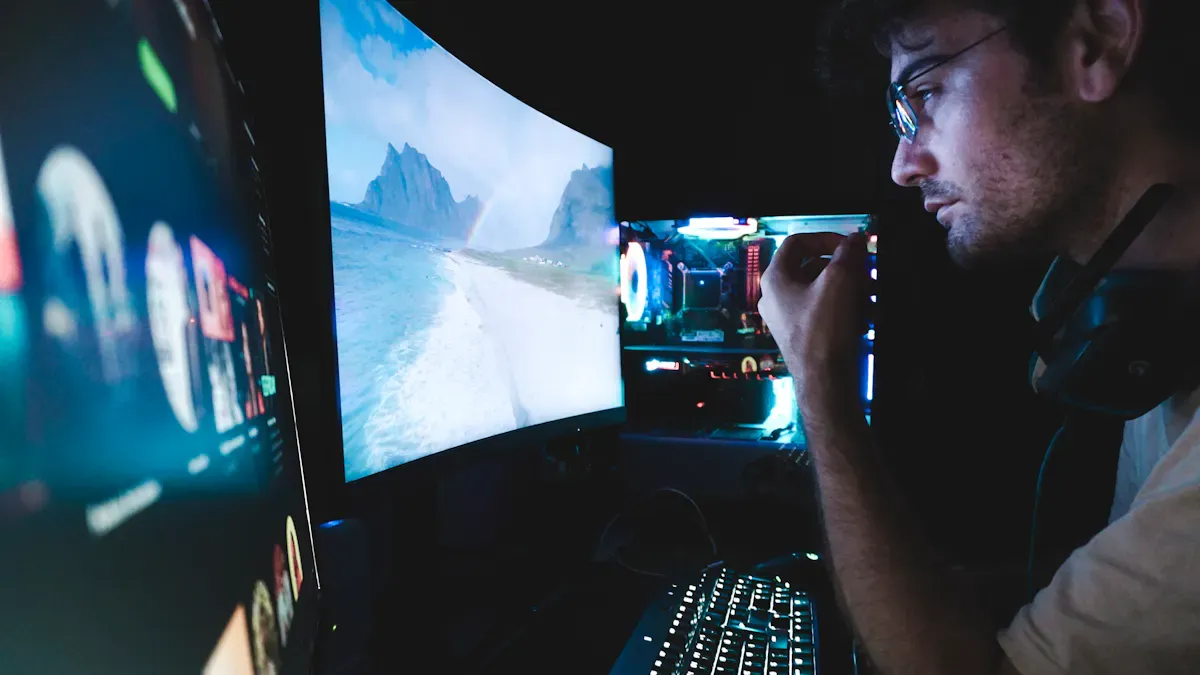
You see many brands making curved LED monitors in 2026. Samsung, Dell, HP, MSI, Philips, and Gigabyte lead the market. Each brand offers something special for different needs. Samsung gives you bright OLED panels for both gaming and retail. Dell Alienware focuses on fast response and high refresh rates for gaming. HP designs monitors for work and multitasking. MSI and Gigabyte create curved monitors with features for gamers. Philips brings sharp 4K displays for clear images.
Curved LED panels use a special design. The screen bends toward you. This shape matches how your eyes see. You feel like the picture wraps around you. This makes games and movies more real. You also see more on the screen when you work.
Tip: When you pick a curved monitor, think about what you do most. Gaming, working, or watching movies need different features.
Key Features, Pros, Cons
You want to know what makes the best curved monitors stand out. The table below shows top curved LED monitors for 2026. You can see their main strengths and weaknesses.
Monitor Model | Pros | Cons |
|---|---|---|
Philips 328E1CA | Vivid 4K details, High contrast, Wide color, FreeSync up to 60Hz | Tilt-only stand, Narrow FreeSync, Some smearing |
Gigabyte G34WQC-A | High pixel density, Wide color, FreeSync up to 144Hz, Ergonomic stand | Some smearing, VRR flicker in some units |
MSI MPG 491CQPX | Fast response, Infinite contrast, Wide color, VRR up to 240Hz, Rich ports | Risk of burn-in |
Dell AW3423DWF | Fast response, VRR up to 165Hz, Infinite contrast, High brightness, USB hub | Risk of burn-in |
You see that curved monitors for gaming often have high refresh rates and fast response times. These features help you play games smoothly. For work, you want a monitor with a wide color range and sharp details. Some curved LED monitors have risks like burn-in or limited stand movement. Always check if the monitor fits your space and needs.
You get the best curved monitors when you match the features to your use. Curved LED panels make your games, work, and movies look better and feel more real.
Brand Analysis: Curved LED Panels
Curved LED panels use new technology to bend the screen. The display curves around what you see. This shape is like how your eyes look at things. You feel more inside the action with curved monitors. They are good for games, work, and stores. The global led display industry keeps making these panels better. They improve color, brightness, and smart features.
Samsung OLED Panels
Samsung is a top brand for curved OLED panels. These panels show deep blacks and bright colors. OLED technology gives high contrast and quick response. Samsung curved monitors are great for games and stores. You see smooth motion and clear pictures. The anti-reflection coating helps stop glare. You can see well even in bright rooms.
Key Features:
OLED display with high contrast
Fast response for gaming
Anti-reflection coating
Wide color range
Performance:
Games look smooth with high refresh rates.
Store displays look bright and catch your eye.
Price:
Samsung curved LED panels cost more than basic monitors.
You pay extra for special features and long life.
User Reviews:
Many people like the immersive feeling.
Some worry about burn-in with OLED panels.
Note: Samsung curved monitors work well for games and stores. You get good quality and smart features.
HP E45c G5
HP E45c G5 is a curved monitor for work. The screen is wide for doing many things at once. It is good for people who need lots of space for windows. The monitor also has fast response and bright light.
Feature | HP E45C G5 | LG 40WP95C-W | Samsung Odyssey Neo G9 |
|---|---|---|---|
Response Time | 3ms | 5ms | N/A |
Contrast Ratio | 2700:1 | N/A | 2500:1 |
Brightness | 510 nits | 300 nits | N/A |
Screen Size | 44.5 inches | 39.7 inches | N/A |
Refresh Rate | 165Hz | N/A | N/A |
Key Features:
Ultra-wide curved screen
High brightness and contrast
Fast response time
165Hz refresh rate
Performance:
You get more done with a bigger screen.
Games run smooth with fast response and high refresh rate.
Price:
HP curved LED panels cost less than some top gaming monitors.
You get good value for work and games.
User Reviews:
People like the wide screen for work.
Some want more features for gaming.
Tip: HP E45c G5 is a strong curved monitor for work. You can use it for both work and games.
Dell Alienware AW3225QF
Dell Alienware AW3225QF is made for gamers and workers. It has a 32-inch 4K curved screen and a 240Hz refresh rate. The monitor is fast and very bright.
Key Strengths | Limitations |
|---|---|
32-inch 4K panel with 240Hz refresh rate and 0.03ms response time | Oversized stand requires significant desk space |
1,000-nit peak HDR brightness | No USB-C power delivery |
True G-SYNC certification for optimized NVIDIA performance | No built-in speakers |
Samsung's anti-reflection coating reduces glare | N/A |
Industry-leading warranty support | N/A |
Key Features:
4K curved display
240Hz refresh rate
0.03ms response time
G-SYNC certification
Performance:
Games look sharp and move smoothly.
Workers see bright and clear details.
Price:
Dell Alienware curved LED panels cost more than basic monitors.
You pay for gaming extras and good support.
User Reviews:
Gamers like the fast speed and high refresh rate.
Some say the stand is too big for small desks.
Alert: Dell Alienware AW3225QF is great for gaming. Make sure you have enough room for the stand.
LG
LG makes curved monitors for work and games. You see sharp pictures and many colors. LG curved LED panels use IPS technology for clear views from the side.
Key Features:
IPS curved display
Wide color range
Good brightness
Performance:
You can do many things at once on LG monitors.
Games look smooth with okay refresh rates.
Price:
LG curved LED panels cost less than Samsung and Dell.
You get good value for work and fun.
User Reviews:
People like the colors.
Some want faster refresh rates.
Note: LG curved monitors are good for work and games. You get solid performance and a fair price.
Sony
Sony has curved LED panels with great picture quality. You see dark blacks and bright highlights. Sony curved monitors use smart processing for clear motion.
Key Features:
High contrast curved display
Advanced image processing
Good brightness
Performance:
Movies and games look colorful and rich.
Work is easier with sharp images.
Price:
Sony curved LED panels cost more than LG and TCL.
You pay for great pictures and a trusted brand.
User Reviews:
People love the picture quality.
Some want more gaming features.
Tip: Sony curved monitors are good for movies and work. You get strong images and a sturdy build.
TCL
TCL makes curved LED panels that are not expensive. You get Mini-LED technology in these monitors. TCL adds AI features and keeps prices low.
Strategy Focus | Description |
|---|---|
Mini-LED Technology | Scaling Mini-LED technology to enhance mid-tier product offerings, improving affordability and performance. |
AI Features | Enhancing AI features to increase viewer engagement and platform monetization. |
Cost-Reduction | Implementing cost-reduction strategies to maintain competitive pricing. |
Key Features:
Mini-LED curved display
AI smart features
Competitive pricing
Performance:
You get good brightness and color for less money.
Work and games run well on these monitors.
Price:
TCL curved LED panels cost less than most brands.
You get smart features for a good price.
User Reviews:
People like the price and AI tools.
Some want more high-end options.
Note: TCL curved monitors are a good deal. You get smart features and nice performance.
Hisense
Hisense sells curved LED panels for people on a budget. You see clear pictures and okay brightness. Hisense curved monitors are good for simple work and fun.
Key Features:
Budget curved display
Decent brightness
Simple design
Performance:
You use Hisense monitors for daily tasks.
Games work for casual players.
Price:
Hisense curved LED panels cost less than most brands.
You get basic features for a low price.
User Reviews:
People like the low price.
Some want more features for games and work.
Tip: Hisense curved monitors are good for saving money. You get simple features and steady performance.
There are many curved LED panels to choose from. Each brand has something special for games, work, or stores. You can find a curved monitor that fits your needs and budget.
Performance & Display Quality
Image Quality
Curved LED panels make pictures look much better. The screen bends around your eyes. Colors look bright and sharp. These monitors use new technology for deep blacks and bright spots. You get high color accuracy, over 95%. The contrast ratio can reach 3000:1. Brightness is improved for games, work, and stores. The table shows the newest upgrades in curved LED monitor image quality for 2026.
Feature | Specification |
|---|---|
Color Accuracy | Over 95% |
Contrast Ratio | Up to 3000:1 |
Brightness | Enhanced for various uses |
Curved LED panels help you see tiny details in games and work. You notice less glare and colors look more vivid. This makes curved monitors good for gaming and work setups. You see clear pictures when watching movies or doing design work.
Durability
You want your monitor to last for years. Curved LED panels use tough materials and smart cooling. This stops the monitor from getting too hot. Most curved monitors have screens that resist scratches. You can use them every day for games or work without worry. Curved LED panels fight burn-in and color fading. You get steady performance for a long time. Many curved monitors have long warranties. You feel safe picking a curved productivity monitor for your desk.
Tip: Use a soft cloth to clean your curved monitor. This keeps the screen clear and protects the curved LED panel.
Smart Features
Curved LED panels now have smart features to make things easier. You get built-in AI tools that change brightness and color. These features help you see better in games and work. Many curved monitors let you use your voice to control settings. You can switch modes for games, work, or movies with one button. Some curved productivity monitors connect to your phone or tablet. You use smart features to get more done and have more fun gaming.
Smart brightness adjustment
Voice control options
Quick mode switching for gaming and work
Device connectivity
Curved LED panels give you a better experience. You see sharp pictures, enjoy strong durability, and use smart features every day.
Price & Value
Premium vs Budget Curved Monitors
You have lots of choices for curved monitors. Premium curved LED monitors cost more. Alienware AW3225QF is one example. These monitors are high quality and have good customer service. They give you better gaming and sharper pictures. You get more advanced features with premium models. They have higher resolutions and faster refresh rates. The build quality is stronger too. Budget curved monitors use simpler parts. They have fewer features but still let you enjoy curved screens. You can use them for work or fun.
Here is a quick look at curved monitor prices in 2026:
Monitor Category | Price Range |
|---|---|
Budget | $150 – $300 |
Mid-range | $350 – $800 |
High-end | $1,000+ |
You get what you pay for with curved LED panels. Premium monitors give you a better curved display. They are good for gaming and work. Budget monitors help you save money. You may miss some features that make your experience better.
Tip: If you want the best curved monitor for gaming or work, pick a high-end curved LED panel. If you need a simple monitor for daily tasks, a budget curved LED panel is fine.
Long-Term Value
You should think about more than price when picking a curved monitor. High-end curved LED panels last longer. They use less energy. You spend less on repairs and electricity over time. Budget curved monitors use standard parts. This can mean higher costs for power and fixing problems. You may see more downtime and brightness loss with budget curved LED panels.
Here are some things to think about for long-term value:
High-end curved monitors last longer than budget ones.
You fix high-end curved LED panels less often.
Premium curved monitors use less power.
Budget curved monitors may need more repairs and lose brightness faster.
A curved productivity monitor gives you more value if you use it every day. You get a better curved experience and save money in the long run with a high-quality curved LED panel.
User Reviews & Satisfaction
Consumer Ratings
Many people like curved led monitors. Most buyers give four or five stars. Samsung, Dell, and HP get high scores for picture and lasting power. Gamers say curved led monitors show smooth motion and feel real. People who work like the wide screen and clear details. Store owners say curved led panels bring in customers and help sales.
Brand | Average Rating | Top Use Case |
|---|---|---|
Samsung | 4.7/5 | Gaming, Retail |
Dell Alienware | 4.6/5 | Gaming |
HP | 4.5/5 | Productivity |
LG | 4.4/5 | Work, Gaming |
TCL | 4.3/5 | Budget, Retail |
Hisense | 4.2/5 | Budget, Work |
Tip: Look at ratings before you buy a curved led monitor. High scores mean people are happy.
Common Feedback
You hear lots of thoughts about curved led monitors. Gamers say the curved screen makes games feel exciting. They notice less eye strain and smoother play. People who work say curved led monitors help them see more windows. They finish jobs faster and feel less tired. Store owners say curved led panels make ads pop. Customers notice bright colors and sharp pictures.
Most users love how the curved monitor pulls them in.
Many buyers enjoy bright screens and strong colors.
Gamers like fast refresh rates and clear motion.
People who work like the wide curved screen for many tasks.
Some worry about burn-in with some led monitors.
Budget buyers are glad for cheap curved led choices.
Note: Curved led panels bend to fit your eyes. This makes pictures look real and helps you pay attention. You get a better time for games, work, and stores.
Curved led monitors work well for many uses. Reviews show people are happy with gaming, work, and store screens. You can count on these monitors for good performance and value.
Head-to-Head Comparison: Curved Monitors
Gaming Performance
If you want a curved monitor for gaming, it makes games feel exciting. The curve matches your eyes, so you feel inside the game. Top curved LED monitors in 2026 have high refresh rates and fast response times. They also show bright colors. These features help you play games smoothly.
Here is a table that compares the best curved LED monitors for gaming:
Monitor Name | Refresh Rate | Resolution | User Rating | Key Features |
|---|---|---|---|---|
SANSUI 32-inch | 240Hz | 1080p | 8.4 | 1ms response, 1500R curve, budget-friendly |
SAMSUNG Odyssey G9 | 240Hz | 1440p | 9.7 | 1000R curve, premium features |
LG UltraGear | 240Hz | 3440×1440 | 9.3 | USB-C, FreeSync Premium, sleek design |
Alienware | 180Hz | 1440p | 9.2 | Great color, low blue light |
ASUS TUF | 165Hz | 1440p | 9.0 | Military build, HDR400 |
Sceptre 32-inch | 240Hz | 1080p | 8.7 | 1ms response, speed-focused |
Odyssey G5 | 165Hz | 1440p | 8.8 | 1000R curve, FreeSync Premium |
Odyssey G55C | 165Hz | 1440p | 8.6 | HDR10, compact design |
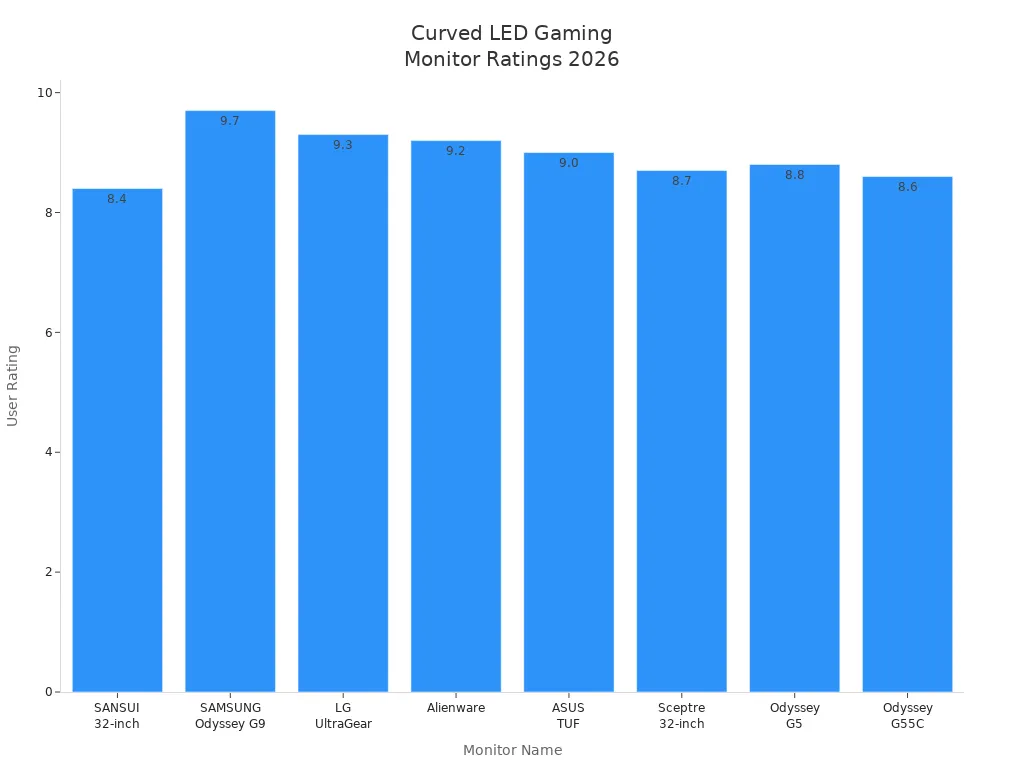
The Samsung Odyssey G9 is great for immersive gaming. SANSUI and Sceptre are fast and cost less. LG UltraGear has bright colors and a wide screen. Alienware looks cool and shows strong colors. Each curved monitor gives you something special for gaming. You can pick the one that fits how you play.
Productivity Features
A curved monitor helps you do more at work. The curved screen lets you see lots of things at once. You can open many windows and switch tasks quickly. The best curved LED monitors for work have big screens and sharp 4K resolution. They also show wide color and have fast refresh rates.
Feature | Details |
|---|---|
Screen Size | 32" |
Resolution | UHD 4K |
Color Gamut | 93% DCI-P3 |
Refresh Rate | 144Hz (up to 165Hz) |
Response Time | 1ms |
Connectivity | USB-C, HDMI 2.1, four USB 3.2 ports |
Ergonomics | Curved design, less eye strain |
Multitasking | KVM switch, Picture-By-Picture |
You can use a curved monitor with a KVM switch to control two computers. Picture-By-Picture lets you see two devices at the same time. These curved LED monitors help you work faster and feel less tired. You get more done every day.
Retail Applications
Curved LED panels make stores look cool and modern. You can use a curved monitor to show bright ads and videos. The curved shape grabs attention and makes people stop and look. Stores use curved LED panels to tell stories and connect with shoppers. The flexible design fits any space.
More people notice curved screens in stores. Bright colors and smooth motion make products stand out. Curved LED panels help you create a shopping experience customers remember.
Tip: Put a curved monitor in your store to get more customers and sales.
Best Picks for Buyer Needs
Gaming Setups
You want a curved monitor that makes your games feel real. The best curved gaming monitor for 2026 uses a 49-inch OLED display. This curved screen wraps around your view. You see every detail and color. The 32:9 aspect ratio gives you a wide field. The response time is only 0.03ms. You play games with no lag. The refresh rate reaches 240Hz. You get smooth motion in every game. This curved gaming monitor works with AMD FreeSync Premium Pro and Nvidia G-Sync. You avoid screen tearing and stuttering.
Feature | Details |
|---|---|
Display Size | 49" OLED |
Aspect Ratio | 32:9 |
Response Time | 0.03ms |
Refresh Rate | 240Hz |
Compatibility | AMD FreeSync Premium Pro, Nvidia G-Sync |
You get a curved gaming monitor that gives you fast action and bright colors. You feel inside the game. You see more and react faster. Many gamers say this curved monitor changes how they play. You can use it for racing, shooting, and adventure games.
Tip: Choose a curved gaming monitor with a high refresh rate and fast response time. You get the best experience for every game.
Professional Use
You need a curved monitor for productivity. The best curved monitor for work has a wide screen. You see many windows at once. You finish tasks faster. The HP E45c G5 is a top curved monitor for productivity in 2026. The curved screen measures 44.5 inches. You get high brightness and strong contrast. The refresh rate is 165Hz. You switch between tasks with no delay. The curved design helps your eyes. You feel less tired after long hours.
You use a curved monitor for editing, coding, and design. You see sharp details and bright colors. You connect your devices with USB-C and HDMI ports. You use smart features like KVM switch and Picture-By-Picture. You control two computers with one curved monitor. You work smarter and faster.
Wide curved screen for multitasking
High brightness and contrast for clear images
Fast refresh rate for smooth movement
Smart features for easy control
Note: Pick a curved monitor with a wide screen and smart tools. You boost your productivity and finish more work.
Retail Environments
You want a curved LED panel that grabs attention in your store. The best curved monitor for retail uses modular design. You change the layout fast. You create immersive displays. The curved LED panel saves energy. You lower costs and help the environment. Adaptive brightness adjusts to the light in your store. You keep your display clear and bright. High resolution shows sharp images. Customers notice your products.
Feature | Description |
|---|---|
Modularity | Supports quick reconfiguration for various retail layouts and immersive experiences. |
Energy Efficiency | Reduces operational costs and aligns with sustainability goals, crucial for modern retail. |
Adaptive Brightness | Automatically adjusts to ambient light, enhancing visibility and customer engagement. |
High Resolution | Provides clear and vibrant displays, essential for attracting customers in retail settings. |
You use a curved LED panel to show ads, videos, and product information. You make your store look modern. Customers stay longer and buy more. You change your display for new products or seasons.
Tip: Use a curved LED panel with adaptive brightness and high resolution. You attract more customers and improve your store.
Budget Options
You want a curved monitor that fits your budget. The best budget curved LED panel for 2026 is the AOC C24G1A. You pay $144 for a 24-inch curved screen. The screen curvature is 1500R. You see a wide view. The resolution is 1920×1080. You get clear images. The VA panel gives you good colors. The refresh rate is 165Hz. You play games and work with smooth motion. The monitor supports FreeSync. G-SYNC is unstable, but you still get good value.
Model | Price | Size | Screen Curvature | Resolution | Panel Type | Refresh Rate | VRR |
|---|---|---|---|---|---|---|---|
AOC C24G1A | $144 | 24" | 1500R | 1920×1080 | VA | 165Hz | FreeSync (G-SYNC Unstable) |
You use this curved monitor for daily tasks and casual gaming. You save money and enjoy a curved screen. You get a simple design and steady performance.
Note: Pick a budget curved monitor with a good refresh rate and clear resolution. You get the curved experience without spending much.
You find the best curved monitor for your needs. You choose a curved gaming monitor for fast action. You pick a curved monitor for productivity to finish more work. You use a curved LED panel in your store to attract customers. You select a budget curved monitor to save money. Curved LED panels help you play, work, and sell better.
Buying Tips for Curved LED Panels
What to Consider
You need to pick the right curved monitor for you. Curved LED panels bend the screen with special technology. This makes pictures wrap around your eyes. You feel like you are inside the action. The screen shows sharp images and bright colors. Curved monitors are good for games, work, and stores. You can use them in art galleries or ads to get attention. The curve helps your eyes feel comfortable. In small rooms, you might see some distortion. Check your room size and shape before buying. Look at resolution, refresh rate, and brightness. These features give you clear pictures. Decide if you want a curved monitor for games or work. Some curved LED panels have smart features like voice control. You can connect devices and switch modes fast. This gives you a flexible setup.
Tip: Try the viewing angle and curve before you buy. Make sure the screen fits your space and your eyes.
Mistakes to Avoid
Many people make mistakes when picking a curved monitor. You can avoid problems by checking important details. The table below shows common mistakes and how to fix them:
Common Mistakes | Solutions |
|---|---|
Ignoring the chain reaction of dead pixels | Check if the module passed a bending cycle test. Good curved monitors should handle 10,000+ micro-vibration cycles and 500+ extreme bends without pixel problems. |
Mismatch between control systems and physical curvature | Make sure your supplier uses Pixel-to-Pixel Mapping. This stops image distortion on curved LED panels. |
Heat dissipation and flatness issues after installation | Pick products with high thermal conductivity back panels and fanless cooling. These features keep your curved monitor cool and flat. |
Always check how strong your curved monitor is. You want a curved LED panel that lasts a long time. Ask about warranty and support. Match the control system to the curve to stop image distortion. Look for curved monitors with good cooling. This keeps your curved LED panel safe and flat.
Alert: Do not skip quality tests for curved monitors. You protect your money and get a better screen.
You notice that a curved monitor uses special led technology to bend. The curved shape is good for your eyes. It also makes pictures look more real. If you play games, a curved gaming monitor like Dell Alienware or Samsung is fast. These monitors show bright colors too. HP has a curved monitor for work with strong led panels. TCL and Hisense make curved monitors that cost less. You can pick a curved gaming monitor for games. You can choose a curved monitor for work. You can use a curved led monitor in your store. Look at the comparison and tips to find the best curved monitor for you.
What Are Curved LED Panels and How Do They Work?
Curved LED panels are display devices that achieve a curved shape through specialised technologies. Their core value lies in delivering a stronger sense of immersion and visual impact. They achieve curvature in two main ways: using flexible modules for true physical bending, or using rigid modules arranged at small angles to simulate a curve.
🧐 What Are Curved LED Panels?
Simply put, curved LED panels are LED displays that break the traditional flat limitation and can be bent into specific arcs as needed. This technology aims to make the screen better match the natural field of view of the human eye, providing a more enveloping and immersive visual experience.
⚙️ Core Working Principles: Two Key Technologies
Curved LED panels are realised mainly through the following two technologies, each with different cost, effect, and application trade‑offs.
Technology | Core Principle | Advantages | Disadvantages | Typical Applications |
|---|---|---|---|---|
Flexible Modules | Use flexible PCBs and soft materials (e.g., rubber back cover) so each module itself can bend. | Smooth curve, seamless splicing; suitable for complex, irregular shapes like waves, cylinders, spheres. | Slightly less rugged and durable in extreme environments compared to rigid modules. | Creative displays, stage backgrounds, custom‑shaped screens, interior architectural decoration. |
Rigid Module Splicing | Use standard rigid LED modules arranged at precise small angles (e.g., 178° between two modules) on a specially designed curved frame to "simulate" a continuous curve. | Structurally robust, high impact resistance; better suited for outdoor or high‑risk environments. | When viewed up close, you may notice tiny facets or creases at the splice points – not completely smooth. | Outdoor billboards, large building facades, applications where durability is critical. |
✨ Main Types & Visual Forms
Based on the above technologies, curved LED panels can take many forms to meet different creative and functional needs.
Concave – The screen curves inward like a cave. This design effectively focuses the viewer's gaze toward the centre, enhancing immersion. Common in command centres or large broadcast studio backdrops.
Convex – The screen bulges outward, using its unique shape to attract attention. Convex designs provide wider viewing angles, making the image visible from many different angles. Ideal for outdoor advertising and open areas like shopping mall atriums.
Wave – A continuous combination of concave and convex curves, forming a wave‑like visual effect. Highly dynamic and artistic. Often used in technology exhibition halls, museums, or as decorative building facade elements.
Cylindrical / Spherical – The screen wraps around to form a cylinder or sphere. Spherical screens achieve 360° no‑blind‑spot visual coverage, delivering a stunning panoramic experience – the ultimate form for landmark visual installations.
🌍 Core Application Scenarios
The unique visual advantages of curved LED panels have led to their widespread adoption across multiple sectors.
Commercial & retail – In flagship stores and shopping mall atriums, wave or cylindrical screens create stunning visual centres, attracting foot traffic and building a premium brand image.
Culture & entertainment – In museums, science centres, and planetariums, spherical or immersive surround screens create lifelike, interactive educational and artistic experiences.
Stage & events – In concerts, product launches, and esports events, flexible screens that can be quickly configured into various shapes create highly dynamic, tech‑forward stage backdrops, greatly enhancing on‑site excitement.
Command & control centres – In security, transportation, and energy monitoring centres, large concave curved screens provide operators with a seamless, consistent information visualisation platform, enabling efficient decision‑making.
💡 Key Buying Considerations
When choosing curved LED panels, beyond basic parameters like pixel pitch, brightness, and refresh rate, pay special attention to the following:
Technology type – Decide whether your application needs the ultra‑smoothness of flexible modules or the structural strength of rigid module splicing.
Minimum bending radius – A critical specification measuring how tightly the screen can curve, usually expressed in millimetres (mm) or degrees (°). For example, LG's LCCM series supports a minimum bending radius of 611R, while INFiLED's SF series supports a maximum bending angle of 60°. Ensure it meets your design's curvature requirements.
Seamless splicing quality – High‑quality curved screens should have no visible gaps at the splices, with uniform brightness and colour. Some manufacturers (e.g., Nanolumens with Nixel™) achieve truly seamless curved surfaces through patented technology.
Installation & maintenance access – Consider the installation environment and whether the screen supports front access or rear access maintenance. For example, INFiLED SF series modules use magnetic attachment and support front access, simplifying later inspection and replacement.
Brand & budget – There are many well‑known brands, such as LG, INFiLED, DeepSky, etc. Different brands have different technology and price positioning. True physical‑bending "true curved" technology (e.g., Nanolumens) typically costs more – balance against your budget.
💎 Summary
Curved LED panels are a mature technology that optimises the visual experience by physically changing the screen's shape. The core decision is whether to choose flexible modules or rigid module splicing – a trade‑off between smoothness, durability, and cost. Based on that, select the most appropriate curve type and product specifications for your specific application scenario.
Let me know if you would like a more detailed comparison of specific curved LED products or brands!please contact Shenzhen TopAdkiosk Display Technology Co.
FAQ
What are curved LED panels and how do they work?
Curved LED panels use tiny lights to make pictures. The screen bends toward you. This shape matches your eyes. You see images that feel real and wrap around your view.
Are curved monitors better for your eyes?
You feel less eye strain with a curved monitor. The curve helps your eyes move less. You see the whole screen without turning your head as much.
Can you use a curved monitor for gaming and work?
Yes, you can use a curved monitor for both. Gamers see smoother action. Workers see more windows at once. You get a better view for many tasks.
Do curved LED panels cost more than flat ones?
Curved LED panels usually cost more. You pay for the special shape and better experience. Budget options exist if you want to save money.
How do you clean a curved LED monitor?
Use a soft, dry cloth. Wipe the screen gently. Do not spray water or cleaner directly on the panel. This keeps your monitor safe and clear.
See Also
Selecting The Perfect LCD Video Wall For Your 2026 Needs
Evaluating Top Transparent OLED Displays Available In 2025
Digital Signage Or LED Signs: Best Business Option For 2026
