Top 4:3 LCD Monitors for Desktop Use in 2026
Shenzhen TopAdkiosk Display Technology Co., Ltd.
Add.: 2F, Bldg 10, Changfeng Industrial Park, Dongkeng, Fenghuang, Guangming, Shenzhen, China 518132
Mobile/WHATSAPP: 86-138 25769658
Email: marketing@topadkiosk.com topadkiosk@gmail.com
Skype: pghenry1
Wechat: adkioskhenry
English Web.: http://www.topadkiosk.com/
https://www.topkioskdisplay.com/
http://www.ad-kiosk.com/
https://www.toplcddisplay.com/
http://www.multitouchdigitalsignage.com/
https://www.youtube.com/channel/UCYVYNJHxLVEcQD8fuUxXNTA/videos?view_as=subscriber
https://www.facebook.com/TOPADKIOSKSHENZHEN/?ref=bookmarks
You want a 4 3 lcd display that works for you now. Here are the best monitors for desktop use in 2026:
Model | What Stands Out |
|---|---|
Arcooda 26 | Large 26" screen, supports up to 1600x1200 resolution, great connections |
Arcooda 1600x1200 | Clear color, bright screen, good for design and office work |
Eizo S2133 | Very accurate color, sharp screen, great for creative jobs |
TRU-Vu Industrial | Super bright, supports up to 4K, made for industrial and retro setups |
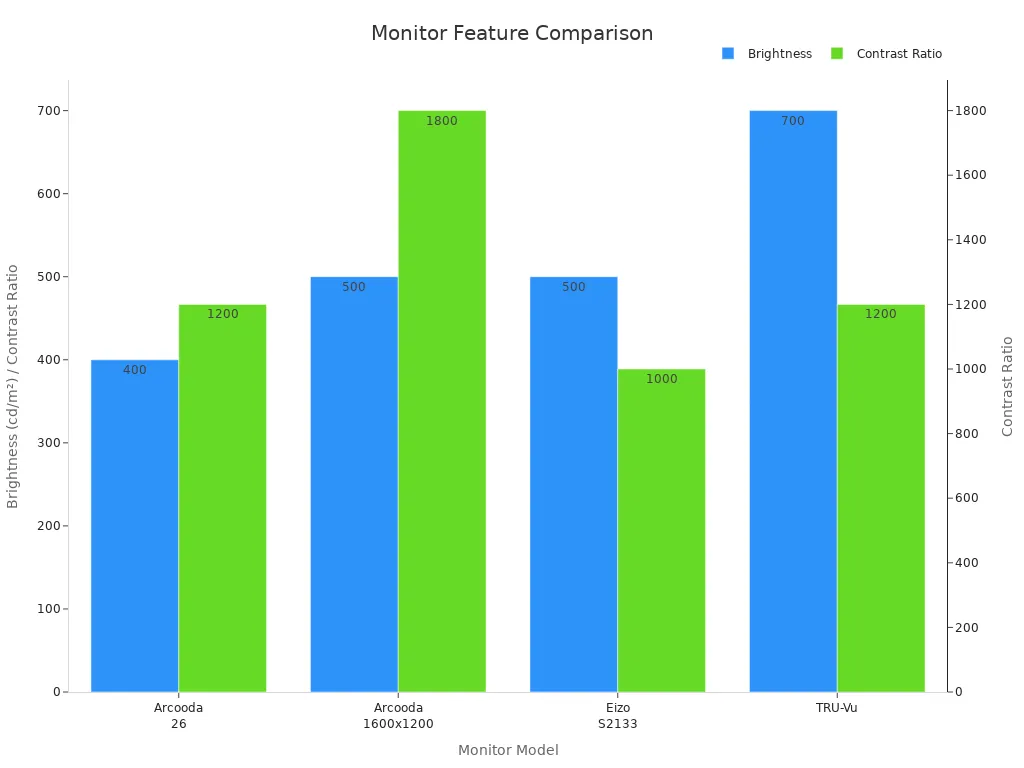
If you want bright color, high resolution, or strong build, these monitors are good. You can use them for office work, graphic design, or retro games. Each monitor has good connections, so you can plug in almost any device.
Key Takeaways
Pick the Arcooda 26 if you want a big screen and many ways to connect. It works well for office jobs and old-school games. The Eizo S2133 shows colors very well, so it is great for art projects and everyday office work. TRU-Vu Industrial monitors are made strong for tough places. They have bright screens and lots of ways to connect. Think about what you need, like how clear the screen is and what ports you use, to pick the best 4:3 monitor for you. Cheaper choices like the 17 inch Square PC Monitor 4:3 LED work well for simple jobs.
4 3 LCD Display Comparison
Specs and Price Table
You want to see how these monitors stack up side by side. Here’s a quick table that shows you the specs, price, and a few notes for each monitor. This way, you can spot the right 4 3 lcd display for your needs at a glance.
Product Name | Price | Rating | Screen Size | Resolution | Remarks |
|---|---|---|---|---|---|
Arcooda 26 | $1,299 | 4.7 | 26" | 1600x1200 | Large display, great for retro and office use |
Arcooda 1600x1200 | $1,099 | 4.6 | 20.1" | 1600x1200 | Bright screen, ideal for design and productivity |
Eizo S2133 | $899 | 4.8 | 21.3" | 1600x1200 | Top color accuracy, perfect for creative work |
TRU-Vu Industrial | $1,499 | 4.5 | 19"-24" | Up to 3840x2160 | Super bright, built for industrial and retro setups |
$187.68 | 3.9 | 19" | 1280x1024 | Good for CCTV and PC, BNC/VGA inputs | |
17 inch Square PC Monitor 4:3 LED | $89.90 | 3.9 | 17" | 1280x1024 | Budget pick, VESA mount, office or industrial use |
SKitphrati 17 Inch 10-Point Touch | N/A | 4.1 | 17" | 1280x1024 | Touch display, works with Raspberry Pi and Win11 |
💡 Tip: If you want a monitor for creative work, look at the Eizo S2133. For a budget-friendly display, the 17 inch Square PC Monitor 4:3 LED is a solid choice.
Resolution and Connectivity Overview
When you pick a monitor, you want to know if it fits your setup. Most of these monitors offer a 1600x1200 resolution, which gives you sharp images and lots of space for multitasking. The TRU-Vu Industrial monitor stands out with support for up to 4K, so you get even more detail if you need it.
You’ll find that each display comes with a range of connections. The Arcooda models and Eizo S2133 give you DVI, VGA, and HDMI, so you can plug in both new and old devices. TRU-Vu monitors add DisplayPort and sometimes legacy ports, which helps if you use older computers or arcade boards. JaiHo and the 17 inch Square PC Monitor 4:3 LED focus on BNC and VGA, which work well for CCTV or older PCs. SKitphrati’s touch monitor supports HDMI and USB, making it easy to use with Raspberry Pi or Windows 11.
You can match the right monitor to your needs by checking the resolution and the ports. If you want a big screen for design or retro gaming, go for the Arcooda 26. If you need a tough display for industrial work, TRU-Vu is your best bet. For simple office tasks, the 17 inch Square PC Monitor 4:3 LED gets the job done.
Best 4:3 Monitors Reviewed
Arcooda 26 Monitor
This monitor gives you a big, clear screen for work or games. The Arcooda 26 has a 26-inch display. It lets you pick from many display settings. You see sharp pictures with up to 2880x2160 resolution. This means you notice every detail. It works well for office jobs, design, or retro gaming. You can connect almost any device because it has many ports.
Resolution | Supported Ports |
|---|---|
Up to 2880x2160 | 15khz, 24khz, 31khz, VGA, DVI, HDMI, Displayport |
Up to 1440x1080 | 15khz, 24khz, 31khz, VGA, DVI, HDMI, Displayport |
You can use this monitor with old or new computers. The build is strong and the screen stays bright, even in sunny rooms. The price starts at $495 for the basic model. The arcade version costs $695.
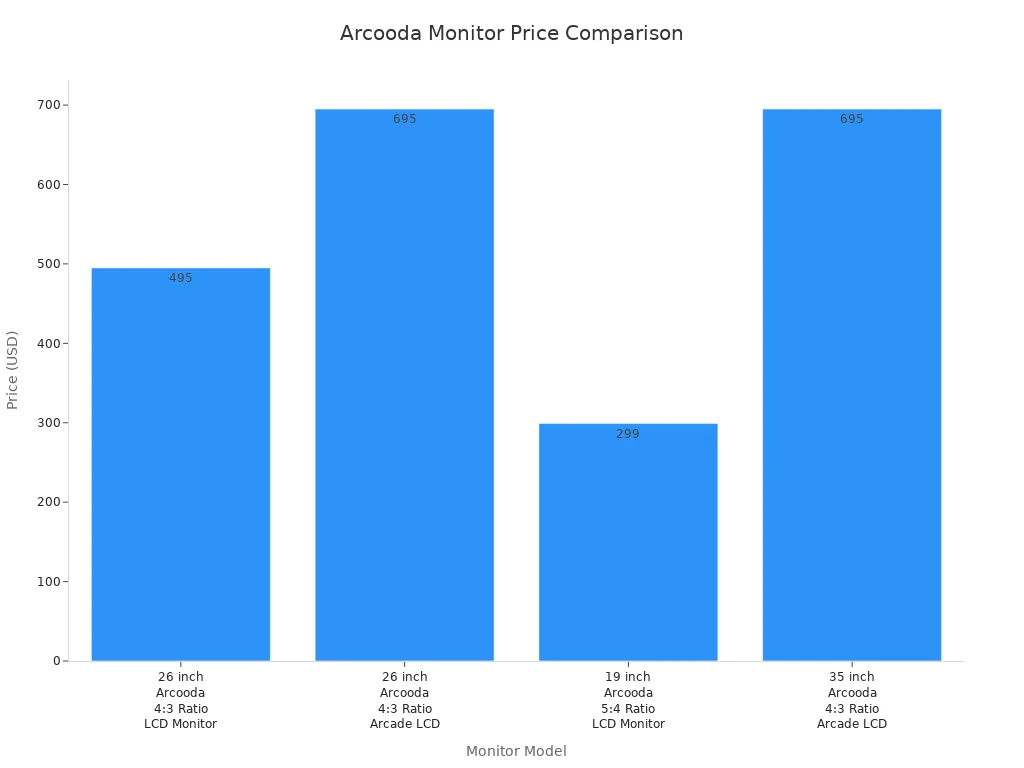
Why pick the Arcooda 26?
The screen is big, so you can do more at once.
It is great for retro gaming monitors and arcade setups.
You get lots of ports for easy connections.
The price is good for what you get.
Arcooda 1600x1200 Monitor
This monitor is good for both work and games. The Arcooda 1600x1200 has a bright, clear screen. The resolution goes up to 1600x1200. This is great for office work, graphic design, and retro gaming. You get smooth images and bright colors. This makes work and games look better.
Feature | Details |
|---|---|
Monitor Resolution | |
Best Uses | All round performance for retro gaming, arcade cocktail tables, and standard desktop applications. |
You can connect it to many devices because it has flexible ports. The build is strong, so you can use it every day. The price is not too high or too low. It is a smart choice if you want good quality and a fair price.
💡 Tip: If you like classic games or need a monitor for both work and fun, this one is a good fit.
Eizo S2133 Monitor
This monitor is best for color accuracy and a sharp screen. The Eizo S2133 gives you a 21.3-inch display. The resolution is 1600x1200, so images look crisp. You can use DisplayPort, D-Sub, and DVI-D to connect it.
Feature | Details |
|---|---|
Supported Resolutions | 1600 Dots × 1200 Lines |
Connectivity Options | DisplayPort, D-Sub, DVI-D |
Max Dot Clock | 162 MHz |
Max Display Color | Approx. 16.77 million colors |
The Eizo S2133 has special modes for different jobs. FineContrast Mode is for pro work. User1 and User2 Modes let you set your own colors. Paper Mode makes the screen look like paper, which is good for reading. Movie Mode is best for videos.
Feature | Use Case Description |
|---|---|
FineContrast Mode | Lets you pick the best display mode for your job. |
User1/User2 Modes | Helps you match colors for design and photography. |
Paper Mode | Makes the screen look like printed paper, great for reading. |
Movie Mode | Optimizes the display for videos and animations. |
The build feels fancy and the monitor lasts a long time. The price is lower than some other top monitors. You get great value for creative work, office jobs, or watching movies.
TRU-Vu Industrial Monitors
If you need a tough monitor, TRU-Vu industrial monitors are a good pick. These monitors keep the 4:3 aspect ratio. Many old systems still need this shape. The design is strong with TRU-Tuff Treatment. This helps the monitor resist shock and shaking. The screen is bright at 350 nits, so you see well in any light.
Feature | Description |
|---|---|
Rugged Design | Built to withstand tough environments with TRU-Tuff Treatment for shock and vibration resistance. |
Compatibility with Legacy | Supports 4:3 aspect ratio, ideal for legacy systems, with both analog and digital inputs. |
Inputs | HDMI, VGA, and Composite BNC for versatile connectivity. |
Brightness | 350 nits for clear visibility in various lighting conditions. |
Warranty | Full 3-Year Warranty ensuring reliability and performance. |
You can use these monitors with old or new devices. TRU-Vu keeps making 4:3 monitors because some systems cannot use widescreen. You get HDMI, VGA, and BNC ports, so you can connect almost anything. The monitor comes with a 3-year warranty, so you know it will last.
TRU-Vu monitors are good for industrial setups, retro gaming, and places that need a tough display.
Many old systems still use these monitors because of space and software needs.
You get peace of mind with a strong build and a long warranty.
If you want a 4 3 lcd display that works with old systems and can handle hard use, TRU-Vu has what you need.
4:3 Monitor Buying Guide
Key Features to Consider
When you look for a 4 3 lcd display, you should know what makes it special. A 4:3 aspect ratio means the screen is almost a square. This shape gives you more space up and down than a widescreen. You can see more lines of text or taller pictures at once. If you use old software or want a classic style, this monitor is a good choice.
Pick a monitor with a sharp screen and nice colors. Check the resolution. Higher resolution lets you see more details. Brightness and contrast are important too. A bright screen helps in rooms with lots of sunlight. Strong contrast makes pictures stand out. You want a tough monitor if you move it a lot.
Compatibility and Connectivity
You need to make sure your monitor works with your computer. Some computers only use 4:3 monitors. Others use widescreen monitors. If you change a 4:3 monitor to a widescreen, you might have problems. The table below shows what to check:
Aspect | |
|---|---|
Mechanical Design | Old cases need 4:3 monitors. New cases use widescreen. |
Software Architecture | Old programs work best with 4:3. New apps like widescreen. |
User Interaction | Vertical jobs fit 4:3. Dashboards look better on widescreen. |
Replacement Risks | You might see weird screens or need new software if you switch. |
Look at the ports on your monitor. Most new monitors have HDMI, DisplayPort, and VGA. Some also have DVI or BNC. Make sure your computer or device matches these ports.
Use Cases: Office, Design, Retro
You can use a 4:3 monitor for many things. In the office, you get more space for papers and documents. Designers like the square screen for editing photos or layouts. Retro fans use these monitors for old games and computers. In factories or arcades, you need a strong monitor. The table below shows why these monitors are good for special jobs:
Feature | Description |
|---|---|
Ruggedness | Made for tough places. |
Customization | Touch screens and special displays for unique needs. |
Performance | Works well inside and outside. |
Aspect Ratio | Both 4:3 and widescreen are available. |
Applications | Great for factories and arcade setups. |
Price and Value
You may see that 4:3 monitors cost more than widescreen ones. These monitors are not common now. They work best with old computers and special setups. Widescreen monitors are cheaper and better for new apps and high-definition videos. If you need a 4:3 monitor for an old system, it is worth it because it fits perfectly and saves trouble. For most new uses, widescreen gives you more space and is a better deal.
📝 Tip: Always pick a monitor that matches your main jobs. You save time and avoid problems when your screen fits your work.
You need a monitor that fits what you do. The Eizo S2133 is good for office work. It shows clear words and works well every day. The Arcooda 26 is liked by creative people and retro gamers. It has a big 26-inch screen and sharp pictures. You can see it from any angle. Here is a simple table to help you:
Monitor | Best For | Standout Feature |
|---|---|---|
Arcooda 26 | Creative, Retro/Arcade | Large screen, many inputs |
Eizo S2133 | Office, Creative | Color accuracy |
TRU-Vu | Industrial | Rugged build, bright display |
TRU-Vu monitors are best for hard jobs in rough places. Choose your 4 3 lcd display based on what you need most. All these monitors have good screens and lots of ways to connect. Pick the one that matches your space, money, and what you want to do.
What Is a 4:3 Aspect Ratio LCD Display?
A 4:3 aspect ratio LCD display is a liquid crystal display where the width to height ratio is 4:3. In simple terms, if the width is 4 units, the height is 3 units. This ratio was once the absolute mainstream in early CRT televisions and computer monitors. Although it is no longer the primary consumer standard today, it still has specific applications in many professional and commercial fields.
📐 What Is the 4:3 Aspect Ratio?
The 4:3 aspect ratio is one of the most classic display ratios in history. It closely matches the natural field of human vision when focusing on a subject, resulting in a square, stable image. Before 16:9 (widescreen) became the standard for TVs and computer monitors, nearly all televisions, computer screens, and game console outputs used the 4:3 ratio. This ratio was used for everything from 480p standard‑definition TV to common computer resolutions such as 1024×768 and 1400×1050.
🖥️ Characteristics of 4:3 LCD Displays
Stable image – Compared to 16:9 widescreen, a 4:3 screen is closer to a square, offering moderate information density that is less likely to cause visual fatigue.
High pixel utilisation – When displaying documents, spreadsheets, legacy software interfaces, or standard‑definition video, a 4:3 screen uses the display area efficiently. There are no wasted black bars on the sides or stretched/distorted content as often occurs on widescreens.
Common resolutions – Typical 4:3 LCD resolutions include 640×480 (VGA), 800×600 (SVGA), 1024×768 (XGA), 1280×960, and 1400×1050 (SXGA+) , among others.
Size range – Common diagonal sizes range from 8 inches to 21 inches. Long‑time industrial users may still have 15‑inch, 17‑inch, or 19‑inch 4:3 medical or industrial displays.
🔧 Current Main Application Scenarios
Although the 4:3 ratio has been replaced by 16:9, 16:10, and even 21:9 in the consumer electronics space, it remains active in the following fields:
Industrial control and instrumentation – Many older production lines, industrial PCs (IPCs), and PLC programming equipment still use 4:3 displays to ensure software interfaces are not distorted and touch positioning remains accurate.
Medical imaging – Some medical imaging equipment (e.g., X‑ray, ultrasound) and diagnostic workstations continue to use 4:3 displays because physicians prefer the aspect ratio for critical diagnostic details.
Security surveillance – Early surveillance video playback systems were mostly 4:3. Using a 4:3 LCD displays the full image without cropping.
Point‑of‑sale (POS) systems – Many older POS software interfaces were designed for 1024×768; 4:3 touchscreens are still widely used.
Digital signage – Some elevator or public transport information screens, due to space constraints or a need to display text‑heavy content, still use 4:3 narrow‑bezel LCDs.
Retro gaming and computing – Enthusiasts seek out 4:3 LCDs to connect older game consoles (e.g., PS2, GameCube) or run classic operating systems for an authentic vintage display experience.
⚠️ Buying Considerations
Compatibility – If you are replacing an old 4:3 display, ensure the input interface (VGA, DVI, HDMI) and touch functionality (resistive, capacitive) match your equipment.
Resolution matching – The physical resolution of the display should ideally match the source output resolution (e.g., 1024×768). Otherwise, the image may appear blurry or show black bars.
Supply channels – Mainstream consumer e‑commerce may no longer sell new 4:3 LCDs. They are typically available through industrial parts suppliers, industrial automation vendors, or the second‑hand market.
💎 Summary
The 4:3 aspect ratio LCD display is a professional/industrial display device with a square, classic form factor. Although it is no longer common on everyday televisions and laptops, its perfect compatibility with legacy software and hardware, combined with its advantages in specific viewing angles and information density, makes it irreplaceable in fields such as industrial automation, healthcare, security, and POS systems. If you need to run older systems or maintain existing equipment, the 4:3 LCD remains a reliable veteran.
FAQ
What is a 4:3 aspect ratio LCD display?
A 4:3 aspect ratio LCD display shows images almost like a square. You see more height than width. People use this monitor for office work, graphic design, and retro gaming. It fits old computers and arcade machines.
Can I use a 4:3 monitor with modern computers?
Yes, you can connect a 4:3 monitor to most new computers. Just check the ports like HDMI, VGA, or DVI. Some monitors also work with DisplayPort. You get a clear picture for your daily tasks.
Why do people still buy 4:3 monitors?
You might need a 4:3 monitor for old software, classic games, or special setups. Some jobs and factories use these monitors because they fit their machines. Retro fans love them for arcade games.
Are 4:3 monitors good for gaming?
You can play retro games on a 4:3 monitor. These monitors show classic games the way they were meant to look. For new games, widescreen gaming monitors work better.
How do I choose the right 4:3 monitor?
Look at the screen size, resolution, and ports. Pick a monitor that matches your computer and your main job. If you want bright colors or a tough build, check the specs before you buy.
See Also
Top LCD Kiosks Enhancing Retail Spaces in 2026
Essential LCD Display Innovations to Watch in 2026
Selecting The Perfect LCD Video Wall For Your Area in 2026
Best 10 Digital Signage Video Wall Options for 2026
The Impact of Round LCD Displays on Business Signage in 2025
