Android digital signage players that fit every business
Shenzhen TopAdkiosk Display Technology Co., Ltd.
Add.: 2F, Bldg 10, Changfeng Industrial Park, Dongkeng, Fenghuang, Guangming, Shenzhen, China 518132
Mobile/WHATSAPP: 86-138 25769658
Email: marketing@topadkiosk.com topadkiosk@gmail.com
Skype: pghenry1
Wechat: adkioskhenry
English Web.: https://www.topkioskdisplay.com/
http://www.ad-kiosk.com/
https://www.toplcddisplay.com/
http://www.multitouchdigitalsignage.com/
https://www.youtube.com/channel/UCYVYNJHxLVEcQD8fuUxXNTA/videos?view_as=subscriber
https://www.facebook.com/TOPADKIOSKSHENZHEN/?ref=bookmarks
You want to find android digital signage players that fit your business goals in 2026. The best signage depends on things like screen size, resolution, and technical details. For indoor digital signage, check if the android player shows high-definition content, has strong connections, and lasts a long time. Businesses also want easy ways to mount, manage power, and keep things safe. If you have a retail store, office, or any indoor place, picking an android player with the right brightness, touchscreen, and safety rules helps your signage work well.
Key Takeaways
Pick the best android digital signage player for your business. Think about screen size, resolution, and what kind of content you want to show.
Find options that do not cost too much, like the Amazon Fire TV Stick 4K Max or Onn 4K Streaming Box. These give you good digital signage without spending a lot.
Make sure your signage players can show high-definition content. They should also have strong connections for smooth use and clear pictures.
Think about interactive features and remote management. These help customers get involved and make it easy to change content.
Get ready for the future by choosing solutions that can grow with your business. Pick ones that can change as your business and technology change.
Quick comparison of android digital signage players
Key features and business fit
There are many android digital signage players in 2026. Each player has special features for different businesses. Some players are good for small shops. Others work well for big companies or busy stores. You want screens that show clear pictures and run fast. Hardware like the Amazon Fire TV Stick 4K Max is easy to set up. It works well for simple signage and gives good performance. The Amazon Signage Stick is great for retail and hotels. It has advanced content tools and strong hardware. Nvidia Shield TV Pro shows high-resolution displays and interactive content. It is a top pick for tough environments.
ScreenCloud Pixi lets you control digital signage with easy tools. Raspberry Pi 5 helps you make custom screens. It is good for startups or creative projects. Chromecast with Google TV gives you fast access to signage software. It supports many types of content. Generic Android TV boxes are flexible and fit many businesses. Built-in media players are good for simple setups in hotels or offices. TelemetryTV Box is strong and works all day. It is best for businesses that need reliable tech.
Think about your business place, the content you want to show, and how many screens you need. Retail stores use signage for ads and to get customers interested. Offices show news and numbers. Hotels promote services and events. Schools and hospitals use displays for information and directions.
At-a-glance product table
Player | Key Features | Ideal Business Fit |
|---|---|---|
Amazon Fire TV Stick 4K Max | Easy setup, HD content, affordable | Small business, startups |
Amazon Signage Stick | Advanced management, strong hardware | Retail, hospitality |
Nvidia Shield TV Pro | High-res displays, interactive content | Large-scale, corporate |
Raspberry Pi 5 | Custom screens, flexible hardware | Creative, educational |
ScreenCloud Pixi | Simple controls, cloud management | Offices, multi-location |
Chromecast with Google TV | Quick access, supports many content | Small business, hospitality |
Generic Android TV boxes | Flexible, scalable hardware | Any business type |
TelemetryTV Box | Resilient, 24/7 operation | Demanding, high-traffic |
This table helps you compare digital signage screens. You can pick the best displays for your business. Find hardware that fits your needs and shows your content.
Small business and startup solutions
Budget-friendly android digital signage players
You want to spend less money but still get good digital signage. Many android digital signage players work well and cost less. You can pick from different devices that fit your budget. These devices help you show clear pictures and videos. The table below lists popular choices for 2026. Each device gives you good quality and supports high-resolution screens.
Device Name | Price Range | Operating System | CPU | RAM | Output Resolution |
|---|---|---|---|---|---|
Onn 4K Streaming Box | $20 – $30 USD | Android TV 10.0 | Amlogic S905Y2 Quad-Core | 2GB DDR4 | Up to 4K UHD @ 60fps |
X96Q Android TV Box | $30 – $50 USD | Android 10.0 | Allwinner H313 Quad-Core | 1GB/2GB DDR3 | Up to 4K UHD @ 30fps |
X96 Max Plus | $40 – $80 USD | Android 9.0 | Amlogic S905X3 Quad-Core | 2GB/4GB DDR3 | 8K@24fps, 4K @60fps |
Xiaomi Mi Box 3 | N/A | N/A | N/A | N/A | 4K Ultra HD |
You can see the price differences in the chart below. Devices like Onn 4K Streaming Box and X96Q Android TV Box cost less but still work well. These players help you use digital signage without spending too much.
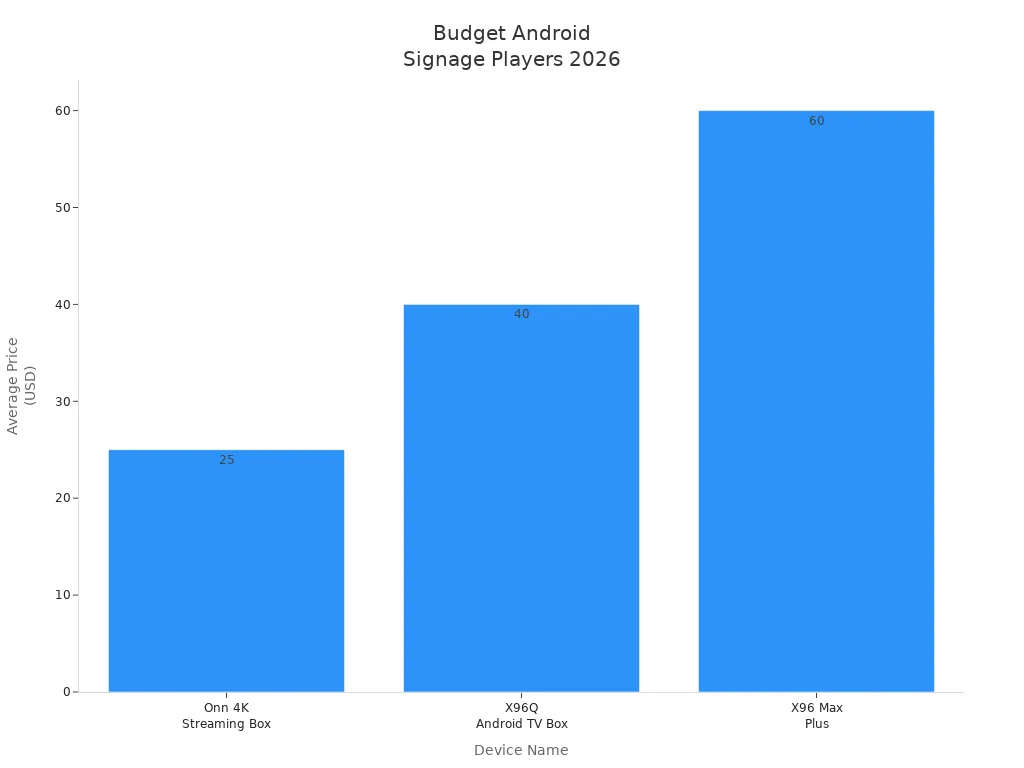
You can also use Amazon Fire TV Stick 4K Max, Raspberry Pi 5, Chromecast with Google TV, and ScreenCloud Pixi. These devices are good for small businesses and startups. They are easy to set up and support digital signage. Many startups use PosterBooking because it is free for the first ten screens. This lets you try signage without worrying about cost.
Easy setup and essential features
You need digital signage that is simple to install and manage. Android devices make setup quick and easy. You can connect your player to a screen and start showing content fast. PosterBooking helps you launch signage quickly. You can upload pictures, videos, or interactive content and update your screens easily.
Small businesses want features that help them grow. You need tools to create and schedule content. You can change your messages anytime. You also want devices that show high-definition displays and run smoothly. The table below lists the most important features for small businesses.
Feature | Description |
|---|---|
Interactive Content Management | Tools for creating, scheduling, and updating content in real-time, essential for adapting messaging quickly. |
Scalability | Supports deployments from a few screens to thousands, simplifying large-scale operations. |
Ease of Use | Android devices are easier to deploy, update, and standardize across locations, enhancing operational efficiency. |
Cost-Effectiveness | Generally cheaper than Windows PCs or proprietary hardware, making them accessible for small businesses. |
You want your signage to look sharp and run fast. Devices with strong processors and enough RAM help you show high-definition content. You also need good graphics for visual displays. Many android digital signage players support Full HD and 4K output. This makes your screens clear and attractive.
Processor speed and RAM help your signage run smoothly.
Strong graphics make your displays look professional.
High-resolution output gives you clear digital signage.
You can pick software that fits your needs and budget. The table below lists popular digital signage solutions for startups. PosterBooking is special because it is free for up to ten screens. OptiSigns and Rise Vision have high user ratings and flexible pricing.
Software Name | Starting Price | User Ratings | Link to Ratings |
|---|---|---|---|
PosterMyWall | $9.95/user/month | 2 Ratings | |
L Squared Digital Signage | $1/day/screen | 2 Ratings | |
Look Digital Signage | $6.00/month | 1 Rating | |
Fugo | $24/month/screen | 1 Rating | |
OptiSigns | $10/month/screen | 7,880 Ratings | |
Rise Vision | $11/month/display | 1,443 Ratings | |
QuickESign | $5/month | N/A | |
PosterBooking | $0/month (first 10 screens) | 20 Ratings |
You can see how users rate these solutions in the chart below. OptiSigns and Rise Vision have many good reviews. PosterBooking gives you a free choice for small setups.
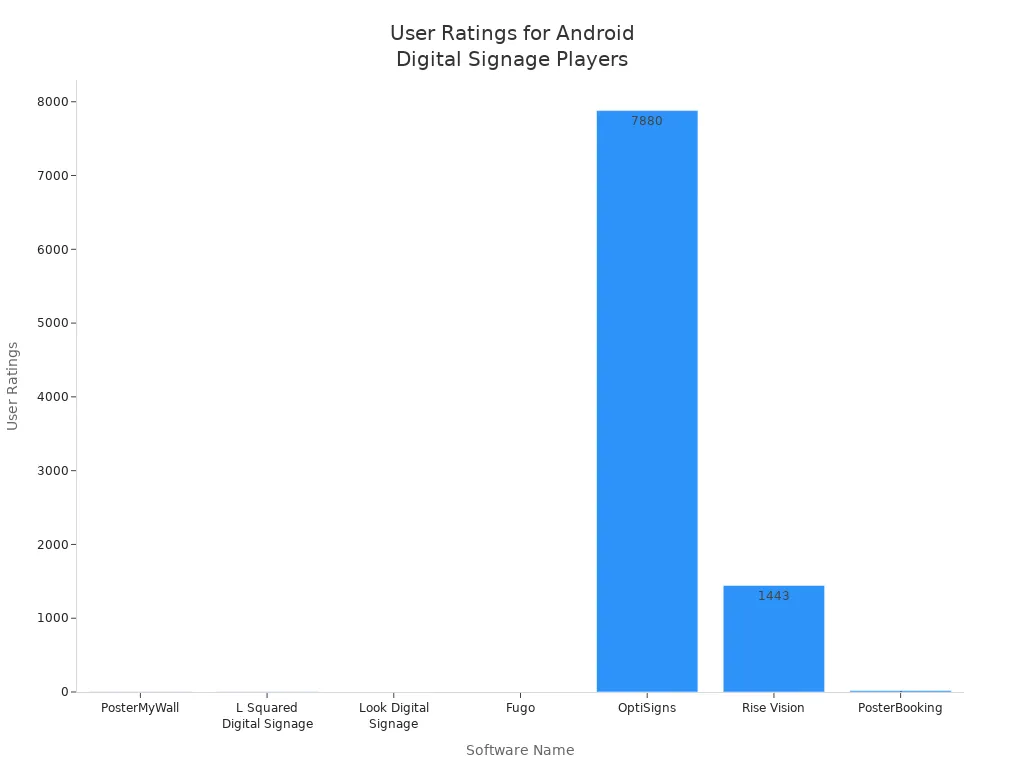
You can use android digital signage players in stores, hotels, and offices. These players help you show interactive content and manage screens easily. You get strong features, flexible pricing, and reliable performance. You can start with a small setup and add more as your business grows.
Tip: Try a free or low-cost solution like PosterBooking. Test your signage and upgrade when your needs change.
Retail and hospitality signage needs
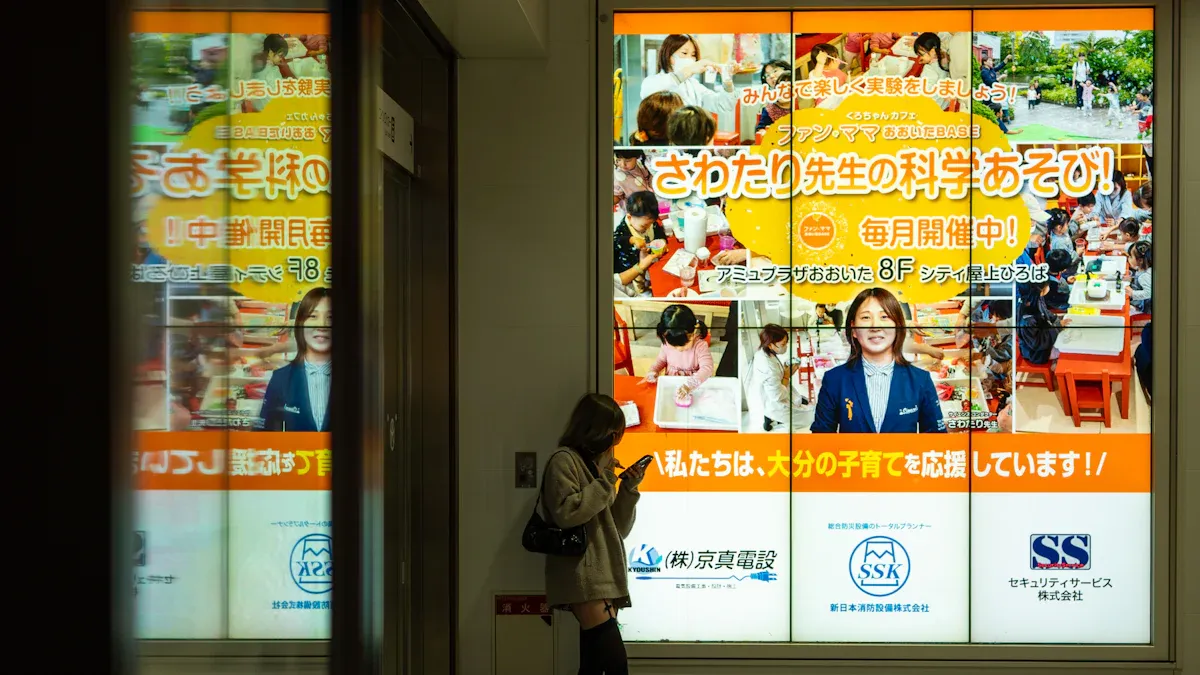
Interactive and immersive features
You want your store or hotel to be special. Android digital signage players help you make fun displays. These players turn normal screens into touchscreens. People can tap, swipe, and look at products or services. You can use these screens in busy places like hotel lobbies or trade shows. The screens catch people’s eyes and help them find things.
Many stores use XR digital signage now. This mixes real screens with augmented reality. You can show virtual things on real displays. Customers see products in cool new ways. Motion, sound, and touch make the screens more fun. You can change what shows based on what people do. AI-driven personalization helps you show the best message for each person.
Here are some features you can use:
Immersive displays pull in customers in busy places.
XR digital signage changes with what customers do.
Interactive self-service lets people pick what they want.
AI-driven personalization shows different things for each person.
Motion and sound make the space feel lively.
Feature | Description |
|---|---|
Immersive Displays | Used in places where it is hard to get attention, like big lobbies and trade shows. |
XR Digital Signage | Mixes real screens with augmented reality for fun experiences. |
Interactive Self-Service | Lets customers use the screen to get their own information. |
AI-Driven Personalization | Changes what is on the screen based on what people do. |
Interactive touchscreens help people get involved. Customers can look at menus, check prices, or learn about items. Good digital signage screens show clear pictures and videos. Outdoor digital signage is great for hotels and stores outside. You can use software to change what is on the screens fast.
Tip: Use cool technology to make visits fun. You can help customers and show them what they need.
Integration with POS and engagement tools
You can link android digital signage players to POS systems. This helps you show new deals right away and keep your brand the same everywhere. You can change what is on all your screens at once. Many stores use built-in media players because they are easy. You can connect screens to CRMs and payment tools. This makes it easy to talk to customers.
You can watch and control your screens from anywhere. Remote management lets you change signs in many places. You can use digital signage to check prices and show sales. You can show ads that change and make shopping better. In hotels, you can tell guests about services and events.
Evidence Description | Source |
|---|---|
Linking with PMS and POS systems lets you change offers fast and keep your brand the same. | Intuiface |
Lets you talk to CRMs and payment tools, making it easier to reach customers. | Intuiface |
Watching and changing screens from far away helps you update many places at once. | Portworld |
Sector | Use Case | Description |
|---|---|---|
Retail | Dynamic Advertising | Uses screens to show ads and product deals. |
Retail | Shows fun content to keep customers interested. | |
Hospitality | Personalized Guest Services | Tells guests about hotel services and events. |
You can use Amazon Signage Stick and Nvidia Shield TV Pro. These players help you manage content and use touchscreens. You can control screens, change prices, and see how people use them. You can save money by picking hardware and software that fit your needs.
Note: Pick digital signage screens that work with your POS and CRM tools. This helps you show the right things and make customers happy.
Corporate and office environments
Secure android digital signage players
You need to keep your office screens safe. Android digital signage players help protect your screens and information. Devices like Amazon Signage Stick, Nvidia Shield TV Pro, and ScreenCloud keep your data secure. These players use safe connections so your information stays private. Only trusted people can change what shows on the screens. You can set up who can update the content. This stops mistakes and keeps your displays working well.
Offices use digital signage instead of old noticeboards. You can show company values and directions on screens. Real-time data can also be shown to everyone. Good screens make your messages easy to read. You need strong displays for a clear look. Reliable players help your screens work every day without problems.
Remote management and scalability
You want to control your screens from anywhere. Android digital signage players let you manage content in many places. You can check your screens and fix problems quickly. Device grouping lets you send messages to certain offices. Centralized content helps you keep the same message everywhere.
Feature | Description |
|---|---|
Lets you show the same message in many places easily. | |
Device grouping | Sends special messages to certain groups of screens. |
Remote monitoring and diagnostics | Lets you check and fix screens from far away. |
Multi-user access with permissions | Lets more people help manage screens but keeps control. |
Cost-effective scalability | Makes it easy to add more screens as you grow. |
Digital signage software helps you update screens easily. You can start with a few screens and add more later. Prices are flexible so you can grow as your business gets bigger. You can connect with other office tools to share news fast. Content management systems help you schedule and change what is on your screens.
Tip: Pick android digital signage players with good security and remote control. You can add more screens as your company grows and keep your displays safe.
Large enterprise and multi-location deployments
High-performance android digital signage players
Big businesses need strong android digital signage players. These players help you run screens in many places. You want hardware that works all day and shows clear images. TelemetryTV Box gives you high performance. It works 24/7, supports 4K, and has lots of storage. TelemetryTV Droid-1 connects well and uses Android 11. Nvidia Shield TV Pro and Amazon Signage Stick show reliable displays. They also have interactive features. Generic Android TV boxes fit many business needs. They support built-in media players.
Player Name | Performance Level | Key Features | Price Tier |
|---|---|---|---|
TelemetryTV Box | High | 24/7 operation, 4K support, extensive connectivity, large storage capacity | $$ |
TelemetryTV Droid-1 | Mid | Cost-effective, Android 11, 4K support, good connectivity options | $ |
You want screens that stay bright and sharp. Hardware must handle many screens and keep your signage running. These players show content in stores, offices, and public spaces.
Centralized control and analytics
Managing screens in many places can be hard. You need tools to control all screens from one spot. Kitcast gives you a dashboard to organize screens and set playlists. You can group displays and send content to different areas. Kitcast works with many devices. You do not need the same hardware everywhere. You get a consistent user experience on all screens.
Feature | Kitcast (Android) | Other Platforms (General) |
|---|---|---|
Centralized Control | Offers a comprehensive view of all screens, allowing for group organization and targeted playlists. | Varies by platform; may lack centralized control. |
Hardware Flexibility | Supports multiple devices (Apple TV, Android TV, Fire TV Stick) from a single dashboard. | Often requires uniform hardware across locations. |
User Experience | Consistent user experience across different devices. | May differ significantly between platforms. |
You face problems when you use android digital signage players at scale:
Device downtime can stop screens and hurt your business.
Scalability issues make it hard to add new screens.
Maintenance and technical skills are needed for updates.
Content management can lead to old messages and weak signage.
Security risks can threaten your data and disrupt screens.
You can fix these problems with strong hardware and centralized management. Analytics help you track content and fix issues fast. You keep your signage fresh and safe. Reliable displays and interactive features help your business grow.
Tip: Pick android digital signage players with centralized control and analytics. This makes your screens easy to manage and keeps your content up to date.
Specialized and advanced display needs
Outdoor, 4K, and touchscreen solutions
You might need android digital signage players for outside areas, 4K screens, or touch displays. These places need special features. Outdoor screens deal with sunlight, rain, and dust. You need screens that stay bright in the sun. Regular screens are hard to see in bright light. Outdoor digital signage uses strong materials and weatherproof covers. You want screens that work all day and night.
Here is a table of top picks for outdoor, 4K, and touchscreen use:
Product Name | Resolution | Features |
|---|---|---|
4K@60Hz | Cloud control, good for commercial displays | |
DSBOX-6320SE | 4K | Supports Android/OpenHarmony, WiFi, Bluetooth |
4K UHD PCAP Touch Screen | 4K | 10-point Capacitive touch, interactive signage |
These players are good for outdoor screens. They show sharp 4K pictures and strong brightness. The 4K UHD PCAP Touch Screen lets people use the display. This is great for maps, menus, or info points. TelemetryTV Droid-1 also supports 4K video and has many ways to connect. You get smooth use and easy setup.
Outdoor screens must be tough. Commercial android displays are made for 24/7 use. They have more brightness for better viewing. Media players show 4K content and multi-zone layouts. Android smart TVs are easy to set up but have basic brightness.
Versatile and innovative options
You want screens that fit any place. Raspberry Pi 5 with Android OS gives you flexibility. You can use it for creative projects or custom outdoor screens. Generic Android TV boxes also work in many spaces. They support different screen sizes and brightness.
Modern android digital signage players have many features:
You can show photos, videos, and animations.
App integrations connect your display to Google Drive or social media.
You can change screen direction from landscape to portrait.
You can use Microsoft 365 and Google Workspace to manage content.
Dynamic templates and AI-powered content creation make your messages stand out.
Content management helps you organize and schedule what shows on each screen.
Offline features keep your outdoor display running without internet.
Security features like two-factor authentication protect your system.
Cloud-based management lets you update outdoor screens from anywhere.
Real-time content updates help you share news fast.
Scheduling flexibility lets you set times for each message.
Analytics integration tracks how people use your outdoor displays.
You can use an Interactivity Editor to build touch apps without coding. Advanced event management triggers actions when people touch the screen. These tools help you make fun outdoor displays.
Tip: Pick android digital signage players with high brightness and strong durability for outdoor use. This keeps your message clear in any weather.
Buying guide and future-proofing
Choosing the right android digital signage player
You want to pick the best screens for your business. Think about how big your business is. Check your budget and what you need for technology. Every business wants something different from their displays. Some only need simple screens for menus. Others want displays that customers can touch and use. Look at the hardware first. Good hardware helps your screens work well. It keeps your pictures and videos looking clear.
Here is a table to help you compare important features:
Feature | Importance |
|---|---|
Processor speed and RAM | Smooth handling of high-definition content |
Graphics capabilities | Supports interactive and visually rich displays |
High-resolution output | Clear and crisp digital signage displays |
Multi-screen support | Useful for social media walls and large displays |
Internal storage | Stores media files locally |
Expandable storage | Adds more space with SD cards or USB drives |
Wi-fi and ethernet | Reliable internet for updates and remote management |
HDMI, USB, Bluetooth | Connects to displays and accessories |
Operating system | Needs a recent Android version |
Compatibility | Works with your digital signage software |
Build quality | Durable for different environments |
Cooling mechanisms | Prevents overheating during long use |
Low power consumption | Saves energy and money |
Power over ethernet | Combines power and data in one cable |
Think about what you want to show on your screens. If you want videos or interactive things, you need strong hardware. Where you put your screens matters too. Outdoor screens must be bright and tough. Make sure your players work with your signage software. Check if they can grow with your business.
Tip: Do not choose hardware with weak processors or little storage. Make sure your screens fit your business and future plans.
Support and long-term considerations
You want your screens to last a long time. Pick displays that have good support and easy updates. Choose hardware that can get new features and software upgrades. Cloud-based management lets you control screens from anywhere. This helps you keep your screens fresh and your content new.
Digital signage is changing fast. More businesses use cloud-based management for flexibility. Scalability is important. You want screens and software that can grow with your company. New technology like 5G, edge computing, and IoT will make screens faster and smarter. Sustainability is important too. Energy-saving hardware and good content practices help your business and the planet.
Note: Always check the support and warranty for your hardware. Good support helps you fix problems quickly and keeps your screens working.
You can make smart choices by comparing prices and checking hardware specs. Plan for what you might need later. The best screens give you strong displays, easy management, and room to grow.
You can pick android digital signage players that fit your business. Match the features to what you need. The table below lists the best choices for each type:
Player Model | Key Features | Best For |
|---|---|---|
BrightSign Series | Reliable performance | Dependable solutions |
IAdea XMP-7300 | 4K video, HTML5 content | High-resolution displays |
Philips Android SoC Displays | Integrated setup | Streamlined infrastructure |
Elo Touch Solutions I-Series | Touchscreen, interactive | Kiosks, education |
To start using signage, test the devices to see if they work well. Install the software and connect your player. Upload pictures or videos to your screens. Always think about growing your business. Pick support that helps your screens stay on.
Android Digital Signage Players That Fit Every Business
By 2026, Android digital signage players have evolved from niche "tech toys" into versatile commercial tools suitable for businesses of all sizes. Their core appeal lies in the low barrier to entry and high scalability: you can start with a $50 entry‑level device and free software (e.g., Android smart TVs with 2‑screen free plans). At the same time, you can scale up to industrial‑grade players with built‑in NPUs and PoE+ to reliably run 4K or even 8K content. The key is matching the right device to your business scale, technical environment, content complexity, and long‑term expansion plans.
This guide breaks down Android players in 2026 and provides a clear decision framework to help you choose.
🤖 Why Android is a Smart Choice for Digital Signage in 2026
Android has become mainstream not only because of its wide device ecosystem but also because it lowers the deployment barrier for digital signage.
Cost effectiveness and ubiquity: The Android ecosystem offers solutions from microbusinesses to large chains, allowing flexible hardware selection based on specific use cases.
Standardisation and ease of development: A unified Android OS simplifies software development, and many apps can be installed and run seamlessly across different devices.
Future‑ready intelligent core: High‑end Android processors now include NPUs (Neural Processing Units) that run AI algorithms on‑device. For example, BrightSign Series 6 and devices powered by the RK3588 chip already support “edge AI” – enabling audience analysis, interactivity, and more. The 2026 trend combines this with API‑first open architectures, deeper AI‑driven image/video generation, real‑time data analytics, and precise interactivity.
🏆 Mainstream Android Player Comparison for 2026
Based on performance, positioning, and cost, devices fall into three broad categories. Use this matrix to find the right fit for your budget and project requirements.
Tier / Type | Representative Models | Key Specifications | Software / Ecosystem | Pricing & Best For |
|---|---|---|---|---|
🥇 Budget‑Friendly (Entry‑Level) | Amazon Signage Stick | 4K output, Wi‑Fi 6, specific OS | Most mainstream Android digital signage apps (e.g., OptiSigns, Yodeck) can be installed. | $65 – $99 |
🥈 Best Value (Balanced) | Minix NEO T6 | 4K output, more reliable 24/7 industrial design, active cooling, enhanced durability | Often bundled with mature CMS platforms (e.g., ScreenCloud, OptiSigns) for optimised out‑of‑box experience. | Wide price range |
🥉 Enterprise / Mission‑Critical (High‑End) | BrightSign Series 6 (XC5/XT5) | 4K/8K decode, built‑in NPU for edge AI, multi‑display output, PoE+, industrial‑grade wide temperature. Key advantage: on‑device AI processing, reducing network dependency. | Integrated with professional signage software (e.g., CrownTV). Also works with open‑source or flexible platforms like Xibo, PiSignage, SignageSpace. | $200 – $400+ |
You may also consider commercial displays with built‑in Android SoC ($400–$800). These integrate the player into the display itself – a clean look and simplified maintenance.
🛠️ Decision Framework – How to Choose for Your Business
1. Assess Your Use Case and Content Sources
Before deciding on hardware, clarify your business needs:
Content: Simple image slideshows or 4K video with multi‑zone complex layouts?
Environment: Climate‑controlled office, or a hot, dusty back‑of‑house or outdoor area?
Interactivity: Just one‑way display, or do you need touch, AI face recognition, or sensors?
2. Choose the Right Tier
Startup / zero budget / single screen: Use an old Android TV with a free app, or buy an Amazon Signage Stick with a free‑tier software plan.
Small‑medium shops (café, retail): Choose a Minix NEO T6 or ScreenCloud PIXI for scheduled updates and remote management.
Large chains / mission‑critical (transport hubs, hospitals): Invest in a BrightSign XD1035 or industrial‑grade player – leverage PoE+ (simplified cabling) and built‑in NPU for smart operations.
3. Think About Scale and Long‑Term Roadmap
Scalability: If you plan to manage many screens, choose a solution with a unified cloud management platform.
Longevity: Avoid consumer‑grade devices (e.g., Fire Sticks) – they may fail under 24/7 operation within a year due to heat or memory issues. Choose commercial‑grade industrial devices with monitoring and alerting.
💎 Summary
The beauty of Android digital signage players lies in their extraordinary adaptability. From a sub‑$50 entry‑level device with a free app to a nationwide network of hundreds of high‑end Android players with built‑in NPUs, there is almost always a perfect technical path. I hope this guide helps you clarify your thinking and select the right device for your needs.
FAQ
What is an android digital signage player?
An android digital signage player is a small device. It connects to a screen and shows pictures or videos. You use software to control what is on the screen. Many businesses use these players for ads and sharing news.
Can I use android digital signage players for indoor digital signage?
Yes, you can use android digital signage players inside. These devices work well in stores, offices, and schools. The screens look clear and are easy to control. Pick a player that matches your screen size and what you need.
How do I set up an android digital signage player?
First, connect the player to your screen with an HDMI cable. Then, install the signage software. Next, upload your pictures or videos and set the schedule. Most players are easy to set up. You can control everything from your computer or phone.
What features should I look for in indoor digital signage?
Look for high-resolution output and easy content tools. Pick a player with strong hardware. Make sure it works with your software. Good indoor digital signage helps you share messages fast.
Are android digital signage players cost-effective for small businesses?
Android digital signage players are a good deal for small businesses. You spend less money than on other systems. Setup is easy and you get flexible choices. Many players have free or cheap software for managing your screens.
See Also
Top Digital Signage Solutions Gaining Popularity in 2026
Understanding The Functionality Of Outdoor Digital Signage Today
Selecting The Ideal LCD Digital Signage For Your Business
An In-Depth Look At In-Store Digital Signage Options
Selecting The Most Effective Outdoor Digital Signage For Businesses
