Affordable Apple TV Digital Signage Solutions Reviewed for 2026
Shenzhen TopAdkiosk Display Technology Co., Ltd.
Add.: 2F, Bldg 10, Changfeng Industrial Park, Dongkeng, Fenghuang, Guangming, Shenzhen, China 518132
Mobile/WHATSAPP: 86-138 25769658
Email: marketing@topadkiosk.com topadkiosk@gmail.com
Skype: pghenry1
Wechat: adkioskhenry
English Web.: https://www.topkioskdisplay.com/
http://www.ad-kiosk.com/
https://www.toplcddisplay.com/
http://www.multitouchdigitalsignage.com/
https://www.youtube.com/channel/UCYVYNJHxLVEcQD8fuUxXNTA/videos?view_as=subscriber
https://www.facebook.com/TOPADKIOSKSHENZHEN/?ref=bookmarks
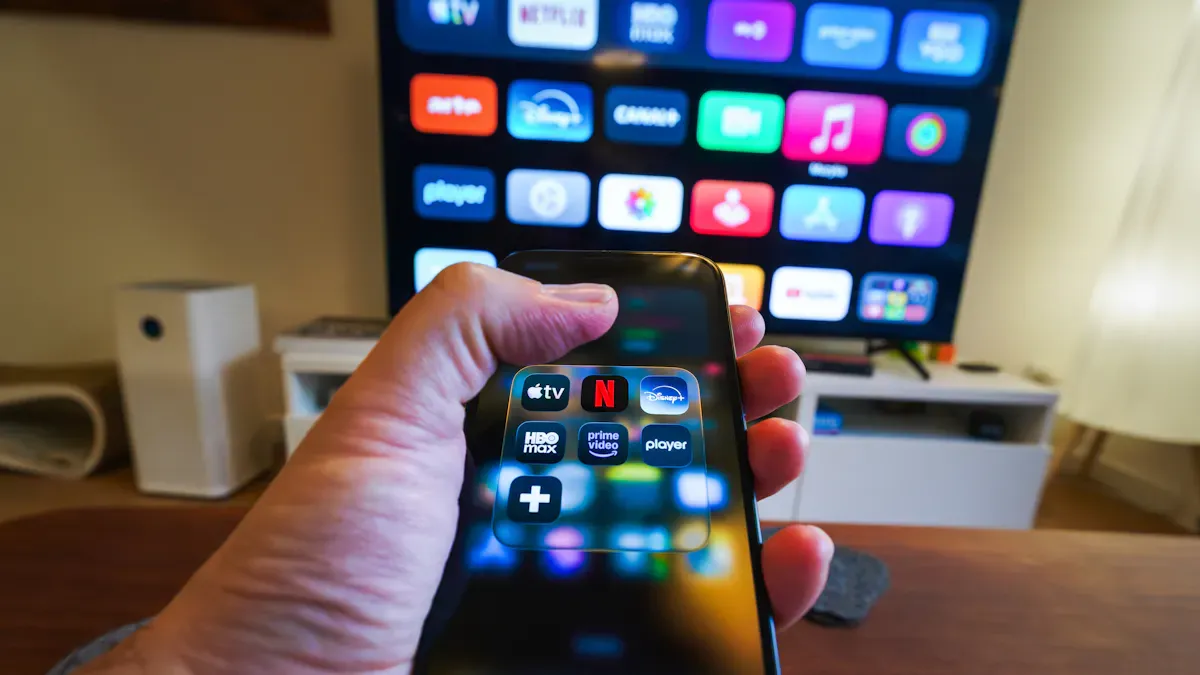
If you want affordable apple tv digital signage for 2026, you have some great choices. Many small businesses save money with Kitcast, which starts at $7 per screen each month. Rise Vision is also popular, especially for schools and non-profits, with plans from $10.50 per screen. You can stretch your budget even more if you already own Apple TVs. Today, smarter content management and AI help you share more engaging messages. Displays now look sharper and even let people interact with them, making your screens work harder for you.
Key Takeaways
Kitcast is cheap and starts at $7 for each screen every month. This makes it great for small businesses.
OptiSigns has a free plan for up to 3 screens. You can try the features before you pay for a plan.
TelemetryTV is good for handling many screens. It lets you check device health right away and control them from far away.
Yodeck does not work with Apple TV. So, if you use Apple devices, try Kitcast or OptiSigns instead.
When picking digital signage software, think about what you need. Also, look at your budget and how much help you get. This will help you choose the best one.
Best Apple TV Digital Signage Solutions
Kitcast
Kitcast is a good choice if you want digital signage software that works well with Apple TV. It has many features for small businesses and big companies. You can use templates, dashboards, widgets, and AI-powered tools to manage your screens. Kitcast lets you make reports and check analytics to see how your content does. It works with Apple TV and other devices like Android TV, Fire TV, BrightSign, Samsung Tizen, LG WebOS, ChromeOS, macOS, and iOS. This helps if you use different kinds of hardware.
Key Features:
Templates help you make content fast
Dashboards and widgets make things easy to manage
You get help all day and by email
AI-powered tools make your displays smarter
You can make reports and check analytics
Security is strong for big companies
Pricing Structures:
Basic features start at $7 per screen each month
Kitcast Pro is $10 per screen each month and gives you more options like SSO, API, audit logs, MDM integration, and proof-of-play
Pros and Cons:
Pros | Cons |
|---|---|
Hard to learn for new users | |
Works for lots of screens | Can cost a lot for small groups |
Good for data-driven content | Too much for simple needs |
Great for showing data | Not best for simple design templates |
Lets you change layouts |
Tip: Kitcast is best if you already use apple tv and want to grow your digital signage software without buying new hardware.
OptiSigns
OptiSigns is easy to use and feels like using a phone. You can set up screens fast and use features like OptiSync and interactive kiosks. OptiSigns works with many devices, like Apple TV, Android, Amazon Fire TV, Windows, macOS, Linux, Chrome OS, Raspberry Pi, BrightSign, LG WebOS, Samsung Tizen, Roku, iOS, and ARM Linux. This is good if you have a small budget or use different devices.
Unique Selling Points:
Free plan lets you try up to 3 screens before you pay
The support team is in Houston and helps from 7 AM to 7 PM CST
They answer fast, sometimes in just a few hours
You get interactive features to keep people interested
Pricing Structures:
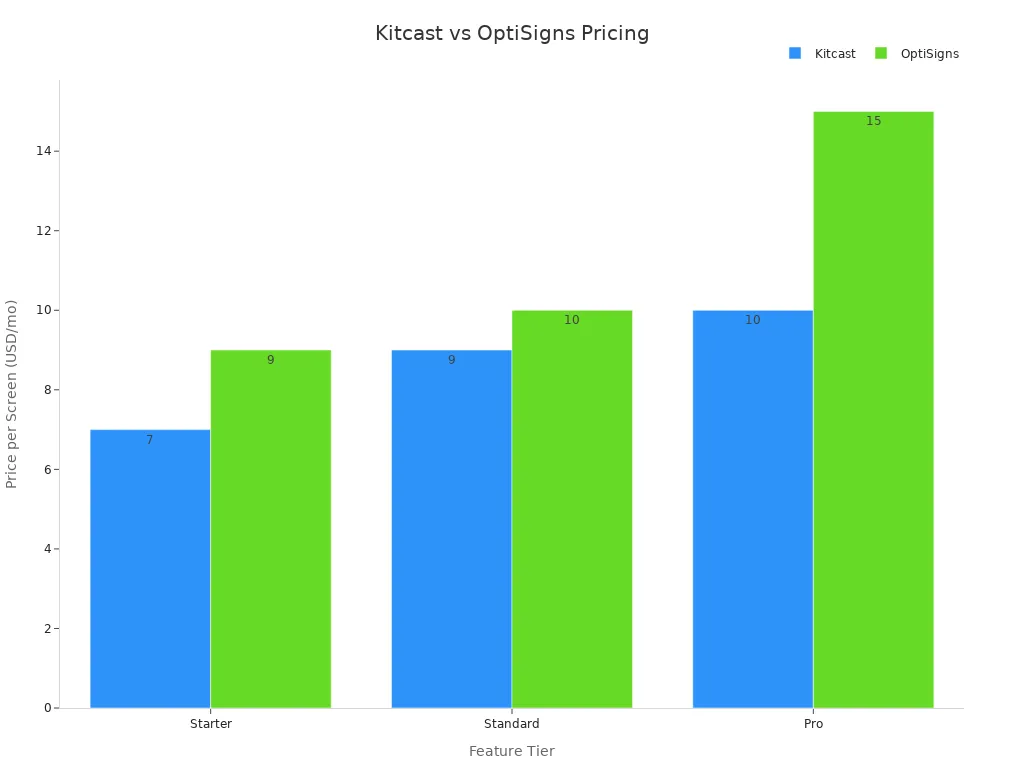
Feature Tier | Kitcast Price | OptiSigns Price |
|---|---|---|
Starter | $7/screen/mo (annual) | $9/screen/mo (annual) |
Standard | $9/screen/mo | $10/screen/mo |
Pro | $10/screen/mo | $15–$45/screen/mo |
Pros:
Works with almost any device, even old screens
Free plan lets you test before you buy
Support team answers quickly
Easy for beginners
Cons:
Paid plans cost a little more than Kitcast
Extra features cost more money
Note: OptiSigns is a good choice if you want to use different hardware and need good support.
TelemetryTV
TelemetryTV gives you strong tools for apple tv digital signage, especially if you have many screens. You can see device health stats right away, so you know if a screen stops working. The software lets you set up many devices at the same time, which saves time. You can also send commands to hardware, like turning screens on or off or changing the volume.
Feature | Description |
|---|---|
See how devices are doing, check CPU, error logs, and get emails if screens go offline | |
Automatic Device Provisioning | Set up many screens at once to save time |
Serial Port Commands | Control hardware from far away, like turning screens on or off |
Pros:
Good for big groups of screens
Lets you watch and control screens easily
Helps your digital signage software work well
Cons:
MacOS is not the best for digital signage
Mac Mini can cost a lot if you need many
If you need to manage lots of screens and want strong tools, TelemetryTV is a good pick. Just remember, Apple hardware can get expensive.
Yodeck
Yodeck is a popular digital signage software for many businesses, but it does not work with Apple TV at all. There is no app, web wrapper, or trick for Apple TV. If you use Apple TV, Yodeck will not work for you.
Key Points:
Does not support Apple TV
Works with Raspberry Pi and other devices
Easy setup with ready-to-use players and drag-and-drop tools
Alert: If you use Apple TV, do not pick Yodeck. Try other digital signage software instead.
Hexnode
Hexnode is good for managing Apple devices in companies. It gives you tools to control Apple TV groups, set them up, and lock them with Single App Mode. You can use Apple Business Manager to set up without touching the device and send MDM commands to manage screens. Hexnode keeps your apple tv digital signage safe and the same in many places.
Main Features:
Automation helps you set up many at once
Full control over screens without touching them
You can send out settings and apps
Limitations:
Right now, Hexnode’s digital signage software only works for Android devices
Does not support other systems
Some limits in file and design choices
Note: Hexnode is best if you want to manage Apple TV as part of a big group of Apple devices, but it may not be best if you need advanced digital signage software for your screens.
When you look at these apple tv digital signage solutions, you see big differences in what devices they work with, how much they cost, and what hardware they support. Kitcast and OptiSigns have good features and prices, so they are good for most small businesses. TelemetryTV is best if you need strong tools to watch and control screens, but Apple hardware can cost more. Yodeck and Hexnode do not work well for Apple TV, so you should pick something else if you use Apple TV for your screens.
Comparison Table

Do you want to know how each digital signage software compares? The table below shows the top Apple TV solutions. You can see differences in features, prices, and what devices they work with. This helps you choose the best one for your screens.
Solution | Features | Pricing (per screen/mo) | Free Plan | Compatibility | Hardware Compatibility | Pros | Cons |
|---|---|---|---|---|---|---|---|
Kitcast | AI tools, templates, analytics | $7–$10 | Trial | Apple TV, Android, etc. | Wide | Easy deployment, scalable | Learning curve, cost for small |
OptiSigns | Interactive, OptiSync, widgets | $9–$45 | Yes | Apple TV, many others | Very wide | Free plan, fast support | Higher price, extra fees |
TelemetryTV | Device health, remote control | $12–$20 | Trial | Apple TV, Chrome, etc. | Wide | Strong monitoring, control | Price, Apple hardware cost |
Yodeck | Templates, drag-and-drop | $7.99 | Yes | Not Apple TV | Raspberry Pi, others | Budget-friendly, free plan | No Apple TV compatibility |
Hexnode | MDM, automation, app push | $3–$5 | Trial | Apple TV, Android | Apple devices | Easy management, automation | Limited signage features |
Rise Vision | Templates, cloud-based | $10.50 | Yes | Apple TV, Chrome, etc. | Wide | Affordable for schools | Fewer advanced features |
Scala | Custom templates, scheduling | $50 | No | Apple TV, Windows, etc. | Wide | Customizable, scalable | Expensive for small business |
ScreenCloud | Easy setup, integrations | $20 | Trial | Apple TV, Android, etc. | Wide | Simple, good for SMBs | Higher price |
NoviSign | Real-time updates, templates | $20 | Trial | Apple TV, Android, etc. | Wide | Good for schools, retail | Price, fewer advanced tools |
BrightSign | Reliable, large-scale | $30 | No | Apple TV, BrightSign | Wide | Great for big deployments | Price, not for small screens |
OnSign TV | Scheduling, versatile | $9.99 | Trial | Apple TV, Android, etc. | Wide | Scalable, flexible | Limited free features |
If you want a free plan, you can try OptiSigns, Yodeck, or Rise Vision before paying. Kitcast gives a free trial, so you can test its tools and templates. Most options work with many devices, but Yodeck does not work with Apple TV.
For small businesses, Kitcast, OptiSigns, and Rise Vision are good choices.
If you want easy setup and lots of device options, try OptiSigns or Kitcast.
Schools and nonprofits can save money with Rise Vision and NoviSign, which have real-time updates.
Check if the software works with your hardware before picking one. Some work with many devices, but some only work with Apple TV. Kitcast and OptiSigns are easy to set up, so you can start using your screens quickly.
Quick Highlights
Kitcast: Works for any business, supports many devices, free trial.
OptiSigns: Free plan, works with lots of hardware, quick setup.
Rise Vision: Good price for schools, free plan, easy to use.
Yodeck: Cheap, but does not work with Apple TV.
Hexnode: Best for managing devices, but has fewer signage features.
Use this table to compare your options and pick the best digital signage software for you.
How to Choose Apple TV Digital Signage Software
Picking Apple TV digital signage software can seem hard. You can make it easier by following a few steps.
Assess Needs
First, think about how you will use your screens. Do you run a restaurant and need menu boards that change? Maybe you work in an office and want dashboards or alerts. Small businesses use digital signage for showing products, managing rooms, or training workers. In healthcare, screens help teach patients or share updates. Hotels and schools use screens for onboarding or classroom displays. Write down your main goals before you look at cloud-based tools.
Budget & Pricing
Next, decide how much money you can spend. Apple TV digital signage software has different prices. Here is what you might pay in 2026:
Pricing Model | Cost Range (2026) |
|---|---|
Per-Screen Pricing | |
Flat-Rate Pricing | $12/month (up to 2 screens) |
$35/month (up to 10 screens) | |
$95/month (unlimited screens) |
Cloud-based tools often charge by the screen. Count your screens and see what fits your budget. Some platforms let you try free trials or plans. This helps you test features like scheduling content before you pay.
Support & Updates
Good support is important. You want quick answers when you ask questions. Some providers, like Rise Vision, give free training and help you get started. Try sending a question and see how fast they reply. Look for cloud-based tools that update their software often. Updates keep your system safe and add new features. Ongoing support and updates help your screens stay reliable and current.
Scalability
Think about what you might need later. Will you add more screens or locations? Cloud-based tools let you manage many Apple TVs from one place. Features like easy setup, user management, and flexible scheduling help you grow without worry. You can group screens, schedule content, and use drag-and-drop widgets for quick changes. Remote management and strong security make expanding simple.
Tip: Always check if the software lets you manage everything from one place and roll out updates easily. This saves you time as your business gets bigger.
There are lots of cheap Apple TV digital signage choices in 2026. Kitcast is popular because it is simple to use and has good tools for checking how your content does. This makes it a top pick for showrooms and schools. OptiSigns gives you a free plan and works with almost any device. You can set up your screens quickly with it. TelemetryTV lets you control many screens at the same time. This is helpful for restaurants and offices. Some users, like Lunya and Coker College, switched to these platforms. They wanted to save money and make their screens do more. Apple TV helps you save because you can use the same device for streaming, sharing, and digital signs. Most small businesses choose cloud-hosted software. This makes updates and remote control easy. When you look at your options, pick software that fits your needs, works with your devices, and can grow with you.
Factor | Why It Matters |
|---|---|
You want simple screen control. | |
Flexibility | You need custom content. |
Scalability | You may add more screens. |
Support | You need quick help. |
Security | You want safe hardware. |
Tip: Choose a solution that matches your industry, works with your devices, and lets you control all your screens from one place. The best choice depends on what you want, how much you can spend, and how you will use your screens.
Comparing Apple TV Digital Signage Software Options
Deploying digital signage on Apple TV is an excellent path for those seeking a pure Apple ecosystem, ease of deployment, and great value. You typically just install an app on the Apple TV and manage content through a central cloud platform – no extra hardware needed.
After a comprehensive comparison, if you want the best native experience and fastest deployment, Kitcast is the ideal choice. If you need balanced features and high flexibility, OptiSigns offers outstanding value. For budget‑limited simple needs, a free entry‑level app like EZ Plus is sufficient.
📝 Quick Decision Guide – Choose the Right Software
For the best experience: Kitcast
Core advantage: The only native tvOS app deeply optimised for Apple TV – unmatched runtime efficiency and stability.
What you need to know: You pay more for a premium experience, but you get professional templates and top‑tier support right out of the box.
For a balance of features and price: OptiSigns
Core advantage: Broad cross‑platform support, highly competitive pricing, powerful and flexible features.
What you need to know: To achieve this value, you accept a minor technical trade‑off – it uses a web‑based version on Apple TV.
For tight budgets or free entry: EZ Plus / Screen Canvas and other basic apps
Core advantage: These apps perfectly demonstrate the core value of using Apple TV for digital signage – an ultra‑low barrier to entry. Build a digital signage system with zero software cost.
What you need to know: Features are limited, may include vendor watermarks, or require a one‑time purchase. Suitable for simple, low‑demand scenarios.
⚖️ Side‑by‑Side Comparison of Major Solutions
Feature | Kitcast | OptiSigns | EZ Plus | Screen Canvas | ScreenCloud | Yodeck |
|---|---|---|---|---|---|---|
Core strength | Apple TV‑first native app – best experience | Cross‑platform, great value, balanced features | Free start, focused on education | Fully free version, design directly on TV | Enterprise‑grade, powerful but expensive | User‑friendly, balanced price and features |
Apple TV compatibility | ✅ Native tvOS app | ✅ Supported (some limitations) | ✅ Supported | ✅ Supported | ✅ Supported (not their recommended hardware) | ✅ Supported |
Pricing model (reference) | Monthly plans with tiers | Per‑screen monthly, entry ~$10/screen/month | Free with watermark; ad‑free ~$2/screen/month | Free version; Pro lifetime or monthly options | From $20/screen/month | First screen free, then very competitive |
User experience feedback | Deploy in under 5 minutes, polished graphics, simple operation | Easy to use, suitable for non‑technical users | Simple, intuitive interface | Design directly on TV – simple and intuitive | Powerful, professional interface | Intuitive, easy to get started |
Education focus | Strong advantage, MDM integration available | General purpose, not core focus | Has educational edition | General purpose | General purpose (all enterprises) | General purpose (all enterprises) |
Typical user comments | "Makes our brand look professional" | "Solved our video playback issues" – some features limited on Apple TV | "Direct and low‑cost" | "Convenient tool to create and display custom signage" | "Powerful but pricey" | "User‑friendly, affordable, flexible" |
🏆 In‑Depth Comparison of Popular Digital Signage Solutions
1. Kitcast – The “Native Choice” for Apple Ecosystem
Core advantage: The only digital signage app on the market built natively for tvOS. Runs smoothly, supports Apple MDM solutions, and comes with many high‑quality content templates – greatly simplifying content creation.
Consideration: Users generally find it more expensive. For multi‑screen deployments, this may be a significant factor.
2. OptiSigns – The “All‑Rounder” for Value
Ease of use & value: Offers a feature‑rich dashboard with pricing starting around $10/screen/month – very competitive and feature‑complete.
Technical trade‑off: On Apple TV, it does not run as a native app – some advanced features may be limited.
3. ScreenCloud – The “Professional Alternative” for Apple TV
Powerful but expensive: Provides a native tvOS app, but starts at about $20/screen/month – costly. Also may face similar feature limitations on Apple TV.
4. Yodeck – High‑Value Multi‑Platform Option
Affordable pricing: Known for its first screen free plan; paid plans are very competitive. Its user‑friendly interface and flexible deployment make it a great value choice.
🆓 Free & Low‑Cost Entry Options
For budget‑sensitive or simple needs, starting with Apple TV digital signage can be extremely low‑cost. Here are some free or one‑time low‑cost apps:
EZ Plus: Free version sufficient for simple non‑commercial trials. Remove watermark for about $2/month.
Screen Canvas: Offers a fully free version; Pro features via one‑time purchase (from $19.99) or annual subscription ($14.99/year).
piMenuboardTV: One‑time $4.99 for permanent use.
Beyond these, you can also use free photo‑frame apps like iDigiFrameTV or simply display an iCloud photo library slideshow directly on Apple TV for basic image rotation.
🔧 Technical Principle – Why Apple TV Is a Great Signage Player
The fundamental reason Apple TV is a popular digital signage player is that it is essentially a powerful mini‑computer:
Strong performance: Powered by Apple’s own chips, it can smoothly play 4K/HDR video – far exceeding many low‑cost players.
Cost‑effective: As a mature consumer product, it offers excellent value. (The external power supply design is sometimes criticised in commercial settings, but it does not affect stable signage performance.)
Ecosystem synergy: Native AirPlay support makes content distribution and screen mirroring easy; also integrates seamlessly with MDM solutions like Jamf for unified device management.
Choosing Apple TV as a digital signage player is a precise trade‑off between cost, performance, and deployment simplicity. When selecting software, consider your future scale, budget, and technical requirements. For businesses planning multi‑screen networks, prioritise platforms that support large‑scale deployment, stable remote management, and analytics.
FAQ
What makes Apple TV digital signage software different from other options?
Apple TV digital signage software is easy to set up. It works well with other Apple devices. If you already have Apple TV, it can save you money. Some software works with lots of devices. Others only work with Apple TV.
Can I try digital signage software for free before buying?
Yes, you can try some for free. OptiSigns, Yodeck, and Rise Vision have free plans or trials. Kitcast lets you try it for free too. You can test the features and see what you like best.
Which solution works best for small businesses?
Kitcast and OptiSigns are good for small businesses. Kitcast has simple tools and shows you how your screens do. OptiSigns gives you a free plan and works with many devices. Both are easy to start and help you manage screens.
How do pricing plans compare between providers?
Prices go from $7 up to $45 for each screen every month. Kitcast starts at $7, OptiSigns at $9, and TelemetryTV at $12. Some software costs more if you want extra features. Always check what you get for the price.
What should I look for when choosing digital signage software?
Check if it works with your devices. Make sure it is easy to use and has good support. Look for things like templates, analytics, and remote control. Pick the one that fits your needs and goals.
See Also
An In-Depth Look at Retail Digital Signage Options
Best Ten Video Wall Digital Signage Options for 2026
Latest Innovations in Digital Signage Technology for 2026
