Advantages and Disadvantages of LCD Screens Explained
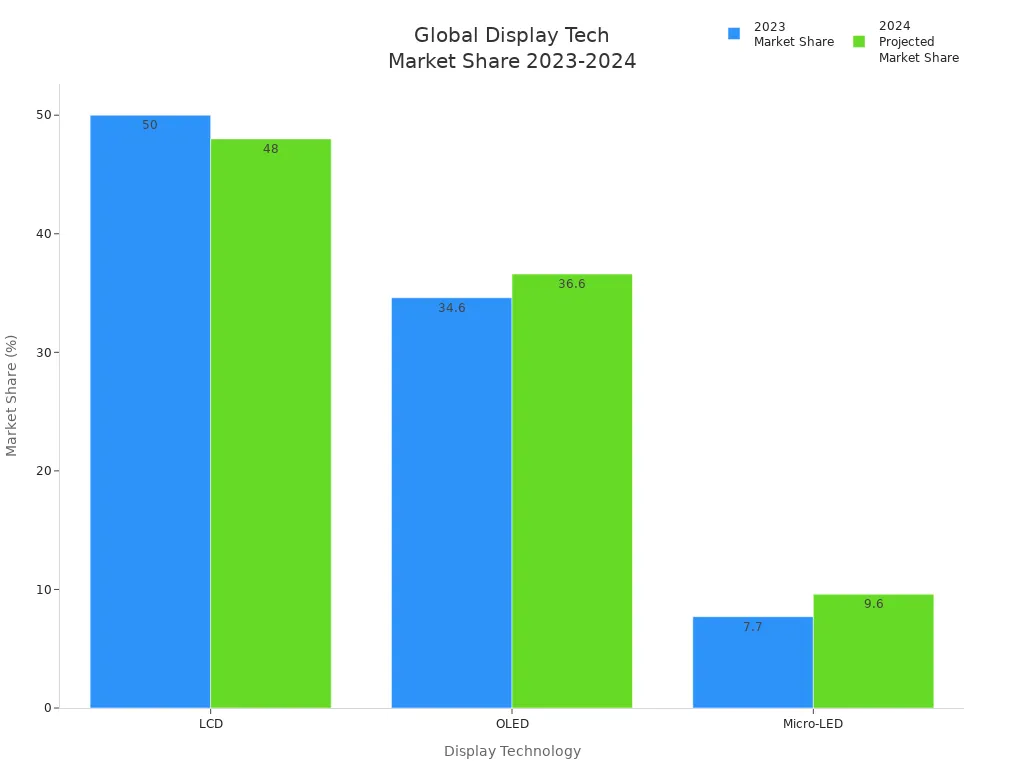
You see lcd screens almost everywhere. They are in tvs, monitors, and phones. LCD displays show clear pictures and bright colors. They have high resolution in many uses. You notice their thin shape and low power use. You might wonder about their good and bad points. LCD can give great picture quality. But you may see limited viewing angles. The table below shows lcd screens are still the most used:
Shenzhen TopAdkiosk Display Technology Co., Ltd.
Add.: 2F, Bldg 10, Changfeng Industrial Park, Dongkeng, Fenghuang, Guangming, Shenzhen, China 518132
Mobile/WHATSAPP: 86-138 25769658
Email: marketing@topadkiosk.com topadkiosk@gmail.com
Skype: pghenry1
Wechat: adkioskhenry
English Web.: http://www.topadkiosk.com/
https://www.topkioskdisplay.com/
http://www.ad-kiosk.com/
https://www.toplcddisplay.com/
http://www.multitouchdigitalsignage.com/
https://www.youtube.com/channel/UCYVYNJHxLVEcQD8fuUxXNTA/videos?view_as=subscriber
https://www.facebook.com/TOPADKIOSKSHENZHEN/?ref=bookmarks
Display Technology | 2024 Projected Market Share | |
|---|---|---|
LCD | 50% | 48% |
OLED | 34.6% | 36.6% |
Micro-LED | 7.7% | 9.6% |
You can learn about types of liquid crystal displays. You can compare tn, va, and ips. You can see how lcd is used in tvs and monitors.
Key Takeaways
LCD screens are thin and light. They do not use much energy. This makes them easy to use in many places.
They show clear pictures and nice colors. You can watch TV, work, or play games on them.
LCD screens do not get burn-in problems. You can show the same picture for a long time without worry.
Think about the small viewing angles and slower response times. These things matter if you want to use an LCD for fast games.
LCD screens are easy to find and do not cost much. Many people use them for different devices.
What Are LCD Screens?
LCD Technology Overview
You see lcd screens in many devices, such as TVs, computer monitors, and smartphones. These screens use a special technology called liquid crystal display. The main parts of an lcd screen work together to show images and text. You can look at the table below to understand the basic structure:
Component | Description |
|---|---|
Polarized Glass | Two pieces of polarized glass form the outer layers of the lcd. |
Electrodes | Positive and negative electrodes made of indium-tin-oxide are used. |
Liquid Crystal Layer | A thin layer of liquid crystal sits between the glass sheets. |
External Light Source | An external light source is required for the lcd to function. |
You will notice that lcd screens do not make their own light. They need an outside light source to work. This is why you often hear about backlights in lcd displays.
How LCD Screens Work
You might wonder how an lcd screen creates the pictures you see. The process starts when the backlight shines through the first layer of polarized glass. The light then passes through the liquid crystal layer. When you turn on your device, the electrodes send electric signals to the liquid crystals. These crystals twist and turn to control how much light passes through each part of the screen.
The liquid crystals do not glow. They only change the way light moves. This action lets the lcd show different colors and shapes. The second piece of polarized glass helps form the final image that you see.
Tip: Because lcd screens need a backlight, they can work well in bright rooms. You get clear images even when sunlight is present.
You can find lcd screens in many products because they are thin, light, and use less power than older display types.
Pros and Cons of LCD Screens
You may want to know the pros and cons of lcd screens before you choose a new display. This quick guide helps you see the main points at a glance. You can use this summary to compare lcd with other types of displays.
Note: The table below shows the main advantages and disadvantages of lcd screens. You can use it to decide if lcd fits your needs for a monitor, TV, or other applications.
Advantages of LCD Screens | Disadvantages of LCD Screens |
|---|---|
Thin and compact design | More expensive than plasma panels |
Low power consumption | Lower contrast in bright rooms |
High picture quality | Poor viewing angles |
No magnetic interference | Not as power-efficient as OLED |
Available in various shapes | Poor black image reproduction |
Sharp brightness | Slow response time affecting performance |
Advantages of LCD
You get a thin and lightweight display that fits in many spaces.
LCD uses less power than older displays, so you save energy.
You see sharp images and good color for most applications.
LCD displays do not have magnetic interference, so you get stable images.
You can find lcd in many shapes and sizes for different uses.
The bright screen works well in rooms with a lot of light.
Disadvantages of LCD
You may pay more for lcd screens than for plasma panels.
The contrast can look lower in bright rooms, which affects image quality.
You might notice poor viewing angles, especially with some types of liquid crystal displays.
LCD is not as power-efficient as OLED displays.
Black images may not look as deep or true as on other display types.
Some lcd screens have slow response times, which can affect fast-moving images.
You can compare tn vs va vs ips comparison to see how different lcd types perform. Each type has strengths and weaknesses for color, viewing angles, and speed. Think about the applications of lcd before you choose a display for your needs.
Advantages of LCD Screens
Thin and Lightweight Design
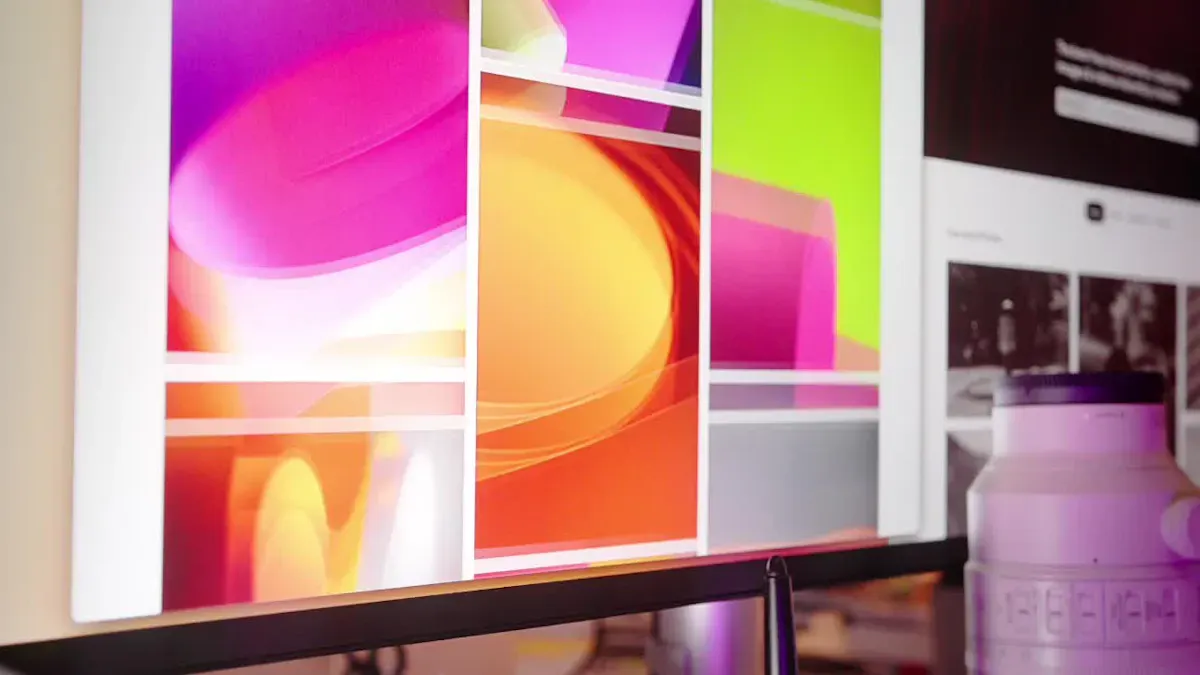
LCD screens are thin and light. You can move them easily. They fit on desks or walls. Older CRT screens are big and heavy. LCD screens are much easier to carry. OLED screens are also thin. But many people still pick lcd for its good price and size.
Display Type | Thickness (cm) | Weight Characteristics |
|---|---|---|
CRT | >10 | Heavy and boxy |
LCD | <10 | Thin and lightweight |
OLED | N/A | Generally thin |
Tip: LCD screens are easy to hang on a wall or move to another room because they are not heavy.
Energy Efficiency
LCD screens use less power than old CRT screens. This helps you save energy. CRT screens can use 80 to 150 watts. Big lcd screens can use over 200 watts. OLED screens use even less power. But lcd is still a good choice for saving energy. New lcd technology makes these screens better for the planet and your wallet.
Display Type | |
|---|---|
CRT | 80-150 |
LCD | 200+ (for larger sizes) |
OLED | 30-60 |
Note: Using lcd screens can help you spend less money on electricity, especially if you use them a lot.
Good Clarity and Contrast
LCD screens show clear pictures and sharp words. This is a big plus for lcd. New lcd screens have better color and sharpness. IPS panels show colors well and let you see from more angles. LCD does not have the perfect contrast of OLED. But features like FALD make lcd contrast better. You will see bright whites and nice colors. LCD works well for school, work, and fun.
Note: LCD screens need a backlight, so blacks are not as deep as OLED. Still, lcd gives you good clarity and contrast for most things.
No Burn-In Issues
LCD screens do not get burn-in. Burn-in happens when a picture stays too long and leaves a mark. OLED and plasma screens can get burn-in. LCD screens do not have this problem. You can leave the same image on lcd for hours. This makes lcd safe for menus or dashboards.
Affordable Manufacturing Cost
LCD screens cost less to make than OLED. This is a big reason why lcd is popular. Companies can make lcd panels for less money. TFT lcd screens are cheap to produce. This keeps the price low for TVs, monitors, and phones. You get a good screen without spending too much.
LCD screens save energy and are cheap to make.
TFT lcd screens are used in many low-cost devices.
LCD screens are less expensive to make than OLED, so they cost less for you.
Wide Availability
You can find lcd screens almost everywhere you look. In 2023, lcd had about half the market. LCD sales made around $65 billion in the US. Even with new screen types, lcd is still easy to buy. You can pick from many sizes and prices.
LCD screens were almost half the market in 2023.
LCD sales made about $65 billion.
LCD is still a top pick for TVs, monitors, and phones.
Callout: Because lcd screens are everywhere, you can always find one that fits your needs and budget.
When you know the good and bad points, you see why lcd screens are still a top choice. LCD screens are thin, light, save energy, show clear images, do not get burn-in, cost less, and are easy to find.
Disadvantages of LCD Screens
Limited Viewing Angles
You may notice that lcd screens do not look the same from every angle. When you move to the side or look from above or below, the image can change. This happens because lcd controls light in a way that works best when you look straight at the display. As you move away from the center, you might see colors shift, contrast drop, or the screen become dimmer.
The viewing angle is the maximum angle where you can still see a clear image.
If you look from an off-angle, you may see:
Color shifting, where colors look different.
Contrast reduction, making dark and light areas blend together.
Brightness loss, so the screen looks dim.
Standard TFT lcd modules give you viewing angles of about 60° to 90°. Wide-view TFT modules can reach 110° to 150°. IPS technology improves this, letting you see up to 170 degrees horizontally and 178 degrees vertically.
Note: If you plan to watch with a group or move around a lot, limited viewing angles can affect your experience.
Slower Response Times
Response time tells you how fast a display can change from one image to another. Fast response times are important for games and videos with quick action. LCD screens often have slower response times than other displays.
OLED displays can reach response times as low as 0.03 milliseconds.
CRT displays usually have response times between 1 and 5 milliseconds.
Many lcd displays have higher response times, which can cause motion blur or ghosting during fast scenes.
If you play games or watch sports, you might notice trails behind moving objects. This can make the picture look less sharp.
Contrast and Color Accuracy
LCD screens sometimes struggle with contrast and color accuracy. You may see that blacks do not look deep, and colors may not always match real life. This happens because lcd uses a backlight, which can leak through even when the screen tries to show black.
Display Model | Average Error (JNCD) | Color Gamut (%) |
|---|---|---|
Samsung Galaxy Note 4 | 1.5 | Close to sRGB |
iPad Air 2 | 3.9 | Lower performance |
Older LCD Displays | >20 | 55-65 |
Many lcd manufacturers use bluish white points (7,000-8,500 K) for text backgrounds. This can make the screen look blue instead of pure white.
The ideal white point for true color is 6,500 K.
Bright light in the room can wash out the image, making colors and contrast look weaker.
Tip: Some lcd screens adjust color and brightness automatically to help with these problems, but results can vary.
Backlight Bleed
Backlight bleed happens when light from the lcd backlight leaks around the edges or corners of the screen. You may see bright spots, especially when the display shows dark images. This can distract you and lower the quality of movies or games.
Price Segment | |
|---|---|
Budget (<$300) | 68% |
Mid-range ($300–$600) | 41% |
Premium (>$600) | 29% |
Backlight bleed is more common in cheaper lcd screens.
Even expensive displays can have some bleed, but it is less likely.
Callout: If you want deep blacks and even lighting, backlight bleed can be a big drawback.
Size and Cost for Larger Displays
When you want a very large screen, lcd can become expensive and heavy. Making big lcd displays costs more because the panels are harder to produce without defects. You may also find that large lcd screens use more power and need stronger support to mount or move.
Outdoor lcd screens use special high-brightness panels to stay visible in sunlight.
These displays often have extra features like sensors for automatic brightness and tough materials for weather protection.
For home use, very large lcd screens can cost much more than smaller ones or other display types.
Note: If you need a huge screen for a home theater or public space, you might want to compare lcd with other options before you buy.
You can see that the disadvantages of lcd include limited viewing angles, slower response times, issues with contrast and color accuracy, backlight bleed, and higher costs for large displays. Knowing these drawbacks helps you decide if lcd is the right choice for your needs.
LCD Screens vs Other Displays
LCD vs OLED
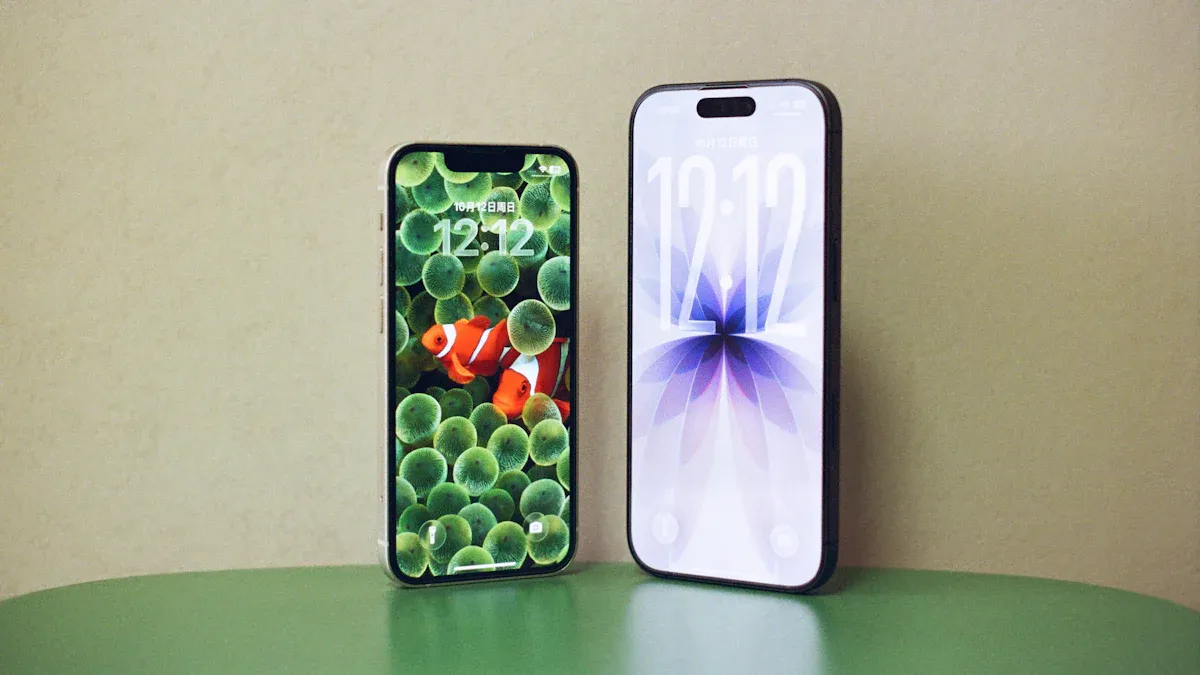
LCD and OLED screens are found in many devices. Each has its own strengths. OLED makes true black by turning off pixels. LCD uses a backlight, so dark scenes may look lighter. OLED has very high contrast. LCD has lower contrast. OLED shows bright colors, but these colors can fade. LCD lasts longer and does not get burn-in. Look at the table below to compare:
Feature | OLED Displays | LCD Displays |
|---|---|---|
Contrast Ratio | Infinite contrast ratios | Lower contrast ratios due to backlight |
True Black | Achievable by turning off pixels | Not achievable due to light leakage |
Lifespan | Prone to burn-in, especially blue pixels | Longer lifespan, less prone to burn-in |
Color Degradation | Vibrant colors but can degrade over time | May suffer from backlight failure |
Tip: Choose OLED for deep blacks and bright colors. Pick lcd if you want a screen that lasts longer.
LCD vs CRT
CRT screens were used in old TVs and monitors. LCD uses less energy than CRT. CRT uses 60-100 watts. LCD uses only 20-40 watts. LCD screens have less glare and last longer. CRT lasts about 50,000 hours. LCD can last up to 100,000 hours. LCD screens are lighter and safer. See the table below for differences:
Display Type | Energy Consumption (Watts) |
|---|---|
CRT | 60-100 |
LCD | 20-40 |
LCD screens have less glare than CRT.
LCD lasts longer than CRT.
Using less energy saves money.
LCD is good for people who care about energy.
Callout: LCD screens help you save money and protect the planet.
LCD vs LED
LCD and LED screens are different. LCD uses fluorescent lamps for light. LED uses tiny diodes for light. LED screens are brighter and use less energy. LED also shows better pictures. LCD is thin, lasts a long time, and supports Full HD.
LED screens show sharper images than lcd screens.
LED lasts longer than lcd.
LCD is popular because it is cheap and easy to find.
Note: LED is best for bright and efficient screens. LCD is still a good choice for many people.
Choosing LCD Screens
Best Use Cases
LCD screens are used in many places. They work well at home, in offices, and in factories. You see lcd in TVs, monitors, and control panels. LCD is thin and light, so it fits small spaces. The screen is clear and bright for reading or watching videos. It is also good for working on projects.
Here is a table that shows where lcd is best:
Use Case | Features |
|---|---|
Home TVs and Monitors | Thin, bright, easy to mount |
Office Computers | Clear text, low power use |
Wide temperature range, high brightness | |
Embedded Systems | Tough design, works in harsh environments |
LCD is trusted for control panels in factories. These panels work in hot or cold places and stay bright. Embedded systems use lcd modules in rough spots. You can pick different ways to install lcd, like shelf, card, or VESA mounts. Some lcd screens connect to industrial networks, such as PROFIBUS and PROFINET.
Tip: LCD screens are a good choice if you need a display that works all day and can handle dust or water.
When to Consider Alternatives
Sometimes, other screens are better for certain needs. Mini-LED TVs are very bright, so they work well in sunny rooms. QD-OLED panels can lose contrast in strong light and may look purple. Mini-LED gives better HDR and less blooming. Mini-LED QLED and QNED TVs show bright colors and cost less than OLED.
Think about these things when picking a screen:
Resolution: 4K is best for graphics. HD is fine for simple tasks.
Screen Size: Choose a size that fits your room.
Brightness: High brightness helps in sunny places.
Features: Touch-screen or touchless displays are fun to use.
Connectivity: Make sure your screen connects to other devices.
Manufacturer Reputation: Pick brands with good support.
You should also think about how far you sit from the screen, where you put it, and what you want to show. Picture quality depends on color, brightness, contrast, and viewing angle. LCD screens may have problems with viewing angles, so check if that matters to you.
Callout: New Mini-LED and QD-OLED screens are getting cheaper. They are bright and last a long time. You do not have to worry about burn-in like with OLED screens.
LCD screens give you clear pictures and use less energy. They work in many places. But you may not see well from the side. LCD screens can break more often. The table below shows the good and bad points:
Advantages | Disadvantages |
|---|---|
Sharpness and high brightness | Poor performance at higher brightness levels |
Energy efficiency | Lower reliability over time |
Suitable for many uses | Compromised picture quality in low light |
New lcd screens have better viewing angles and smart features. Think about what you need before picking lcd.
FAQ
What does LCD stand for?
LCD stands for Liquid Crystal Display. You see this technology in many screens, such as TVs, monitors, and phones.
Do LCD screens use a lot of electricity?
No, LCD screens use less electricity than older CRT screens. You save energy when you use LCD for your TV or computer.
Can LCD screens get burn-in?
You do not need to worry about burn-in with LCD screens. The images do not leave permanent marks, even if you show the same picture for hours.
How do I clean an LCD screen safely?
Use a soft, dry cloth to wipe the screen gently. Do not spray water or cleaner directly on the screen. You can use a little water on the cloth if needed.
See Also
Pros and Cons of Using LCD Display Screens
Essential Insights on LCD Display Screens' Pros and Cons
Understanding LCD Display Screens and Their Functionality
Key Comparisons of LED and LCD Video Wall Technologies
Comparative Analysis of LED, LCD, OLED, and QLED Technologies
