55-inch Monitor Versus 34-inch Ultrawide Display Comparison
Shenzhen TopAdkiosk Display Technology Co., Ltd.
Add.: 2F, Bldg 10, Changfeng Industrial Park, Dongkeng, Fenghuang, Guangming, Shenzhen, China 518132
Mobile/WHATSAPP: 86-138 25769658
Email: marketing@topadkiosk.com topadkiosk@gmail.com
Skype: pghenry1
Wechat: adkioskhenry
English Web.: http://www.topadkiosk.com/
https://www.topkioskdisplay.com/
http://www.ad-kiosk.com/
https://www.toplcddisplay.com/
http://www.multitouchdigitalsignage.com/
https://www.youtube.com/channel/UCYVYNJHxLVEcQD8fuUxXNTA/videos?view_as=subscriber
https://www.facebook.com/TOPADKIOSKSHENZHEN/?ref=bookmarks
You want a simple guide to pick a monitor size. You need to choose between a 55-inch monitor and a 34-inch ultrawide display. Your workspace, how you work, how you play games, and how much you want to feel inside the action are important. Check the table below to see how these things are different:
Feature | 55 Monitor Dimensions | 34-inch Ultrawide Displays |
|---|---|---|
Workspace | Regular shape gives less space | Wider screen lets you open more |
Productivity | You might need two monitors | One long screen helps you work |
Immersive Experience | Big but flat screen | Curved screen feels more real |
Gaming | Normal 16:9 view | Wider 21:9 shows more game world |
The size of your desk and room matters too. A 55 monitor dimensions require a lot of space. A 34-inch ultrawide fits on smaller desks. Think about how you use your computer before you choose.
Key Takeaways
Pick a monitor that fits your desk size. A 34-inch ultrawide works well for small desks. A 55-inch monitor needs a bigger space.
The 34-inch ultrawide helps you do many things at once. You can open lots of windows. This makes you finish work faster.
Gaming feels more exciting with a 55-inch monitor. The 34-inch ultrawide lets you see more details in games.
Think about how much money you want to spend. The 34-inch ultrawide costs less. It is good for both work and fun.
Measure your desk and room before you buy a monitor. This helps you make sure it fits well. It also keeps you from feeling uncomfortable.
Quick Verdict
Summary Recommendation
You want a monitor that fits your needs. The 34-inch ultrawide display works well for most people. It gives you a wide workspace and clear visuals. You can open several windows side by side. This monitor supports a resolution of 3440×1440 pixels. You see sharp images and text. You enjoy games and movies with a wider view. The 34-inch ultrawide boosts productivity and entertainment.
The 55-inch monitor suits users who want a huge screen. You get an immersive experience for racing and first-person shooter games. The large size fills your vision. You feel inside the action. This monitor works best in big rooms with large desks. You need space to use it comfortably.
You should look at your desk size, room setup, and how you use your computer. The right choice depends on your daily tasks and favorite activities.
Tip: If you want to compare different monitor sizes for your needs, check the chart below. It shows the best size for gaming, work, and general use.
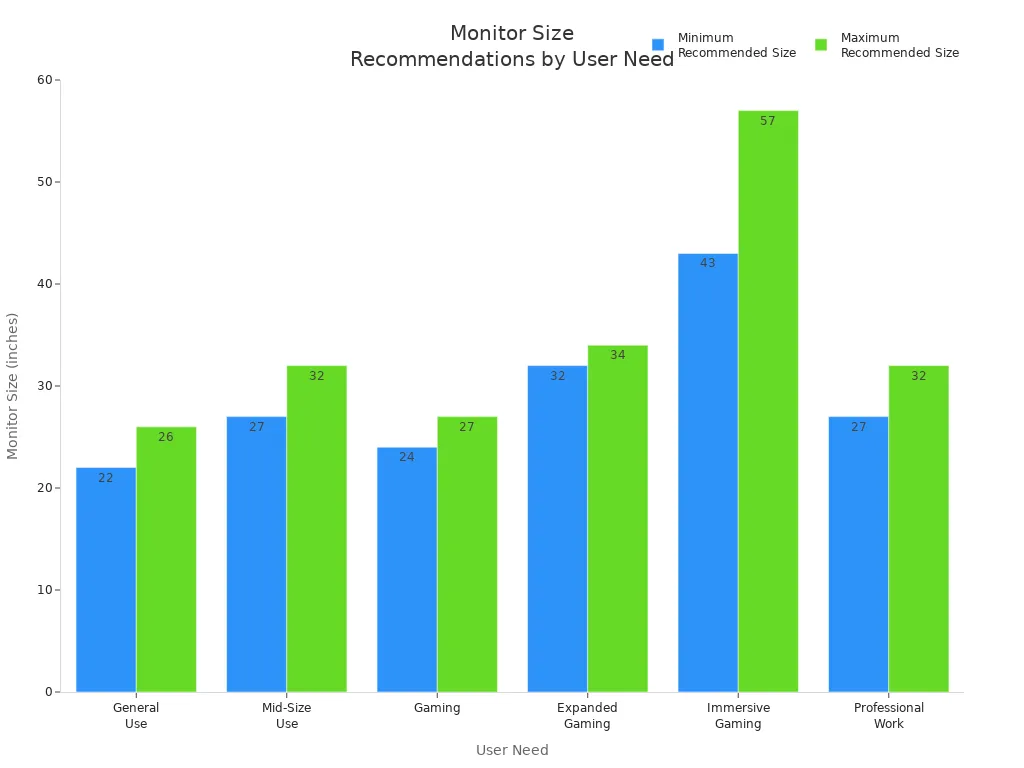
Best for Different Users
You need to match your monitor to your style. Here is a table that helps you see which monitor fits you best:
User Type | Best Monitor Size | Why It Works |
|---|---|---|
General User | 22 to 26 inches | Fits small desks, good for web browsing |
Professional Worker | 27 to 32 inches | Improves productivity, easy on your eyes |
Competitive Gamer | 24 to 27 inches | Quick response, less eye movement |
Immersive Gamer | 43 to 57 inches | Wide view, feels like you are in the game |
Creative Designer | 32 to 34 inches | Wide workspace, clear visuals |
You see that different monitor sizes work for different people. The 34-inch ultrawide display helps you multitask and enjoy games. The 55-inch monitor gives you a cinematic experience. You should pick the monitor that matches your space and your main activities.
The 34-inch ultrawide monitor lets you display multiple documents at once. You work faster and smarter.
You get crystal clear performance for gaming and watching videos. The monitor fits both work and play.
You make your choice based on this comparison. You get the best value when you match your monitor to your needs.
Monitor Size Comparison
55 Monitor Dimensions
When you look at a 55-inch monitor, you see a huge display that fills your view. The 55 monitor dimensions usually measure about 47.9 inches wide and 27.0 inches tall. In centimeters, that is 121.7 cm by 68.6 cm. Most 55-inch widescreen monitors have a depth between 2 and 4 inches without the stand. With the stand, the depth can reach 10 inches or more. You need a large desk to fit this monitor. The 55 monitor dimensions make it perfect for big rooms or setups where you want a screen that feels like a home theater.
Width: 47.9 inches (121.7 cm)
Height: 27.0 inches (68.6 cm)
Depth: 2–4 inches (without stand), up to 10 inches (with stand)
Area: 1292.58 square inches
Note: The 55 monitor dimensions give you a lot of screen space, but you must check your desk and room size before you buy.
34-inch Ultrawide Dimensions
A 34-inch ultrawide monitor gives you a wide and slim display. The width is about 31.4 inches, and the height is 13.1 inches. In centimeters, that is 79.8 cm by 33.3 cm. The depth is usually around 4 to 8 inches with the stand. This monitor fits on most desks and works well in small or medium rooms. The 34-inch ultrawide display uses a 21:9 ultrawide aspect ratio, which means you get more horizontal space for multitasking or gaming.
Width: 31.4 inches (79.8 cm)
Height: 13.1 inches (33.3 cm)
Depth: 4–8 inches (with stand)
Area: 418.55 square inches
Tip: The 34-inch ultrawide display is easy to fit on your desk and gives you extra width for work and play.
Screen Area and Aspect Ratio
You need to know how much screen space you get with each monitor. The 55-inch widescreen has a 16:9 aspect ratio. This shape is common for TVs and large monitors. The 34-inch ultrawide uses a 21:9 aspect ratio, which is much wider and better for multitasking.
Here is a table to help you see the monitor size comparison:
Display Type | Width (inches) | Height (inches) | Area (inches²) | Aspect Ratio |
|---|---|---|---|---|
55-inch widescreen | 47.9 | 27.0 | 1292.58 | 16:9 |
34-inch ultrawide | 31.4 | 13.1 | 418.55 | 21:9 |
You can see that the 55 monitor dimensions give you more than three times the screen area of a 34-inch ultrawide. The 55-inch widescreen is much taller and wider, so you get a bigger picture for movies or games. The 34-inch ultrawide is not as tall, but the 21:9 ultrawide shape lets you open more windows side by side. This makes it great for work and multitasking.
The 55 monitor dimensions work best if you want a huge screen for movies or immersive games.
The 34-inch ultrawide fits better on most desks and helps you stay productive.
This comparison helps you decide which monitor size fits your needs and your space.
Workspace and Desk Fit
Desk Requirements
You need to think about your desk before choosing a monitor. A 55-inch monitor takes up a lot of space. The width is about 121.7 cm (47.9 inches), and the height is 68.5 cm (27 inches). Most desks must be at least 120 cm (47.2 inches) wide and 60 cm (24 inches) deep to fit a 55-inch monitor safely. If your desk is smaller, the monitor may hang over the edge or feel too close to your eyes.
A 34-inch ultrawide monitor is easier to fit. Its width is similar to having two 24-inch monitors side by side, but you do not have a gap in the middle. Most desks can hold a 34-inch ultrawide without trouble. You still need a desk that is at least 120 cm wide, but the monitor does not feel as overwhelming.
Here is a quick table for desk size:
Monitor Type | Minimum Desk Width | Minimum Desk Depth |
|---|---|---|
55-inch Monitor | 120 cm (47.2 in) | 60 cm (24 in) |
34-inch Ultrawide | 120 cm (47.2 in) | 60 cm (24 in) |
Tip: Always measure your desk before buying a large monitor. Make sure you have enough space for your keyboard, mouse, and other items.
Room Setup
Your room setup matters as much as your desk. A 55-inch monitor works best in a large room. You need to sit farther back to see the whole screen without moving your head too much. If your room is small, the monitor may feel too big and cause neck strain.
A 34-inch ultrawide fits well in most rooms. You can sit closer and still see everything. This monitor gives you a wide view, but it does not take over your space. You get the benefits of a big screen without needing a huge room.
Place your monitor so you can look straight ahead.
Leave space behind your desk for cables and airflow.
Make sure you have good lighting to reduce eye strain.
This comparison helps you see which monitor fits your workspace and room. You can choose the right size for comfort and productivity.
Productivity
Multitasking
You want to finish your work faster. The right monitor helps you stay organized. A bigger screen makes it easier to do many things at once. You can open several apps and see them all together. You do not need to switch between windows. Many people use a 28–32-inch monitor to split their workspace. This lets you use different programs at the same time. It helps you keep your work smooth.
You can write while watching a video.
You can compare two spreadsheets side by side.
You can check your email while browsing the web.
A 34-inch ultrawide display gives you even more space. You can keep your tools and windows in view. This wide screen helps you focus and avoid distractions. Even if your monitor is smaller, you can still work well if your workspace is neat.
Tip: Put your windows where you can see everything you need. This saves time and keeps you focused.
Split-Screen Use
Split-screen features help you work better. Both 55-inch monitors and 34-inch ultrawide displays let you use split-screen. They feel different when you use them. The table below shows how each monitor helps your work:
Feature | 55-inch Monitor | 34-inch Ultrawide Display |
|---|---|---|
Screen Real Estate | Large, good for many windows | Wide, great for multitasking |
Usability for Gaming | Immersive view with a big screen | Great for gaming without gaps |
Ideal for Professionals | Easy to drag content between screens | Keeps important things visible |
Best for Creators | Good for creative work | Bigger previews and tool palettes |
Multitasking Capability | Dual setups help your workflow | One wide view for many windows |
A 55-inch monitor gives you a big view. You can drag things across the screen and see many windows. This is good for creative work and gaming. A 34-inch ultrawide keeps your workspace tidy. You can see all your important stuff and keep your view together. If you multitask a lot, the ultrawide monitor is very useful.
Gaming Experience
Immersion
You want to feel like you are inside the game. A big monitor can help you do that. A 55-inch monitor fills your vision with bright colors and sharp details. You see every part of the action, just like in a movie theater. This size works well for racing games, adventure games, and first-person shooters. You get a cinematic experience that makes every moment exciting.
A 34-inch ultrawide display also gives you a strong sense of immersion. The curved screen wraps around your view. You notice more of the game world at once. The LG 34UC89G, for example, uses an IPS panel for vibrant colors. You see smooth motion because of G-SYNC support and a fast refresh rate. The 21:9 aspect ratio lets you see more on the sides, which helps you spot hidden details or enemies.
The curved screen pulls you into the game.
The wide view shows more of the map or environment.
Fast response times make every action feel instant.
You can enjoy both monitors for immersive gaming. The 55-inch monitor gives you a huge, flat image. The 34-inch ultrawide offers a wide, curved view that feels natural for your eyes.
Competitive Gaming
You need quick reactions and clear visuals for competitive gaming. Both monitors have strengths and weaknesses. The 34-inch ultrawide gives you a wider field of view. You can see more of the game, which helps you react faster. The high refresh rate and G-SYNC support reduce screen tearing. You get smooth and responsive gameplay.
However, you may find some challenges. The 34-inch ultrawide can be too large for small desks. You might have trouble sitting far enough back to see the whole screen. The monitor does not always swivel, so you cannot adjust it easily.
The wide screen helps you spot opponents early.
You may need a bigger desk for comfort.
Lack of adjustability can affect your setup.
A 55-inch monitor looks impressive, but it may not be the best for fast-paced games. You need to move your eyes and head more to see everything. This can slow your reaction time. For the best competitive play, you should choose a monitor that fits your desk and lets you see the whole screen without strain.
Tip: Try to match your monitor size to your gaming style. If you play for fun, go big for immersion. If you play to win, pick a size that keeps you fast and focused.
Creative Work
Photo and Video Editing
You want your photos and videos to look their best. The right monitor helps you see every detail. A 55-inch monitor gives you a huge canvas. You can view your work at full size and spot small mistakes. This large screen makes it easy to compare before-and-after shots. You can keep your editing tools open without covering your main image. If you work with 4K or higher resolution videos, a 55-inch monitor lets you see more of your timeline at once.
A 34-inch ultrawide display also works well for editing. The wide 21:9 aspect ratio gives you extra horizontal space. You can stretch out your video timeline and keep your toolbars handy. Many editors like the curved design because it wraps the image around your field of view. This shape helps you focus on your work and reduces eye movement.
Tip: Use a color-calibrated monitor for the most accurate results in photo and video editing.
Coding and Design
You need space to code and design. A bigger monitor lets you open more windows and see more code at once. You can compare files side by side or keep your reference material in view. The table below shows how different monitor sizes help with creative work:
Monitor Size | Advantages |
|---|---|
27 to 32 inches | Enough space for multitasking and working with several windows open. |
34 to 49 inches | Great for graphic design or video editing. More horizontal space. Fewer monitors needed. |
A 34-inch ultrawide display gives you a wide workspace. You can split your screen between code, design tools, and previews. This setup helps you stay organized and work faster. A 55-inch monitor offers even more room, but you may need to move your head more to see everything. For most coding and design tasks, a 34-inch ultrawide strikes a good balance between size and comfort.
Note: Choose a monitor that fits your desk and lets you see your work clearly. The right size boosts your creativity and productivity.
Resolution and Viewing Distance
Recommended Resolutions
You want your monitor to show sharp images and clear text. The right resolution makes a big difference. A 55-inch monitor works best with a high resolution. Most users choose 3840 × 1600 pixels, also called UWQHD+. This resolution gives you lots of detail and keeps everything looking crisp, even on a huge screen.
A 34-inch ultrawide display usually comes in two main resolutions. The most popular is 3440 × 1440 pixels (WQHD). This setting gives you a wide workspace and sharp visuals. Some 34-inch monitors use 2560 × 1080 pixels (WFHD). This option works well if you want bigger icons and text.
Here is a quick table to help you compare:
Monitor Size | Recommended Resolution |
|---|---|
55-inch ultrawide | 3840 × 1600 (UWQHD+) |
34-inch ultrawide | 3440 × 1440 (WQHD) |
2560 × 1080 (WFHD) |
Tip: Choose the highest resolution your monitor supports for the best picture quality.
Ideal Viewing Distance
You need to sit at the right distance from your monitor. This helps you see everything clearly and keeps your eyes comfortable. For a 55-inch monitor with 4K resolution, you should sit at least 0.87 meters (2.9 feet) away. Many people find the best range is between 1.4 and 2.3 meters. This distance lets you see the whole screen without moving your head too much.
A 34-inch ultrawide monitor works well at a closer range. You can sit about 0.57 meters (1.9 feet) away. This is similar to the distance you would use for a 27-inch monitor with a 2560 × 1440 resolution. The pixel density stays high, so images look smooth and text stays easy to read.
Here is a table for quick reference:
Monitor Type | Size | Resolution | Minimum Distance | Best Range |
|---|---|---|---|---|
55-inch Monitor | 55 in | 4K | 0.87 m (2.9 ft) | 1.4–2.3 m |
34-inch Ultrawide | 34 in | 3440 × 1440 | 0.57 m (1.9 ft) | Similar to 27-inch |
Note: Sitting too close to a large monitor can cause eye strain. Adjust your chair and desk to find the most comfortable spot.
Price and Value
Cost Comparison
You want to know how much each monitor costs. The price of a 55-inch monitor can vary a lot. Most 55-inch monitors cost between $1,000 and $2,000. Some high-end models cost even more. You pay extra for features like high refresh rates, better color accuracy, and smart functions.
A 34-inch ultrawide display costs less. You usually find these monitors priced between $700 and $900. This price range covers most popular brands and models. You get a wide screen and good resolution without spending as much as you would for a 55-inch monitor.
Here is a table to help you see the comparison:
Monitor Type | Typical Price Range |
|---|---|
55-inch Monitor | $1,000 – $2,000+ |
34-inch Ultrawide | $700 – $900 |
Note: Prices change based on features, brand, and sales. Always check for deals before you buy.
Investment
You need to think about value, not just price. A 55-inch monitor gives you a huge screen and a cinematic experience. You pay more, but you get a display that can replace a TV or home theater. If you use your monitor for movies, games, and creative work, the extra cost may be worth it.
A 34-inch ultrawide display offers strong value for work and play. You spend less money and still get a wide workspace. This monitor fits most desks and rooms. You can use it for multitasking, gaming, and creative projects. You save money and space.
Ask yourself how you use your monitor. If you want a big screen for immersive games and movies, the 55-inch monitor is a good investment. If you need a monitor for productivity and everyday use, the 34-inch ultrawide gives you great value.
Tip: Choose the monitor that fits your needs and budget. You get the best value when you match your monitor to your daily tasks.
You should pick a monitor that fits your desk, money, and what you do each day. A 34-inch ultrawide monitor gives you lots of room side to side. It fits on most desks and helps you do many things at once. A 55-inch monitor looks like a movie screen but needs a big room and the right spot. Think about these things:
How much desk space you have and how far you sit matters for comfort.
Bigger screens make games and movies feel real but can take up too much space on small desks.
Pick a monitor that helps you work well, feels good to use, and looks nice.
You will do your best work if you choose a monitor size that matches your needs and keeps your desk neat.
What Are the Physical Dimensions of a 55-Inch Monitor?
The “55 inches” of a 55‑inch monitor refers to the diagonal length of the screen – approximately 139.7 cm. The actual screen width is roughly 121–124 cm, and the height is about 68–72 cm. If you include the stand, the height increases to around 75–85 cm.
Final dimensions vary slightly by brand and model, but the typical ranges are:
Screen width: Usually around 121.8 cm. Some models can be as narrow as 121.0 cm, while others may reach 124.4 cm, depending on bezel design.
Screen height: Generally about 68.5 cm. Like width, slim‑bezel models may be slightly shorter (around 68.1 cm).
Height with stand: This varies significantly with stand design. Dual‑pillar or large bases add height – typically 78–85 cm.
📋 Example Models – Size Comparison
Model | Type | Without Stand (W x H x D) | With Stand (W x H x D) |
|---|---|---|---|
Dell P5524Q | Professional monitor | 124.1 cm x 72.15 cm x 6.48 cm | Not specified |
LG 55UL3G-B | Commercial signage | 124.4 cm x 72.6 cm x 8.71 cm | 124.4 cm x 78.6 cm x 23.1 cm |
Sony XRM-55X90L | Television | 122.5 cm x 70.7 cm x 5.6 cm | 122.5 cm x 73.8 cm x 34.5 cm |
Samsung Odyssey Ark | Curved gaming monitor | 117.48 cm x 70.48 cm x 25.18 cm | 117.48 cm x 110.2 cm x 37.9 cm |
TCL Q10H | Television | 122.5 cm x 70.8 cm x 6.8 cm | Not specified |
Sony X90L | Television | 122.8 cm x 71.5 cm x 8.2 cm | Not specified |
⚠️ Important Distinction: “Screen Size” vs. “Unit Dimensions”
Screen size – The diagonal length of the active display area (the part that shows the image). This is what “55 inches” means. It is not the width or height of the monitor.
Unit dimensions – The physical size of the monitor itself (including bezels, housing, and back structure). This is larger than the screen diagonal.
🔧 Key for Wall Mounting: VESA Hole Pattern
Before wall‑mounting, look up the monitor’s VESA pattern (e.g., 300×300 mm). This is the standard for mount compatibility. Always verify this before buying a wall mount.
📐 Customising Exact Dimensions for Recessed or Cabinet Installation
Measure the whole unit – Consult the product’s official datasheet (usually under “Specifications” on the manufacturer’s website) for exact width, height, and depth both with and without the stand.
Leave clearance – Once you have the unit, verify dimensions with a high‑precision tape measure. For recessed installations, leave adequate ventilation space – typically 3‑8 cm (1‑3 inches) on the top and sides.
Stand depth – For desktop or cabinet placement, pay attention to the stand depth. Typical values range from 25‑30 cm.
If you need a recommendation for the optimal screen size based on viewing distance, or have specific installation questions, feel free to share more details.
FAQ
What is the main difference between a 55-inch monitor and a 34-inch ultrawide?
You get a much larger screen with the 55-inch monitor. The 34-inch ultrawide gives you a wider workspace but takes up less room. The 55-inch feels more like a TV, while the 34-inch fits most desks.
Can you use a 55-inch monitor for office work?
You can use a 55-inch monitor for office work, but it may feel too big if your desk is small. You might need to move your head more to see everything. The 34-inch ultrawide usually works better for daily tasks.
Is a 34-inch ultrawide good for gaming?
Yes! You get a wide field of view, which helps in many games. The curved screen pulls you into the action. Many gamers like the 21:9 aspect ratio for racing and adventure games.
How far should you sit from a 55-inch monitor?
You should sit at least 2.9 feet (about 0.87 meters) away from a 55-inch monitor. This distance helps you see the whole screen without straining your eyes or neck.
Do both monitors support split-screen features?
Yes, both monitors support split-screen features. You can open multiple windows side by side. The 34-inch ultrawide makes multitasking easier because of its wide shape.
See Also
Best OLED Monitors To Enhance Your Visual Experience
Selecting The Ideal Gaming Monitor For Your Configuration
Evaluating Top Transparent OLED Displays Coming In 2025
Selecting The Perfect LCD Video Wall For Your Area In 2026
Exploring Major Distinctions Between LED And LCD Video Walls
